# Email for testing (test email accounts)
Discover the benefits of using dummy email accounts for testing. Learn about the best random email generators to create them quickly and efficiently for your projects.
If you are a QA tester or software developer, you will come across the need to have lots and lots of testing email accounts. These are disposable or throwaway email addresses you can use to test the sending and receiving of messages in your application.
## Why is it important to have dummy email addresses?
There are many reasons to use test email addresses. These include the need to use [test email accounts](/guides/test-user-sign-up-with-test-email-accounts/) to simulate the mass emails that you are going to send out through an application. Additionally, blank mail addresses can be used to test application login and authentication processes.

Without test email accounts, it's not possible to detect issues before you deploy the system in production. Instead of creating dummy email addresses manually, you should think about using a random email generator. It will help you to get all the dummy email addresses that you want for [testing](/blog/how-to-test-an-email-address/) purposes within a short period of time.
## How do dummy emails work?
Dummy emails are temporary email addresses, which you can get for a short period of time. There are service providers who offer dummy emails, such as Mailslurp. However, you can proceed with creating them on your own as well.
[](https://www.youtube.com/watch?v=3wsa8QSBvO0)
[Open video on YouTube](https://www.youtube.com/watch?v=3wsa8QSBvO0)
You will be getting a unique email address, which you can use to receive emails. However, some of the dummy emails will even provide you the opportunity to send out emails. In most instances, dummy emails would have a validity of around 10 minutes to few hours.
## Where can you create dummy emails?
If you want to create dummy emails quickly, you should select the best random email generator out there. Here are few options available to consider:
### MailSlurp

MailSlurp is the leading email address generator. Create unlimited test email accounts and use the powerful [email API](/docs/) and dashboard to control inboxes and [custom domains](/guides/custom-domains/). With Mailslurp you can test your email deliverability, email parts and much more.
## Creating disposable mail accounts
You can send and receive email in code from disposable email addresses:
```typescript
// create a randomly assigned email address
const mailslurp = new MailSlurp({ apiKey });
const { id, emailAddress } = await mailslurp.createInbox();
```
Create a [free account](https://app.mailslurp.com/) and generate infinite throwaway of permanent test email accounts that can be controlled with SMTP, [REST API](/docs/), or [dashboard](/guides/dashboard/).

## Reading temporary mail in code and tests
With MailSlurp's SDK libraries you can easily wait for expected email content during tests and extract content.
```typescript
// send an email containing a link to the inbox
await mailslurp.sendEmail(inboxId!, {
to: [emailAddress!],
subject: "Please click the link provided",
body: "https://my.app/confirm
",
});
// wait for matching email to arrive with desired subject
const waitForController = new WaitForControllerApi(new Configuration({ apiKey }));
const confirmation = await waitForController.waitForMatchingFirstEmail({
inboxId,
unreadOnly: true,
timeout: 30000,
matchOptions: {
matches: [
{
field: MatchOptionFieldEnum.SUBJECT,
should: MatchOptionShouldEnum.CONTAIN,
value: "Please click the link provided",
},
],
},
});
// extract the link using regex pattern on the confirmation body
const results = /(https.+)<\/p>/g.exec(confirmation.body!)!;
expect(results.length).toBe(2);
const url = decodeURIComponent(results[1]);
expect(url).toContain("https://my.app/confirm");
```
## Sending email from test accounts
You can also [send email](/blog/javascript-send-email/) from test accounts. This is useful for testing email sending and notifications. You can easily send emails using the MailSlurp [developer SDKs](/docs/):
```typescript
await mailslurp.sendEmail(inbox.id, {
to: [recipientEmail],
// can include names in addresses in the format below
replyTo: '"Support" ',
// quote the property if a reserved word
["from"]: inbox.emailAddress,
});
```
If you prefer to use SMTP clients you can use the MailSlurp SMTP server to send emails from any email client or library. Here is an example of how to configure the nodemailer client:
```typescript
// create an inbox using MailSlurp client
const mailslurp = new MailSlurp({ apiKey: process.env.API_KEY! });
const inbox = await mailslurp.createInboxWithOptions({
inboxType: CreateInboxDtoInboxTypeEnum.SMTP_INBOX,
});
// get smtp access details for mailbox
const server = await mailslurp.inboxController.getImapSmtpAccess({
inboxId: inbox.id,
});
// Create auth plain transport
const transport = nodemailer.createTransport({
host: server.smtpServerHost,
port: server.smtpServerPort,
secure: false,
auth: {
user: server.smtpUsername,
pass: server.smtpPassword,
type: "PLAIN",
},
});
// Send email
const sent = await transport.sendMail({
from: inbox.emailAddress,
to: inbox.emailAddress,
subject: "Test outbound email",
text: "Can I send on behalf?",
html: "Hello world",
});
```
### Use a real inbox to finish the test
Create a MailSlurp address for each test account, receive its email and check the message. Follow signup and reset links through to the account result.
[Create a test inbox](https://app.mailslurp.com/sign-up/?onboardingRequest=testing)
## Other services
### Mailinator
Mailinator is one of the most popular random email address generators you can find. You can get random and dummy email addresses for workflow testing with this. All the emails that you get will be having the @mailinator.com test domain. You will not be able to attach any files
to the emails that you receive with Mailinator.
### Guerilla Mail
Guerrilla Mail is a free service available for people who are looking for a random email generator. You don't have to go through a sing up process to start using this service. It will provide you the chance to send emails and receive emails. However, it doesn't have the best user interface for you to get work done.
### Maildrop
Maildrop is an open-source project, which you can use to generate email
addresses instantly. It is coming to you with a good-looking UI as well.
It is an effective service that you can use to send out emails without
attachments.
### Tempmail
You may also use Tempmail to generate [disposable emails](/as/temp-mail-api/). The inbox would
show you all the incoming emails instantly, and you don't have to
refresh the page. This is available for free as well.
### Creating a fake email with your Gmail
You may also use your Gmail to create a fake email for testing purposes.
You should be using a Gmail account that you are not using. You just
need to add a "+" to the preferred username and follow that with some
random characters. For example, if your email address is
``, you will be able to create the new email as
``.
Likewise, you will be provided with
endless opportunities to add any random characters and create new email
addresses. Gmail will treat each email address as a unique email
account. You can set up filters within your Gmail inbox to segregate the
incoming emails, respectively.
## Should you use temporary emails?
Even though the idea of using temporary emails for testing purposes
looks appealing, there are some limitations to it as well. For example,
you cannot use it for complex applications, such as for situations where
the recipients have different permission levels.
You will not also be
able to use them to effectively test on mobile and web applications as
well. In all such instances, you are encouraged to use [MailSlurp](/about/how-it-works/) - a powerful [test email account](/guides/test-email-address/) service.
## Testing with MailSlurp disposable email accounts
MailSlurp is a free email platform for generating disposable (or permanent) mailboxes for testing and development.

You can create and control inboxes in code, tests, or using the [online dashboard](https://app.mailslurp.com). Here is an example using Javascript:
```typescript
const MailSlurp = require("mailslurp-client").default;
const mailslurp = new MailSlurp({
apiKey: process.env.API_KEY ?? "your-api-key",
});
// create an inbox with options using the inbox controller
const inbox = await mailslurp.inboxController.createInbox({
// name is used a contact name when sending
name: "John Doe",
// use the expanded domain pool so randomly assigned email address is more varied
useDomainPool: true,
// permanent by default or supply an expires at time
expiresAt: undefined,
});
```
## Automated end-to-end email testing
MailSlurp enables application [integration testing](/guides/email-testing/) e2e using disposable email accounts.
### Use Cypress JS to test with email
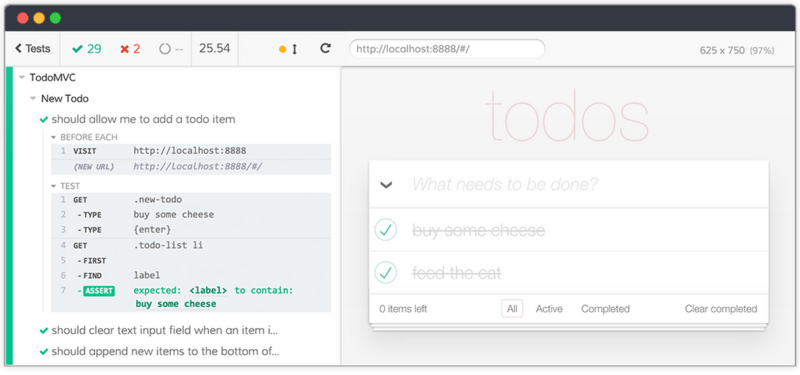
See the [cypress test example](/guides/testing-email-with-cypress/) for more information.
### Playwright email testing
Playwright is an awesome browser testing tool from Microsoft that offers a different approach to Cypress (or [Puppeteer](/blog/capture-website-screenshots-nodejs/)). With Playwright you can automate the integration testing of email processes with MailSlurp. Here is an example:
```typescript
import { test, expect, Page } from '@playwright/test';
import MailSlurp from "mailslurp-client";
test.describe('test email login with playwright', () => {
test('can login and verify email address with mailslurp', async ({ page }) => {
const apiKey = process.env.API_KEY;
expect(apiKey).toBeDefined();
// load playground app
await page.goto("https://playground.mailslurp.com");
await page.click('[data-test="sign-in-create-account-link"]');
// create a new inbox
const mailslurp = new MailSlurp({ apiKey })
const password = "test-password"
const { id, emailAddress } = await mailslurp.createInbox()
// fill sign up form
await page.fill('input[name=email]', emailAddress);
await page.fill('input[name=password]', password);
await page.click('[data-test="sign-up-create-account-button"]');
// wait for verification code
const email = await mailslurp.waitForLatestEmail(id)
// extract the confirmation code (so we can confirm the user)
const code = /([0-9]{6})$/.exec(email.body)[1];
// enter confirmation code
await page.fill('[data-test="confirm-sign-up-confirmation-code-input"]', code);
await page.click('[data-test="confirm-sign-up-confirm-button"]');
// fill out username (email) and password
await page.fill('[data-test="username-input"]', emailAddress);
await page.fill('[data-test="sign-in-password-input"]', password);
// submit
await page.click('[data-test="sign-in-sign-in-button"]');
await page.waitForSelector("[data-test='greetings-nav']")
});
});
```
See the [playwright guide](/examples/playwright-fake-email-test/) for examples.
### Selenium email testing
Selenium is a popular browser automation tool. You can use it to test email processes with MailSlurp. Here is an example:
```java
/**
* Create a real email address with MailSlurp and use it to start sign-up on the playground
*/
@Test
public void test3_canCreateEmailAddressAndSignUp() throws ApiException {
// create a real, randomized email address with MailSlurp to represent a user
InboxControllerApi inboxControllerApi = new InboxControllerApi(mailslurpClient);
inbox = inboxControllerApi.createInbox(null,null,null,null,null,null,null, null, null);
// check the inbox was created
assertNotNull(inbox.getId());
assertTrue(inbox.getEmailAddress().contains("@mailslurp.com"));
// fill the playground app's sign-up form with the MailSlurp
// email address and a random password
driver.findElement(By.name("email")).sendKeys(inbox.getEmailAddress());
driver.findElement(By.name("password")).sendKeys(TEST_PASSWORD);
// submit the form to trigger the playground's email confirmation process
// we will need to receive the confirmation email and extract a code
driver.findElement(By.cssSelector("[data-test=sign-up-create-account-button]")).click();
}
```
## More options
For more email testing options see the [guides](/guides/) and [developer docs](/docs/).