
Webhook Documentation
Documentation navigation
Receive MailSlurp email and SMS events by webhook, handle retries safely, and route new messages into your application as they arrive.

Webhooks let you receive event payloads directly on your server when something happens, such as a new email, an inbound SMS message, or an account bounce. Webhooks can be attached to inboxes, phone numbers, or your account. See the event type payloads below for schema examples.

About
Why use webhooks? Webhooks let you respond to events when they occur. They remove the need to continually poll the MailSlurp API to request the latest emails. This mitigates rate-limiting errors. Webhooks also enable graceful error handling because they are backed by a queue and can be retried over time when your server is down or throwing exceptions.
Webhook event types
Webhook events are listed below. Each event type indicates the triggering action for the webhook. For instance NEW_EMAIL webhooks are triggered when an inbox they are attached to receives a new email.
EMAIL_RECEIVEDInbox received an email payload.WebhookNewEmailPayload
NEW_AI_TRANSFORM_RESULTAI transformer produced a new extraction result.WebhookNewAITransformResultPayload
NEW_EMAILNew email received by an inbox.WebhookNewEmailPayload
NEW_CONTACTContact created from inbound email activity.WebhookNewContactPayload
NEW_ATTACHMENTEmail attachment detected for a received message.WebhookNewAttachmentPayload
EMAIL_OPENEDTracked email open event.WebhookEmailOpenedPayload
EMAIL_READEmail read event.WebhookEmailReadPayload
DELIVERY_STATUSDelivery status update for a sent email.WebhookDeliveryStatusPayload
BOUNCEAccount-level email bounce event.WebhookBouncePayload
BOUNCE_RECIPIENTRecipient bounce event for an email address.WebhookBounceRecipientPayload
NEW_SMSPhone number received an SMS message.WebhookNewSmsPayload
NEW_GUEST_USERGuest user event payload.AbstractWebhookPayload
See the event documentation for details on each type.
Delivery and idempotency
MailSlurp delivers webhooks at least once, so your endpoint may receive the same payload more than once. Use the unique messageId on each payload as an idempotency key. Save it on your server, check it when a webhook arrives, and skip any payload you have already processed.
Message payload
When a webhook is triggered, MailSlurp posts the corresponding JSON payload to the webhook URL. See the event type documentation below for schemas. Each MailSlurp library contains webhook payload types that extend AbstractWebhookPayload. Use the eventName property or the x-event header to cast the event to the appropriate concrete type.
function handleWebhookPayload(body: AbstractWebhookPayload) {
  // Use the event name to cast the payload to its concrete type.
  if (body.eventName === AbstractWebhookPayloadEventNameEnum.NEW_EMAIL) {
    const event = body as unknown as WebhookNewEmailPayload;
    log.info(event.emailId);
  } else {
    throw new Error("Unexpected webhook event");
  }
}
Or for simpler usage parse the request body into your expected payload:
const newEmail: WebhookNewEmailPayload = JSON.parse(requestBody);
log.info(
  `New email from ${newEmail.from} with subject ${newEmail.subject}`
);
Allow a static IP address range
MailSlurp sends webhooks from a static IP list if you use the useStaticIpRange flag when creating the webhook.
| Public IPv4 address |
|---|
| Use the dashboard or contact support for the current static IP range. |
To use static IP webhooks in code do the following:
// create a webhook with static ip
const webhook = await webhookController.createWebhook({
  inboxId: inbox.id,
  createWebhookOptions: {
    eventName: CreateWebhookOptionsEventNameEnum.NEW_CONTACT,
    // send test webhook to service that returns caller ip address
    url: 'https://f.mailslurp.link/f/getip',
    // must set static ip flag to enable
    useStaticIpRange: true
  }
});
// send test webhook
const result = await webhookController.sendTestData({
  webhookId: webhook.id
});
// check ip address in result
expect(publiclyKnownStaticIpRange).toContain(result.response.message);
Allow these IP addresses through your network firewall if you are having trouble receiving webhooks. Contact support for help.
Custom payload and redirect
You can customize the shape of the event payload for use with other services such as Slack or Teams by providing a requestBodyTemplate property containing templated JSON.
await mailslurp.webhookController.createWebhook({
  inboxId: inbox.id,
  createWebhookOptions: {
    eventName: CreateWebhookOptionsEventNameEnum.NEW_EMAIL,
    url: slackIncomingWebhookUrl,
    // custom request body for slack uses {{subject}} to insert
    // the subject from the standard NEW_EMAIL payload
    requestBodyTemplate: `{"text":"New message: {{subject}}"}`,
  },
});
Use mustache style templating to insert properties from the standard payload for the event into your custom payload.
Sent headers
Each webhook is sent via HTTP with the following headers:
| Header | Example | Description |
|---|---|---|
| x-from | api.mailslurp.com | Identifies the MailSlurp server that sent the webhook. |
| x-event | NEW_EMAIL | Names the event that triggered the webhook. |
| x-signature | sig-29s033if2 | Works with the signature verification endpoint to verify the payload. |
| x-message-id | 38547638 | Unique ID for the webhook payload. Use this ID to avoid processing a webhook multiple times. |
| Authorization | Basic xdsf924 | Basic authentication. Only set if your webhook was created with a username and password. |
You can add custom headers when you create a webhook and these header name value pairs will be sent with every request. Use these static headers in your application if required. See the static header section for more information.
Create and manage webhooks
Webhooks can be created in the MailSlurp dashboard or using the API WebhookController. Webhooks can be attached to an inbox or phone number or created without one depending on the event type.
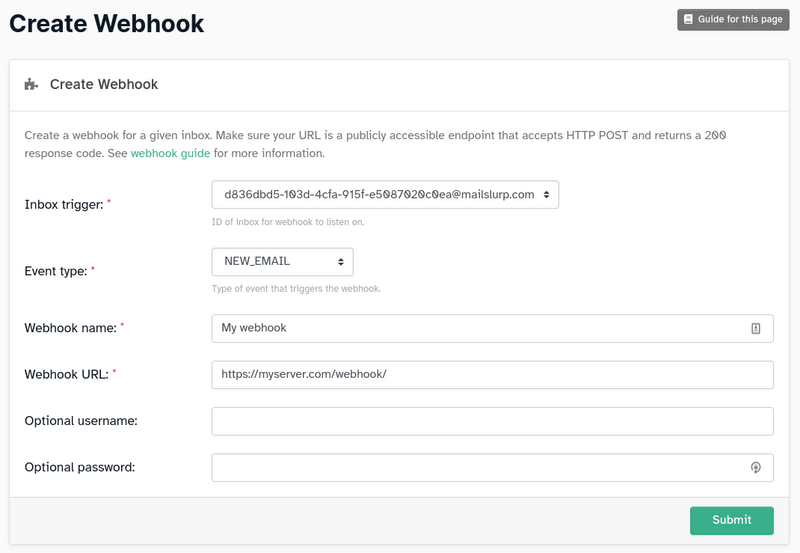
Here is an example of creating an inbox-related webhook with the MailSlurp JavaScript client.
const inbox = await mailslurp.createInbox();
const webhook = await mailslurp.webhookController.createWebhook({
  inboxId: inbox.id!,
  createWebhookOptions: {
    eventName: CreateWebhookOptionsEventNameEnum.NEW_EMAIL,
    url: testEndpoint.url!!,
  },
});
Account-scoped webhooks
For account-based events such as BOUNCE, pass null for the inbox ID:
const webhook = await mailslurp.webhookController.createAccountWebhook({
  createWebhookOptions: {
    eventName: CreateWebhookOptionsEventNameEnum.BOUNCE,
    url: testEndpoint.url!!,
  },
});
Account-scoped webhooks are useful for processing events from every inbox or your whole account. For example, one account webhook with the NEW_EMAIL type can receive inbound email events across all of your inboxes.
Phone-scoped webhooks
SMS related events support phone number scoping like so:
await mailslurp.webhookController.createWebhookForPhoneNumber({
  phoneNumberId: phone.id,
  createWebhookOptions: {
    eventName: CreateWebhookOptionsEventNameEnum.NEW_SMS,
    url: testEndpoint.url!!
  }
});
Set static headers
MailSlurp can include your static headers with every webhook request. Set the includeHeaders option when creating the webhook, and each POST request to your server will contain the provided name-value pairs.
// create webhook
const createWebhookOptions: CreateWebhookOptions = {
  name: "my-webhook",
  url: "https://your.server",
  includeHeaders: {
    headers: [{ name: "x-test-header", value: "123" }],
  },
};
const webhook = await webhookController.createWebhook({
  inboxId: inbox.id!!,
  createWebhookOptions: createWebhookOptions,
});
Authentication
To secure your endpoint with basic authentication, specify a username and password when you create the webhook. MailSlurp sends them in an Authorization header with the value Basic <credentials>, where the credentials are a base64-encoded string containing the username and password separated by a colon.
Setup your server
To receive webhook payloads, expose a public HTTPS endpoint that responds with a 200-299 status code. If your endpoint returns a redirect or error status, MailSlurp queues the payload and retries it with backoff.
Example handler
You can use any framework or server to handle MailSlurp webhooks. Here is an example using Node.js:
import { WebhookNewSmsPayload } from 'mailslurp-client';

import bodyParser from 'body-parser';
import express from 'express';

// create a server
const app = express();
app.use(bodyParser());

/**
 * Define an endpoint on your server for the NEW_SMS webhook event
 */
app.post('/inbound/new-sms', (request, response) => {
  // access the data on request body
  // and cast to the expected event type take action
  const sms = request.body as WebhookNewSmsPayload;
  // access the entity
  log.info(`New SMS from ${sms.fromNumber}`);
  // return a 2xx status code so MailSlurp knows you received it
  response.sendStatus(200);
});
Verify webhook signature
MailSlurp sends an x-signature header that can be used with the x-message-id header to verify a webhook payload.
const signature = request.header("x-signature");
const messageId = request.header("x-message-id");
const { isValid } = await mailslurp.webhookController.verifyWebhookSignature({
  verifyWebhookSignatureOptions: { signature, messageId },
});
expect(isValid).toBeTruthy();
Results and redrive
You can view webhook delivery results on the dashboard webhooks page. MailSlurp queues webhook deliveries and retries a payload when your endpoint returns an unsuccessful response status.
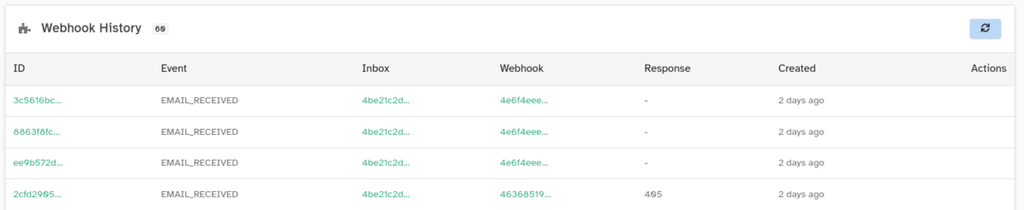
Event types
Each webhook responds to one event type. When the attached inbox, phone number, or account produces that event, MailSlurp sends its JSON payload to the URL you specified using an HTTPS POST request. Each event has a different payload, as documented below.
Open each event payload schema in the API reference.
EMAIL_RECEIVEDpayload schemaNEW_AI_TRANSFORM_RESULTpayload schemaNEW_EMAILpayload schemaNEW_CONTACTpayload schemaNEW_ATTACHMENTpayload schemaEMAIL_OPENEDpayload schemaEMAIL_READpayload schemaDELIVERY_STATUSpayload schemaBOUNCEpayload schemaBOUNCE_RECIPIENTpayload schemaNEW_SMSpayload schemaNEW_GUEST_USERpayload schema