
guides
Email to webhook guide for inbound automation
Route inbound email to your server in real time with HTTP webhooks. Learn how to build reliable email webhook and email-to-webhook automation for support, finance, and operations workflows.
Email webhooks send inbound message events to your HTTP endpoint as soon as mail arrives.
If you are searching for "email webhook", "email to webhook", or "webhook email" implementations, this guide covers setup, payload design, reliability patterns, and the production controls you need before routing real business traffic.
Quick answer: what is email to webhook?
Email to webhook means converting inbound email events into HTTP POST callbacks so your systems can process messages in real time.
Instead of polling an inbox every few minutes, your application receives structured events immediately and decides what to do next: create a ticket, extract an attachment, update an order, or trigger a review workflow.
When to use email to webhook
Use email to webhook when an inbound message should start an application workflow, not sit in a shared mailbox.
| Customer job | How MailSlurp helps |
|---|---|
| Receive a customer reply and update a product record | Assign a dedicated inbox to the workflow and post each new email event to your handler. |
| Convert vendor invoices or receipts into back-office tasks | Trigger a webhook, fetch the message and attachments, then pass the data into parsing or review. |
| Route support messages into a ticket queue | Use inboxes, aliases, and rules so each queue receives only the messages it owns. |
| Replace no-reply senders with monitored replies | Send from a role address, receive replies in MailSlurp, then trigger the right support, billing, or lifecycle workflow. |
| Test signup, OTP, or password reset messages in CI | Create test inboxes and webhooks so release checks can assert that real email events arrived. |
| Connect inbound email to AI extraction | Send the webhook event into a worker that calls MailSlurp parsing and structured extraction APIs. |
Executive summary
- Use email webhooks when inbound messages need to trigger work immediately, not after mailbox polling.
- Treat webhook delivery as at-least-once and build idempotent handlers from day one.
- Keep the webhook layer focused on receipt, validation, and queueing, then hand off parsing or classification to downstream services.
- Test webhook handlers with realistic inbound messages before connecting finance, support, or order workflows.
- Pair the guide with Email webhooks when you want the product overview and Inbound email routing when you want workflow-specific implementation ideas.
Why use webhook email events?
- No long-polling loops
- Faster message processing
- Easier routing into internal systems
- Better automation for attachments, parsing, and downstream actions
Teams usually adopt email-to-webhook patterns for one of three reasons:
- Shared inboxes are becoming operational bottlenecks.
- Attachments and replies need structured downstream handling.
- Polling loops are too slow or too fragile for production workflows.
How email webhooks work

- Create or choose an inbox
- Register a webhook URL
- Select event type
- Receive JSON payloads on matching events
- Return 2xx status to acknowledge
Useful payload fields to persist first:
| Field | Why it matters |
|---|---|
eventName |
Confirms the handler is processing the expected event type, such as NEW_EMAIL. |
webhookId |
Identifies which MailSlurp webhook generated the event. |
inboxId |
Keeps routing tied to the mailbox that owns the workflow. |
messageId or emailId |
Gives your worker a stable key for deduplication and later email lookup. |
createdAt |
Helps operators debug delayed handlers, retries, and downstream queue latency. |
In practice, the safest architecture is:
- Receive the webhook.
- Validate and persist the event ID plus basic metadata.
- Hand the payload to a queue or worker.
- Perform parsing, attachment download, or system-specific routing outside the initial request.
That keeps your endpoint fast enough for retries while still giving downstream systems the full message context they need.
Common webhook event types
NEW_EMAILorEMAIL_RECEIVEDNEW_CONTACTNEW_ATTACHMENT
Each event has a typed payload documented in MailSlurp webhook docs.
For most inbound automation projects, NEW_EMAIL is the main entry point. Use more specific event subscriptions only when a downstream system really needs them, otherwise you create unnecessary branching and operational noise.
Create a webhook with API
const webhook = await mailslurp.webhookController.createWebhook({
  inboxId,
  createWebhookOptions: {
    url: "https://api.example.com/webhooks/mailslurp-email",
    eventName: "NEW_EMAIL",
  },
});
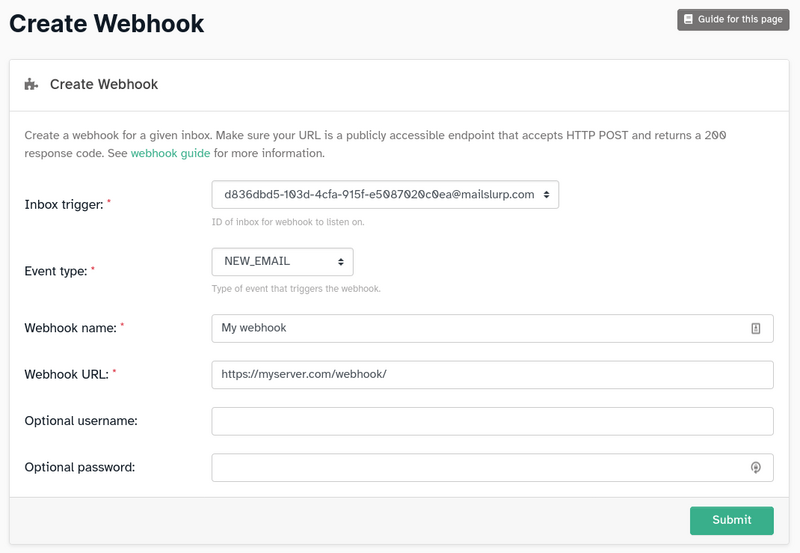
You can also create webhooks in the dashboard:
Receive the email webhook in Node
A webhook endpoint should accept JSON, persist the event quickly, return a success response, and let a worker handle slower tasks.
import express from "express";

const app = express();

app.use(express.json({ limit: "2mb" }));

app.post("/webhooks/mailslurp-email", async (request, response) => {
  const event = request.body as {
    eventName?: string;
    emailId?: string;
    messageId?: string;
    inboxId?: string;
    webhookId?: string;
  };

  if (event.eventName !== "NEW_EMAIL") {
    return response.status(200).json({ ignored: true });
  }

  const eventId = event.messageId ?? event.emailId;

  if (!eventId) {
    return response.status(202).json({ queued: false });
  }

  await saveEventOnce(eventId, event);

  response.status(200).json({ received: true });

  void enqueueInboundEmailWork({
    emailId: event.emailId ?? event.messageId,
    inboxId: event.inboxId,
    webhookId: event.webhookId,
  }).catch(console.error);
});
Use your own database or queue behind saveEventOnce and enqueueInboundEmailWork. The important behavior is the same in every stack: dedupe by the email or message ID, acknowledge quickly, and process the full message outside the request.
Example email webhook payload
Webhook payloads vary by event type, but your handler should expect a compact event that points back to the MailSlurp message and inbox. Store the IDs first, then fetch the full email when your worker needs body content, headers, or attachments.
{
  "eventName": "NEW_EMAIL",
  "webhookId": "webhook-id",
  "inboxId": "inbox-id",
  "emailId": "email-id",
  "messageId": "message-id",
  "createdAt": "2026-07-24T00:00:00.000Z"
}
For a reliable email-to-webhook API flow:
- Accept the event at a public HTTPS endpoint.
- Validate that the event type and inbox match the workflow.
- Store
webhookId,inboxId,emailId, andmessageId. - Return
200after the event is stored. - Fetch the full email from MailSlurp in a worker.
- Route the result to Slack, Zapier, a ticketing system, a parser, or an internal API.
What to include in the first webhook version
Your first handler does not need to solve the whole workflow. It should prove that you can receive, validate, and route a message safely.
Start with:
- inbox ID
- message ID
- sender address
- subject
- timestamp
- a pointer to fetch the full message or attachments if needed
That is usually enough to confirm routing logic before you build parser, classification, or ERP integrations on top.
Reliability requirements
Return a fast 2xx response
Your endpoint should return 200 or 201 quickly (typically within 30 seconds) so events are marked successful.
Handle retries safely
Webhook delivery is at-least-once. Implement idempotency by storing and deduplicating event IDs such as messageId.
Monitor failures and latency
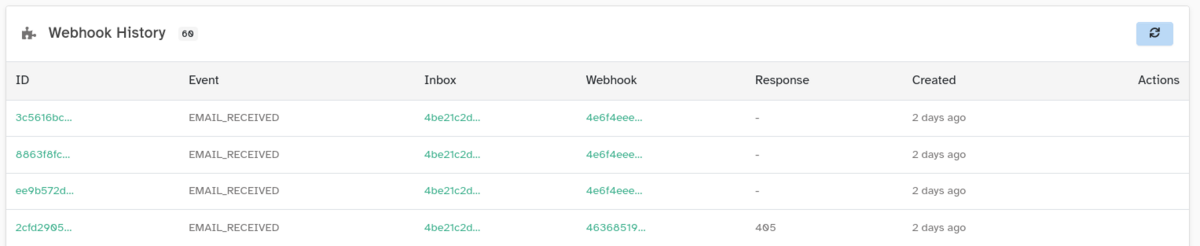
Track webhook history to detect slow handlers, retries, and downstream dependency failures.
Common failure modes in production
Parsing too much inside the webhook request
If your handler downloads attachments, runs classification, and talks to multiple internal systems before returning, retries will become noisy and latency will spike. Acknowledge first, then process asynchronously.
Missing inbox-level routing rules
When multiple workflows share one intake path without clear inbox or ruleset boundaries, downstream systems end up inferring too much from sender or subject. Use dedicated inboxes, rulesets, or aliases where possible.
No replay or event history
When a handler fails, operators need a way to inspect what was delivered and retry the workflow safely. Keep event history and make it easy to re-run test messages after a fix.
Test webhook email locally
Use tools like ngrok to expose localhost endpoints during development. Validate request schema and signature logic before production deployment.
You should also test with real message shapes, not only toy payloads:
- HTML-heavy marketing replies
- invoice or receipt attachments
- forwarded support threads
- automated sender notifications
This is where Testing webhooks and Email Sandbox API help before rollout.
Preview messages that trigger webhooks
When a webhook starts a support, finance, auth, or operations workflow, also verify the email body your worker will fetch after the event arrives.
Check that:
- the message body contains the fields the worker expects
- links and fallback instructions point to the right environment
- attachments and inline images still load when the full email is reviewed
- the HTML stays readable in supported preview contexts before the automation ships
Webhook to send email workflows
Some teams search for "webhook to send email" when they want an inbound event to trigger an outbound response or notification.
With MailSlurp, keep the workflow explicit:
- Receive the inbound email webhook.
- Validate the sender, inbox, subject, and message ID.
- Fetch the email body or attachments if your workflow needs them.
- Decide whether the system should send an email, create a ticket, request review, or update a record.
- Send follow-up email through your application or MailSlurp email APIs only after the event is deduped and authorized.
This pattern works well for order confirmations, supplier replies, lead-routing acknowledgements, support intake, and review requests. It also avoids sending duplicate responses when a webhook is retried.
Practical use cases
- Forward support emails into ticketing pipelines
- Trigger fraud or compliance review flows from specific senders
- Parse attachments and route structured data to CRM or data warehouse
- Trigger user notifications based on inbound replies
- Send controlled follow-up email after an inbound message has been validated
Email webhook routing patterns
| Pattern | Best fit | MailSlurp route |
|---|---|---|
| One inbox per workflow | Finance inboxes, supplier mailboxes, support queues | Inbound email routing |
| Alias or ruleset driven routing | Multi-tenant apps, shared intake addresses, regional queues | Email automation routing |
| Webhook plus parser worker | Invoices, receipts, claims, forms, attachments | AI email parsing |
| Webhook plus test inboxes | CI checks, OTP tests, signup and password reset tests | Email Sandbox API |
Email to webhook destination examples
Start with one destination and one event type. After the first path is stable, add secondary notifications or parser steps.
| Destination | What to send first | Good first workflow |
|---|---|---|
| Internal API | emailId, sender, subject, inbox ID, and received timestamp |
Create or update a customer, order, claim, lead, or support record after a matching inbox receives a reply. |
| Slack or Teams | Sender, subject, workflow name, and a link to the message | Notify an operations channel when a supplier, customer, or billing inbox receives a new message. |
| Zapier or workflow tool | Message metadata plus a stable MailSlurp message reference | Start a no-code workflow while keeping the original email available for review and replay. |
| Ticketing system | Sender, subject, body summary, attachments, and mailbox owner | Convert inbound support email into a ticket with the right queue and priority. |
| Parser or extraction API | Message ID, attachment IDs, sender, and expected output schema | Extract invoice, receipt, claim, or lead fields before writing to the destination system. |
Use Email webhooks when the main requirement is reliable event delivery, Inbound email routing when multiple teams or queues own the workflow, and AI email parsing when attachments or structured fields drive the next action.
Where email webhooks fit in the MailSlurp platform
Use the guide as the implementation reference, then move into the route that matches your real job:
- Email webhooks for the product overview and operational controls.
- Inbound email routing for workflow design across support, finance, and operations.
- AI email parsing and structured extraction when you need normalized fields and attachment extraction.
- Email automation routing when webhooks are one part of a wider rules and routing layer.
Build end-to-end automation flows
For production webhook pipelines, combine inbound callbacks with parser and QA routes:
- AI email parsing and structured extraction for extraction and normalization.
- Inbound email routing for finance, support, and operations workflow design.
- Email Sandbox API and Email testing tools for release-gate validation.
Production checklist for email webhook launches
Before you connect an email webhook to a production workflow, confirm:
- The webhook URL uses HTTPS and belongs to the service that owns the workflow.
- The handler checks event type, inbox ID, and destination before doing work.
- Each
emailIdormessageIdis processed once, even if MailSlurp retries delivery. - Slow parsing, attachment downloads, and downstream writes happen after the initial
2xxresponse. - Operators can inspect recent webhook history and rerun failed work safely.
- Test inboxes can replay representative messages before a parser, ticketing, Slack, Zapier, or internal API change ships.
- Product and support teams know which inboxes, aliases, or rulesets feed each destination.
This checklist keeps email-to-webhook automation dependable as volume grows from one monitored inbox to support, finance, operations, and customer-reply workflows.
FAQ
What is the difference between an email webhook and an inbound email API?
An inbound email API usually gives you ways to create inboxes and read messages. An email webhook is the push-delivery layer that sends message events to your application automatically when they happen.
When should I use email to webhook instead of polling?
Use email-to-webhook when message latency matters, inbox volume is growing, or operators should not have to wait for a polling loop before a workflow starts.
Can I use email webhooks for attachments?
Yes. A common pattern is to receive the event, store the message metadata, then fetch and process attachments asynchronously so your handler stays retry-safe.
What status should an email webhook endpoint return?
Return a 2xx response after your endpoint has accepted and stored the event. Return errors only when MailSlurp should retry delivery.
Can a webhook send email after receiving a message?
Yes. The webhook should trigger your application logic first. After you validate and dedupe the inbound event, your worker can send a response, create an internal notification, or call a downstream API.
Are email webhooks enough for complex routing on their own?
Usually not. Webhooks handle delivery well, but most production systems also need inbox boundaries, rulesets, parser steps, and exception handling paths.
Related pages
- Email webhooks product page
- Inbound email routing solutions
- AI email parsing and extraction
- Testing webhooks guide
- Noreply email address best practices
Final take
Webhook email architectures are the fastest way to turn inbound messages into real workflows, but the wins come from disciplined delivery design. Start with a narrow handler, enforce idempotency, keep processing asynchronous, and expand into routing and parsing only after the core event path is reliable.