
Invoice and receipt extraction
Extract vendor names, totals, line items, tax values, due dates, and attachment references from invoice and receipt emails.
Open invoice workflow
Turn incoming emails, PDFs and images into fields your software can use. Extract invoice details, shipment updates and customer requests with prompts or JSON schemas, then review the results and send them to your systems.
Trusted by top companies worldwide






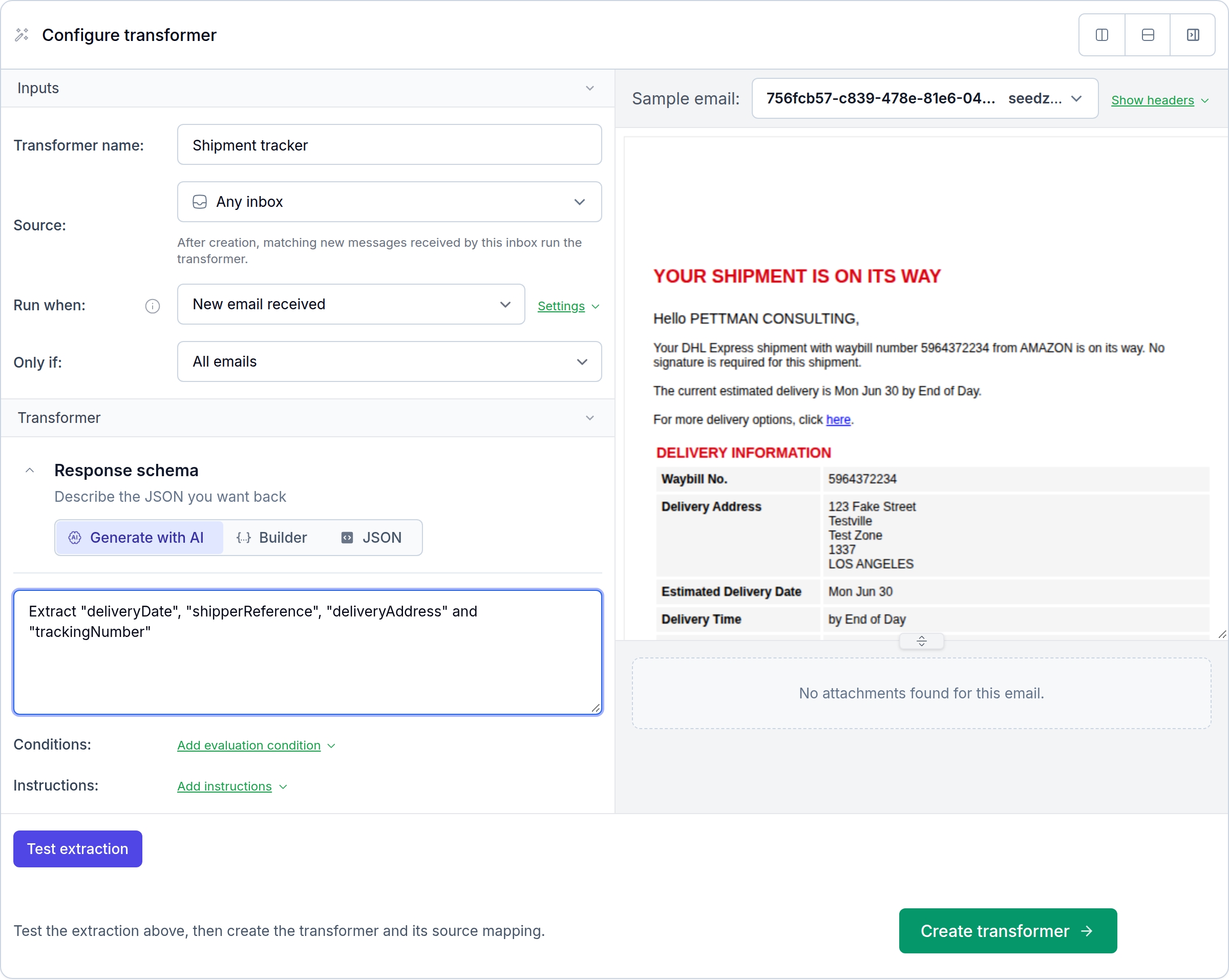
Start with a received email or attachment and define the output fields. For a shipment update, that could be the delivery date, carrier reference and tracking number. Test your prompt against the source before applying it to incoming messages.
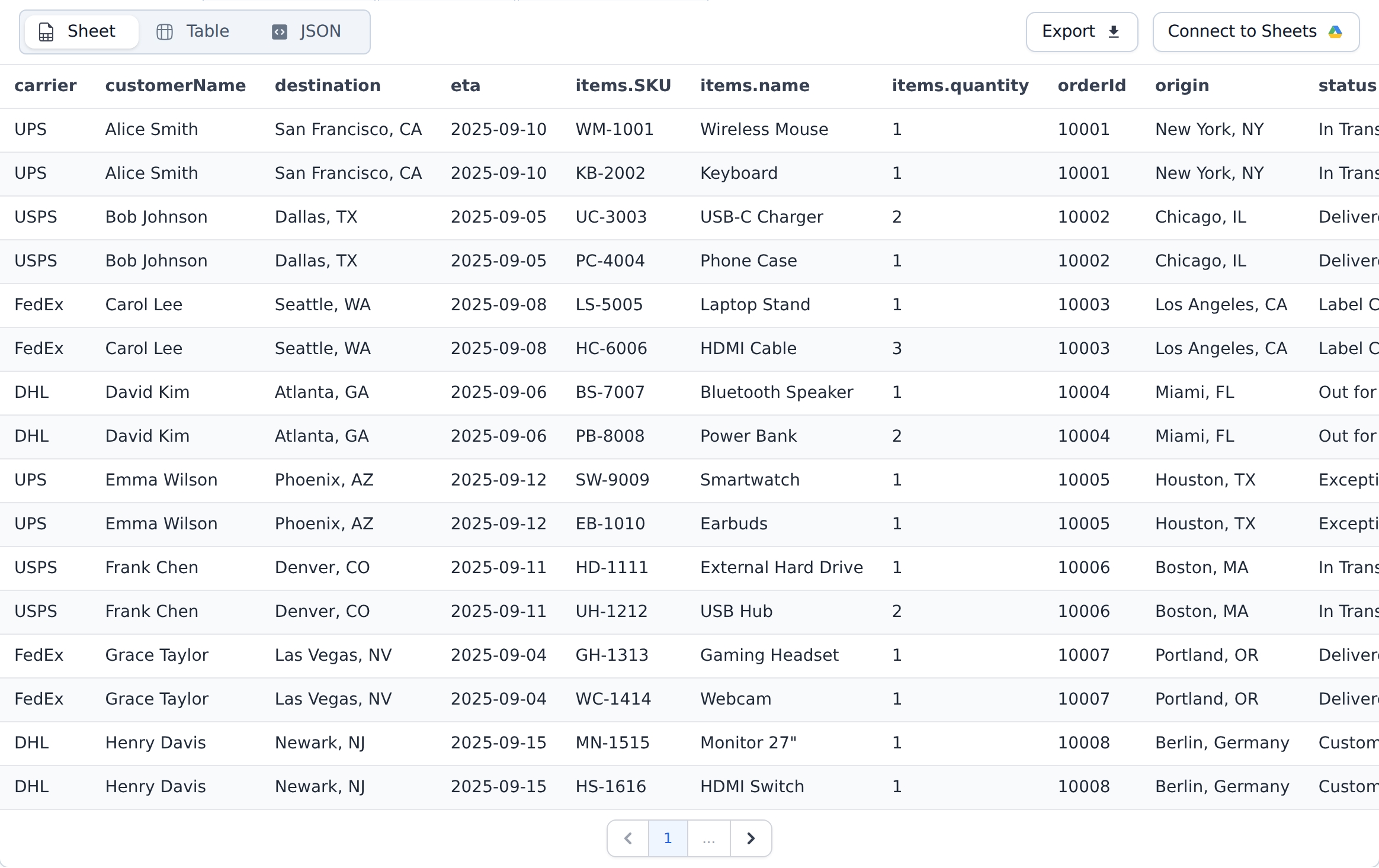
Open extracted values as a table, spreadsheet or JSON. Keep the source message available for review, rerun extraction when your schema changes and pass the result to your application, webhook or Google Sheets.
Define the fields you need, validate extracted values against a schema, and send the result to APIs, webhooks, databases, sheets, or downstream automations with a replay path back to the original email.
Convert unstructured messages into reliable records while keeping inbox capture, routing, and automation in the same platform.
Extract vendor names, totals, line items, tax values, due dates, and attachment references from invoice and receipt emails.
Open invoice workflowParse inbound order, lead, quote, and support messages, then route structured data to the right queue, CRM, Salesforce Flow, or business API.
Open order ingestionRead PDFs, screenshots, forms, documents, CSV files, and images attached to messages and include the extracted fields in the final payload.
Open Drive integrationUse schemas to keep extracted data consistent, validate required fields, and reduce downstream cleanup before records are saved to Sheets, CRM fields, ticket queues, or automation flows.
Open Sheets integrationTrigger extraction from inbox rules, inbound API events, webhooks, Zapier, and Salesforce Flow as soon as a matching email arrives.
Open inbound APIReview extraction runs in the dashboard or call the same workflows from SDKs, REST APIs, and backend jobs.
Open parser APIUse these guides to build MailSlurp-driven document parsing, AI extraction, inbox intake, and webhook automation.
Build AI email parsing, OCR, template parsing, inbox APIs, and webhook-driven extraction workflows with MailSlurp.
Open parser workflowRoute document intake, AI extraction, normalization, validation, and email-first automation through MailSlurp.
Open document workflowConnect parsed message data to sheets, CRMs, support queues, storage, and downstream APIs.
Open parser integrationsConnect the inbox, extraction rules, and downstream handoff without losing the source message that explains each result.
MailSlurp combines inbox capture with prompt-based extraction, labels, typed JSON schemas, stored run results, and replayable workflows. You can classify a message, validate required fields, and rerun the extraction when a prompt or schema changes without losing the source email. Explore the MailSlurp email parser.
Receive the email in a MailSlurp inbox, choose the fields you need, and run an AI transformer with a prompt or JSON schema. MailSlurp can include message content and attachment text from PDFs, images, and documents, then return structured output for your application. Read the parser API workflow.
Connect a Google or Microsoft mailbox to MailSlurp, or forward selected messages into a MailSlurp inbox. From there, inbox rules and webhook events can send matching email and attachments into the same extraction workflow as messages received on MailSlurp domains. See email parser integrations.
After MailSlurp returns the structured result, route it through a webhook or a connected automation. You can write selected fields to Google Sheets, call a business API, update a CRM, or keep a review step for values that need a person to confirm them. Connect extraction to Google Sheets.
MailSlurp is a strong choice when the job begins with a real inbox and continues through PDF or image OCR, schema-validated extraction, routing, and review. It keeps the original message, attachment, extracted fields, and downstream handoff connected, which makes invoice exceptions much easier to investigate. See the invoice extraction workflow.
Integrate MailSlurp Seamlessly




Official plugins and SDKs for all major programming languages, frameworks, and test platforms. All functionality available via API or dashboard.

MailSlurp fits right into your existing development, testing, and CI/CD workflows. Deploy and iterate with confidence and actionable feedback.
Emails processed
500 million+
Infrastructure that scales.
Mobile networks
20+
Leverage global telecom networks.
Mature platform
10+ years
Stable and dependable.
