
guides
Testing email OTP in UIPath Studio
Use programmable email accounts in UI Path integration testing for MFA/2FA verification
UiPath is a leading robotic process automation (RPA) platform used to automate repetitive business and testing workflows. UiPath Studio allows testers and QA engineers to build automated UI and API driven tests using visual workflows and code activities. While UiPath is commonly used for enterprise process automation, it is also very effective for end to end testing of web applications that depend on email based verification.
Modern web applications often rely on email based one time passwords to verify users during sign up, login, and sensitive account actions. Testing these flows reliably is difficult because OTP codes are generated dynamically and sent to real inboxes. Manual testing is slow, brittle, and does not scale. This is where UiPath automation and programmatic email testing become essential.
The complete source code is available on GitHub.
Tutorial
In this tutorial and the accompanying youtube series we will demonstrate how to use MailSlurp's free disposable email accounts to create real, unique email accounts on demand and automate the testing of a real web application's OTP verification flow.
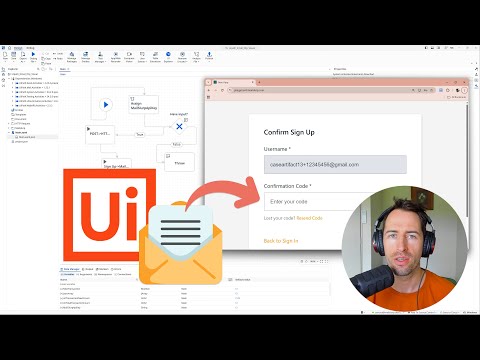
What is OTP?
An OTP, or one time password, is a short lived security code sent to a user by email or SMS to confirm identity or ownership of an account. Email OTP verification is widely used to prevent fraud, reduce fake sign ups, and secure password resets. Because these codes expire quickly and are unique per request, they are notoriously hard to test using traditional automation tools alone.
Automated testing of email OTP flows ensures that user sign up and authentication journeys work correctly under real conditions. By capturing verification emails, extracting OTP codes, and submitting them back into the application automatically, teams can validate critical security and onboarding flows with confidence. This approach improves test coverage, reduces regressions, and enables fully automated CI friendly testing of email verification logic using UiPath.
How to test verification in UiPath
Assuming you already have UiPath Studio installed on your Windows PC, we can use the program to define a series of steps and automations that will:
- Load a demo web application in Chrome
- Create a new user email account using MailSlurp HTTP requests
- Use browser automation to fill out a user sign-up form
- Wait for and extract the OTP code using MailSlurp
- Submit the OTP code using Chrome automation and then assert user is verified
Our end workflow will look something like this:
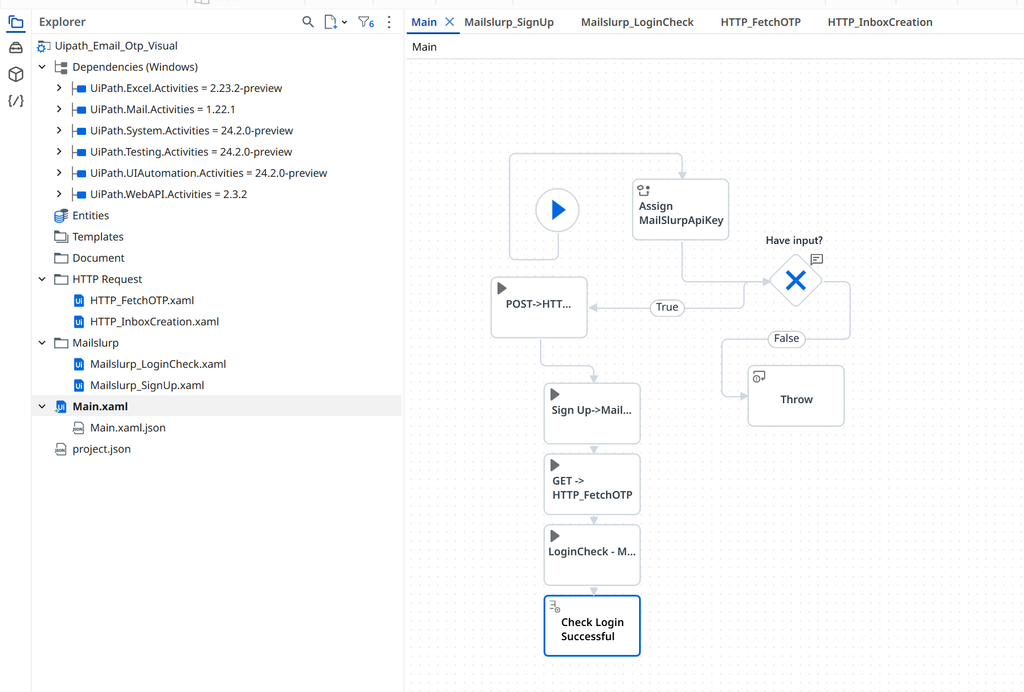
Setup
First you need a free MailSlurp account. You can create a free account and obtain an API Key. We will use this in the next steps.
Step 1: Load the demo web application in Chrome
Start by opening the MailSlurp playground application in Chrome using UiPath browser automation. This demo app simulates a real user sign-up and email verification flow.
In UiPath Studio, create a new Process and add a Use Application/Browser activity. Select Chrome as the browser and set the URL to: https://playground.mailslurp.com
Once the page loads, add a Check App State or Element Exists activity to confirm the application is ready. Target a stable element such as the page header or the sign-up button to avoid flaky tests.
Step 2: Create a new user email account using MailSlurp HTTP requests
Next, create a disposable email inbox using the MailSlurp API. This inbox will receive the OTP verification email during sign-up.
Add an HTTP Request activity with the following configuration:
- Method: POST
- URL:
https://api.mailslurp.com/inboxes - Headers:
- x-api-key: YOUR_API_KEY
- Content-Type: application/json
- Accept: application/json
Store the response body in a string variable. Use regular expressions to extract the inbox ID and email address from the JSON response.
- Inbox ID regex:
"id"\s*:\s*"([^"]+)" - Email address regex:
"emailAddress"\s*:\s*"([^"]+)"
Save these values to variables named inboxId and emailAddress.
Step 3: Fill out the user sign-up form using browser automation
With a real email address available, automate the sign-up flow in the browser.
Using Chrome automation in UiPath:
- Navigate to the sign-up page if required
- Type the generated
emailAddressinto the username or email field - Enter a test password such as
TestPassword123! - Submit the sign-up form
After submission, wait for the OTP verification screen to appear. This confirms that the application has sent a verification email.
Step 4: Wait for and extract the OTP code from the email
Now wait for the verification email and extract the one time password.
Add an HTTP Request activity configured as follows:
- Method: GET
- URL:
https://api.mailslurp.com/waitForLatestEmail?inboxId=$inboxId&timeout=30000 - Headers:
- x-api-key: YOUR_API_KEY
- Accept: application/json
Store the response in a string variable. Extract the email body and then extract the OTP code using a regular expression.
Use the following regex to find a 6 digit OTP code in the email body: \d{6}
Store the matched value in a variable called otpCode.
Step 5: Submit the OTP and assert the user is verified
Return to the Chrome browser session where the OTP form is displayed.
- Type the extracted
otpCodeinto the verification input field - Submit the verification form
Once verification succeeds, sign in again using the same email address and password. Finally, assert that the user account is verified by checking for a logged-in dashboard element, a verified account label, or another authenticated-only UI element.
This final assertion confirms that the full email OTP verification flow works end to end using UiPath and MailSlurp.
Next steps
To explore MailSlurp and UiPath:
- Download the project source code
- See the developer documentation