
blog
What Is Inbox Placement Testing? Inbox, Spam, and Promotions
Learn how inbox placement testing works, what spam scores can tell you, and how to test Gmail and Outlook placement with MailSlurp before a campaign.
An email platform can report a campaign as delivered even when the message is sitting in Gmail Promotions, Outlook Junk, or a folder your customer rarely checks. Inbox placement testing shows what happened after the receiving mail server accepted the message.
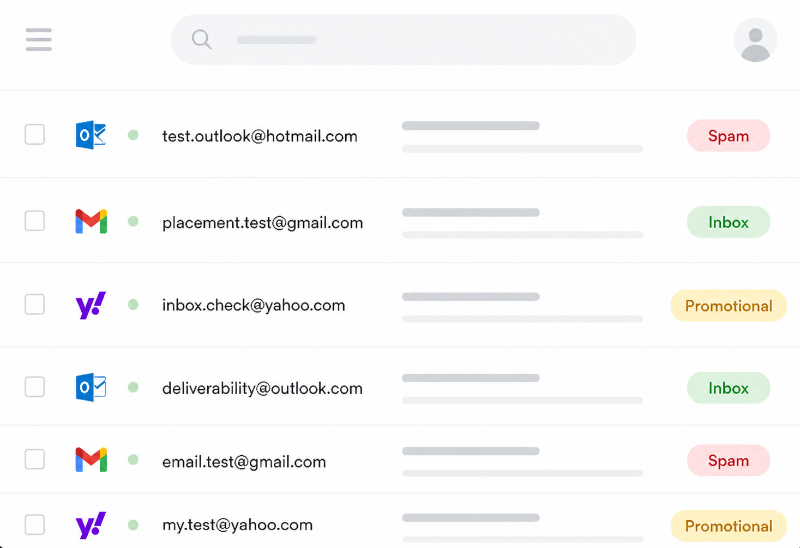
In practical terms, an inbox placement test sends your real email to controlled accounts at providers such as Gmail, Google Workspace, Outlook, Microsoft 365, and Yahoo. The result shows whether each copy reached the main inbox, a tab such as Promotions, spam or junk, or was not received during the test window.
Inbox placement testing in a minute
- Delivery tells you that a receiving server accepted the email. Placement tells you where the mailbox put it.
- A seed test uses controlled provider accounts, so you can compare results without bothering real subscribers.
- A spam score points to possible content, authentication, or sender problems. It does not predict a mailbox decision with certainty.
- Promotions is not the same as spam. It may be normal for a marketing campaign, but it is still worth measuring because it changes where the message appears.
- The useful workflow is test, inspect, change one thing, and test again.
What is inbox placement testing?
Inbox placement testing is a controlled email deliverability test that measures the folder or tab where a message lands. It is usually run with a seed list: a set of test addresses hosted by the mailbox providers you care about.
You send the finished campaign to those addresses through the same ESP, domain, IP, From address, links, and tracking setup you plan to use in production. The test then checks each mailbox and records the observed result.
A placement report is a sample, not a promise that exactly the same percentage of your subscriber list will behave the same way. Real recipients have their own engagement history, settings, filters, and company policies. Seed testing is still useful because it gives you a repeatable comparison before and after a change.
Delivery, deliverability, and placement are different
These terms are often used as if they mean the same thing. They answer different questions.
| Term | The question it answers |
|---|---|
| Delivery | Did the receiving server accept the message? |
| Deliverability | Can the message reach recipients reliably, with a trustworthy identity and usable content? |
| Inbox placement | Which folder or tab received the accepted message? |
A successful SMTP response proves delivery to the receiving system. It does not prove that the email reached the primary inbox, arrived promptly, or escaped a company quarantine.
Why spam and Promotions placement matter
Spam and junk remove the message from the normal path
Most people do not search their spam folder for a newsletter, launch announcement, or abandoned-cart email. A spam result therefore removes many recipients before subject lines, design, and offers get a chance to work.
It can also point to a wider problem. Google says authentication, DNS, message format, unsubscribe handling, sending behavior, and user-reported spam all affect whether mail is delivered as expected. Microsoft's guidance likewise lists authentication failures, sender reputation, complaints, content, and list quality among common causes of junk placement. See the current Gmail sender guidelines and Microsoft 365 anti-spam guidance when diagnosing a provider-specific result.
Promotions is a more nuanced result
Gmail's default inbox automatically sorts messages into tabs, including Primary, Promotions, Social, and Updates. A genuine promotion landing in Promotions is not a failed delivery and is not evidence that Gmail thinks the sender is malicious.
It may still change campaign performance because the message appears in a different part of the inbox. The important question is whether the placement suits the email. Promotions can be perfectly reasonable for a sale or product announcement. It is more concerning when an expected password reset, security alert, or account notice is classified like bulk marketing.
Do not treat placement testing as a game of removing every word that sounds promotional. Use it to find unexpected changes and to compare the same message across the providers your audience actually uses.
How inbox placement testing works
Most seed-list tests follow the same basic process:
- Create a test run and receive a unique marker plus a current set of seed addresses.
- Add the marker to the subject or body so the service can match the message to the run.
- Send the final campaign to every seed address through your real sending route.
- Wait while the test accounts receive and classify the message.
- Review the folder result for each provider and account type.
- Inspect content, authentication, headers, sender reputation, and delivery timing when a result is poor.
- Make one meaningful change and repeat the test.
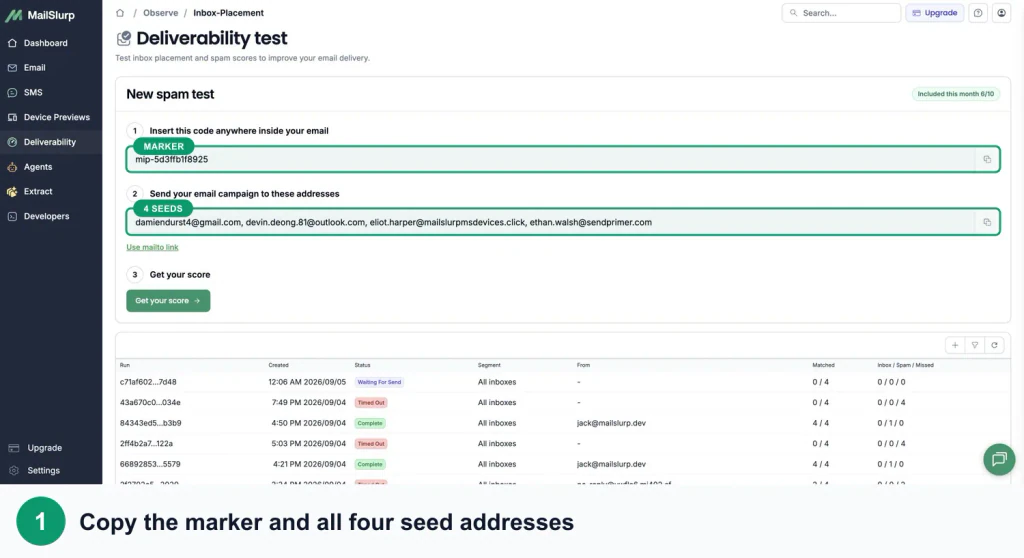
The details of step three matter. Sending a simplified test from a personal mailbox tells you little about a campaign that will use a different domain, ESP, tracking hostname, template, and volume. Test the message that is actually due to go out.
What is a spam score?
A spam score is a diagnostic rating produced by checking a message for signals associated with filtering or poor deliverability. Depending on the tool, those checks may include message structure, risky links, authentication, headers, blocklist data, sender details, and common filtering rules.
Three similar-looking measurements are worth keeping separate:
| Measurement | What it tells you |
|---|---|
| Message spam score | Potential problems found in one email and its sending setup |
| User-reported spam rate | How often recipients marked a sender's mail as spam |
| Inbox placement result | Where a provider actually put the tested message |
Google recommends keeping the user-reported spam rate in Postmaster Tools below 0.1% and avoiding 0.3% or higher. That rate is about recipient complaints; it is not the same number as a message-level spam score.
A good spam score is useful because it gives you a shorter list of things to investigate. It is not an inbox guarantee. Mailbox providers combine many signals, including sender history and recipient behavior, that a standalone content check cannot reproduce.
How placement can affect opens and conversions
Placement sits near the start of the campaign path:
accepted -> visible in the mailbox -> opened -> clicked -> converted
If more messages go to spam, fewer people have a normal opportunity to open them. If a campaign moves from a prominent inbox view to a lower-attention tab, opens and clicks may also move. That makes placement a useful explanation to investigate when campaign performance changes suddenly.
It is not the only explanation. A weak subject line, an irrelevant offer, poor timing, slow landing page, or broken checkout can all reduce results after the message reaches the inbox. Better placement creates more opportunities to engage; it does not make the rest of the campaign good by itself.
Open rates also need care. Apple's Mail Privacy Protection prevents senders from reliably seeing whether protected recipients opened a message. Treat opens as a directional signal, then use clicks, completed signups, purchases, replies, or another real campaign outcome for the final decision. Apple explains the privacy behavior in its Mail Privacy Protection documentation.
A clean comparison keeps the message and audience stable, records placement by provider, and then watches clicks and conversions after the send. That is more useful than assuming a lower spam score must produce a particular uplift.
How to run an inbox placement test with MailSlurp
MailSlurp combines the provider result with the message and domain evidence needed to investigate it. The manual workflow is straightforward:
- Open Inbox placement in the MailSlurp dashboard and create a test.
- Copy the unique marker and all of the seed addresses shown for that run.
- Add the marker to the finished campaign, then send it to the seed list from your usual ESP.
- Keep the results page open while MailSlurp checks the provider accounts.
- Compare Gmail, Google Workspace, Outlook, Microsoft 365, Yahoo, and the other configured results individually.
- Open the content and domain issue tabs, and inspect the received headers when something looks wrong.
- Correct one issue and create a fresh test for the next send.
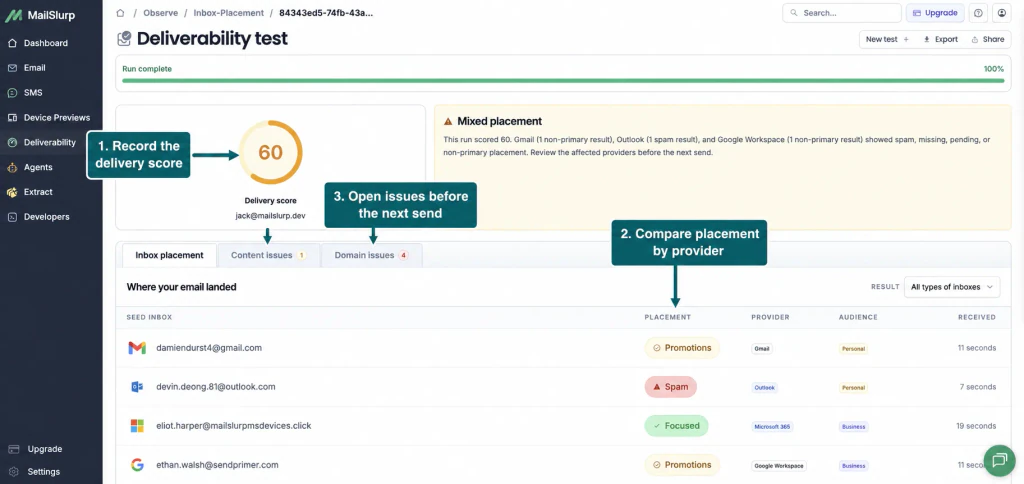
The screenshot shows why the provider rows matter more than an average alone. One message reached Microsoft 365 Focused, Gmail and Google Workspace Promotions, and Outlook Spam. The next change should be based on that pattern, not on a general guess about the copy.
How MailSlurp works with your email service provider
You do not have to replace your email service provider to run a MailSlurp placement test. MailSlurp supplies the controlled provider addresses and the marker that identifies the run. Your ESP still sends the message through its normal domain, IP, template, tracking, and unsubscribe setup.
The exact screens differ by provider, but the handoff is usually the same:
- Create a fresh placement run in MailSlurp and copy its marker and seed addresses.
- Add those addresses to a dedicated test list, seed group, tag, or internal audience in your ESP.
- Add the marker to the finished message without changing the sender or sending route you want to measure.
- Check the recipient count carefully, then send only to the controlled test audience.
- Return to MailSlurp and compare the Gmail, Google Workspace, Outlook, and Microsoft 365 results.
Keep the test audience separate from customer lists. You can reuse the list or group name, but replace old seed contacts with the addresses from the current MailSlurp run and use its new marker.
These walkthroughs show the provider-specific setup:
- Test Braze inbox placement with a Seed Group
- Test Brevo inbox placement with a Test List
- Test Klaviyo inbox placement with a dedicated list
- Test Mailchimp inbox placement with a tagged audience
- Test Salesforce inbox placement with opted-in test contacts
For a detailed setup, follow the MailSlurp inbox placement documentation. If you run the same checks regularly, the MailSlurp inbox placement product also supports an API workflow so a team can keep the test alongside its normal release or campaign process.
What to check after a poor result
Start with the evidence that can explain the widest failure, then narrow down.
The message is missing everywhere
Confirm that you used the current marker and every seed address. Then check the send log, rejection response, suppression list, and rate limits. A matching mistake can look like a deliverability failure, so rule it out first.
Several providers put it in spam
Check SPF, DKIM, and DMARC alignment before rewriting the campaign. Then review sender reputation, complaint history, list quality, volume changes, links, and message structure.
One provider behaves differently
Inspect that provider's received headers and filtering result. Microsoft 365, Gmail, and Yahoo do not use identical systems, and business accounts can apply policies that personal accounts do not. An email header analysis can reveal authentication and routing differences hidden by the campaign dashboard.
Gmail puts a marketing email in Promotions
First decide whether that is actually wrong for the message. If you expected Primary, compare with a previous campaign that reached Primary and change one variable at a time. Avoid a wholesale rewrite based on a single run.
The spam score improves but placement does not
The remaining issue may sit outside the message content: sender reputation, audience complaints, domain alignment, send volume, or the provider's history with that traffic. Keep the improved message, investigate those signals, and rerun the placement test.
When should you test inbox placement?
Run a test before a send when the cost of a surprise is high, including:
- a large marketing campaign or seasonal promotion
- a new sending domain, subdomain, IP, or ESP
- a substantial template or tracking-domain change
- a sudden increase in sending volume
- a transactional flow such as signup, password reset, OTP, billing, or security alerts
- an investigation into falling opens, clicks, or customer reports of missing email
For recurring campaigns, keep a small set of representative messages and compare results over time. A trend is more informative than one unusually good or bad run.
If the affected message is a reset, OTP, receipt, or account alert, follow the transactional email spam diagnosis workflow to trace application dispatch, provider acceptance, placement, authentication, and time-to-visible receipt separately.
Frequently asked questions
Is inbox placement testing the same as a spam test?
No. A spam test looks for risk signals in the message and sender setup. An inbox placement test observes the folder or tab chosen by real provider accounts. Use the spam test to diagnose; use placement to check the outcome.
Is the Gmail Promotions tab bad?
Not automatically. Promotions is a normal delivered category for marketing email. It becomes a concern when the result is unexpected, changes sharply from earlier sends, or affects a message that should behave like an account or security notification.
How accurate is a seed-list test?
It accurately reports what happened to the controlled accounts in that run. It does not forecast every subscriber because placement can depend on individual engagement, settings, and company policies. Its strength is repeatable provider comparison.
Can inbox placement testing improve open rates?
It can help you find and fix placement problems that reduce the opportunity to open. Measure the result rather than assuming an uplift: compare provider placement, clicks, and conversions before and after the change.
How often should I run a test?
Test before important campaigns and after changes to domains, authentication, providers, templates, links, or sending volume. If email is central to the product or revenue, schedule repeat tests so a gradual decline does not go unnoticed.
A practical way to use the results
Run the finished email through the free spam test, then use a seed-list placement test for Gmail, Outlook, and the providers that matter to your audience. If a result is poor, inspect authentication, headers, reputation, and content; change one thing; and test again.
That gives you evidence you can act on before the campaign reaches the rest of the list. Check your spam score for free or create a free MailSlurp account to save and repeat the workflow.