
solutions
Playwright email + SMS testing
Receive email and TXT messages in Playwright to test user journeys end-to-end.
An OTP test has two waits: the application must deliver the code, then the browser must accept it. Checking that the signup page changed is insufficient if the code went to the wrong address, expired in transit or signed in a different account.
MailSlurp gives Playwright tests API-controlled inboxes and SMS retrieval. Keep browser interactions in Playwright, wait for the message through MailSlurp, then submit its actual code and verify the resulting account. The JavaScript SDK works directly in Playwright tests; the Playwright setup guide also covers fixtures and integrations.
Real users, real tests
Many teams still resort to clicking through sign-up or login flows manually because talking to SMTP servers or Gmail APIs is brittle. A separate MailSlurp inbox per test keeps messages apart; your application creates and verifies the corresponding test account.
Throwaway mailboxes in Playwright tests
Before each test run use MailSlurp to generate disposable user accounts and then fill sign-up forms using the new email addresses.
The complete OTP helper below creates an expiring inbox and deletes it in finally. Call it once per test attempt so retries and parallel workers never share a mailbox.
Create global phone numbers
Choose a phone number with the country and SMS capabilities your test requires from the numbers available to your account. Allocate a number to one concurrent flow at a time, or use an explicit reservation mechanism. The SMS testing guide explains receiving and checking a text message.
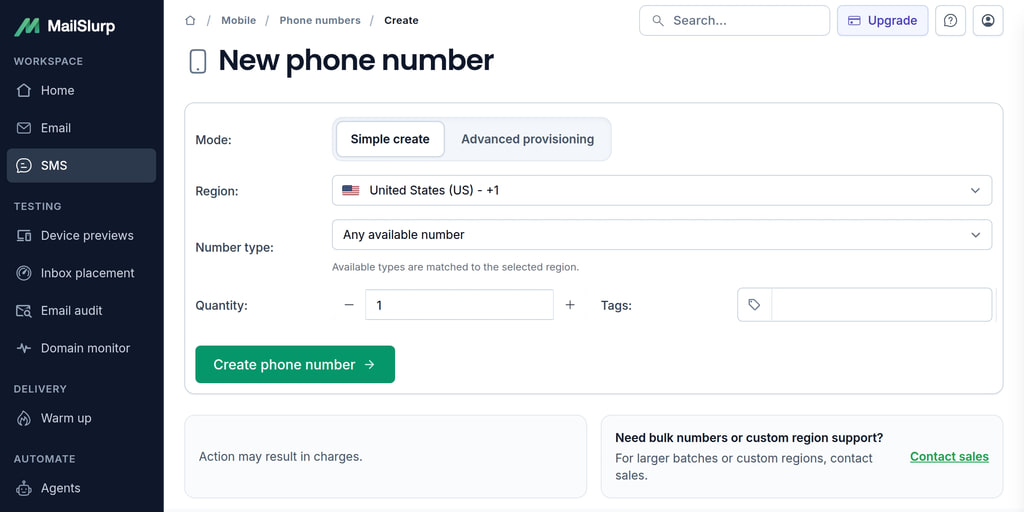
Unique test functions
MailSlurp exposes message waits, text extraction and HTML-link queries. The useful assertion comes after extraction: the code must complete the intended action for the intended account.
Wait for matching
Use a bounded wait with the inbox ID, a timestamp recorded before the application action, and the expected subject. unreadOnly: false prevents a manual inspection from hiding the message. A fresh inbox gives each test an isolated destination; matching still matters when the application sends both a welcome message and a verification code.
Find and click links
For HTML messages, getEmailLinks extracts anchor destinations. This fragment assumes emailController is your MailSlurp client's email controller and emailId belongs to the message just received. Select the expected origin and path before navigating; help and unsubscribe links can also appear in the result:
// get links from email content
const { links } = await emailController.getEmailLinks({
  emailId: emailId,
});
Extract codes
This complete TypeScript helper requests a code, receives the matching email, extracts exactly one six-digit value from its text, submits it and checks the signed-in account. Install @playwright/test and mailslurp-client. In a Playwright test with a 120-second timeout, call await verifyEmailOtp(page, mailslurp, appOrigin) using an initialized client and your test application's origin.
Adapt the routes, labels, subject, code wording and account-email selector to your application. The sample expects the account page to show the email address that just verified; a generic success heading alone would not identify the account.
import { expect, type Page } from '@playwright/test';
import { MailSlurp, MatchOptionFieldEnum, MatchOptionShouldEnum } from 'mailslurp-client';

export async function verifyEmailOtp(page: Page, mailslurp: MailSlurp, appOrigin: string) {
  const origin = new URL(appOrigin).origin;
  const inbox = await mailslurp.createInboxWithOptions({ expiresIn: 600_000 });
  try {
    const since = new Date();
    await page.goto(`${origin}/signup`);
    await page.getByLabel('Email').fill(inbox.emailAddress);
    await page.getByRole('button', { name: 'Send code' }).click();
    const email = await mailslurp.waitController.waitForMatchingFirstEmail({
      inboxId: inbox.id, since, timeout: 60_000, unreadOnly: false,
      matchOptions: { matches: [{
        field: MatchOptionFieldEnum.SUBJECT,
        should: MatchOptionShouldEnum.EQUAL,
        value: 'Verify your account',
      }] },
    });
    expect(email.to).toContain(inbox.emailAddress);
    const { lines } = await mailslurp.emailController.getEmailTextLines({
      emailId: email.id, decodeHtmlEntities: true,
    });
    const codes = Array.from(lines.join('\n').matchAll(/Your verification code is:\s*(\d{6})(?!\d)/g));
    expect(codes.length, 'Expected exactly one six-digit verification code').toBe(1);
    await page.getByLabel('Verification code').fill(codes[0][1]);
    await page.getByRole('button', { name: 'Verify' }).click();
    await expect(page).toHaveURL(`${origin}/account`);
    await expect(page.getByTestId('account-email')).toHaveText(inbox.emailAddress);
  } finally {
    await mailslurp.inboxController.deleteInbox({ inboxId: inbox.id }).catch(() => {
      console.warn('Inbox cleanup failed; its configured expiry remains in place.');
    });
  }
}
The regular expression matches the phrase surrounding the OTP, not the first number anywhere in the message. It preserves leading zeroes and rejects missing or duplicate codes. For a different template, change the phrase and expected length together. Keep codes out of console logs and restrict traces that contain authentication messages.
Query HTML content
For an HTML message, use a CSS selector to inspect a particular element. As above, emailController and emailId refer to the initialized client and received message:
// query HTML for content
const { lines } = await emailController.getEmailHTMLQuery({
  emailId: emailId,
  htmlSelector: '.heading > .username'
});
Cross-platform support
Use the MailSlurp SDK for your suite's language alongside the corresponding Playwright library. The TypeScript helper above is not a drop-in example for other language runtimes: