
blog
Testing email sign-up APIs using Postman
Use Postman MailSlurp integration to create inboxes inside tests and use them to receive MFA codes
Postman is a powerful tool for testing APIs. In this guide we will show you how to use Postman to test email sign-up APIs. We will use the MailSlurp API to create inboxes inside tests and use them to receive MFA codes during sign-up for a dummy application.

About
Many applications use email and password signup and login authentication. Often these applications require email verification or multi-factor authentication (MFA) to secure user accounts. With the MailSlurp API we can use Postman to create disposable email accounts during testing of sign-up APIs that require email verification or MFA. It this example we will show you how to create a Postman collection that:
- Creates a new inbox for each test
- Sends a sign-up request to a dummy API
- Waits for an email to arrive in the inbox
- Extracts the MFA code from the email
- Sends the MFA code to the API to complete sign-up
A copy of this collection is hosted on Postman.
Why do we do this?
We want to know that our dummy server application allows user sign up and functions correctly. This is a critical aspect of any application so it is good to be confident it works as expected. The dummy app sends a verification code via email that must be submitted by the user to confirm the address. We will use MailSlurp's free throwaway email accounts to receive the verification code and submit it back to the server.
Steps
Make sure you have a free MailSlurp API KEY and pass it as a header x-api-key.
Create an email address
First step in our test is to create a new email address using the MailSlurp API.
curl --location --request POST 'https://api.mailslurp.com/inboxes/withDefaults' \
--header 'x-api-key: {{YOUR_API_KEY}}'
Use a post request script to store the inbox_id and email_address as collection variables.
pm.test("New email address created", function () {
  pm.expect(pm.response.code).to.equal(201);
  const responseData = pm.response.json();
  pm.expect(responseData).to.be.an("object");
  pm.expect(responseData).to.include.all.keys("id", "emailAddress");
  // set variables for use in next stage
  pm.collectionVariables.set("inbox_id", responseData.id);
  pm.collectionVariables.set("email_address", responseData.emailAddress);
});
Sign up new user
Next we will send a sign-up request to our dummy server application. This will cause the server to send a verification email to the email address we created in the previous step.
curl --location --request POST '{{testServerBaseUrl}}/sign-up?emailAddress={{email_address}}&password={{password}}
pm.test("Can sign up", function () {
  pm.expect(pm.response.code).to.equal(200);
});
Wait for email
Now we can call the MailSlurp waitFor API to hold a test open until an email arrives in the inbox we created. This is useful for testing asynchronous email sending.
curl --location 'https://api.mailslurp.com/waitForLatestEmail?inboxId={{inbox_id}}&timeout=6000&unreadOnly=true' \
--header 'x-api-key: {{YOUR_API_KEY}}'
In the post request scripts we can save the email_id for the matching email as a collection variable.
pm.test("Wait for email", function () {
  pm.expect(pm.response.code).to.equal(200);
  const responseData = pm.response.json();
  pm.expect(responseData).to.be.an("object");
  pm.expect(responseData).to.include.all.keys("id", "subject");
  pm.expect(responseData.subject).to.eql("Please confirm your email address");
  pm.collectionVariables.set("email_id", responseData.id);
});
Extract confirmation code
We can use the MailSlurp contentMatch API to extract the confirmation code from the email body using a regex pattern.
curl --location 'https://api.mailslurp.com/emails/{{email_id}}/contentMatch' \
--header 'Content-Type: application/json' \
--header 'x-api-key: {{YOUR_API_KEY}}' \
--data '{ "pattern": "Your confirmation code is \"(\\w+)\"" }'
Using the Your confirmation code is "(\w+)" regex pattern we can extract the confirmation code from the email body and save it as a collection variable for use in the next step.
pm.test("Can extract content", function () {
  pm.expect(pm.response.code).to.equal(200);
  const responseData = pm.response.json();
  pm.expect(responseData).to.be.an("object");
  pm.expect(responseData).to.include.all.keys("matches");
  // set variables for use in next stage
  pm.collectionVariables.set("code", responseData.matches[1]);
});
Submit confirmation code
Now we can send the confirmation code back to the server to complete the sign-up process.
curl --location --request POST '{{testServerBaseUrl}}/confirm?emailAddress={{email_address}}&code={{code}}'
A 2xx response code indicates that the sign-up process was successful.
pm.test("Can confirm", function () {
  pm.expect(pm.response.code).to.equal(200);
});
Login with confirmed account
Lastly we can test that the user can login with the confirmed account.
curl --location --request POST '{{testServerBaseUrl}}/login?emailAddress={{email_address}}&password={{password}}
pm.test("Can login", function () {
  pm.expect(pm.response.code).to.equal(200);
});
Conclusion
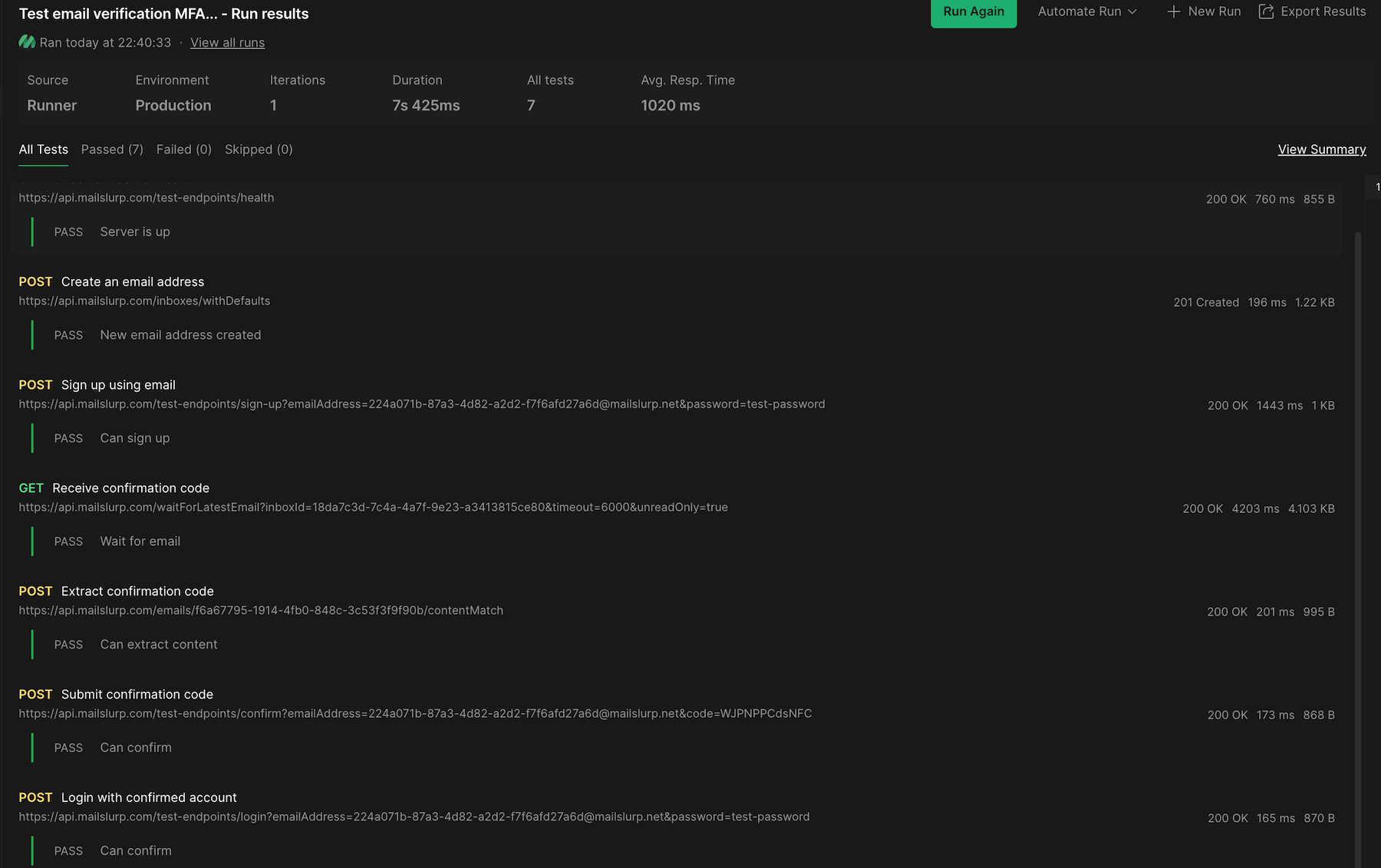
The examples above show how to use Postman to test email sign-up APIs using MailSlurp. By creating inboxes inside tests we can send and receive emails during API collection test runs. This is useful for testing email verification and MFA processes in applications that require email sign-up.
For more information, see our developers documentation and Postman examples.