
guides
Using Page Object Model (POM) for E2E MFA testing
Build Page Object Model tests for email and SMS verification with Selenium, TestNG, and Playwright. Create inboxes, wait for OTPs, extract codes, and complete authentication.
An authentication test often reaches the confirmation screen and stops: the next step needs a code sitting in an email or text message. MailSlurp lets the test receive that message and enter its code, while a Page Object Model (POM) keeps browser selectors out of the test's main flow.
This guide builds that pattern with Selenium and TestNG in Java, then Playwright in TypeScript. Both examples create an email inbox during the run or select an existing phone number, request a verification message, wait for it, extract the code, and finish in the browser.
The runnable examples use the MailSlurp playground's signup verification screens. This verifies ownership of an email address or phone number; a login MFA test additionally needs an already enrolled account, a first-factor login, and a second-factor challenge. The login MFA section explains how to apply the same pattern to that journey.
What belongs in a page object?
A page object gives an application screen a small, readable API. Instead of repeating selectors in every test, you call methods such as fillSignUp, submitSignUp, confirmSignUp, and signIn. When the confirmation form changes, its selectors have one home.
There are three responsibilities in these examples:
| Part | Responsibility | Example |
|---|---|---|
AuthPage |
Browser navigation, selectors, and UI readiness | Fill the email field and submit the code |
MessageClient |
MailSlurp resources, delivery waits, and extraction | Wait for the current verification email |
| Test | Arrange the account, coordinate the journey, and assert the outcome | Verify that authenticated content becomes visible |
The page object never needs your MailSlurp API key. The message helper never needs a browser. Keeping those responsibilities separate makes it possible to switch from regex extraction to AI without changing a form interaction. Selenium's POM guidance describes this separation, and Playwright supports the same class-based pattern.
TestNG is the Java test runner in this combination: it supplies lifecycle hooks and assertions, while Selenium drives the browser. POM here means Page Object Model; Maven's pom.xml is a separate project configuration file.
Follow the email and SMS workflow
Email: create the address during the test
- Create a MailSlurp inbox with an expiry and retain both its ID and email address.
- Open signup through the page object and fill the address and password.
- Capture
sinceimmediately before submitting the form that sends the message. - Call a MailSlurp wait method with the inbox ID, timestamp, timeout, and expected subject.
- Extract the code with a template-specific regex, or use an AI wait that selects the message and extracts
OTP_CODE. - Enter the code through the page object, complete confirmation, and sign in. Assert authenticated access, then delete the test inbox.
SMS: provision a phone before the run
- Open the MailSlurp dashboard, go to phone numbers, and add a number that can receive SMS. These playground examples use a US number because the signup form defaults to the US country code.
- In the test, list US phone numbers and select the first result. This is a convenient starting point for an isolated test account. For a shared account or CI, set
MAILSLURP_PHONE_NUMBER_IDto a number assigned to that scenario. - Fill the signup form with the dialable number. Capture
sinceand submit; pass the phone's resource ID, rather than its dialable number, towaitForLatestSms. - Extract the SMS code, submit it through the page object, and assert successful sign-in.
- Keep the provisioned number for future tests. Release any reservation and clean up the application's test user according to your environment's lifecycle.
Listing a phone does not create or exclusively reserve it. Run the first-number example with one worker, and keep other suites off that number. A signup run also needs a phone number that is not already registered in the target application; for repeated runs, reset your own test application's account or test an existing-user login flow.
flowchart TD
    A["Start an isolated test"] --> B{"Email or SMS?"}
    B -->|Email| C["Create an expiring inbox"]
    B -->|SMS| D["Select a phone added in the dashboard"]
    C --> E["Page object fills signup details"]
    D --> E
    E --> F["Capture since, then submit signup"]
    F --> G{"Message channel"}
    G -->|Email| H["Wait for the matching email"]
    G -->|SMS| I["Wait for SMS on the phone ID"]
    H --> J["Extract the code with regex or AI"]
    I --> J
    J --> K["Page object enters the code"]
    K --> L["Confirm, sign in, and assert access"]
    L --> M["Close browser and clean up test resources"]
In the AI version, selection, waiting, and extraction can happen in one API request. In the regex version, the wait returns the full message and the helper extracts the code locally.
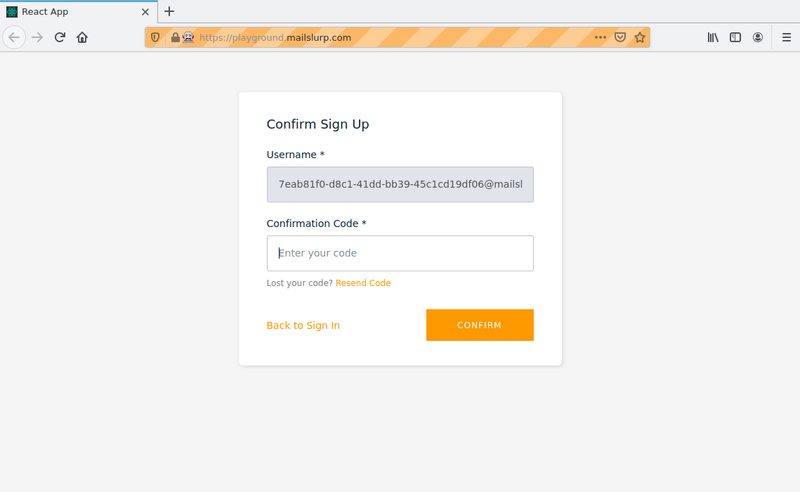
The playground's confirmation screen is the handoff between the message helper and the page object: the helper returns a code, and the page object enters it. The final assertion still belongs to the test.
Set up Selenium and TestNG
The Java POM example project contains AuthPage.java, MessageClient.java, PomMfaTest.java, and the Maven dependencies. Use its complete files; the sections below explain the page class and the message-helper methods used by the tests.
The project targets JDK 17 and pins MailSlurp Java 17.0.0, Selenium 4.25.0, and TestNG 7.1.0. Have Chrome available and set MAILSLURP_API_KEY in your shell or CI secrets. Selenium Manager can resolve the Chrome driver; restricted runners should have a compatible browser and driver available beforehand.
git clone https://github.com/mailslurp/examples.git
cd examples/java-selenium-testng-pom-mfa

# Compile without sending messages or opening a browser.
mvn -DskipTests test-compile

# Run the email scenario.
mvn -Dtest=PomMfaTest#emailVerification test

# After provisioning and reserving a phone, run the SMS scenario.
RUN_SMS_POM=1 mvn -Dtest=PomMfaTest#smsVerification test
These tests contact the playground and MailSlurp. Adapt the application URL, selectors, expected subject, and code format when using your own test backend.
Put Selenium selectors in AuthPage
The page class waits for visible fields and clickable buttons. It exposes the final greeting element so the test can assert that authentication succeeded. The SMS branch removes +1 only after checking it, because this particular playground form has a separate US country-code control.
import org.openqa.selenium.By;
import org.openqa.selenium.WebDriver;
import org.openqa.selenium.WebElement;
import org.openqa.selenium.support.ui.ExpectedConditions;
import org.openqa.selenium.support.ui.WebDriverWait;
import java.time.Duration;

public class AuthPage {
    private final WebDriver driver;
    private final WebDriverWait ui;

    public AuthPage(WebDriver driver) {
        this.driver = driver;
        this.ui = new WebDriverWait(driver, Duration.ofSeconds(15));
    }
    private WebElement visible(String selector) {
        return ui.until(ExpectedConditions.visibilityOfElementLocated(By.cssSelector(selector)));
    }
    private void click(String selector) {
        ui.until(ExpectedConditions.elementToBeClickable(By.cssSelector(selector))).click();
    }
    public void openSignUp(String url) {
        driver.get(url);
        click("[data-test=sign-in-create-account-link]");
    }
    public void fillSignUp(String identity, String password, boolean sms) {
        if (sms && !identity.startsWith("+1")) {
            throw new IllegalArgumentException("The SMS playground example expects a US number");
        }
        visible(sms ? "input[name=phone_line_number]" : "input[name=email]")
                .sendKeys(sms ? identity.substring(2) : identity);
        visible("input[name=password]").sendKeys(password);
    }
    public void submitSignUp() {
        click("[data-test=sign-up-create-account-button]");
    }
    public void confirmSignUp(String code) {
        visible("[data-test=confirm-sign-up-confirmation-code-input]").sendKeys(code);
        click("[data-test=confirm-sign-up-confirm-button]");
    }
    public void signIn(String identity, String password) {
        visible("[data-test=username-input]").sendKeys(identity);
        visible("[data-test=sign-in-password-input]").sendKeys(password);
        click("[data-test=sign-in-sign-in-button]");
    }
    public WebElement greeting() {
        return visible("[data-test=greetings-nav]");
    }
}
A larger application can split this into SignUpPage, VerificationPage, and LoginPage. Split when screens have distinct responsibilities; a small example does not need a class for every input.
Wait for email in MessageClient
The Java helper configures an ApiClient with the key from the environment, a 30-second connection timeout, and a 70-second read timeout. These methods belong inside that helper; its messages field is a WaitForControllerApi.
public String emailCode(UUID inboxId, OffsetDateTime since) throws Exception {
    Email email = messages.waitForMatchingFirstEmail(inboxId,
            new MatchOptions().addMatchesItem(new MatchOption()
                    .field(MatchOption.FieldEnum.SUBJECT)
                    .should(MatchOption.ShouldEnum.CONTAIN)
                    .value("Please confirm your email address")))
            .since(since).timeout(60_000L).unreadOnly(true).execute();
    return codeFrom(email.getBody(), "(?i)verification code is\\s+(\\d{6})\\b");
}

private String codeFrom(String body, String pattern) {
    Matcher match = Pattern.compile(pattern).matcher(body == null ? "" : body);
    if (!match.find()) throw new IllegalStateException("Expected a six-digit verification code");
    return match.group(1); // Preserve leading zeros.
}
The regex names the text around the code instead of accepting any six-digit number in the email. group(1) returns the capture as a string, preserving leading zeros. An absent code fails immediately with an extraction error rather than passing an empty value to Selenium.
Select a phone and wait for its SMS
The phone helper uses an explicit ID when configured, otherwise it lists the first US phone added in the dashboard. The SMS wait uses the timestamp from the triggering browser action:
public PhoneNumberDto phone() throws Exception {
    PhoneControllerApi phones = new PhoneControllerApi(client);
    String configuredId = System.getenv("MAILSLURP_PHONE_NUMBER_ID");
    if (configuredId != null && !configuredId.isBlank()) {
        return phones.getPhoneNumber(UUID.fromString(configuredId)).execute();
    }
    // For an isolated account: use the first provisioned US phone.
    List<PhoneNumberProjection> available = phones.getPhoneNumbers()
            .phoneCountry("US").size(1).execute().getContent();
    if (available == null || available.isEmpty()) {
        throw new IllegalStateException("Add a US phone number in the MailSlurp dashboard");
    }
    return phones.getPhoneNumber(available.get(0).getId()).execute();
}

public String smsCode(UUID phoneNumberId, OffsetDateTime since) throws Exception {
    SmsDto sms = messages.waitForLatestSms(new WaitForSingleSmsOptions()
            .phoneNumberId(phoneNumberId).since(since).timeout(60_000L).unreadOnly(true))
            .execute();
    return codeFrom(sms.getBody(), "\\b(\\d{6})\\b");
}
The SMS regex assumes a single six-digit candidate. If your text also includes an order number or several codes, anchor the pattern to a phrase in the template or use the AI helper below. For several message types on one phone, use body or sender conditions with waitForSms.
Coordinate the journey in a TestNG test
@BeforeMethod creates a browser and helper for each test, and @AfterMethod(alwaysRun = true) closes the browser and removes any test inbox even when a test fails. The email and SMS journeys are each complete tests; neither depends on another test running first. See the TestNG lifecycle documentation for the annotation behavior.
import com.mailslurp.models.*;
import org.openqa.selenium.WebDriver;
import org.openqa.selenium.chrome.ChromeDriver;
import org.openqa.selenium.chrome.ChromeOptions;
import org.testng.SkipException;
import org.testng.annotations.*;
import java.time.OffsetDateTime;
import static org.testng.Assert.assertTrue;

public class PomMfaTest {
    private WebDriver driver;
    private AuthPage auth;
    private MessageClient messages;
    private InboxDto inbox;
    private final String password = "Test-password-42!";

    @BeforeMethod
    public void setUp() {
        inbox = null;
        driver = null;
        messages = new MessageClient(System.getenv("MAILSLURP_API_KEY"));
        driver = new ChromeDriver(new ChromeOptions().addArguments("--headless=new"));
        auth = new AuthPage(driver);
    }

    @Test(timeOut = 180_000)
    public void emailVerification() throws Exception {
        inbox = messages.inboxes.createInboxWithOptions(new CreateInboxDto().expiresIn(600_000L)).execute();
        auth.openSignUp("https://playground.mailslurp.com");
        auth.fillSignUp(inbox.getEmailAddress(), password, false);
        OffsetDateTime since = OffsetDateTime.now();
        auth.submitSignUp();
        String code = "1".equals(System.getenv("USE_AI_OTP"))
                ? messages.aiCode(inbox.getId(), false, since)
                : messages.emailCode(inbox.getId(), since);
        auth.confirmSignUp(code);
        auth.signIn(inbox.getEmailAddress(), password);
        assertTrue(auth.greeting().isDisplayed());
    }

    @Test(timeOut = 180_000)
    public void smsVerification() throws Exception {
        if (!"1".equals(System.getenv("RUN_SMS_POM"))) {
            throw new SkipException("Set RUN_SMS_POM=1 after reserving a phone");
        }
        PhoneNumberDto phone = messages.phone();
        auth.openSignUp("https://playground-sms.mailslurp.com");
        auth.fillSignUp(phone.getPhoneNumber(), password, true);
        OffsetDateTime since = OffsetDateTime.now();
        auth.submitSignUp();
        String code = "1".equals(System.getenv("USE_AI_OTP"))
                ? messages.aiCode(phone.getId(), true, since)
                : messages.smsCode(phone.getId(), since);
        auth.confirmSignUp(code);
        auth.signIn(phone.getPhoneNumber(), password);
        assertTrue(auth.greeting().isDisplayed());
    }

    @AfterMethod(alwaysRun = true)
    public void tearDown() {
        try {
            if (driver != null) driver.quit();
        } finally {
            if (inbox != null) {
                try {
                    messages.inboxes.deleteInbox(inbox.getId()).execute();
                } catch (Exception cleanupFailure) {
                    System.err.println("Inbox cleanup failed; expiry remains enabled: " + inbox.getId());
                }
            }
        }
    }
}
Keep this example class sequential: its fields belong to a test-class instance. To enable TestNG method-level parallelism, provide separate browser, page object, and message-resource state per invocation, and assign different phone numbers. Simply enabling parallel="methods" would make these fields compete.
The greeting assertion proves the browser reached the authenticated view. In your application, assert something specific to the expected account or use a protected endpoint to confirm which user is authenticated.
Build the same POM workflow in Playwright
The Playwright example project includes pom-auth-page.ts, pom-message-client.ts, and pom-mfa.spec.ts under tests/. Install its pinned dependencies and Chromium, and use the same MAILSLURP_API_KEY environment variable:
cd examples/playwright-email-testing
npm ci
npx playwright install chromium
npx playwright test tests/pom-mfa.spec.ts --workers=1 --retries=0
The SMS test skips unless RUN_SMS_POM=1. To run it, first provision the phone and prepare the target account state, then use:
RUN_SMS_POM=1 npx playwright test tests/pom-mfa.spec.ts --grep 'verify an SMS' --workers=1 --retries=0
The repository config uses a headed browser. Set headless: true in its Chromium project when running on a CI runner without a display. The test sets its own 180-second timeout so message delivery has room to complete.
Keep locators and form actions in a class
Playwright locator actions wait for the relevant element to be ready. The page object returns a locator for the test's retrying assertion:
import type { Page } from '@playwright/test';

export class AuthPage {
  constructor(private readonly page: Page) {}

  async openSignUp(url: string) {
    await this.page.goto(url);
    await this.page.locator('[data-test=sign-in-create-account-link]').click();
  }

  async fillSignUp(identity: string, password: string, channel: 'email' | 'sms') {
    if (channel === 'sms' && !identity.startsWith('+1')) {
      throw new Error('The SMS playground example expects a US number');
    }
    const input = channel === 'email' ? 'email' : 'phone_line_number';
    const value = channel === 'email' ? identity : identity.slice(2);
    await this.page.locator(`input[name=${input}]`).fill(value);
    await this.page.locator('input[name=password]').fill(password);
  }

  async submitSignUp() {
    await this.page.locator('[data-test=sign-up-create-account-button]').click();
  }

  async confirmSignUp(code: string) {
    await this.page.locator('[data-test=confirm-sign-up-confirmation-code-input]').fill(code);
    await this.page.locator('[data-test=confirm-sign-up-confirm-button]').click();
  }

  async signIn(identity: string, password: string) {
    await this.page.locator('[data-test=username-input]').fill(identity);
    await this.page.locator('[data-test=sign-in-password-input]').fill(password);
    await this.page.locator('[data-test=sign-in-sign-in-button]').click();
  }

  get greeting() {
    return this.page.locator('[data-test=greetings-nav]');
  }
}
Keep email and phone waits in a helper
MessageClient constructs a MailSlurp SDK client from the API key. Its email methods use MailSlurp, MatchOptionFieldEnum, and MatchOptionShouldEnum from mailslurp-client:
async emailCode(inboxId: string, since: Date) {
  const email = await this.api.waitController.waitForMatchingFirstEmail({
    inboxId, since, timeout: 60_000, unreadOnly: true,
    matchOptions: { matches: [{
      field: MatchOptionFieldEnum.SUBJECT,
      should: MatchOptionShouldEnum.CONTAIN,
      value: 'Please confirm your email address',
    }] },
  });
  return this.codeFrom(email.body, /verification code is\s+(\d{6})\b/i);
}

private codeFrom(body: string | null | undefined, pattern: RegExp) {
  const code = pattern.exec(body ?? '')?.[1];
  if (!code) throw new Error('Expected a six-digit verification code');
  return code; // Preserve leading zeros.
}
The phone methods additionally import GetPhoneNumbersPhoneCountryEnum. They use the same dashboard-first setup and explicit-ID override as the Java version:
async phone() {
  const phoneNumberId = process.env.MAILSLURP_PHONE_NUMBER_ID;
  if (phoneNumberId) return this.api.phoneController.getPhoneNumber({ phoneNumberId });
  // For an isolated account: use the first provisioned US phone.
  const { content } = await this.api.phoneController.getPhoneNumbers({
    phoneCountry: GetPhoneNumbersPhoneCountryEnum.US, size: 1,
  });
  if (!content?.length) throw new Error('Add a US phone number in the MailSlurp dashboard');
  return content[0];
}

async smsCode(phoneNumberId: string, since: Date) {
  const sms = await this.api.waitController.waitForLatestSms({
    waitForSingleSmsOptions: {
      phoneNumberId, since, timeout: 60_000, unreadOnly: true,
    },
  });
  return this.codeFrom(sms.body, /\b(\d{6})\b/);
}
A browser auto-wait cannot wait for an external inbox to receive a message. The MailSlurp wait covers delivery; the page object's actions and final Playwright assertion cover the UI.
Keep the scenario readable in the test
With those responsibilities extracted, the test shows the order of operations directly. The since timestamp sits immediately before submission rather than being hidden inside a helper that runs after the message might arrive.
import { test, expect } from '@playwright/test';
import { AuthPage } from './pom-auth-page';
import { MessageClient } from './pom-message-client';

test.describe('POM email and SMS verification', () => {
  test.setTimeout(180_000);

  test('verify an email and sign in', async ({ page, request }, testInfo) => {
    const messages = new MessageClient(process.env.MAILSLURP_API_KEY ?? '');
    const inbox = await messages.api.createInboxWithOptions({ expiresIn: 600_000 });
    const auth = new AuthPage(page);
    const password = 'Test-password-42!';
    try {
      await auth.openSignUp('https://playground.mailslurp.com');
      await auth.fillSignUp(inbox.emailAddress, password, 'email');
      const since = new Date();
      await auth.submitSignUp();
      const code = process.env.USE_AI_OTP === '1'
        ? await messages.aiCode(request, { inboxIds: [inbox.id] }, since)
        : await messages.emailCode(inbox.id, since);
      await auth.confirmSignUp(code);
      await auth.signIn(inbox.emailAddress, password);
      await expect(auth.greeting).toBeVisible();
    } finally {
      try {
        await messages.api.inboxController.deleteInbox({ inboxId: inbox.id });
      } catch {
        await testInfo.attach('inbox-cleanup', {
          body: `Cleanup failed for ${inbox.id}; expiry remains enabled.`, contentType: 'text/plain',
        });
      }
    }
  });

  test('verify an SMS and sign in', async ({ page, request }) => {
    test.skip(process.env.RUN_SMS_POM !== '1', 'Set RUN_SMS_POM=1 after reserving a phone');
    const messages = new MessageClient(process.env.MAILSLURP_API_KEY ?? '');
    const phone = await messages.phone();
    const auth = new AuthPage(page);
    const password = 'Test-password-42!';
    await auth.openSignUp('https://playground-sms.mailslurp.com');
    await auth.fillSignUp(phone.phoneNumber, password, 'sms');
    const since = new Date();
    await auth.submitSignUp();
    const code = process.env.USE_AI_OTP === '1'
      ? await messages.aiCode(request, { phoneNumberIds: [phone.id] }, since)
      : await messages.smsCode(phone.id, since);
    await auth.confirmSignUp(code);
    await auth.signIn(phone.phoneNumber, password);
    await expect(auth.greeting).toBeVisible();
  });
});
The API key stays in the Node.js test process; it is never passed to page.evaluate or application JavaScript. Playwright owns the browser context lifecycle, while the test owns its inbox. Inbox expiry provides a fallback if the process exits before teardown.
Use an AI matcher when the message format varies
Regex is a good choice for a stable template you control. A semantic match is useful when localized or redesigned messages express the same purpose with different wording. MailSlurp can select the verification message and extract the code in one request, so the page object still receives an ordinary string.
This method is included in the TypeScript MessageClient. It imports APIRequestContext from @playwright/test and randomUUID from node:crypto:
async aiCode(request: APIRequestContext, scope: { inboxIds?: string[]; phoneNumberIds?: string[] }, since: Date) {
  const response = await request.post('https://api.mailslurp.com/ai/messages/wait', {
    headers: { 'x-api-key': this.apiKey, 'Idempotency-Key': randomUUID() },
    timeout: 130_000,
    data: {
      scope, since: since.toISOString(), timeout: 120_000,
      match: { prompt: 'The signup verification message containing the current confirmation code' },
      extractionPreset: 'OTP_CODE',
    },
  });
  if (!response.ok()) throw new Error(`MailSlurp HTTP ${response.status()}`);
  const result = await response.json();
  if (!result.successful || !/^\d{6}$/.test(result.data?.code ?? '') ||
      !result.extractionEvidence?.['/code']?.length) {
    throw new Error(`AI evaluation ${result.evaluationId}: ${result.status}: ${result.summary}`);
  }
  return result.data.code as string;
}
The test passes either { inboxIds: [inbox.id] } or { phoneNumberIds: [phone.id] }. The Java project's MessageClient.aiCode calls the same endpoint with OkHttp and Gson. Both complete tests select that alternative when USE_AI_OTP=1:
# In the Java example directory:
USE_AI_OTP=1 mvn -Dtest=PomMfaTest#emailVerification test

# In the Playwright example directory:
USE_AI_OTP=1 npx playwright test tests/pom-mfa.spec.ts --grep 'verify an email' --workers=1 --retries=0
These requests use your account's AI allowance. Check successful, the application's expected code format, and /code extraction evidence before entering the value. An HTTP 2xx response alone is insufficient: an ambiguous message can return INCONCLUSIVE without usable data. Preserve that result as a failure instead of asking repeatedly until it passes.
For a message already obtained by a deterministic wait, use /ai/messages/extract with its email or SMS ID rather than waiting for it again. The AI testing guide covers named assertions, custom output schemas, evidence, and token budgets. If retrying an interrupted request, retain its idempotency key and original body.
Use the same page objects for a login MFA challenge
A signup-confirmation test does not establish that an existing user's second factor is enforced during login. For that test, prepare an account with email or SMS MFA enrolled, retaining its inbox ID or assigned phone ID. Begin with a fresh browser context or session so remembered-device state does not bypass the challenge.
The login workflow becomes:
- Fill username and password through
LoginPage. - Capture
since, then submit the first-factor login or click the control that sends the MFA code. - Wait for the challenge screen and assert that the session has not yet gained access to a protected page or endpoint.
- Call the same MailSlurp message helper with the enrolled inbox or phone ID. Update the subject filter or AI prompt to describe a login MFA message, rather than signup confirmation.
- Submit the returned code through
MfaChallengePage, then assert access to the expected account.
MfaChallengePage should own your application's OTP input, submit button, resend button, and error locator. The playground's confirmSignUp selectors are specifically for signup; replace them with the login challenge's controls in your application. Selenium/TestNG and Playwright can keep the same separation of browser actions, message operations, and assertions.
Exercise the rejection paths too:
| Scenario | What the test should establish |
|---|---|
| Valid delivered code | The enrolled account gains authenticated access. |
| Incorrect code | The challenge displays an error and protected access remains denied. |
| Expired code | The application rejects it according to the configured expiry policy. |
| Reused code | A completed challenge cannot be replayed to gain access again. |
| Resend | The new message is selected using a new timestamp, and old-code behavior matches the application's policy. |
| Wrong account or browser session | The code cannot complete a challenge it was not issued for. |
Where possible, configure a short expiry in the test backend or use an application-supported test clock rather than making the suite sleep for several minutes. For authenticator-app challenges, use virtual TOTP devices; those codes follow a different retrieval mechanism from delivered email and SMS.
Keep the tests reliable in CI
A fresh inbox per attempt removes one common source of false passes: reading a verification code from yesterday's test. For phones, an explicit ID makes selection repeatable, but your suite still needs exclusive ownership while a scenario runs. unreadOnly and since help filter messages; neither is a reservation mechanism.
There are separate timeout budgets. The deterministic helpers allow 60 seconds for delivery; the Java HTTP read timeout allows 70 seconds. The AI wait allows 120 seconds with a longer transport timeout. Browser readiness waits and the total test timeout cover different parts of the journey. A fixed Thread.sleep or page.waitForTimeout does not identify the right message.
On failure, keep the inbox or phone ID, message or AI evaluation ID, start time, expected filter, and browser trace or screenshot. Avoid putting OTPs, authentication links, API keys, or complete message bodies in shared logs. Read a full message once and retain it: another unread-only wait may not return that message after its read state changes.
If the SMS signup fails before any message arrives, check whether the number already belongs to a user in the target application. If extraction succeeds but confirmation fails, check the account, browser session, leading zeros, code expiry, and resend behavior before increasing timeouts.
Continue with your application's verification flow
Start with one email scenario and a fresh inbox, then add an assigned phone and the rejection cases your authentication policy requires. Keep the selectors in page objects and the final account-access assertion visible in the test.
- Playwright email and SMS documentation
- Selenium setup, waits, and extraction documentation
- Wait conditions and troubleshooting
- Create a MailSlurp account for authentication testing
Allocate phone numbers across parallel workers
For concurrent SMS tests, put phone-pool lease acquisition and release in the message service or fixture. Pass the leased number to the page object and keep its ID for message waits. Release the lease in teardown; keep the rented number in the pool for later tests.