
solutions
Email Load Testing with Disposable Inboxes
Load test application email delivery and processing with isolated inboxes, matched messages, latency measurements, and k6, JMeter, Gatling, or Locust.
A successful send request does not tell you how long a customer waits for an email. During a signup spike, the application can respond quickly while its mail queue grows. An email integration load test follows the request through to a real recipient, so you can measure both response time and message delivery.
MailSlurp supplies private inboxes that your load generator can create and read over HTTP. Give each test user an isolated address, trigger your application's actual sending path, then match the resulting message. For inbound processing, send to the address your application consumes and also verify the resulting application record.
Features
Measure the complete email workflow
Keep three results separate: whether the application accepted the request, whether its email arrived, and whether the next action completed. A password-reset test might measure request acceptance, reset-message receipt and successful password change. Each phase needs its own deadline and failure count.
Stress-Test Notifications and Onboarding Flows
Start with a single successful journey, then increase the rate gradually. Use a burst for a signup spike and a sustained run for queue growth or resource leaks. Define the expected rate, recipient count, test duration and delivery deadline before starting. Use controlled test recipients and confirm the permitted volume and concurrency for your sending provider and MailSlurp plan.
Reliable Email API Testing at Scale
Create a new inbox for each independent test user and include a unique request reference in the test email's subject. Match both the inbox and reference instead of asking for an arbitrary latest unread message. Capture the request start time before triggering the send, and use it as the wait's since boundary. Opening an email to debug it should not change whether the test can find it.
Support SRE and release engineering teams
Report received messages against all expected sends, alongside latency percentiles. Count missing messages and duplicate application actions separately. When traffic stops, measure how long the queue takes to drain and check that retries do not produce duplicate processing. Keep generator failures visible too: an overloaded runner can silently produce less traffic than intended.
Integrate with any framework
The MailSlurp REST API provides the same sequence in each framework: create an inbox, trigger the application, wait for a correlated message, assert its content, and delete the inbox in teardown. Store the API key in protected runner configuration and pass it in the x-api-key header.
K6s
The example below starts with one iteration so you can validate the integration before increasing load. It expects a staging endpoint you control at APP_TRIGGER_URL. Adapt the request body to your application: this example sends {email, reference} and expects the application to send an email to that address with reference in its subject. A 2xx trigger response means the application accepted the request; the subsequent wait checks receipt.
Save this as email-load.js. Set MAILSLURP_API_KEY and APP_TRIGGER_URL in your runner's environment, then run k6 run email-load.js. Add your application's required authentication to the trigger request before using it. The example's 30-second receipt objective is illustrative; replace it with your product's agreed requirement.
Show the complete k6 email test
import http from 'k6/http';
import { check, fail } from 'k6';
import { Rate, Trend } from 'k6/metrics';

const workflowFailed = new Rate('email_workflow_failed');
const missingEmail = new Rate('email_missing');
const receiptTime = new Trend('email_observed_receipt_ms', true);
const cleanupFailed = new Rate('email_cleanup_failed');
const base = 'https://api.mailslurp.com';

export const options = {
  vus: 1,
  iterations: 1,
  thresholds: {
    checks: ['rate==1'],
    email_workflow_failed: ['rate==0'],
    email_missing: ['rate==0'],
    email_observed_receipt_ms: ['p(95)<30000'],
    email_cleanup_failed: ['rate==0'],
  },
};

function readJson(response, name) {
  const ok = check(response, {
    [`${name} succeeded`]: (r) => r.status >= 200 && r.status < 300,
  });
  if (!ok) fail(`${name} failed with status ${response.status}`);
  return response.json();
}

export default function () {
  if (!__ENV.MAILSLURP_API_KEY || !__ENV.APP_TRIGGER_URL) {
    fail('Set MAILSLURP_API_KEY and APP_TRIGGER_URL');
  }
  const headers = {
    'x-api-key': __ENV.MAILSLURP_API_KEY,
    'Content-Type': 'application/json',
  };
  const params = { headers, timeout: '65s' };
  let inbox;
  let accepted = false;
  let received = false;
  let passed = false;
  try {
    inbox = readJson(http.post(`${base}/inboxes?expiresIn=300000`, null, params), 'Create inbox');
    if (!inbox.id || !inbox.emailAddress) fail('Inbox response has no ID or address');
    const reference = `load-${__VU}-${__ITER}-${Date.now()}`;
    const started = Date.now();
    const since = encodeURIComponent(new Date(started).toISOString());
    const trigger = http.post(__ENV.APP_TRIGGER_URL, JSON.stringify({
      email: inbox.emailAddress, reference,
    }), { headers: { 'Content-Type': 'application/json' }, timeout: '15s' });
    accepted = check(trigger, {
      'Application accepted request': (r) => r.status >= 200 && r.status < 300,
    });
    if (!accepted) fail(`Application rejected request: ${trigger.status}`);

    const email = readJson(http.post(
      `${base}/waitForMatchingFirstEmail?inboxId=${encodeURIComponent(inbox.id)}&timeout=60000&since=${since}&unreadOnly=false`,
      JSON.stringify({ matches: [{ field: 'SUBJECT', should: 'CONTAIN', value: reference }] }),
      params
    ), 'Wait for matching email');
    received = check(email, {
      'Recipient matches this iteration': (e) => Array.isArray(e.to) && e.to.includes(inbox.emailAddress),
      'Subject contains this request reference': (e) => typeof e.subject === 'string' && e.subject.includes(reference),
    });
    if (!received) fail('Received email does not match this iteration');
    receiptTime.add(Date.now() - started);
    passed = true;
  } finally {
    workflowFailed.add(!passed);
    if (accepted) missingEmail.add(!received);
    if (inbox && inbox.id) {
      const removed = http.del(`${base}/inboxes/${encodeURIComponent(inbox.id)}`, null, params);
      cleanupFailed.add(removed.status < 200 || removed.status >= 300);
    }
  }
}
The custom receipt metric includes application time and the wait response's network overhead; it is an observed end-to-end duration, not pure SMTP transit time. Its percentile includes successful receipts, while email_missing retains accepted requests that did not produce a matching email. email_workflow_failed also includes setup and trigger failures. The five-minute expiry is a fallback for interrupted runs, not a replacement for teardown.
In k6, a failed check alone does not make the run fail. The thresholds above turn the checks and custom metrics into pass/fail criteria. For a larger test, configure a scenario suited to the intended request rate and provision enough virtual users for the email wait. Track dropped_iterations with arrival-rate scenarios; a long wait can exhaust available users before the sending service reaches its capacity.
Gatling
Use Gatling HTTP requests for inbox creation, your application trigger and the matching wait. Save the inbox ID, address and reference in the virtual user's session. Check the status and extracted JSON values before the next step; keep inbox creation and deletion outside the delivery-latency measurement. Configure the client timeout to exceed the MailSlurp wait, and ensure teardown runs when an earlier request fails.
The Java SDK guide covers MailSlurp calls for a JVM helper. Use one approach consistently within the measured path so synchronous SDK waits do not unexpectedly block your load generator's execution model.
JMeter
Use HTTP Request samplers with a Header Manager for x-api-key, JSON extractors for the inbox values, and assertions for both response status and message identity. Keep variables thread-local, capture the send start time before the application sampler, and URL-encode that value for the matching wait.
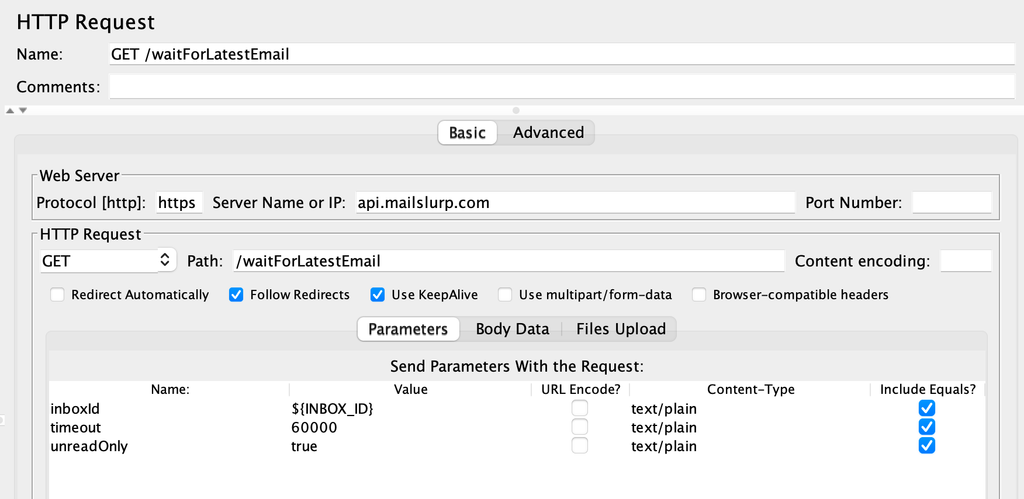
Follow the complete JMeter email testing example for the test plan and runner. Add an application-state assertion after receipt when the requirement is to finish signup or process an inbound message.
Locust
Use Locust's HTTP client for measured API calls and keep each user's inbox ID and address in that user's state. A synchronous SDK call does not automatically appear as a Locust HTTP sample: if you use the Python SDK, explicitly record its elapsed time and success or failure in your Locust instrumentation.
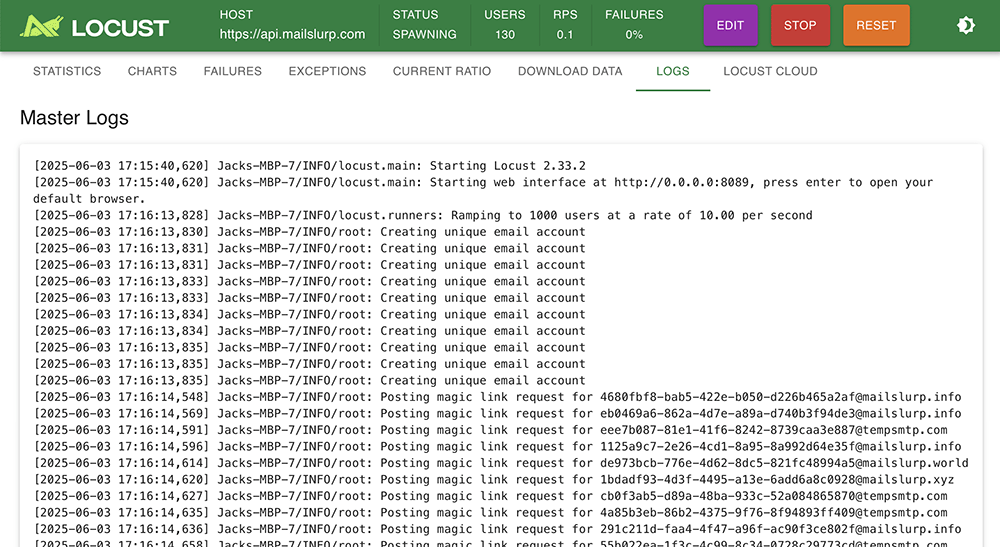
Measure the application trigger and email wait under separate request names. Clean up the owned inbox in a finally block, and report a missing email as a failed workflow rather than logging a warning and continuing as success.
Load test email processing after receipt
For an application that consumes email, receipt is the midpoint. Include a unique reference in the incoming message, wait for the matching application record, and verify the parsed fields and attachment handling. Replay the same message or event in a controlled test and check your deduplication rule prevents a second record.
Keep expected-message count, received count, processed count and duplicate count in the same report. If receipt stays fast while processing latency grows, inspect the consumer queue and worker capacity. If sends are accepted but no message arrives, inspect sender events and the mail queue before increasing the application's processing timeout.