
Inbound Email API for routing, parsing, and operational workflows
Build inbound email workflows with APIs and webhooks. Receive messages, parse content and attachments, and route events into finance, support, order, and document workflows.
An invoice arrives by email, but the next step belongs in an accounts-payable queue. A customer replies to a receipt, and the support system needs that reply on the right ticket. An inbound email API lets your application receive those messages and use their content without someone copying it between systems.
MailSlurp provides the receiving address, stored email, attachments, and webhook notification. Your application decides what the message means and which action to take. Keeping receipt separate from processing makes a failed parser or unavailable ticketing system easier to recover from.
Quick answer
For a continuous inbound workflow, create a MailSlurp inbox for the job and subscribe it to a NEW_EMAIL webhook. Your HTTP handler authenticates the request, saves a pending job, and acknowledges delivery. A worker then fetches the email by emailId, checks its content and attachments, and updates your application.
Keep the notification's messageId for deduplication and the email's emailId for retrieval. They identify different things. Saving both lets you recognize a repeated notification and still retrieve the original message for a retry.
Choose the right inbound email path
If a test is waiting for one signup, OTP, or password-reset email, start with the receive email API and its complete receiving walkthrough. Use email integration testing to follow the message's link or code and verify the resulting account state. The patterns below cover ongoing intake, where each incoming message starts work in your application.
| What you need to build | Next step |
|---|---|
| An HTTP handler for new email | Email webhooks guide |
| Separate queues for replies, documents, or orders | Inbound email routing |
| Extraction from message bodies or attachments | AI email parsing and structured extraction |
| A parser with a defined output schema | Email parser API |
Inbound email API vs email-to-webhook
Email-to-webhook is the notification part of the workflow: a new message causes an HTTP request to your endpoint. An inbound email API also lets you provision addresses, retrieve stored messages, download attachments, and inspect content after the notification has been acknowledged.
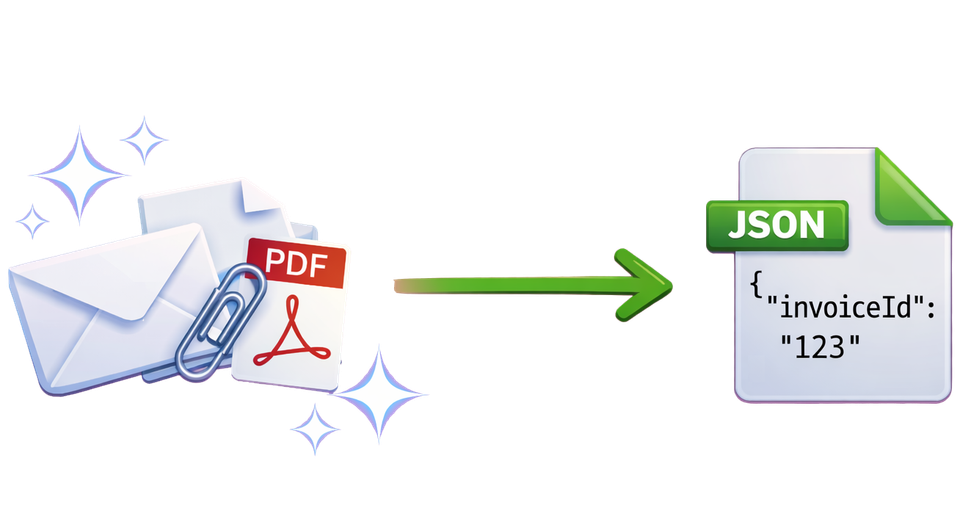
For example, an invoice webhook can start a job containing the email ID. The worker downloads the invoice when it is ready, and can retrieve it again if the first parsing attempt fails.
Webhook vs polling: when to use each
Webhooks (default for production automations)
Use webhooks when every incoming message should start work, such as creating a support ticket or adding an invoice to a review queue. The webhook implementation guide covers the signed request, payload fields, durable acceptance, and retries.
Polling (useful for tests and controlled batch jobs)
Use a bounded wait when a test expects one message after a known action. Use API listing when a batch job deliberately retrieves messages already in an inbox. A production workflow can combine webhook notifications with periodic reconciliation so messages missed by your own processing system are found and handled.
Choose the reconciliation window and record which email IDs have completed processing. Repeatedly listing an inbox without tracking progress can recreate the same work.
Inbound email implementation checklist
Start with one inbox, one event type, and one downstream action. Once that path handles a retry safely, extend it to more inboxes or message types.
Production receive and replay pattern
- Create a dedicated inbox or alias for the workflow and register a
NEW_EMAILwebhook. - Authenticate the webhook request and validate the expected event type, webhook, and inbox.
- Store
messageId,emailId, and a pending job durably before returning a successful HTTP response. Enforce a unique notification ID so concurrent retries cannot create two jobs. - Have a worker fetch the full email using
emailIdand check that it belongs to the expected inbox. - Download and validate the required attachments, parse the content, and perform the downstream action.
- Record the result against the email and your own ticket, invoice, or order ID. Make that action safe to repeat if the worker stops after updating the destination but before recording completion.
A failed parser belongs in the worker's retry or review path. It should not force your webhook endpoint to repeat slow attachment processing every time the notification is delivered.
Operational examples
Use the destination record to decide what to extract. A support reply needs conversation context; an invoice needs amounts and a document; an order needs identifiers that prevent duplicate fulfillment.
| Workflow | Useful fields and files | Result in your application |
|---|---|---|
| Invoice intake | Vendor, invoice number, due date, currency, total, PDF | Create a review item and flag missing or inconsistent fields |
| Support replies | Sender, reply context, subject, body, attachments | Attach the reply to the correct ticket or route it for review |
| Order ingestion | Order ID, items, quantities, customer details | Create or update the order once |
| Restaurant orders | Location, order ID, items, requested time | Route the order to the responsible location |
| Claims and document intake | Case identifier, forms, supporting files | Associate documents with the case and notify its reviewer |
Receive and parse in code
The email webhook guide supplies a Node handler and a database example for accepting work once. Use that as the starting point for continuous intake. Fetch the email through the authenticated API before passing its body or attachments to your parser.
For a test that expects one email, the complete receiving walkthrough starts with an initialized client and a receiving inbox, then shows how to wait for and read the message. Give that inbox's address to your application as the recipient. Match the sender your application actually uses; the receiving inbox's address is not automatically the sender.
Define the fields your parser must return and what happens when one is absent. An invoice without a currency or a reply without a recognized ticket should enter review, rather than silently producing an incomplete record. See the email parser API for extraction contracts.
Security and reliability controls to include
Treat email bodies, links, and attachments as external input even when the webhook request is authentic. Validate the expected attachment type and size, and authorize any business action separately from parsing the message. A sender address or successful extraction alone is not authorization to pay an invoice or change an account.
Use separate inboxes or routing rules for environments and workflows. Keep the original email reference, processing status, and destination record together so an operator can explain what happened without copying sensitive message bodies into logs. Plan retention around the time you need for investigation and replay.
Test failures as well as successful intake:
- Deliver the same notification twice and confirm only one pending job exists.
- Stop a worker after it writes to the destination, then retry and confirm no duplicate ticket or order appears.
- Pass a message with an unexpected attachment or missing required field and check the review path.
- Interrupt a downstream dependency and confirm saved work can resume.
The testing webhooks guide covers test requests. For sender and message diagnostics, use the email header analyzer, SPF checker, DKIM checker, and DMARC checker.
Choose the right next step for your workflow
For mailbox ownership, aliases, and queues, continue with inbound email routing. For the worker's extraction step, use AI email parsing and structured extraction. The invoice processing, support routing, and order ingestion examples explain how those pieces fit the destination record.
FAQ
Does this support attachments and large inbound payloads?
Yes. Fetch attachment metadata and download the files your worker needs through the API. Check the current limits for your account and validate file type and size before processing; a webhook acknowledgement need not wait for a large attachment download.
What happens if my webhook endpoint is temporarily down?
Use MailSlurp's webhook delivery history to investigate failed notifications. Keep your handler safe for retries, and use stored email IDs or inbox reconciliation to recover unfinished work. The webhook guide explains deduplication and acknowledgement.
Can I run inbound workflows in staging?
Yes. Use dedicated staging inboxes and endpoints, then test normal intake, duplicate notifications, parser failures, and recovery before connecting the production workflow.
Is an inbound email API the same as email-to-webhook?
Email-to-webhook sends the notification. The inbound API supplies the address, stored message, and attachment access that your worker uses to complete or retry its job.