
guides
Alias Email Address Proxy: Forwarding, Masking, and Routing Workflows
Learn how alias email address proxy workflows handle forwarding, masking, and routing, and how teams use them for support, testing, and inbound automation.

An alias email address proxy is the routing layer that sits between a public-facing alias and the private destination behind it.
If you are searching for email alias forwarding, alias email proxy, or masked email forwarding, the practical answer is this: the proxy layer gives you a stable public-facing address while keeping the real mailbox hidden behind it.
That matters for privacy, support operations, testing, and any workflow where you want to change the destination mailbox without changing the public address external senders use.
If you want the shorter definition-first version before the implementation details, start with What is an email alias?.
If you are deciding between a live alias, display redaction, and safe replacement addresses for QA, use the email address masking guide first.
Quick answer
Use an email alias when you need to:
- hide the real destination inbox from external senders
- publish a stable address while keeping routing flexible
- forward inbound mail into a private mailbox or workflow
- segment traffic by use case without exposing internal identities
An alias is not the same thing as a second mailbox. It is a routing layer in front of the real destination.
What an email alias actually does
At a minimum, an alias creates a public address such as billing@alias-domain.example or signup-123@example.net and maps inbound mail to a real destination.
That gives you two useful separations:
- the sender sees the alias, not the private mailbox
- your team can rotate, disable, or re-route the real destination without changing the published address

Email alias vs forwarding address vs disposable inbox
These terms overlap in search, but they are not the same control.
| Pattern | Main purpose | Best fit |
|---|---|---|
| Email alias | Stable masked address in front of a real destination | Support, workflows, integrations, partner routing |
| Basic forwarding rule | Send all mail from one address to another | Simple mailbox redirection |
| Disposable inbox | Temporary isolated mailbox for short-lived use | QA, one-off signups, test runs |
If you need a reusable public address with routing control and auditability, an alias is usually the better fit than a disposable inbox.
When aliases are useful
Aliases are useful in a few common situations.
1. Public contact or team addresses
Support, onboarding, and billing teams often need a stable contact address that should survive staff or mailbox changes.
An alias keeps the public address stable while the underlying destination can change over time.
2. Privacy and data minimization
If you do not want to expose a real mailbox address in forms, partner docs, or outbound templates, publish an alias instead.
That reduces direct inbox exposure and helps contain spam when a public address gets reused widely.
3. Workflow and automation routing
Aliases are useful when different inbound streams should land in different systems or environments.
Examples:
- vendor notifications to one route
- customer replies to another
- staging or QA aliases isolated from production
4. Testing and release validation
Teams often use aliases to model real inbound email paths without using personal or shared production inboxes.
That is especially helpful when you want to test forwarding, reply handling, or intake workflows safely.
How alias email forwarding works in practice
The common flow looks like this:
- Create the destination inbox or mailbox.
- Issue an alias address.
- Verify destination ownership if required.
- Receive mail at the alias.
- Forward or route the message to the private destination.
- Preserve reply behavior, logging, or workflow automation as needed.
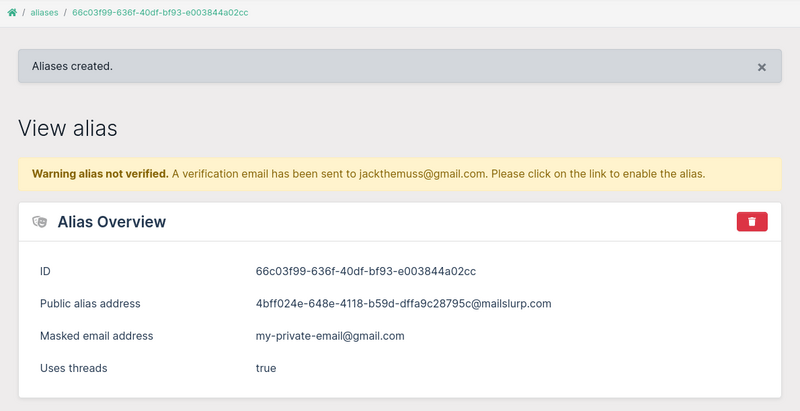
The important design decision is whether the alias is just a forwarding endpoint or part of a broader intake workflow with reply controls, logging, and automation.
What a good alias system should let you control
If aliases are part of a production workflow, you usually need more than "forward everything to one inbox."
Useful controls include:
- destination verification before activation
- alias creation and rotation by API
- reply-thread behavior
- purpose-based routing and disable rules
- audit visibility for what alias was used and where mail went
Without those controls, aliases can become another layer of routing debt instead of a privacy boundary.
Common alias mistakes
Treating aliases like permanent personal mailboxes
Aliases work best as intake and routing surfaces. They are not a replacement for every mailbox management need.
Reusing one alias for unrelated traffic
If billing, support, and partner notifications all share one alias, debugging becomes harder and disable actions become riskier.
Forgetting ownership and lifecycle controls
An alias that forwards to a stale mailbox can quietly leak traffic or create message loss.
Using aliases without testing the full receive path
It is easy to confirm that an alias exists. It is harder to confirm that forwarding, reply behavior, attachments, and automation all behave correctly under load.
Build production alias workflows with MailSlurp
MailSlurp makes aliases part of an actual engineering workflow, not only a privacy trick.
Use it when you need to:
- create aliases by API or dashboard
- verify and rotate destinations safely
- combine aliases with Email proxy forwarding and routing rules
- receive and inspect messages with Receive email API
- validate alias-driven flows in Email sandbox and Email integration testing
If the goal is to expose stable entry points while keeping the real mailbox private and testable, that is the MailSlurp fit.
Related pages
- What is an email alias?
- Email Alias API
- Auto forwarding guide
- Inbox auto repliers
- Receive email API
- Email proxy forwarding and routing rules
FAQ
What is an email alias in simple terms?
An email alias is an alternate address that receives mail on behalf of a real destination inbox without exposing that inbox publicly.
Is an email alias the same as email forwarding?
Not exactly. Forwarding is the behavior. The alias is the public address and routing layer in front of the destination.
Can I reply from an alias?
Some systems support masked or thread-aware reply behavior. Others only forward inbound mail. That capability depends on the alias platform, not the alias concept alone.
Should I use an alias or a disposable inbox for testing?
Use a disposable inbox for short-lived isolated tests. Use an alias when you want a stable public address with controlled forwarding and reply behavior.
Final take
An email alias is the cleanest way to publish a stable address without exposing the real inbox behind it. The value is not only privacy. It is routing control, safer operations, and cleaner testing for inbound email workflows.