
automations
Invoice OCR API: Extract Email PDFs into Validated JSON
Turn invoice attachments into typed JSON with an invoice OCR API, then validate totals, route exceptions, and write safely to a sheet, queue, or ERP.
Did you know that AI and optical character recognition (OCR) can turn the useful details inside emails and attachments into table-ready data? With MailSlurp, you can receive a real email, label and extract the fields you care about, then send the result to a spreadsheet or work with it as JSON, CSV, Excel, and other structured formats.
For invoices, that means a PDF attached to an email can become a typed record instead of another document waiting to be re-keyed. Extracting the text is only half the job, though. Before a record reaches a spreadsheet, approval queue, or ERP, you still need to answer awkward little questions such as: does "total" mean the gross invoice total or the balance still due?
This guide builds an email-first invoice data extraction workflow with MailSlurp. We will receive a PDF, define an explicit output schema, correct an ambiguous first contract, validate the arithmetic, and prepare the result for a safe downstream write.
The short version
- Receive or forward invoices to a dedicated MailSlurp inbox, connected Gmail account, or IMAP mailbox.
- Run an AI transformer for each matching PDF attachment.
- Extract typed fields into a JSON schema that distinguishes similar values.
- Recalculate line totals, tax, invoice total, deposits, and balance due in application code.
- Hold duplicates, missing purchase orders, bank-detail changes, and failed arithmetic for review.
- Upsert accepted records to a sheet, queue, database, or ERP using stable source and event identifiers.
The important boundary is simple: the model reads the document; your application decides whether the result is safe to use.
The invoice we will extract
Our synthetic invoice contains two line items, a subtotal of $1,200, tax of $240, a $300 deposit, an invoice total of $1,440, and a balance due of $1,140. All names, addresses, and identifiers are fictional.
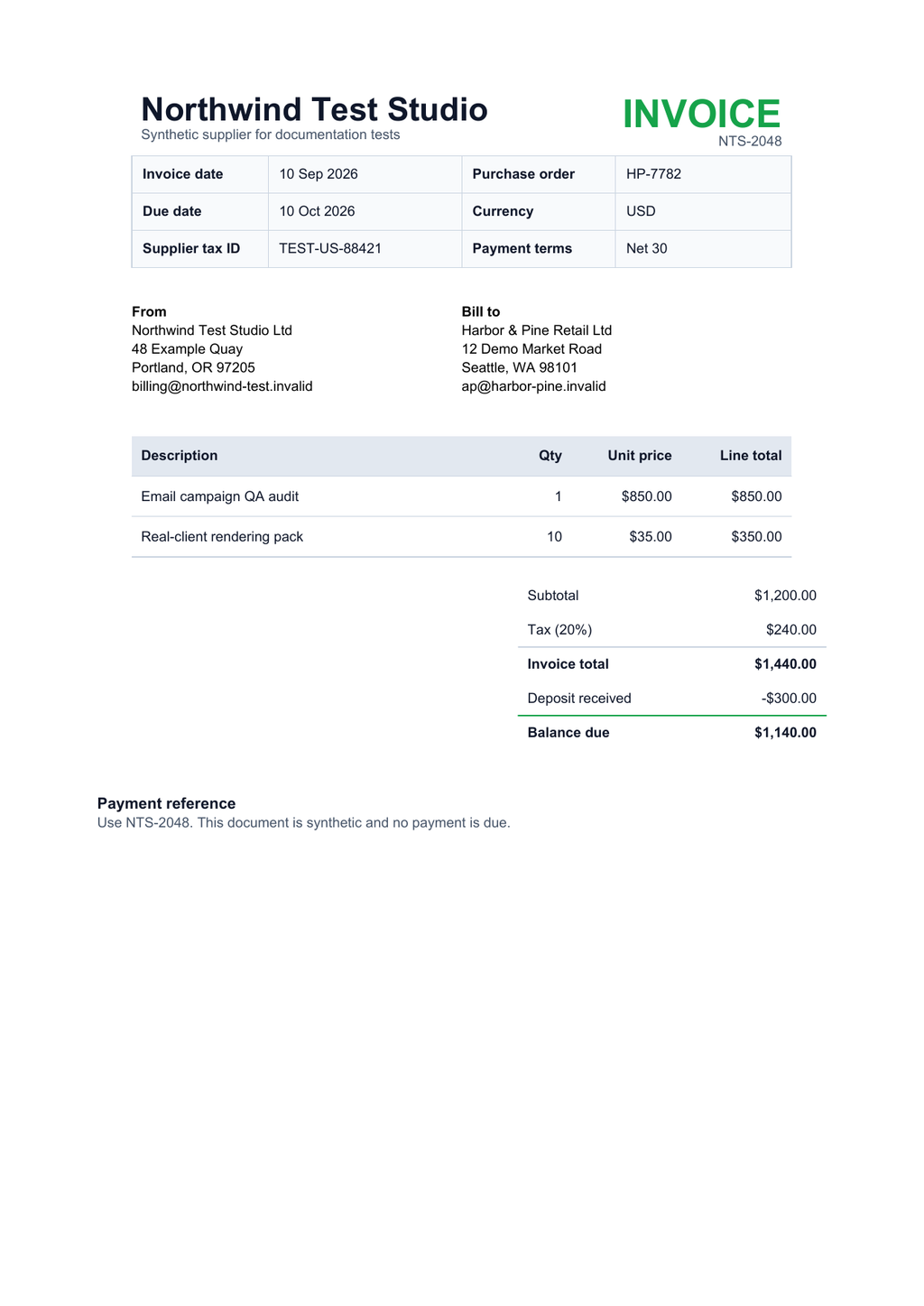
It is deliberately ordinary. Accounts-payable inboxes are full of documents like this: tables, repeated amounts, terse labels, and layouts that move fields away from fixed coordinates.
The distinction between $1,440.00 and $1,140.00 is the useful part. A vague request for invoiceAmount does not tell the extractor or the downstream system which number you mean.
1. Receive the invoice and keep the source IDs
Use a dedicated address for the workflow, such as invoices@your-domain.example, or connect an existing Gmail or IMAP mailbox. A dedicated intake lane makes sender rules, permissions, retention, and review ownership easier to reason about.
When the message arrives, keep these identifiers beside every downstream record:
- the MailSlurp email ID;
- the attachment ID and original filename;
- the transformer or schema version;
- the transform result ID; and
- the webhook
messageId, which is the idempotency key for repeated delivery.
Do not treat the PDF filename as a unique key. Vendors reuse names such as invoice.pdf over and over.
If one email can contain several invoices, configure the transformer mapping to run per attachment. If the body and all attachments together form one business record, run it per message with the BODY_ATTACHMENTS content selector.
2. Avoid the tempting one-field schema
A first attempt often looks like this:
{
  "type": "object",
  "properties": {
    "invoiceAmount": {
      "type": "number"
    }
  },
  "required": ["invoiceAmount"]
}
The schema is valid, but the meaning is not. On our sample, either 1440 or 1140 could look plausible. The extraction may be numerically faithful and still be unusable because the contract failed to distinguish the invoice total from the outstanding balance.
That is a schema problem, not something a confidence score can magically repair. Make the two concepts separate fields and describe how deposits should be represented.
3. Define the invoice JSON you actually need
The corrected contract below uses positive numbers for amounts already paid, so the application can check invoiceTotal - depositReceived = balanceDue without interpreting a minus sign from the page layout.
{
  "type": "object",
  "description": "Fields from one supplier invoice. Monetary values are decimal amounts in the stated currency.",
  "properties": {
    "supplierName": {
      "type": "string",
      "description": "Legal or trading name of the supplier"
    },
    "invoiceNumber": {
      "type": "string",
      "description": "Supplier-issued invoice identifier"
    },
    "purchaseOrder": {
      "type": "string",
      "description": "Purchase order identifier, or an empty string when absent"
    },
    "invoiceDate": {
      "type": "string",
      "description": "Invoice issue date in YYYY-MM-DD format"
    },
    "dueDate": {
      "type": "string",
      "description": "Payment due date in YYYY-MM-DD format"
    },
    "currency": {
      "type": "string",
      "description": "Three-letter ISO currency code",
      "pattern": "^[A-Z]{3}$"
    },
    "subtotal": {
      "type": "number",
      "description": "Sum before tax and payments"
    },
    "taxAmount": {
      "type": "number",
      "description": "Total tax charged on the invoice"
    },
    "invoiceTotal": {
      "type": "number",
      "description": "Gross invoice total before deposits or payments"
    },
    "depositReceived": {
      "type": "number",
      "description": "Positive amount already paid or credited; use 0 when none"
    },
    "balanceDue": {
      "type": "number",
      "description": "Amount still payable after deposits or payments"
    },
    "lineItems": {
      "type": "array",
      "items": {
        "type": "object",
        "properties": {
          "description": { "type": "string" },
          "quantity": { "type": "number" },
          "unitPrice": { "type": "number" },
          "lineTotal": { "type": "number" }
        },
        "required": ["description", "quantity", "unitPrice", "lineTotal"]
      }
    }
  },
  "required": [
    "supplierName",
    "invoiceNumber",
    "purchaseOrder",
    "invoiceDate",
    "dueDate",
    "currency",
    "subtotal",
    "taxAmount",
    "invoiceTotal",
    "depositReceived",
    "balanceDue",
    "lineItems"
  ]
}
Pair the schema with short instructions about meaning rather than formatting:
Extract one supplier invoice from this attachment.
Return monetary values as numbers without currency symbols.
Treat invoiceTotal as the gross total before deposits or payments.
Return depositReceived as a positive amount already paid.
Treat balanceDue as the amount still payable.
Do not invent a purchase order. Use an empty string when it is absent.
Descriptions matter here. number tells the API about type; it does not explain accounting semantics.
4. Extract an attachment with the API
Once MailSlurp has received the email, pass its attachment ID to the structured-content endpoint. The email ID is optional but useful when the subject or body contains context missing from the PDF.
The compact request below extracts the invoice header and totals. Use the full schema from the previous section when you also need line items.
curl -X POST 'https://api.mailslurp.com/ai/structured-content/attachment' \
  -H "x-api-key: $MAILSLURP_API_KEY" \
  -H 'content-type: application/json' \
  -d '{
    "attachmentId": "ATTACHMENT_ID",
    "emailId": "EMAIL_ID",
    "instructions": "Extract one supplier invoice. Keep invoiceTotal separate from balanceDue. Return depositReceived as a positive amount already paid. Do not invent a purchase order.",
    "outputSchema": {
      "type": "object",
      "properties": {
        "supplierName": { "type": "string" },
        "invoiceNumber": { "type": "string" },
        "purchaseOrder": { "type": "string" },
        "invoiceDate": { "type": "string" },
        "dueDate": { "type": "string" },
        "currency": { "type": "string", "pattern": "^[A-Z]{3}$" },
        "subtotal": { "type": "number" },
        "taxAmount": { "type": "number" },
        "invoiceTotal": { "type": "number" },
        "depositReceived": { "type": "number" },
        "balanceDue": { "type": "number" }
      },
      "required": [
        "supplierName",
        "invoiceNumber",
        "currency",
        "subtotal",
        "taxAmount",
        "invoiceTotal",
        "depositReceived",
        "balanceDue"
      ]
    }
  }'
For a reusable workflow, create an AI transformer in the dashboard or API, map it to the intake inbox, and save the output schema with the transformer. New matching attachments can then produce stored results automatically.
5. Check the extracted record before accepting it
With the full schema, the corrected target record for the sample invoice is:
{
  "supplierName": "Northwind Test Studio Ltd",
  "invoiceNumber": "NTS-2048",
  "purchaseOrder": "HP-7782",
  "invoiceDate": "2026-09-10",
  "dueDate": "2026-10-10",
  "currency": "USD",
  "subtotal": 1200,
  "taxAmount": 240,
  "invoiceTotal": 1440,
  "depositReceived": 300,
  "balanceDue": 1140,
  "lineItems": [
    {
      "description": "Email campaign QA audit",
      "quantity": 1,
      "unitPrice": 850,
      "lineTotal": 850
    },
    {
      "description": "Real-client rendering pack",
      "quantity": 10,
      "unitPrice": 35,
      "lineTotal": 350
    }
  ]
}
Validate it in two passes.
Schema validation
Confirm that required fields exist and have the expected types and formats. This catches missing invoice numbers, an amount returned as "$1,440.00", or an invalid currency code before those values reach downstream code.
MailSlurp also exposes /ai/structured-content/validate for checking structured output schemas before you depend on them.
Business validation
Recalculate the facts that must agree:
const cents = (value: number) => Math.round(value * 100);

const lineItemTotal = invoice.lineItems.reduce(
  (sum, item) => sum + cents(item.lineTotal),
  0,
);

const checks = {
  linesMatchSubtotal: lineItemTotal === cents(invoice.subtotal),
  taxMatchesInvoiceTotal:
    cents(invoice.subtotal) + cents(invoice.taxAmount) ===
    cents(invoice.invoiceTotal),
  paymentsMatchBalance:
    cents(invoice.invoiceTotal) - cents(invoice.depositReceived) ===
    cents(invoice.balanceDue),
};

const needsReview = Object.values(checks).some((passed) => !passed);
Use integer minor units for comparisons so floating-point arithmetic does not introduce a one-cent mismatch.
Other checks depend on your process:
- require a known supplier and an active purchase order;
- reject a duplicate
supplier + invoiceNumberpair; - compare tax treatment with the supplier and jurisdiction;
- flag a due date that precedes the invoice date;
- verify unusually large totals against approval thresholds; and
- route any new or changed bank details to a person using a trusted contact method.
OCR should never be the authority for a bank-account change.
6. Route accepted and uncertain invoices differently
Use three visible states so finance staff can see what happened:
| State | Example condition | Next action |
|---|---|---|
ready |
Required fields present, arithmetic passes, supplier and PO match | Upsert to the finance queue or ERP staging table |
review |
Missing PO, unusual amount, changed bank details, or ambiguous field | Show the PDF and extracted values to an AP reviewer |
rejected |
Corrupt attachment, unsupported content, or failed required-field validation | Keep the source, record the reason, and notify the intake owner |
Do not silently turn an empty purchase order into approval. Absence is information.
For review screens, place the PDF beside the extracted fields and highlight the exact failed rule. Asking someone to reread the whole invoice rather defeats the point of automation.
7. Send the result to Sheets, an API, or an ERP
MailSlurp can store transform results and emit a NEW_AI_TRANSFORM_RESULT webhook. The event includes an idempotent messageId and an aiTransformResultId for fetching the full result.
At-least-once webhook delivery means the same event may arrive again. A safe consumer should:
- record
messageIdbefore starting slow downstream work; - fetch the transform result when the event does not contain everything required;
- validate schema and accounting rules;
- upsert by a business key such as
supplierId + invoiceNumber, rather than blindly appending; - store the source email, attachment, and transform result IDs; and
- record the destination response so a retry can continue without creating a second invoice.
For a shared review list, follow the email parser to Google Sheets workflow. MailSlurp offers a direct Google Sheets destination in beta for eligible plans; contact support if you want it enabled. A webhook-owned writer is a better fit when you need custom validation, row matching, or transactional control.
For application delivery, use the email parser API workflow and place accepted results on a queue before calling a finance system that may be temporarily unavailable.
Common invoice extraction failures
The wrong total was selected
Replace a vague invoiceAmount field with separate invoiceTotal, depositReceived, and balanceDue fields. Add descriptions that define the accounting meaning, then replay the original attachment.
Line items do not add up
Hold the record. Check whether the invoice contains discounts, shipping, rounding adjustments, or tax-inclusive prices that are not represented in the schema. Add the missing concepts instead of forcing the numbers to pass.
The PDF is a scan
Use attachment extraction so the document can be read with OCR, then apply the same schema and business checks. Include rotated, low-contrast, photographed, and multi-page invoices in your regression set if they occur in production.
A vendor changed its layout
Test the transformer against the new document and compare it with stored fixtures from the old layout. Schema-guided extraction is more flexible than fixed coordinates, but it still deserves regression tests.
One message contains several PDFs
Run the transformer per attachment and keep each attachment ID with its result. Do not merge unrelated invoices just because they shared an email.
The webhook was delivered twice
Deduplicate with messageId, then upsert by the invoice business key. Webhook idempotency and business-record uniqueness solve different problems; use both.
Test cases worth keeping
Before the workflow handles live finance mail, save privacy-safe fixtures for:
- a straightforward native PDF;
- a scanned or photographed invoice;
- an invoice with a deposit or partial payment;
- a credit note and a negative line item;
- more than one tax rate;
- an absent purchase order;
- duplicated invoice delivery;
- multiple attachments in one email;
- a vendor template change; and
- a PDF that should be rejected.
Run the same fixtures whenever the schema, instructions, model, or downstream validation changes. A successful test returns the same correct decision after every change, not merely valid JSON.
Build the email-to-invoice workflow
MailSlurp combines inbound email and attachment capture with schema-guided AI extraction, stored results, webhooks, and replay. That keeps the source document and the structured record in the same traceable workflow.
Start an invoice extraction workflow, or read the AI email parser guide if you want a broader explanation of OCR, schemas, review, and delivery first.