
blog
AI Email Parser: OCR and Structured Extraction for Invoices, PDFs, and Support Emails
Learn when to use an AI email parser, how OCR and structured extraction fit together, and how to turn inbound email and attachments into usable business records.
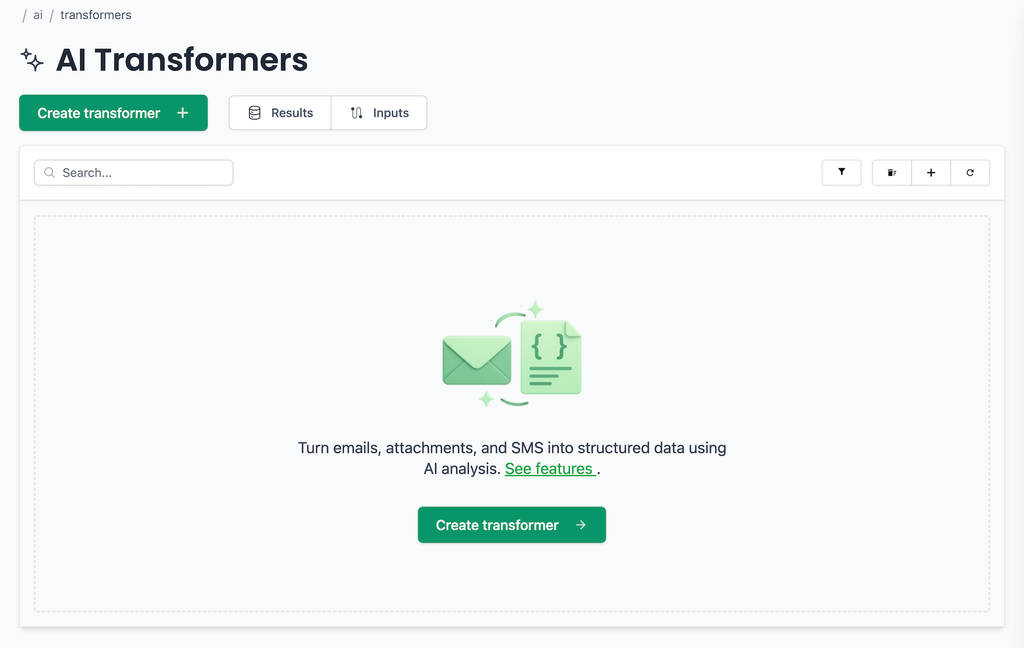
Some email is practically a database row wearing a trench coat. The fields are all there, but they are tucked into a subject line, an HTML table, a PDF attachment, or a sentence written differently by every sender.
An AI email parser turns that mixed content into a predictable record. It can receive the message, read the body and attachments, apply OCR where needed, classify the content, and return fields in a schema your application understands.
The useful result is not simply "the AI understood the email." It is a typed output that can be checked, traced to its source, reviewed when something looks wrong, and delivered safely to another system.
Quick answer: how does AI email parsing work?
An AI email parsing workflow has five layers:
| Layer | What happens | What you should keep |
|---|---|---|
| Intake | Receive a message in a dedicated inbox, by forwarding, or from a connected account | Email ID, sender, recipient, headers, received time |
| Reading | Separate the text, HTML, and attachments; use OCR for scanned content | Attachment IDs and the original files |
| Extraction | Classify the message and map the useful facts into named fields | Instructions, schema, and schema version |
| Validation | Check required fields, formats, totals, duplicates, and workflow rules | Validation outcome and review reason |
| Delivery | Send an accepted result to an API, webhook, queue, database, or spreadsheet | Result ID, delivery receipt, retry state |
That final pair of layers is what makes email data extraction useful in production. A plausible-looking value is not the same thing as a safe invoice, support ticket, or shipment update.
AI parser, rules, or both?
AI is helpful when language and layout vary. Rules are excellent when the input is stable. Most reliable systems use both.
| Input | Better starting point | Why |
|---|---|---|
| One sender with a fixed template | Rules | Fast, deterministic, and easy to test |
| Many invoice suppliers and layouts | AI plus schema | The meaning is consistent even when the page layout is not |
| A scanned PDF or image | OCR, then AI extraction | The text must be recovered before fields can be interpreted |
| Free-form support messages | AI classification and extraction | Intent and identifiers may be expressed in many ways |
| High-risk finance workflow | Hybrid | AI finds the fields; deterministic checks decide what can proceed |
A rule can recognize that a sender address ends in a known domain, or that a subject contains Invoice. AI can then interpret the less predictable body or attachment. After extraction, ordinary code should still check the parts that must be exact.
If you have one stable text template, a conventional email parser API may be all you need. If the important data moves between prose, tables, PDFs, and scans, AI parsing earns its keep.
What happens to an email before extraction?
Email is not one neat block of text. A single message may contain a plain-text body, an HTML body, inline images, headers, and several attachments, all wrapped in MIME parts.
A sound intake process should:
- preserve the original email and its identifiers;
- choose the useful body representation instead of parsing navigation or signatures as business data;
- list and retain attachments rather than flattening them into the message body;
- extract text from born-digital documents; and
- use OCR when a PDF or image contains pixels rather than selectable text.
MailSlurp parser workflows can work with message bodies and attachments such as PDF, CSV, XLSX, DOCX, and HTML. You can create a purpose-built receiving address, forward an existing mailbox, or connect supported Gmail and Outlook accounts. A dedicated inbox is often the cleanest choice for a new workflow because it gives the parser a narrow, predictable stream of messages.
OCR is one step, not the whole solution. It can turn an image of Total: $184.50 into text, but it does not decide whether that number is the subtotal, tax-inclusive total, amount paid, or balance due. That distinction belongs in the extraction instructions and the checks that follow.
A real email-to-JSON example
Consider a shipment update. The order number sits near the delivery address, item names appear in repeated blocks, and the arrival date may be written as Friday rather than as an ISO date.
In MailSlurp, start by naming the record and fields you want from that message class. Specific instructions are easier to test than asking a model to "extract everything useful" and hoping it shares your definition of useful.
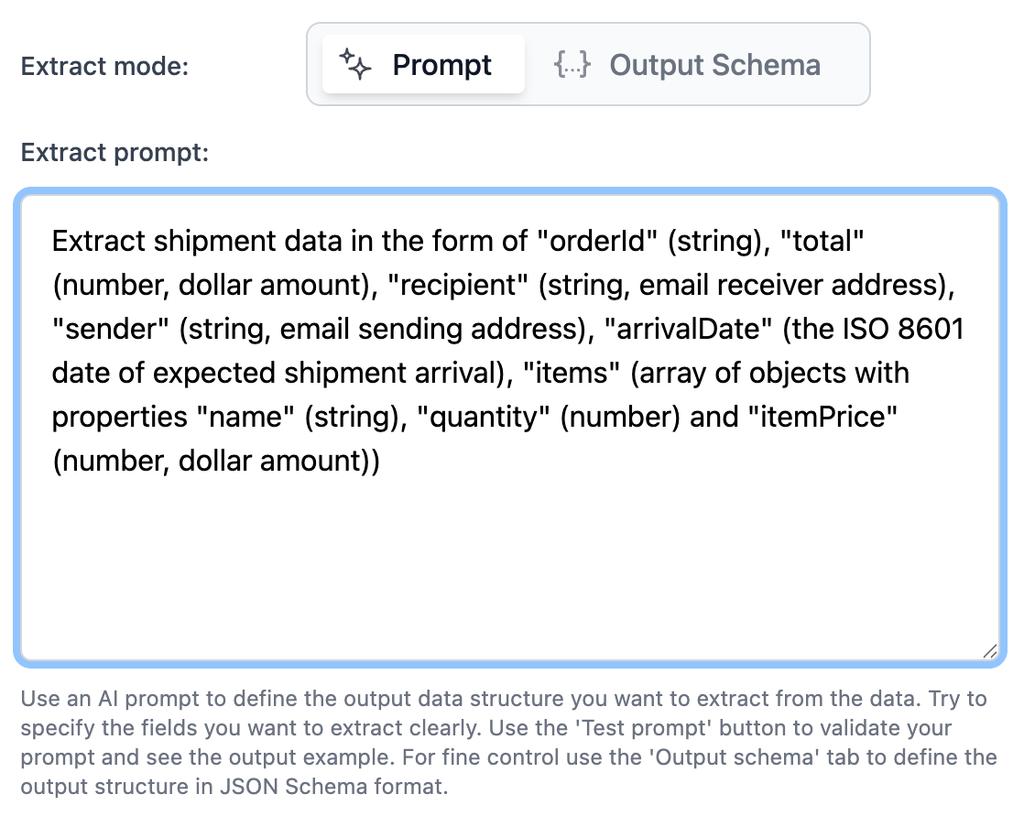
For this message class, a useful result might include orderId, arrivalDate, items, total, and currency. The same pattern applies to a purchase order, a claims message, or a support request: choose the record the next system needs, then extract only the fields that belong in that record.
Avoid a grand universal schema for every email in the company. An invoice and a password-reset request may both arrive by email, but they should not share a loose bag of optional fields. Separate message classes are easier to test and much harder to misroute.
The prompt explains meaning; the schema controls shape
Prompts and schemas have different jobs.
The prompt explains what a field means. For an invoice, it can say:
Extract values only from the attached invoice.
Use the supplier's invoice number, not the email thread ID or purchase order number.
Return the amount payable as total. Do not invent a missing date, currency, or tax value.
Keep every line item separate, including its description, quantity, and line total.
The schema controls names, types, required fields, and whether unexpected properties are allowed:
{
  "type": "object",
  "properties": {
    "supplier": { "type": "string" },
    "invoiceNumber": { "type": "string" },
    "invoiceDate": { "type": "string", "format": "date" },
    "currency": { "type": "string", "minLength": 3, "maxLength": 3 },
    "subtotal": { "type": "number" },
    "tax": { "type": "number" },
    "total": { "type": "number" },
    "lineItems": {
      "type": "array",
      "items": {
        "type": "object",
        "properties": {
          "description": { "type": "string" },
          "quantity": { "type": "number" },
          "lineTotal": { "type": "number" }
        },
        "required": ["description", "lineTotal"],
        "additionalProperties": false
      }
    }
  },
  "required": ["supplier", "invoiceNumber", "currency", "total", "lineItems"],
  "additionalProperties": false
}
This contract will reject a missing total or an unexpected object shape. It will not prove that the total is correct. That is the next layer.
Validate the business fact, not just the JSON
Schema validation answers questions such as "Is total a number?" Business validation answers "Is this the correct total, and is it safe to use?"
For PDF invoice data extraction, check at least:
subtotal + taxreconciles tototalwithin an agreed rounding tolerance;- the currency is allowed for the supplier and destination account;
- the supplier and invoice number form a stable duplicate key;
- any required purchase order is present and valid;
- a sudden bank-detail change is held for independent review;
- dates are plausible and normalized without discarding the source value; and
- line-item totals agree with the invoice total when the document supplies both.
For support email labeling, the checks are different. You may require an account or order ID before routing a billing request, allow a missing ID for a general question, and send uncertain intent or priority to a person.
The parser should be allowed to say, in effect, "I do not have enough evidence." A review queue is healthier than a confident guess with excellent JSON formatting.
Test real variations before switching on automation
One tidy example proves only that one tidy example worked. Build a small fixture set from the variations the workflow will actually receive:
- a normal message with all required fields;
- a forwarded or replied-to message with extra thread text;
- a message with a renamed or missing attachment;
- a scan with imperfect OCR;
- a document with two plausible totals or dates;
- a duplicate message or retried event;
- a sender-template change; and
- a document that belongs to a different message class.
MailSlurp lets you test the transformer beside a real source message before applying it to new matching email.
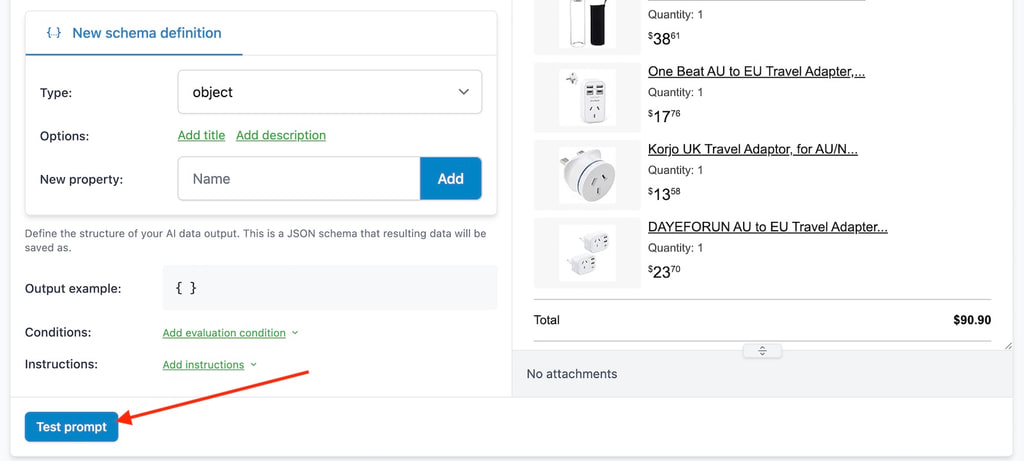
Keep the examples that reveal a mistake. They become regression fixtures for the next prompt or schema version. Otherwise, fixing one troublesome supplier can quietly break three that were already working.
A trust checklist for every parsed record
Before a record leaves the parsing workflow, make sure you can answer these questions:
| Question | Evidence to store | Why it matters |
|---|---|---|
| Which message produced this? | Source email ID and received time | Opens the original evidence quickly |
| Which file was read? | Attachment ID, filename, and content type | Separates attachment errors from message errors |
| Which parser rules applied? | Transformer ID and schema version | Makes changes and regressions traceable |
| Did the output match the contract? | Schema validation result | Stops malformed records at the boundary |
| Did the business values agree? | Totals, duplicate, and policy checks | Catches correct-looking but unusable data |
| Why was it reviewed? | Missing field or review reason | Gives a person a useful starting point |
| Where was it delivered? | Destination ID and response | Distinguishes extraction success from delivery success |
| Can it be retried safely? | Idempotency key and step state | Prevents duplicate invoices, tickets, or rows |
This is a compact contract between the parser and the team relying on it. It also makes debugging pleasantly boring: you can see which step failed instead of rerunning the whole pipeline and crossing your fingers.
Deliver the result without creating duplicates
MailSlurp can store transform results and emit a NEW_AI_TRANSFORM_RESULT webhook. The event includes an idempotent messageId, the aiTransformResultId, the transformer ID, and a source entity ID when available.
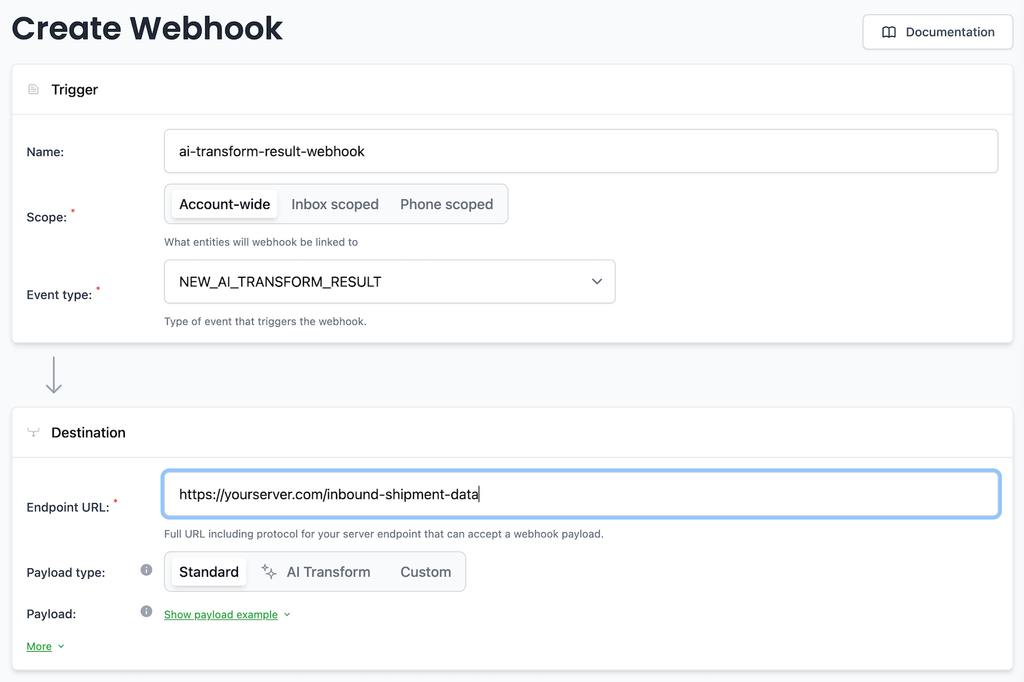
Record the event before changing another system. If the destination is temporarily unavailable, retry the delivery from the stored result rather than paying for another extraction and risking a slightly different answer.
Common destinations include:
- an application API or queue for transactional processing;
- a database or warehouse for normalized records;
- an accounting or ticketing system after validation;
- CSV, Excel, or another export for analyst review; and
- Google Sheets for a shared operational queue.
MailSlurp's direct Google Sheets destination is in beta for eligible plans. The email parser Google Sheets guide also shows an application-owned writer with row matching, validation, and retries when you need more control.
Three useful applications
Invoice and receipt processing
Receive invoices in a dedicated address or connected account, read PDF and image attachments, extract supplier and accounting fields, validate totals and duplicates, then route uncertain documents to review. The invoice OCR workflow covers the finance controls in more detail.
Logistics and delivery documents
Convert shipment notices, order confirmations, proof-of-delivery documents, and exception messages into order references, addresses, dates, line items, and status fields. Keep the original email and file attached to the operational record so a coordinator can verify an unusual result.
Support and claims routing
Classify intent and urgency, extract customer or case identifiers, retain attachments, and choose the correct queue. A parser can prepare the ticket, but high-impact actions such as refunds, account changes, or claim approval should still follow explicit business controls.
How to evaluate an AI email parser
Use your own representative messages rather than a polished vendor sample. A useful evaluation asks:
- Can it receive the message sources you actually use?
- Does it retain headers, body variants, attachments, and source identifiers?
- Can it read both text documents and scans that need OCR?
- Can you define and version a strict output schema?
- Can you inspect the source beside the result?
- Can invalid or uncertain records enter review without being lost?
- Can delivery be retried without rerunning extraction?
- Can your application prevent a repeated event from creating a duplicate?
Run the same fixture set through every option. Accuracy matters, but so do recovery, auditability, and the amount of glue code required between mailbox intake and the final destination.
FAQ
What is an AI email parser?
An AI email parser receives an email and its attachments, identifies the useful information, and returns it as structured fields. It is especially useful when message wording or document layouts vary too much for fixed rules.
Does an AI email parser need OCR?
It needs OCR when the useful text is contained in a scan or image. A born-digital PDF may already contain extractable text. OCR recovers text; the parser still needs instructions, a schema, and validation to turn that text into a dependable record.
Can an AI email parser convert email to JSON?
Yes. Define the expected field names and types in a JSON schema, then validate the result before using it. The schema controls structure, while separate business checks confirm totals, identifiers, dates, and other facts that must be correct.
Can it parse PDF invoices from Gmail or Outlook?
Yes. MailSlurp supports purpose-built receiving inboxes, forwarding, and connected Gmail or Outlook sources. The workflow can read the email and attachment, extract invoice fields, and pass the result to review or a downstream system.
Is AI better than a rule-based email parser?
Not always. Rules are usually better for a stable template with exact markers. AI is more useful for varied language, layouts, and attachments. A hybrid design often works best: deterministic rules select and validate the message, while AI interprets its less predictable content.
How should failed extraction be retried?
Keep extraction and destination delivery as separate steps. If the stored extraction is valid but a webhook, sheet, or database write fails, retry only that delivery step. Re-run extraction when the source or extraction configuration actually needs to change.
Final take
The best AI email parser is not the one that produces the most impressive one-off demo. It is the one that turns untidy messages into records your team can inspect, validate, deliver, and recover without losing the original evidence.
Begin with one narrow workflow. Keep the schema small. Test the awkward examples. And let the parser handle variation while ordinary code guards the facts that must not drift.