

Check authentication
Review SPF, DKIM and DMARC, including whether the DMARC policy is enforced or passive.
Catch SPF, DKIM, DMARC and blocklist issues before the next send. Schedule domain checks, track changes and get alerts your team can act on.
Trusted by teams at






A missing record, an incomplete DKIM check or a passive DMARC policy can be easy to overlook. MailSlurp brings the findings together so you can see what passed, what needs attention and what has not been checked.
Explore the domain checks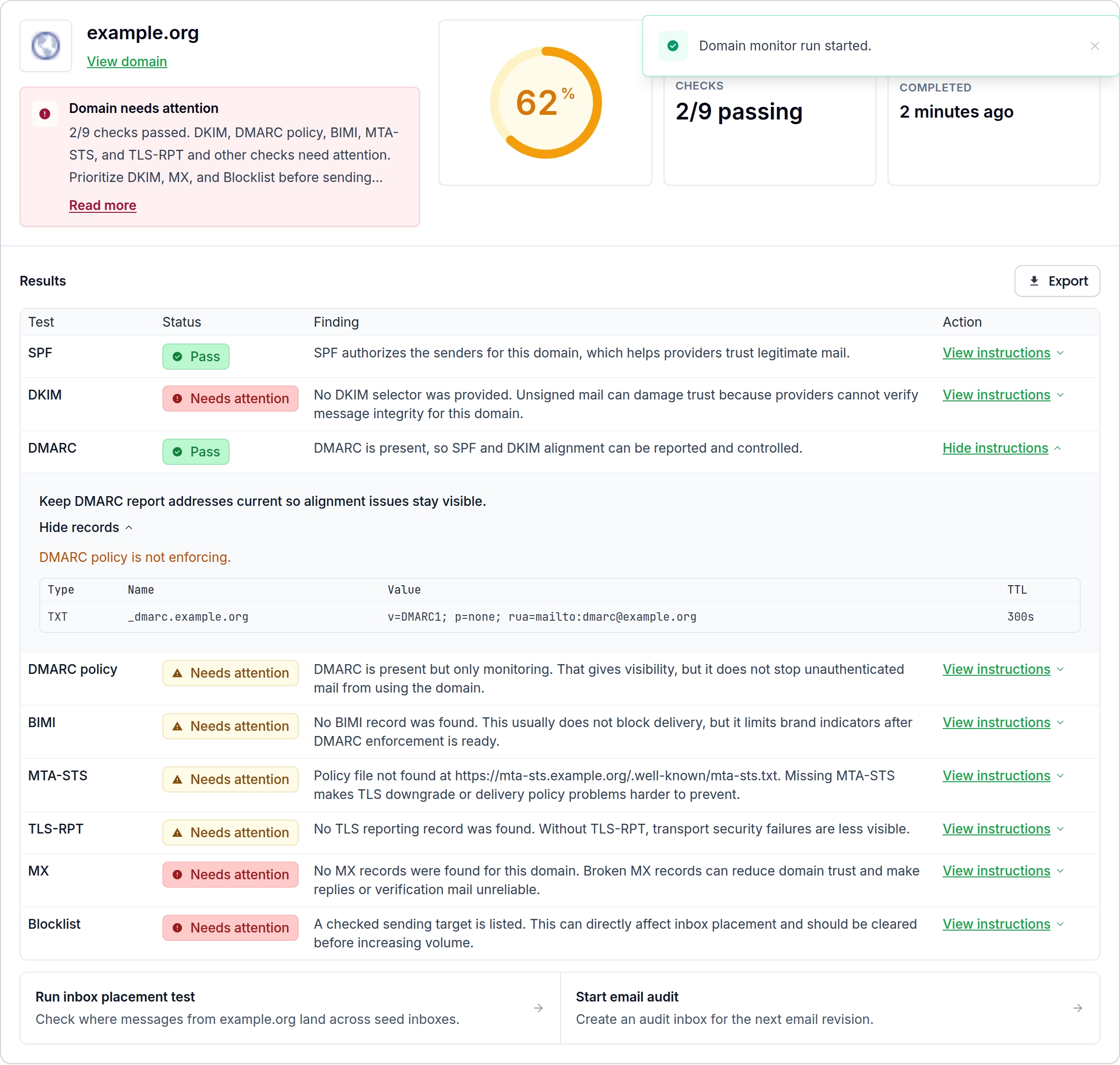
Example report, focused on the summary. Open the image to inspect every finding.
Review SPF, DKIM and DMARC, including whether the DMARC policy is enforced or passive.

See MX and blocklist findings alongside BIMI, MTA-STS and TLS reporting checks.

Keep warnings, failures and unchecked signals visible instead of treating every unknown as a pass.
Domain health can change when you add a sending service or update DNS. Schedule checks and keep a run history, so your team can compare findings before and after a change.
Run a check on demand before a campaign, then keep monitoring the domain between sends. Open each run to investigate the records and signals behind the result.
See how monitoring works
Illustrative monitoring history, not live domain results.
Send domain-monitor alerts to email, Slack, Microsoft Teams or a webhook. Choose the severity your team needs to hear about and open the run to investigate.
Set up domain alerts
Example domain-change alert.

Deliver alerts where the people managing your sender already work.

Configure the minimum severity for each destination to focus on the findings that matter.

Use a webhook to pass alerts to your incident or operations tools.
Pair domain monitoring with inbox placement, device rendering and Email Audit. Use the same campaign across separate tests to see where it lands, how it looks and what needs fixing.

Send through your usual ESP to real seed accounts. Compare inbox, Promotions, spam and not-received results by provider.

Preview the delivered email on real clients and devices, including supported light and dark modes. Catch layout problems before customers do.

Inspect links, images, HTML and accessibility with Email Audit. Find content issues alongside your placement and rendering results.
Check a domain before a release, schedule a monitor or retrieve its history from your own tools. Your team can use the dashboard while developers work with the same monitoring API.
Read the monitoring guideMailSlurp checks SPF, DKIM, DMARC and DMARC policy, MX, BIMI, MTA-STS, TLS reporting and blocklist signals. Each run shows the findings and whether a signal passed, needs attention or was not checked. DKIM checks depend on the selector information available for the domain.
Yes. Run a one-off domain check, save a monitor with a schedule, or trigger a saved monitor on demand. Review previous runs in the dashboard or retrieve results through the API.
Domain monitoring gives you sender and DNS evidence. Inbox placement testing separately measures where a real email lands in seed accounts. Use both to investigate delivery, then use device rendering and Email Audit to check the email itself.
Configure email, Slack, Microsoft Teams or webhook destinations and choose the minimum severity for each. Use the monitor's run history to investigate the findings behind an alert.
Check your sending domain today. Keep watching it between sends.