
blog
Kit Emails Going to Spam? Fix Broadcast and Incentive Delivery
Troubleshoot Kit (ConvertKit) broadcasts and incentive emails that land in spam, from verified sending domains and list health to inbox placement and device rendering.
When a Kit email goes to spam, start by identifying which email failed. A weekly broadcast, an automated sequence message, and the incentive email that delivers a lead magnet do not share exactly the same path or reader expectation.
That distinction matters. A subscriber who misses a newsletter may catch the next one. A subscriber who never receives the promised checklist, course, or download is likely to abandon the signup immediately.
Quick answer
Use this order when Kit or ConvertKit emails land in spam or appear to be missing:
- Identify whether the message is a broadcast, sequence email, incentive email, or confirmation email.
- Confirm that the subscriber completed the expected form and confirmation flow.
- Send from a domain you own and verify it in Kit.
- Check SPF, DKIM, and DMARC alignment for the received message.
- Secure forms with double opt-in or reCAPTCHA and remove cold subscribers from broad sends.
- Test the final email across controlled Gmail and Outlook seed inboxes.
- Preview the delivered message on mobile, desktop, webmail, light mode, and dark mode.
- Change one likely cause, then repeat the same test.
Do not treat a missing incentive email as proof that every broadcast has a reputation problem. First prove which message was sent, which address received it, and where the mailbox placed it.
Separate broadcasts from incentive and confirmation emails
Kit can send several kinds of email during one subscriber journey:
- a form confirmation or double-opt-in message
- an incentive email containing a download link
- a sequence email triggered after signup or tagging
- a one-time broadcast to selected subscribers
Trace the exact flow that failed. Check the form settings, incentive delivery option, sequence subscription, tags, filters, exclusions, and subscriber timeline.
For an incentive email, verify that the subscriber actually submitted the intended form and that confirmation is still required or completed as configured. For a broadcast, save the recipient count and check whether the subscriber was excluded by a filter or subscription state. For a sequence, confirm the entry trigger and the subscriber's current position.
This avoids troubleshooting spam placement when Kit never selected the person for that message.
Do not test only between addresses on your own domain
An internal test can create a misleading result. If a Kit message is sent from hello@example.com to another address at example.com, the receiving system sees mail that claims to come from its own domain but arrived through an external platform. Some corporate filters treat that as suspicious.
Kit's own spam troubleshooting guidance recommends using an external mailbox such as Gmail for this kind of test, or asking the organization's mail administrator to allowlist Kit when internal delivery is required.
A controlled provider seed set is more useful because it tests several independent mailbox systems without relying on the sender's own corporate filter.
Verify the sending domain before changing the copy
Send creator emails from a domain you own rather than a free Gmail or Yahoo address. In Kit, open Settings, choose Email, and complete the Verified Sending Domains setup.
The verified-domain workflow supplies authentication records that let Kit sign messages for your domain. Check that:
- Kit reports the domain as verified
- DKIM passes for a received email
- SPF authorizes the visible sending path
- the From domain aligns under DMARC
- there is one valid SPF policy rather than conflicting records
- the domain in the From address is familiar to subscribers
If the domain already publishes DMARC, the verified sending domain is especially important. A strict DMARC policy without alignment can turn a normal broadcast into spam or a rejection.
Kit also warns that mailbox providers recalculate reputation after a major sending change. When enabling a verified sending domain, begin with engaged subscribers, keep volume steady, and avoid changing several other sending variables at the same time.
Use MailSlurp domain monitoring to detect later SPF, DKIM, DMARC, MX, blacklist, and certificate changes. That gives the team an ongoing signal instead of a one-time DNS screenshot.
Protect creator forms from listbombing
Creator lists often grow through lead magnets, giveaways, recommendations, and embedded forms. Those sources can produce enthusiastic subscribers, but an unsecured form can also be listbombed with addresses that never requested the email.
Review each acquisition source for:
- clear consent beside the form
- double opt-in where appropriate
- reCAPTCHA or another anti-abuse control
- a recognizable From name and domain
- an immediate description of what the subscriber will receive
- unusual spikes from one page, integration, or referrer
Do not import an old address file simply because it belongs to the same creator business. Kit recommends importing people who gave direct permission and have been engaged recently. Unwanted mail produces complaints, and complaints damage the reputation used by future broadcasts.
Suppress cold subscribers before a broad broadcast
Consistent creator newsletters build recognition. Long gaps followed by a sudden send to every historical subscriber do the opposite.
Create engagement groups that reflect meaningful reader behavior. Recent clicks, replies, purchases, course activity, and confirmed signups are usually stronger signals than opens alone. Privacy features and automated image loading can make opens noisy.
Before a large send:
- Start with recently engaged subscribers.
- Exclude addresses with no useful activity for the chosen sunset period.
- Use a short re-engagement sequence only when there is a clear reason to keep the relationship.
- Remove or suppress people who remain inactive.
- Increase volume gradually after a domain or platform change.
Frequency also matters. Sending at least often enough to remain recognizable is safer than disappearing for months and returning with a promotion to the entire database.
Test the exact Kit message across mailbox providers
Create a MailSlurp inbox placement run, copy its unique marker and controlled seed addresses, and prepare the final email in Kit. Use the exact sender, subject, links, tracking, images, and footer intended for the audience.
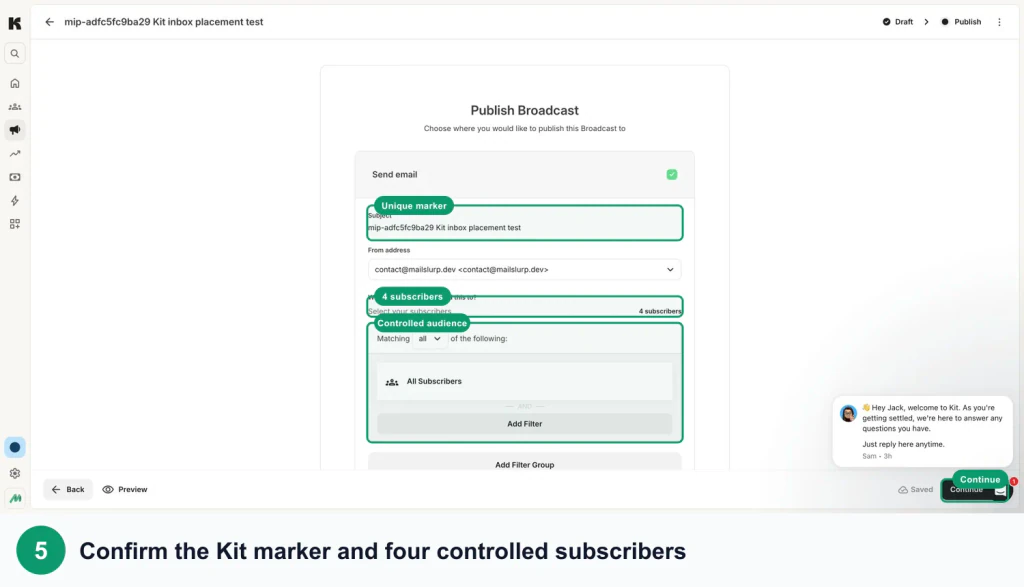
Follow the Kit inbox placement testing guide for the full marker, recipient, send, and results workflow.
Read the result by provider:
- Spam across several providers: check authentication, permission, complaints, cold subscribers, link reputation, and sudden volume changes.
- One provider differs: investigate that provider's reputation and filtering rather than rewriting the whole email immediately.
- Gmail Promotions: the message was categorized, not sent to spam. Decide whether the classification fits the commercial content.
- Not received: check recipient selection, suppression, bounce information, send status, and the exact test address.
- Primary inbox across providers: move to rendering, links, and offer clarity rather than repeatedly changing DNS.
A seed test is a controlled observation, not a promise about every subscriber. Its value is the comparison: the same message, sent at the same time, through the same Kit setup, to independent providers.
Preview the delivered newsletter, not just the editor
A clean Kit editor preview does not show every transformation made by the delivery path and inbox client. The received email contains final tracking URLs, hosted images, generated footer content, and the rendering behavior of Gmail, Outlook, Apple Mail, and mobile apps.
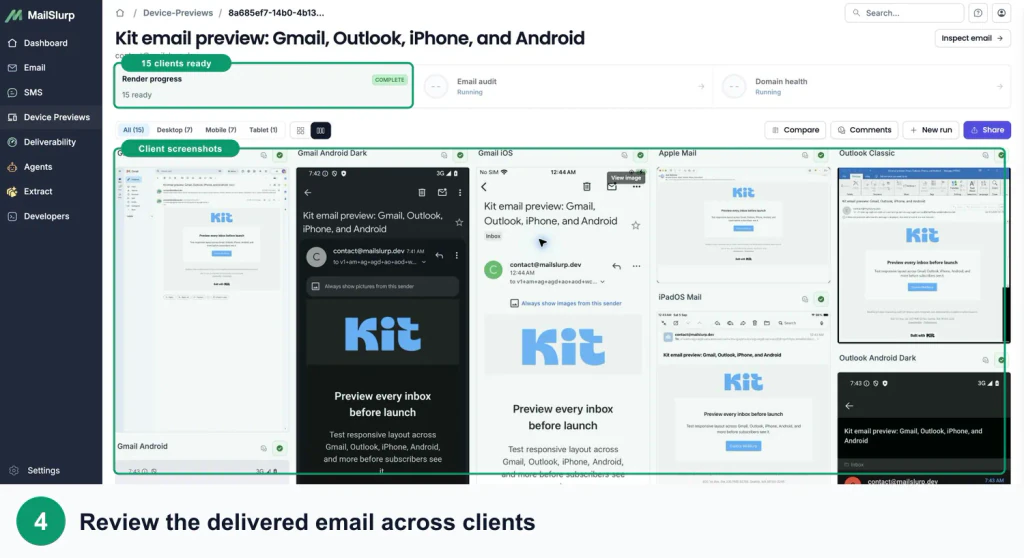
Use the Kit device rendering guide and check:
- the incentive or primary CTA is visible early on a phone
- the download link has a clear label and a useful tap target
- the newsletter still makes sense when images are blocked
- Outlook preserves spacing, buttons, and column order
- dark mode does not hide a logo, divider, or button label
- personalization has a sensible fallback
- tracked links resolve to the intended page
- preference and unsubscribe links remain legible
This is particularly important for an incentive email. If the message reaches the inbox but the download control is clipped or visually lost, the subscriber experiences the same outcome as non-delivery.
Make one correction and retest
Choose the earliest failing stage:
- Fix the form, confirmation, tag, sequence, or broadcast selection if the email was never sent.
- Verify and align the sender domain if authentication fails.
- Secure a listbombed form and remove addresses that did not consent.
- Suppress cold subscribers and stabilize sending volume.
- Replace a suspicious or broken destination URL.
- Repair the mobile, Outlook, or dark-mode layout.
- Repeat the same placement and rendering checks.
Avoid changing the From domain, subject, template, audience, and send volume together. A controlled retest makes it possible to learn which change helped.
Frequently asked questions
Why are my Kit emails going to spam?
Common causes include sending from a public address, an unverified or misaligned domain, internal-domain testing, listbombed forms, poor consent, cold subscribers, complaints, abrupt volume changes, and provider-specific filtering. Test the exact email across independent providers before deciding which cause applies.
Why is my Kit incentive email missing?
Check the form submission, confirmation requirement, incentive settings, subscriber timeline, and spam folder. Then test the incentive email separately from a broadcast because the trigger and delivery moment are different.
Is Gmail Promotions the same as spam?
No. Promotions is an inbox category. Commercial newsletters may be categorized there even when authentication and delivery are healthy. Spam or Junk is a different placement result.
Should I use a Gmail address as the From address in Kit?
Use a domain you own and verify it in Kit. A branded domain supports authentication and gives subscribers a consistent identity to recognize.
Which MailSlurp checks should I use with Kit?
Use Kit inbox placement testing for provider folder results, Kit device rendering for the received layout, and domain monitoring for ongoing sender checks.
For current platform details, see Kit's primary documentation for spam troubleshooting, verified sending domains, verified-domain preparation, and deliverability fundamentals.