
blog
Braze Email Deliverability: Test Users, Placement, and Rendering
Build a reliable Braze email QA path from user profiles and Content Test Groups through sender reputation, inbox placement, and delivered-client rendering.
Braze email testing begins with a user, not just an address. The platform can personalize a test send from profile attributes, audience membership, events, and Liquid logic. That makes the preview realistic, but it also creates more places for a test to fail before the message reaches a mailbox.
A disabled Send Test button, a rejected external address, or an empty personalization value is not the same problem as spam placement. Separate those stages before changing the campaign.
Quick answer
Use this sequence for Braze email deliverability and campaign QA:
- Choose a representative user profile or Content Test Group.
- Confirm the profile has an eligible email address and the attributes used by Liquid.
- Account for workspace or trial restrictions on external test recipients.
- Verify the sending domain, IP setup, and unsubscribe behavior.
- Review delivery errors, bounces, complaints, and sender reputation.
- Send the final message to controlled provider seed inboxes.
- Compare Gmail, Outlook, and Microsoft 365 folder placement.
- Render the delivered email across mobile, desktop, webmail, light mode, and dark mode.
The aim is a test path that preserves the campaign's real sender, personalization, links, and HTML while keeping test recipients controlled.
Start with the profile that drives the message
In Preview & Test, Braze can preview as a user and send to individual users or a Content Test Group. Select a profile that contains the same kinds of data as the intended audience.
Check:
- email address and email subscription state
- language, location, and timezone
- first name and other Liquid attributes
- custom attributes used by content blocks
- purchase, membership, or lifecycle state
- campaign or Canvas eligibility
- frequency-cap and suppression rules
Use fallbacks for values that are optional. A test profile with unusually complete data can hide a blank headline, malformed URL, or missing offer that affects normal customers.
Content Test Groups are useful when reviewers need stable profiles representing several customer states. Keep the group small, controlled, and documented: for example, new customer, active subscriber, lapsed member, and profile with intentionally missing optional data.
Treat recipient restrictions as a test-environment rule
Braze trial workspaces can restrict test emails to the company domain. Braze describes its free trial as allowing test sends to that domain, and the interface may reject an individual address on an unrelated seed domain.
That restriction does not prove the email is undeliverable. It means the chosen test-send route cannot use that recipient in the current workspace.
For a durable production QA path, use an authorized workspace and a controlled Content Test Group whose profiles have approved seed addresses. Confirm the group's ownership, consent, and purpose with the Braze administrator before it becomes part of a release checklist.
Do not substitute a random employee list. Test recipients should be easy to identify, excluded from business reporting where appropriate, and safe to reuse for controlled QA.
Verify sender identity and reputation separately
Braze supports sender-domain and IP configuration for high-volume lifecycle programs. Authentication and reputation answer different questions:
- SPF and DKIM help prove the sending infrastructure is authorized.
- DMARC checks whether the authenticated domain aligns with the visible From domain.
- IP and domain reputation reflect how providers have treated previous mail.
- complaint, bounce, and engagement signals influence future placement.
Confirm that:
- the From domain is recognizable and aligned
- SPF, DKIM, and DMARC pass on a received message
- the unsubscribe path works and is easy to find
- the chosen IP pool matches the traffic type
- a new domain or IP is warmed gradually with engaged users
- transactional and promotional streams are separated where the sending design requires it
Braze's Email Deliverability Center can surface sender reputation, authentication, and delivery errors. Use those signals to find infrastructure or trend problems, then use seed inboxes to observe folder placement for the exact message.
Use MailSlurp domain monitoring to watch SPF, DKIM, DMARC, MX, blacklist, and certificate changes between releases. This helps when DNS responsibilities are divided among lifecycle, security, and infrastructure teams.
Read delivery events before open and click rates
Begin with the message path:
- selected audience
- sent
- delivered or bounced
- inbox, category, or spam placement
- rendered and readable
- clicked or converted
The Braze Message Activity Log can expose delivery and bounce details for a user. Review hard and soft bounce reasons, blocks, deferrals, and complaints before drawing conclusions from opens.
A high delivery rate means receiving systems accepted the messages. It does not prove they reached the primary inbox. Privacy protections, automated image loading, and security scanners can also make opens or clicks less reliable than they appear.
Segment the investigation by provider, sending domain, IP pool, campaign or Canvas step, and engagement cohort. A broad average can hide a Microsoft-only placement problem or a single lifecycle step with a broken link.
Test the final Braze email across providers
Create a MailSlurp inbox placement run and copy its unique marker and controlled seed addresses. In Braze, add the marker without changing the message's visible meaning, then select the controlled test profiles or group that represent those recipients.
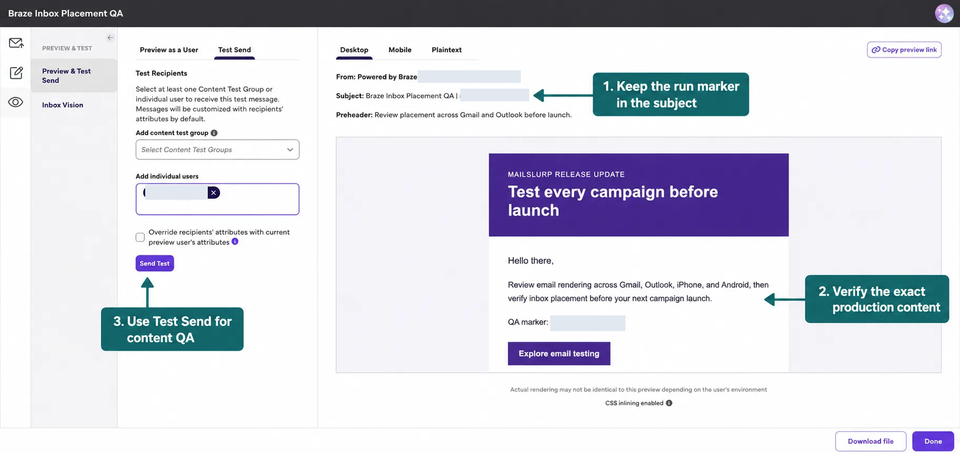
Follow the Braze inbox placement testing guide for the complete seed-run, Braze send, and results workflow.
Interpret the provider rows:
- Spam across providers: inspect consent, unengaged exposure, authentication, complaints, links, and recent volume or IP changes.
- One provider differs: focus on provider-specific reputation, feedback, and filtering.
- Gmail Promotions: treat this as a category, not a failed delivery.
- Not received: check the user profile, group membership, subscription state, campaign eligibility, and activity log.
- Primary inbox is healthy: move to rendering, personalization, link, and journey checks.
Repeat the test after one targeted correction. Changing the segment, From domain, IP pool, subject, and template at once removes the evidence needed to learn what helped.
Render the received message with real profile data
Braze's composer preview is valuable for content creation, but the received email includes final tracking URLs, hosted images, unsubscribe controls, personalization output, and client-specific HTML behavior. An email rendering test checks how that message appears in the selected apps and devices, separately from the inbox-placement result.
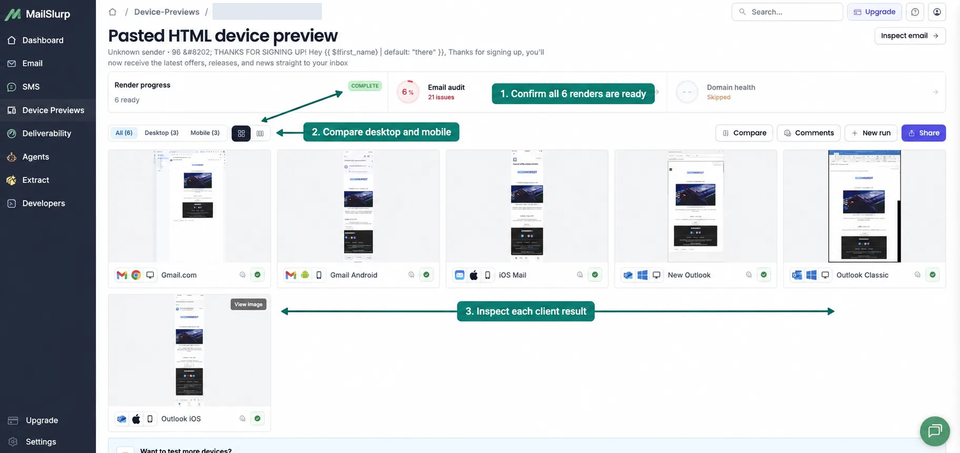
Use the Braze device rendering guide and inspect:
- Liquid fallbacks and conditional blocks
- CTA visibility and tap targets on a phone
- image crops and text alternatives
- column stacking and spacing in Outlook
- dark-mode logo and button contrast
- deep links, tracked links, and preference links
- legal and unsubscribe content
- the plain-text alternative
Test more than the ideal profile. A missing first name or optional product field should produce a useful email, not a blank sentence or broken destination.
Build a release checklist around evidence
A practical Braze email release can use these gates:
- Representative profiles resolve every required Liquid field.
- Audience, subscription, frequency-cap, and suppression rules are confirmed.
- Sender authentication and the intended IP pool are healthy.
- Controlled provider inboxes report acceptable placement.
- Mobile, Outlook, webmail, and dark-mode renders are approved.
- Links, deep links, personalization, and unsubscribe actions work.
- Delivery, complaint, and bounce signals are watched after launch.
Record the tested campaign or Canvas version. When content or sender settings change, rerun the checks that the change can affect.
Frequently asked questions
Why is Braze not letting me send a test email?
Check that a valid individual user or Content Test Group is selected, the profile has an eligible email address, and the workspace permits that recipient. Trial accounts can limit test recipients to the company domain.
Does a Braze delivery event mean the primary inbox?
No. It shows that the receiving system accepted the message. The provider can still place it in Promotions, Spam, Junk, or another folder.
Should I test Braze with a user profile or a plain address?
Use a representative profile when personalization, Liquid, audience rules, or lifecycle state affect the message. A controlled Content Test Group makes this repeatable across several profile conditions.
How do I investigate a provider-specific Braze problem?
Segment delivery, bounce, complaint, and engagement signals by provider, domain, IP pool, and message. Compare those trends with an inbox placement test that sends the same campaign to independent provider seeds.
Which MailSlurp checks should I use with Braze?
Use Braze inbox placement testing for provider folder results, Braze device rendering for received-client layouts, and domain monitoring for ongoing sender checks.
For current platform details, see Braze's primary material for email authentication, deliverability monitoring and requirements, IP warming, and trial test-send behavior.