
blog
Brevo Says Delivered but the Email Is in Spam: What to Check
Understand why a Brevo campaign can be marked delivered while landing in spam. Check domain authentication, sender reputation, Brevo reports, inbox placement, and the final email render.
Brevo emails can go to spam even when the campaign report says they were delivered. That is not a contradiction. In Brevo's reporting, delivered means the receiving system accepted the message; it can include mail placed in the inbox or spam folder.
The report is still useful. It tells you the message was not rejected. The next task is to find out where providers placed it, whether the sender identity was trustworthy, and whether the received email worked on the recipient's device.
Quick answer
If Brevo says delivered but recipients find the email in spam:
- Check the Deliverability tab and read bounce, blocked, deferred, and complaint evidence separately.
- Verify the sender uses a custom domain authenticated with DKIM and DMARC.
- Confirm the From domain aligns with the authenticated identity and any branded subdomain.
- Compare campaigns by Gmail, Outlook, Yahoo, and business-domain behavior.
- Review consent, inactive contacts, complaints, volume changes, and dedicated-IP warming where relevant.
- Send the final Brevo campaign to controlled inbox placement seeds.
- Preview the delivered email across mobile, desktop, Outlook, and dark mode.
- Change one likely cause and repeat the test.
Do not use a high delivered rate or open rate as proof of primary-inbox placement. Folder placement happens after acceptance, while privacy and bot activity can affect engagement reporting.
Read the Brevo campaign report in the right order
Open the campaign report and start with Deliverability, not the headline open rate.
Brevo separates states such as sent, delivered, in processing, skipped, soft bounce, hard bounce, blocked, and unsubscribed. Read them as a sequence:
- Skipped or not sent: Brevo did not attempt delivery to that contact under the campaign rules.
- In processing or deferred: the message may still be waiting on a temporary condition.
- Bounced or blocked: the receiving system did not accept the message normally.
- Delivered: the receiving system accepted it, but the final folder may still be inbox or spam.
- Spam report: a recipient actively reported the message, which can affect future reputation.
Export or record the detailed reasons when bounces or blocks increase. An SMTP response about authentication or policy tells you more than a campaign average.
Brevo reports can include Apple Mail Privacy Protection opens and bot activity by default. Use the available filtering options when you need a cleaner view of human engagement. Even then, an open metric does not replace a folder-placement test.
Authenticate the Brevo sender domain
Brevo's domain setup supports a Brevo verification code, DKIM, and DMARC. Some accounts also have a guided flow that includes branded subdomain and dedicated-IP configuration.
Check the sender settings and confirm:
- the sender uses a domain the organization owns, not Gmail, Yahoo, or Outlook
- Brevo marks the intended domain authenticated
- DKIM passes for the message
- DMARC is published and aligns with the visible From domain
- there is one valid SPF policy for the complete sending arrangement
- the sender address and authenticated domain are not accidentally mismatched
- branded return-path, tracking, or image domains are configured as intended where available
Brevo may replace an unauthenticated or free-domain sender with a Brevo-managed address to keep the message compliant. That is a temporary fallback, not a brand identity to build around. Recipients should see a stable sender they recognize.
Use MailSlurp domain monitoring to watch SPF, DKIM, DMARC, MX, blacklist, and certificate changes. This catches a common operational problem: a domain passes during Brevo setup, then another service adds or changes DNS later.
Decide whether the problem is reputation or one campaign
Compare scope before editing content.
Most campaigns are affected
When several campaigns reach spam at the same provider, inspect:
- complaint and bounce trends
- list acquisition and consent
- dormant contacts receiving repeated sends
- sudden increases in volume or frequency
- a new domain, subdomain, or dedicated IP that was not warmed appropriately
- a From-address or tracking-domain change
- blocklist or DNS changes
This pattern points to sending identity, reputation, or audience quality more strongly than one image or phrase.
One campaign is affected
When similar campaigns remain healthy, compare the failing message's:
- subject and preview text
- link destinations and redirects
- attachments
- HTML structure and copied markup
- image-to-text balance
- missing unsubscribe or sender details
- personalization output
- unusually large size
Brevo's Gmail troubleshooting guidance makes the same distinction: consistent spam placement across campaigns points toward reputation, while one isolated campaign makes content more plausible.
Check the audience and sending pattern
Authentication cannot repair poor permission. Review how the campaign's contacts joined, how recently they engaged, and whether they expected this message.
Useful Brevo segments include:
- recent clickers or purchasers
- recent subscribers who completed the intended opt-in
- inactive contacts approaching a sunset threshold
- contacts grouped by acquisition source
- recipients at Gmail, Outlook, Yahoo, or important business domains
- contacts added during a recent import or integration change
Suppress addresses with no defensible permission and stop repeatedly sending to hard bounces. If the account uses a dedicated IP, check its warming state before a large increase in volume.
Test the actual Brevo campaign
Create a MailSlurp inbox placement run and copy its marker and current seed addresses. Add the seeds to a dedicated Brevo contact list, insert the marker exactly as instructed, and send the launch-candidate campaign through Brevo.
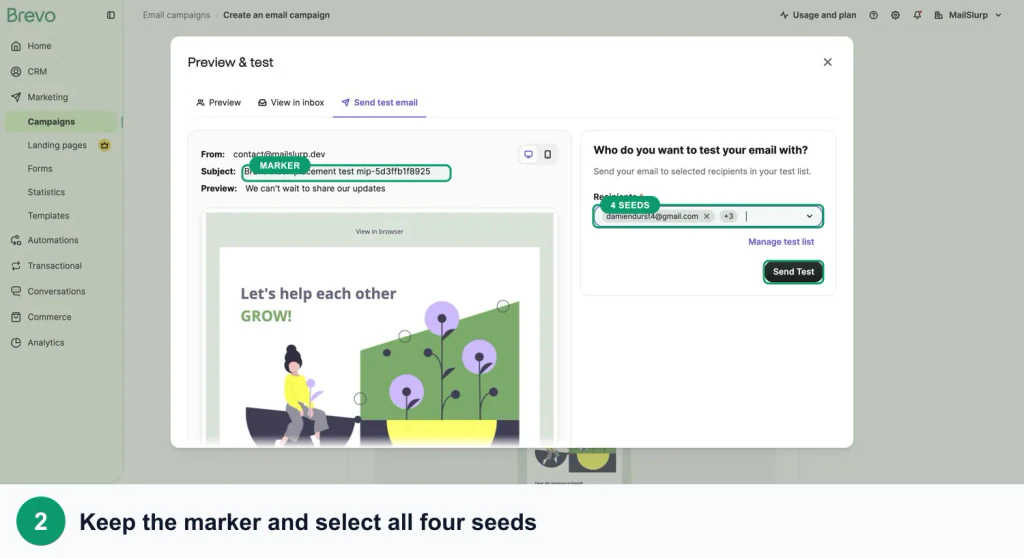
Preserve the production settings:
- authenticated From name and address
- final subject and preview text
- normal tracking options
- hosted images and landing pages
- personalization with representative contact data
- unsubscribe and preference links
- the same list, automation, or campaign path planned for launch
Follow the Brevo placement walkthrough to set up the seed list and send the campaign.
Interpret the provider pattern
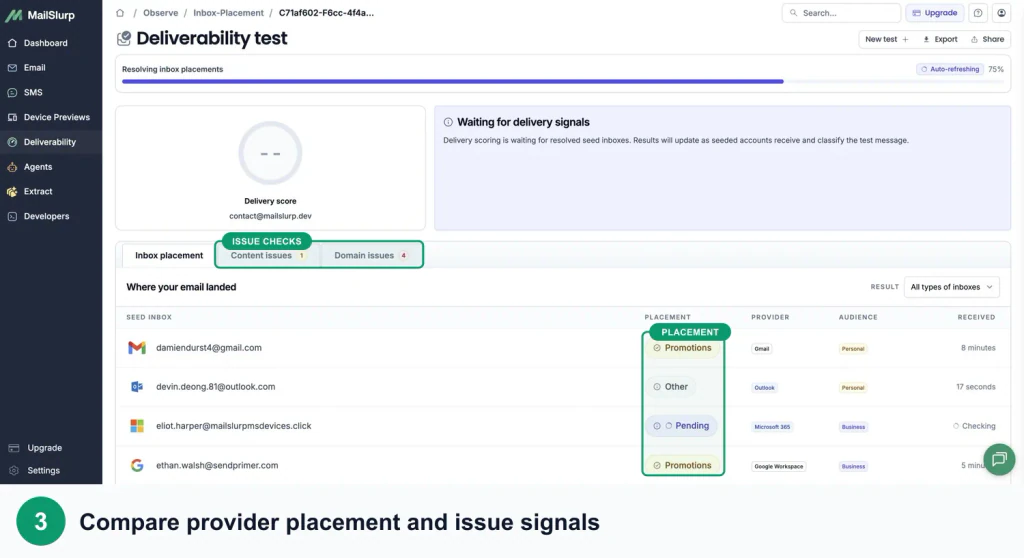
Use the rows to direct the next investigation:
- Spam across providers: check authentication alignment, consent, complaints, domain and IP history, links, and volume changes.
- Gmail spam only: inspect Gmail bounce or reputation trends and compare campaign dates with any spike.
- Outlook Junk only: inspect Microsoft-facing reputation and authentication, plus corporate filtering if Microsoft 365 differs from consumer Outlook.
- Gmail Promotions: decide whether that is reasonable for the message; it is not a spam result.
- Not received: check the Brevo seed list, campaign status, skips, suppressions, blocks, bounces, and test window.
A seed result is a controlled sample, not a promise about every subscriber. Its value is that the same provider accounts can be checked before and after a focused change.
Inspect the email after Brevo delivers it
Inbox placement answers where the message landed. Device rendering answers whether the recipient can read and act on it.
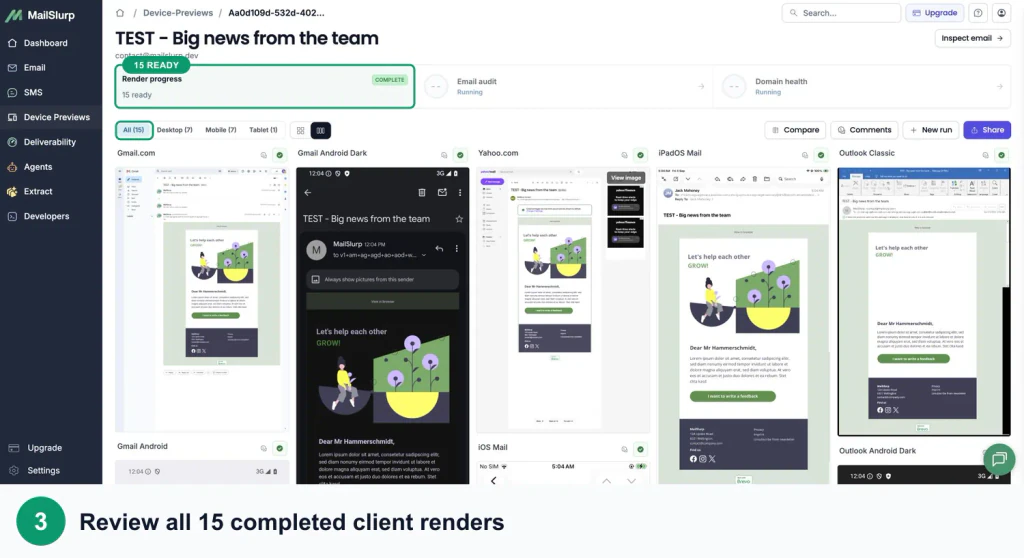
Use the Brevo device rendering guide to check:
- mobile columns and image scaling
- CTA size, position, and contrast
- Outlook spacing and fonts
- dark-mode logos and backgrounds
- subject and preheader pairing
- personalized values and fallback content
- tracked CTA, preference, and unsubscribe destinations
A technically delivered campaign can still underperform because the CTA is below a clipped section, a logo disappears in dark mode, or a product grid becomes too narrow on mobile.
Change one supported cause
Choose the correction that best matches the evidence:
- Complete or repair Brevo domain authentication.
- Align the From identity and branded subdomain.
- Suppress dormant or poorly sourced contacts.
- Stabilize volume and warm a new dedicated IP or domain where required.
- Correct the one campaign's link, attachment, HTML, or message-size problem.
- Repair the mobile, Outlook, or dark-mode defect.
- Repeat the placement test with the same provider set.
If you change sender, audience, HTML, links, and schedule together, the next result cannot tell you what worked.
Frequently asked questions
Why does Brevo say delivered when the email is in spam?
Brevo's report uses delivered for messages accepted by the receiving system. The mailbox can place an accepted message in the inbox or spam folder. Use a controlled placement test to observe the folder.
Why are all my Brevo emails suddenly going to Gmail spam?
Check authentication first, then compare the date of the change with sending volume, audience imports, complaints, bounces, From or tracking domains, and dedicated-IP warming. Brevo's Gmail troubleshooting guide recommends separating broad sender-reputation problems from one-message content problems.
Can an unauthenticated Brevo sender still send?
Brevo may replace some unauthenticated or free-domain From addresses with a managed compliant address. Use a custom domain that you control and complete DKIM and DMARC instead of relying on that fallback.
Do Brevo open rates prove the campaign reached the inbox?
No. Opens can be influenced by privacy protection and bot activity, and a delivered message can still be in spam. Use engagement filters for reporting and provider seed accounts for placement.
Which MailSlurp checks work with Brevo?
Use Brevo inbox placement testing for folder results, Brevo device rendering for the received design, and domain monitoring for ongoing sender health.
For current platform details, see Brevo's primary documentation for domain authentication, spam placement, campaign reports, and Gmail troubleshooting.