
blog
Klaviyo Emails Going to Spam? Diagnose Campaigns and Flows
Find out why Klaviyo campaigns or flows land in spam. Check branded sending domains, engagement segments, Smart Sending, ecommerce content, inbox placement, and device rendering before the next send.
Klaviyo emails usually do not go to spam because of one forbidden word. Mailbox providers evaluate the sender's reputation, authentication, volume, engagement, complaints, links, and message structure together. For an ecommerce program, the diagnosis also needs to separate scheduled campaigns from automated flows.
A weekly promotion may reach a broad segment in one burst. An abandoned-cart or post-purchase flow sends continuously, uses event data, and can contact the same customer near other campaigns. Treating those paths as one problem can hide the actual cause.
Quick answer
When Klaviyo emails are going to spam:
- Check whether the problem affects campaigns, flows, or both.
- Compare Gmail, Outlook, Yahoo, and any important business domains separately.
- Verify the branded sending domain, DMARC alignment, DKIM, and the From address.
- Review engagement segments, dormant profiles, complaints, bounces, and send frequency.
- Check Smart Sending and flow filters before deciding an email was lost.
- Test the final Klaviyo message with a controlled inbox placement seed list.
- Render the received message across mobile, desktop, Outlook, and dark mode.
- Change one suspected cause and repeat the same test.
Klaviyo can report whether a message was delivered, but its own deliverability FAQ explains that it cannot tell you which folder or Gmail tab received that message. A provider-level seed test fills that gap.
Decide whether the problem is a campaign or a flow
Start with the message source and timing.
Campaigns fail in visible bursts
Campaign trouble often follows a broad segment, a list import, an unusual sending time, or a sudden volume increase. Compare the affected campaign with the last healthy campaign using the same sending domain.
Look for changes in:
- the included and excluded segments
- engagement recency
- From name or address
- subject and preview text
- tracking or landing domains
- daily volume by mailbox provider
- bounce, complaint, and unsubscribe rates
Flows can decay quietly
An automated flow can keep sending long after its launch review. A template edit, product-feed change, new discount link, altered trigger, or expanding audience can change the message or its recipients without a campaign launch event.
For an affected flow email, inspect:
- trigger and flow filters
- recent message changes
- Smart Sending skips
- event data used by dynamic blocks
- messages immediately before and after it
- the frequency experienced by one profile across all active flows and campaigns
- performance by provider and engagement group over time
If only one flow message is affected, its content or audience is more suspicious than the account's entire sending infrastructure. If many campaigns and flows change together, start with the domain, reputation, list acquisition, and volume.
Check the branded sending domain before editing content
Klaviyo distinguishes a shared sending domain from a branded sending domain. A branded domain lets the email use your organization's domain identity and build reputation around it. It also supports the authentication and alignment expected by major mailbox providers.
Review the active domain under Klaviyo's domain settings and confirm:
- the branded sending domain is active for the correct send type
- the friendly From address uses the root brand domain, not the sending subdomain
- DKIM passes
- DMARC aligns with the visible From domain
- SPF is valid for the complete sending arrangement
- the click-tracking domain belongs to the brand where configured
- recent DNS changes have not introduced a conflict
Klaviyo can use separate branded domains for marketing, transactional, and service traffic. That separation matters when order confirmations and password resets need a different reputation path from promotions. Check which send type owns the affected message before changing DNS.
Use MailSlurp domain monitoring to watch SPF, DKIM, DMARC, MX, blacklist, and certificate changes between campaigns. A domain that passed during onboarding can drift when another service or team edits DNS later.
Measure engagement by segment, not only account average
Klaviyo's own spam troubleshooting guidance points to dormant subscribers as a common reputation problem. Ecommerce lists often contain a mix of recent buyers, active browsers, one-time giveaway entrants, old imports, and profiles that have not interacted for years.
Break down delivery and engagement by:
- recent click or purchase activity
- source of consent
- last email interaction
- customer status and purchase recency
- mailbox provider
- campaign versus flow
- region or storefront if sending practices differ
Create a sunset policy for profiles that remain unengaged after a deliberate re-engagement path. Continuing to send every promotion to dormant profiles can add negative signals without producing meaningful revenue.
Avoid treating opens as the only engagement test. Privacy features and image handling affect open measurement. Clicks, purchases, replies where applicable, complaints, bounces, unsubscribes, and recency give a more useful combined view.
Check Smart Sending before calling it non-delivery
Smart Sending limits how often a profile receives messages within a configured window. A flow email skipped by Smart Sending did not reach a provider and therefore cannot appear in spam.
When a customer reports a missing email, inspect the profile's message history and the flow's recipient activity. Distinguish:
- skipped by Smart Sending
- excluded by a flow filter
- suppressed or unsubscribed
- bounced or rejected
- accepted and placed in spam
- accepted and placed in another inbox tab
This is especially important for stores with overlapping browse abandonment, cart abandonment, welcome, win-back, and campaign schedules. Frequency controls can be working as intended even when a marketer expected another send.
Run the test through Klaviyo's real sending path
A personal email with copied text does not test Klaviyo's authentication, tracking, headers, HTML, or sending infrastructure. Use the launch-candidate message.
Create a MailSlurp inbox placement run and add its current seed addresses to a dedicated Klaviyo list or segment. Insert the run marker exactly as instructed, then send the finished campaign to that controlled audience.
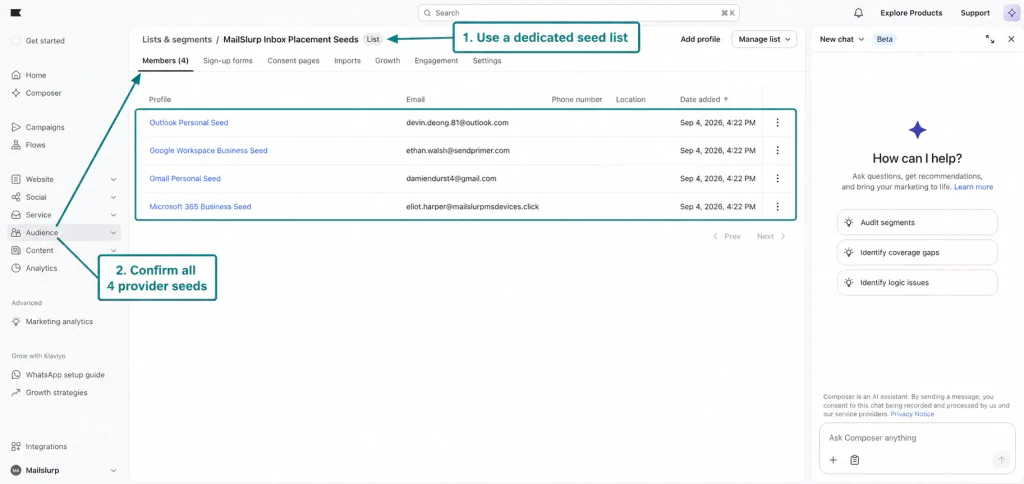
For a flow, trigger a controlled profile through the real event path when possible. This captures the dynamic content, tracking, and profile data that the automation actually produces. If the placement workflow uses a campaign to reach the full seed set, keep the flow's final HTML, sender identity, links, and other critical settings aligned with that campaign test.
Use the Klaviyo inbox placement testing guide for the exact seed-list, marker, send, and results steps.
Read the provider rows before the overall score
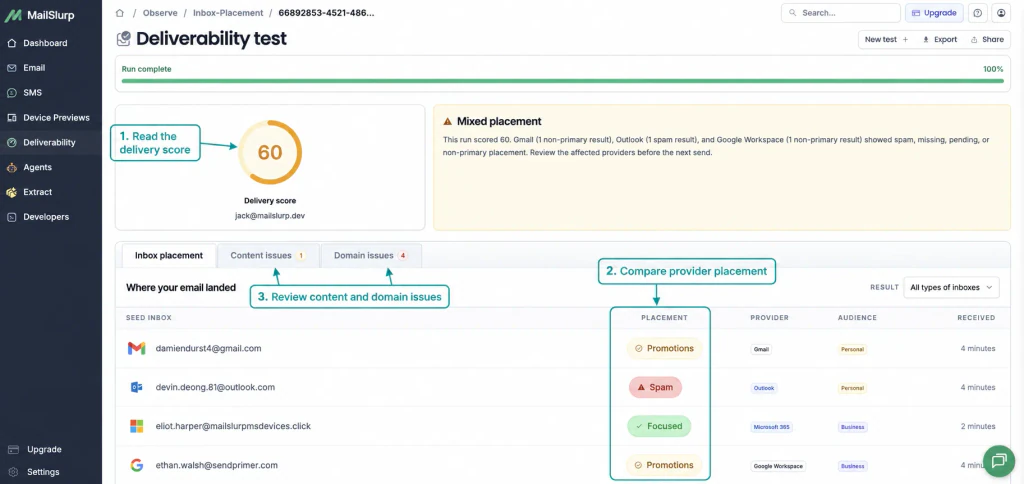
Different result patterns point to different checks:
- Spam across providers: verify authentication, dormant-profile exposure, complaints, bounce trends, sending-domain history, links, and recent volume changes.
- Gmail Promotions: decide whether a sales or product campaign is reasonably categorized. Promotions is not the spam folder.
- Outlook Junk only: compare consumer Outlook with Microsoft 365, then inspect Microsoft-facing reputation, complaints, and corporate filtering.
- Flow messages poor, campaigns healthy: inspect the flow audience, frequency, trigger, content, and sending domain used by that message.
- Campaign poor, flows healthy: inspect the campaign segment, volume, content changes, and burst timing.
- A seed is missing: confirm it was included, not suppressed, and not skipped before checking the mailbox.
Seed placement is a repeatable sample, not a prediction for every customer. Use it to compare versions and detect changes, then combine it with real Klaviyo engagement and revenue data.
Test whether the delivered design can still convert
Deliverability gets the email to a folder. Rendering determines whether the offer, product, and CTA survive the inbox client.
Dynamic ecommerce messages are particularly exposed to layout changes because product titles, prices, image proportions, discount blocks, and recommendations vary by profile and event.
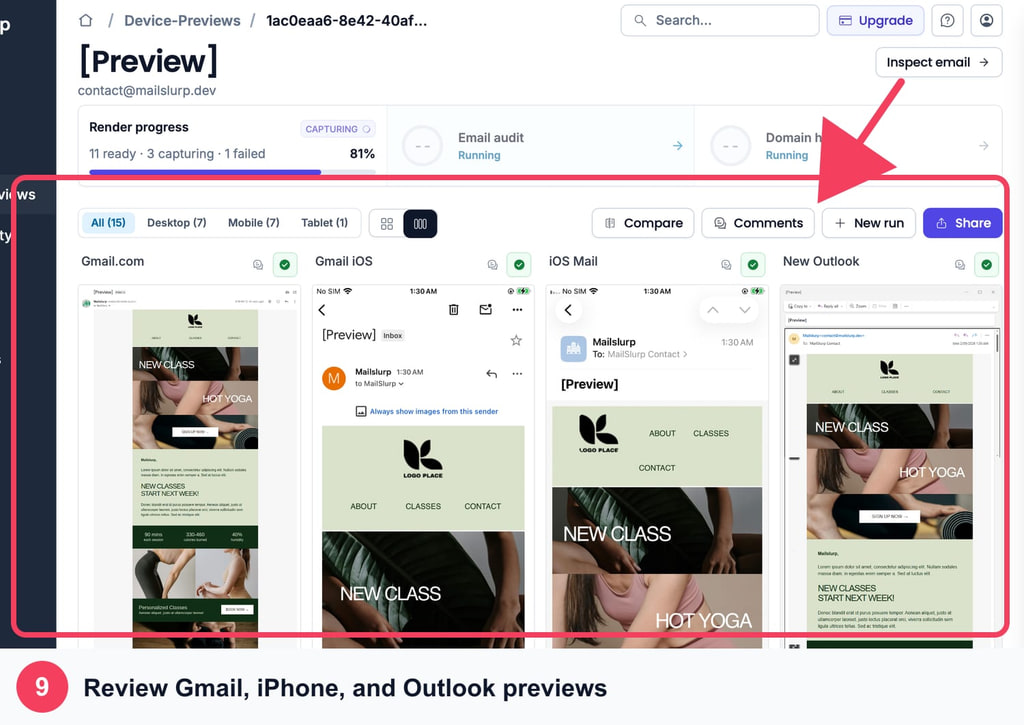
Follow the Klaviyo device rendering guide and check:
- product images and crop behavior
- long product names and prices
- discount-code visibility
- CTA size and contrast on mobile
- dark-mode logo and background treatment
- Outlook spacing and font fallbacks
- personalized blocks when data is missing
- tracked product, checkout, unsubscribe, and preference links
Preview a low-data profile as well as a typical buyer. A design that works with four recommendations may collapse when only one product is available or a personalization value is empty.
Make the next change measurable
Choose one correction supported by the evidence:
- Repair branded-domain authentication or alignment.
- Narrow the audience to a recently engaged segment.
- Apply or adjust a sunset policy for dormant profiles.
- Reduce overlapping campaign and flow frequency.
- Correct one suspicious link, HTML block, or template change.
- Fix the device-rendering defect that hides the offer.
- Retest the same provider set before expanding the send.
Changing the sender, segment, subject, template, links, and schedule together may produce a better number, but it will not produce a useful diagnosis.
Klaviyo pre-send checklist
- Identify whether the message is a campaign or flow.
- Verify the active branded domain and send type.
- Review authentication and From-domain alignment.
- Check recipient activity for skips, suppressions, and bounces.
- Segment by engagement and consent source.
- Review frequency across overlapping flows and campaigns.
- Test the final message against controlled provider inboxes.
- Preview real dynamic content on priority clients and devices.
- Verify product, cart, checkout, preference, and unsubscribe links.
- Save the test result with the version approved for launch.
Frequently asked questions
Why are my Klaviyo emails suddenly going to spam?
Compare the first affected send with a recent healthy one. Look for changes to the branded domain, From address, audience, engagement, link domain, content, frequency, volume, or complaint and bounce rates. Then test the current message across several providers.
Why do Klaviyo preview emails go to spam when campaigns do not?
Preview messages can behave differently from campaigns. Klaviyo notes that a preview sent to the same address used as the From or Reply-To identity can trigger Gmail filtering, and corporate firewalls may treat tests differently. Diagnose campaign placement with the actual campaign path rather than using one internal preview inbox as the verdict.
Can Klaviyo tell me which folder received an email?
Klaviyo can report whether the receiving system accepted the message, but its documentation says it cannot show the folder or Gmail tab where each delivered email landed. A controlled seed test provides that observed placement sample.
Should I remove words that sound promotional?
Only after ruling out sender, audience, frequency, authentication, and reputation issues, or when one specific message fails while similar sends remain healthy. Klaviyo's content-testing guidance recommends iterative testing rather than deleting random words from a complete template.
Which MailSlurp checks should I use with Klaviyo?
Use inbox placement testing to measure folder results, device rendering to inspect the received design, and domain monitoring to watch the sending identity over time.
For current Klaviyo behavior, see the primary documentation for spam troubleshooting, branded sending domains, Smart Sending, and content-trigger testing.