
blog
Constant Contact Emails Going to Spam? Test Before You Resend
Fix Constant Contact delivery problems without overusing resend-to-non-openers. Check authentication, bounces, consent, inbox placement, and mobile rendering first.
Constant Contact makes it easy to resend an email to people who did not open the first campaign. That can recover attention after a busy day or a weak subject line. It can also repeat a delivery, rendering, or relevance problem and generate complaints from people who simply were not interested.
Before scheduling the second send, prove what happened to the first one.
Quick answer
Use this order when Constant Contact emails go to spam or produce a large non-opener segment:
- Confirm the correct lists or segment received the original campaign.
- Review bounces, complaints, unsubscribes, clicks, and other campaign activity.
- Authenticate a domain you own and use its address as the sender.
- Check whether the finished campaign reaches controlled Gmail and Outlook inboxes.
- Preview the delivered layout on mobile, Outlook, webmail, light mode, and dark mode.
- Fix a delivery, link, or layout problem before resending.
- If a resend still makes sense, wait long enough and change the subject line.
- Send once to a well-defined non-opener segment and compare the results.
A resend is an audience decision, not a substitute for deliverability testing.
Read the original campaign report as a path
Start with the details for the sent email. Work from selection to outcome:
- contacts selected from each list or segment
- successfully sent and delivered messages
- non-existent, suspended, blocked, mailbox-full, vacation, and other bounce types
- spam complaints and unsubscribes
- opens that Constant Contact considers reliable
- clicks by link
- downstream registrations, sales, or replies
Constant Contact categorizes bounces from the response returned by each receiving system. Review the reason before removing an address. A typo or non-existent mailbox needs a different response from a temporary block or full mailbox.
Repeatedly sending to addresses that continue to bounce can damage deliverability. Correct an obvious typo when the owner confirms it; remove addresses that are not valid rather than resending the campaign to them.
Treat non-openers as an imperfect signal
An open is measured when a tracking image loads. Privacy protection, image blocking, plain-text reading, and other client behavior make that signal incomplete.
Constant Contact says it identifies Apple Mail Privacy Protection proxy opens and prevents them from counting in resend-to-non-openers, A/B tests, open-based segments, and automation criteria. That improves the signal, but it does not turn every remaining non-open into proof that the subscriber missed the message.
Before resending, ask:
- Did the campaign reach the inbox?
- Was the subject recognizable and useful?
- Did the layout expose the main action on a phone?
- Did the reader click or convert without a recorded open?
- Has this person recently received another campaign or automation?
- Is the address still engaged with the business outside email?
Use clicks, replies, purchases, registrations, and recent consent alongside opens. A person who bought after the first campaign does not need the same promotion again simply because the open pixel was not observed.
Authenticate the address customers recognize
Constant Contact can rewrite a free or unauthenticated From address to its shared ccsend.com domain so mail meets authentication requirements. That provides a safe platform fallback, but a business with its own domain should self-authenticate it and send from a matching branded address.
In the account email settings, check that the domain is marked Authenticated. Then confirm on a received message that:
- SPF passes for the sending path
- DKIM passes with the intended domain
- the visible From domain aligns under DMARC
- the reply-to address is monitored
- there is one valid SPF record
- older senders are removed from DNS when no longer used
Authentication proves the sender is authorized. It cannot guarantee the primary inbox because providers also evaluate consent, complaints, engagement, volume, links, and past reputation.
Use MailSlurp domain monitoring to watch SPF, DKIM, DMARC, MX, blacklist, and certificate changes after setup. This helps small teams catch a DNS change made for another service before the next newsletter.
Test where the original campaign lands
Create a MailSlurp inbox placement run and copy its unique marker and controlled seed addresses. Add those recipients to a dedicated Constant Contact test list, then send the same campaign configuration used for the intended audience.
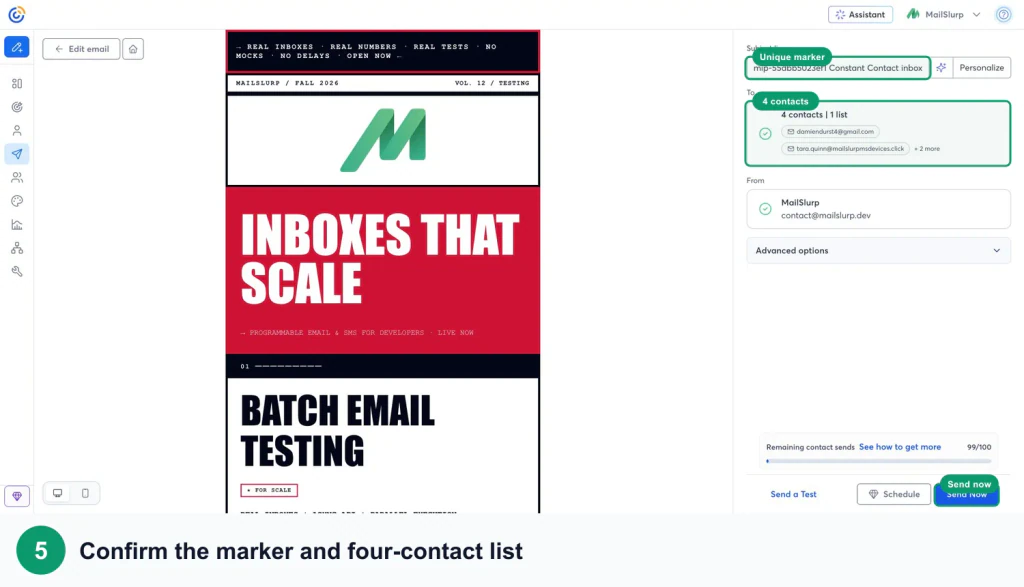
Follow the Constant Contact inbox placement testing guide for the complete list, marker, send, and results workflow.
Use the provider comparison to decide what comes next:
- Spam across providers: inspect consent, authentication, bounces, complaints, inactive exposure, links, and recent volume changes.
- Gmail Promotions: this is inbox categorization, not spam. A promotional newsletter may reasonably land there.
- Outlook or Microsoft 365 differs: investigate Microsoft-facing filtering and sender reputation.
- Not received: confirm list membership, contact status, bounce history, and campaign send details.
- Primary inbox is healthy: move to subject, layout, link, and audience relevance before resending.
The seed test observes controlled inboxes. It does not predict every subscriber, but it prevents a single personal inbox from becoming the entire deliverability diagnosis.
Preview the delivered email before the second send
Constant Contact's editor preview cannot reproduce every inbox engine. The received message includes final tracking URLs, image hosting, footer content, and client-specific HTML behavior.
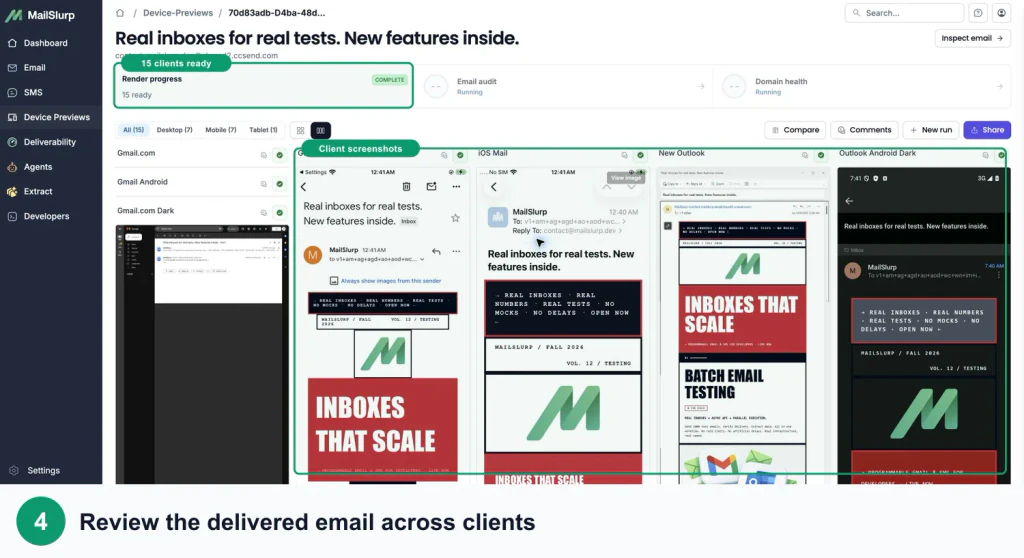
Use the Constant Contact device rendering guide and inspect:
- the main CTA appears early enough on a phone
- buttons are easy to tap and have visible labels
- columns stack in the intended order
- Outlook preserves spacing, fonts, and backgrounds
- dark mode does not hide the logo or CTA
- images retain useful alt text
- every tracked destination resolves correctly
- unsubscribe and preference links remain easy to find
If the first campaign landed in the inbox but the CTA disappeared in Outlook, fix the content rather than resending the broken version with a new subject.
Resend once, with a reason
Constant Contact allows a resend to non-openers for a recently sent campaign and lets you change the subject line. Its guidance recommends waiting until the fourth day because most eventual opens happen during the first three days.
Before enabling the resend:
- Exclude anyone who already completed the desired action.
- Confirm placement and rendering are healthy.
- Check that another campaign or automation will not overlap.
- Wait long enough for delayed opens and clicks.
- Use a genuinely different, accurate subject line.
- Resend once rather than starting a loop.
- Compare complaints, unsubscribes, clicks, and conversions with the original.
If someone ignores both attempts, change the audience or communication plan instead of repeatedly sending the same message.
Frequently asked questions
Why are my Constant Contact emails going to spam?
Common causes include an unauthenticated sender, weak consent, stale contacts, repeated bounces, complaints, sudden volume changes, risky links, and provider-specific reputation. Test the exact campaign across several providers before deciding which cause applies.
Should I resend a Constant Contact email to non-openers?
Only after checking placement, rendering, recent conversions, and overlapping sends. Wait several days, change the subject line, exclude people who already acted, and avoid repeated resends.
Does Delivered mean the primary inbox?
No. It normally means the receiving mail system accepted the message. The provider can still place it in Promotions, Spam, Junk, or another folder.
Can Apple privacy protection affect a Constant Contact resend?
Constant Contact identifies Apple MPP proxy opens and excludes them from its non-opener resend logic. Opens are still only one signal, so also use clicks and actual business outcomes.
Which MailSlurp checks should I use with Constant Contact?
Use Constant Contact inbox placement testing for provider folder results, Constant Contact device rendering for received-client layouts, and domain monitoring for ongoing sender checks.
For current platform details, see Constant Contact's primary documentation for authentication requirements, bounce management, Apple Mail Privacy Protection, and resending to non-openers.