
guides
How to Send E-Mail via Telnet (SMTP Command Guide)
Send e-mail via telnet using protocol-correct SMTP commands. Follow a step-by-step terminal session for EHLO, MAIL FROM, RCPT TO, DATA, and QUIT.

Telnet turns SMTP into a conversation you can read line by line. That makes it handy when you need to answer a small, stubborn question: can I reach this server, which commands does it accept, and where does the exchange go wrong?
It is also plaintext. Use Telnet only with a server you own or are authorized to test, send only to an inbox you control, and never type a production password into the session. If the endpoint requires TLS or authentication, use OpenSSL or a proper SMTP client instead.
Quick answer
To send e-mail via Telnet safely:
- Choose an authorized SMTP endpoint that permits a plaintext test connection.
- Create or choose a controlled recipient, such as a private MailSlurp inbox.
- Connect with
telnet host portand wait for a220greeting. - Send
EHLO,MAIL FROM,RCPT TO, andDATAone at a time. - Read the reply after every command; do not continue after a rejection.
- End the message with a single dot on its own line, then wait for the final
250response. - Open the received message and inspect its content and headers. SMTP acceptance is not proof of delivery.
The command order comes from the SMTP transaction defined in RFC 5321. The practical details below keep that small protocol test from becoming an accidental security problem.
Before you open Telnet
Write down four things first:
- the exact server host and port
- the sender address your test is allowed to use
- a recipient address you control
- the result you expect, such as a successful delivery or a deliberate relay rejection
Do not copy a host and port from another provider and hope for the best. Port 2525, for example, is a provider-specific alternative rather than an SMTP default. Use the endpoint and encryption mode documented for your server.
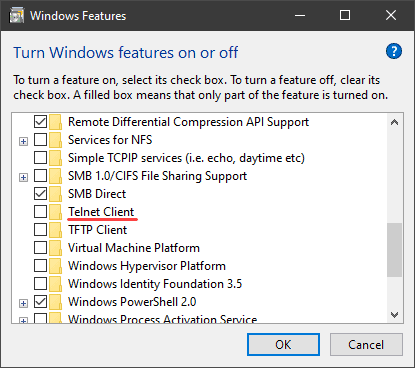
Telnet is not installed by default on many current systems. If the telnet command is missing, install the client through your operating system's package or optional-feature manager. If you only need to see whether a TCP port is reachable, a network client such as nc may be enough. If the server expects TLS, skip Telnet and use the OpenSSL examples later in this guide.
Pick a port Telnet can actually speak to
The port tells you what should happen as soon as the connection opens.
| Port | Typical job | Can plain Telnet complete the send? |
|---|---|---|
25 |
Server-to-server relay or an authorized lab server | Sometimes, if the server deliberately permits a cleartext SMTP session |
587 |
Authenticated message submission with STARTTLS | Usually no; use OpenSSL or an SMTP client when TLS is required |
465 |
Message submission with implicit TLS | No; the TLS handshake starts before SMTP text |
2525 |
Provider-specific alternative | Only when the provider documents a plaintext or upgrade path for that endpoint |
For application sending, follow the provider's supported submission setup rather than treating Telnet as the application client. The SMTP port guide explains the difference between relay, STARTTLS submission, implicit TLS, and provider-specific alternatives.
Check the connection before sending anything
Connect to the authorized host and port:
telnet smtp.staging.example.com 25
Replace the example host with your real test endpoint. A successful TCP connection should be followed by an SMTP greeting similar to:
220 smtp.staging.example.com ESMTP ready
No greeting usually means you have a network, firewall, DNS, wrong-port, or TLS-mode problem before SMTP commands enter the picture. A screen full of unreadable characters often means you connected with Telnet to an implicit-TLS endpoint such as port 465.
A complete SMTP Telnet session
The transcript below labels client lines with C: and server lines with S:. Do not type those prefixes. Replace every address and hostname before using the session.
S: 220 smtp.staging.example.com ESMTP ready
C: EHLO qa.example.com
S: 250-smtp.staging.example.com hello
S: 250-SIZE 10485760
S: 250 HELP
C: MAIL FROM:<sender@qa.example.com>
S: 250 2.1.0 Sender accepted
C: RCPT TO:<your-controlled-inbox@mailslurp.com>
S: 250 2.1.5 Recipient accepted
C: DATA
S: 354 End data with <CRLF>.<CRLF>
C: Subject: Telnet SMTP check
C: From: sender@qa.example.com
C: To: your-controlled-inbox@mailslurp.com
C: Date: Thu, 11 Sep 2026 10:00:00 +0000
C: Message-ID: <telnet-check-20260911@qa.example.com>
C:
C: Hello from an authorized SMTP test.
C: .
S: 250 2.0.0 Message accepted for delivery
C: QUIT
S: 221 2.0.0 Closing connection
Pause after every command. A 250 reply normally lets you continue. A 354 reply means the server is ready for the message headers and body. If the server returns a 4xx or 5xx response, save the exact text and diagnose it before sending another command.
The blank line between the headers and body matters. The final line containing only . matters too: it tells the server that the message is complete. If a body line itself needs to begin with a dot, type two dots. SMTP removes the extra leading dot during delivery; this is the dot-stuffing rule in RFC 5321.
Envelope addresses are not message headers
MAIL FROM and RCPT TO form the SMTP envelope. The From: and To: lines inside DATA are message headers shown to the reader. They often contain similar addresses, but they are not interchangeable.
That distinction explains several confusing results:
- changing the visible
To:header does not change the delivery recipient - BCC recipients appear in
RCPT TOcommands but should not be exposed in aBcc:header - bounces are normally tied to the envelope sender, not simply the visible
From:header
Use the CC and BCC SMTP guide when you need more than one recipient. For a first manual test, one controlled recipient keeps the transcript easy to reason about.
Use a MailSlurp inbox as the receiving proof
The safest recipient is one you can inspect without involving a customer or a colleague. Create a private MailSlurp inbox, copy its address into the RCPT TO command and visible To: header, then complete the session.
After the server returns its final 250, check:
- the message arrived in the expected inbox
- subject and body survived the trip
- the envelope and visible sender match the test plan
Received,Return-Path, andAuthentication-Resultsheaders tell the expected story- the
Message-IDlets you connect the terminal transcript to the received message
You can also wait for the message in a small Node.js script. Start the script, copy the printed address into the Telnet session, and send the message while the wait is open:
import { MailSlurp } from "mailslurp-client";

const apiKey = process.env.MAILSLURP_API_KEY;
if (!apiKey) throw new Error("Set MAILSLURP_API_KEY");

const mailslurp = new MailSlurp({ apiKey });
const inbox = await mailslurp.createInboxWithOptions({
  name: "Telnet SMTP check",
  expiresIn: 10 * 60 * 1000,
});

if (!inbox.id || !inbox.emailAddress) {
  throw new Error("MailSlurp did not return an inbox address");
}

try {
  console.log(`Send the Telnet message to ${inbox.emailAddress}`);

  const email = await mailslurp.waitForLatestEmail(inbox.id, 60_000, true);
  if (email.subject !== "Telnet SMTP check") {
    throw new Error(`Unexpected subject: ${email.subject}`);
  }
  if (!email.body?.includes("authorized SMTP test")) {
    throw new Error("Expected body text was missing");
  }

  console.log(`Received message ${email.id}`);
} finally {
  await mailslurp.deleteInbox(inbox.id);
}
That last step closes the gap between "the server said yes" and "the intended inbox received the right message."
STARTTLS needs a different client
Plain Telnet cannot perform a TLS handshake. On a server that offers STARTTLS, Telnet can show the initial capabilities, but the screen stops being useful as soon as you issue STARTTLS.
Use OpenSSL instead:
openssl s_client \
  -starttls smtp \
  -connect smtp.example.com:587 \
  -crlf \
  -quiet
After the TLS handshake succeeds, send EHLO again before MAIL FROM. RFC 3207 resets the SMTP state after STARTTLS, so capabilities learned before encryption must be discarded. The second EHLO shows what the server permits inside the protected session.
For implicit TLS on port 465, omit -starttls smtp because TLS begins immediately:
openssl s_client \
  -connect smtp.example.com:465 \
  -crlf \
  -quiet
RFC 8314 defines implicit TLS for the submissions service on port 465. It also explains why port 587 with STARTTLS remains widely deployed. In either case, a production client must validate the server certificate and hostname; a terminal handshake is a diagnostic, not a replacement for that policy.
Never send credentials through plain Telnet
SMTP AUTH examples sometimes look harmless because usernames and passwords are Base64-encoded. Base64 is an encoding, not encryption. Anyone able to observe a plaintext session can recover those values.
Do not paste a real password, API key, or reusable token into Telnet. Use the provider's supported TLS configuration and an SMTP library that keeps credentials in environment-backed configuration. If a password has already been exposed in a plaintext transcript, terminal recording, or shared ticket, rotate it.
How to read common SMTP replies
| Reply | What it usually means | What to do next |
|---|---|---|
220 |
The SMTP service is ready | Send EHLO |
250 |
The command or completed message was accepted | Continue, or record the queue/message identifier |
354 |
The server is ready for headers and body | Enter the message, then finish with a dot-only line |
421 |
The service is temporarily unavailable | Stop and retry later; inspect server or provider status |
450, 451, 452 |
A temporary mailbox, processing, or capacity problem | Preserve the exact response and retry according to policy |
530 |
Authentication or a protected session is required | Switch to the documented TLS and authentication flow |
550, 551, 553 |
The recipient, sender, relay, or address policy rejected the command | Check the exact reply text and do not proceed to DATA |
554 |
The transaction or message was rejected | Inspect policy, content, reputation, and server logs |
221 |
The server is closing the session | The conversation is finished |
The three digits narrow the failure boundary; the rest of the server's reply usually carries the useful detail. Keep both in bug reports.
Safe open-relay checks stop before delivery
Only test relay policy on infrastructure you own or are explicitly authorized to assess. Use sender and recipient domains controlled by the test team.
For a negative test, the server should reject an unauthorized external-to-external RCPT TO. If it accepts the recipient unexpectedly, do not continue with DATA. Send:
RSET
QUIT
Then fix or escalate the relay policy. The SMTP relay testing guide covers authenticated paths, rejected paths, evidence collection, and CI checks without turning a protocol lesson into a public-server probe.
Troubleshooting by the point of failure
The connection times out
Check DNS, the port, local firewall rules, cloud egress policy, and whether the server listens on the expected interface. A timeout happens before SMTP command syntax matters.
You connect but never see 220
You may have chosen an implicit-TLS port, a non-SMTP service, or a server that is closing the connection before greeting. Confirm the endpoint and use OpenSSL for TLS.
EHLO is rejected
Check the hostname syntax and try the server's documented behavior. HELO can help with an older basic SMTP endpoint, but it does not expose ESMTP extensions such as STARTTLS or AUTH.
RCPT TO returns 550
Read the full response. The server may be refusing relay, rejecting an unknown recipient, enforcing sender scope, or applying a policy rule. Do not assume every 550 means the address does not exist.
The final 250 arrives but the inbox stays empty
The server accepted responsibility for the message, but a later hop can still defer, bounce, quarantine, or place it in spam. Save the queue or message identifier, inspect server events, check the MailSlurp inbox and spam placement results, and compare the received headers when the message appears.
The message arrives with odd formatting
Manual SMTP sends are deliberately bare. Make sure the headers and body are separated by a blank line, line endings are correct, and any line beginning with a dot is dot-stuffed. Use a real MIME library for HTML, non-ASCII text, and attachments rather than hand-building production messages in Telnet.
Turn the manual check into a repeatable test
Telnet is good at making one protocol exchange visible. It is poor at retries, MIME construction, certificate validation, secrets, and assertions. Once you understand the failure, move the check into the application path or test suite:
- Create a fresh MailSlurp inbox for the run.
- Trigger the real signup, reset, notification, or relay-backed send.
- Wait for the message with a bounded timeout.
- Assert the subject, body, links, OTP, attachments, and headers.
- Keep the message ID beside the test result.
- Delete the temporary inbox or let its short expiry finish the cleanup.
Use Email integration testing for customer journeys, Email Sandbox for safe staging delivery, and the SMTP tester when you need a guided connection check.
FAQ
Can Telnet send email through Gmail or another production provider?
Most production submission services require TLS and authentication, so plain Telnet is the wrong client. Follow the provider's documented endpoint and use OpenSSL for a TLS diagnostic or a normal SMTP library for sending.
Does 250 after DATA prove delivery?
No. It proves that this server accepted responsibility for the message. Confirm the recipient inbox, final headers, links, and customer action before calling the workflow healthy.
Can I use Telnet on port 465?
No. Port 465 starts with an implicit TLS handshake. Use openssl s_client -connect host:465 or an SMTP client configured for implicit TLS.
Why does the server advertise different capabilities after STARTTLS?
That is allowed. The SMTP session resets after the TLS handshake, and the server may expose a different capability list inside the encrypted connection. Send EHLO again.
Is it safe to test whether a server is an open relay?
Only on infrastructure you own or have explicit permission to test. Use controlled domains and stop with RSET if an unauthorized recipient is unexpectedly accepted; do not complete delivery.
Keep the transcript, then test the real journey
A good Telnet session is small and specific. It shows the greeting, command sequence, reply codes, and the exact point where SMTP changed direction. Keep that transcript, pair it with the received MailSlurp message, and you have something far more useful than "email seems broken."
For everyday delivery, let a proper client handle TLS, authentication, MIME, and retries. Use the manual conversation to learn what failed, then use MailSlurp to prove that the message people depend on actually arrived.