












Email Warmup for Low-Volume and Seasonal Senders
Plan email warmup around a quiet sending calendar. Learn how maintenance, pauses and campaign checks fit monthly newsletters and seasonal email.
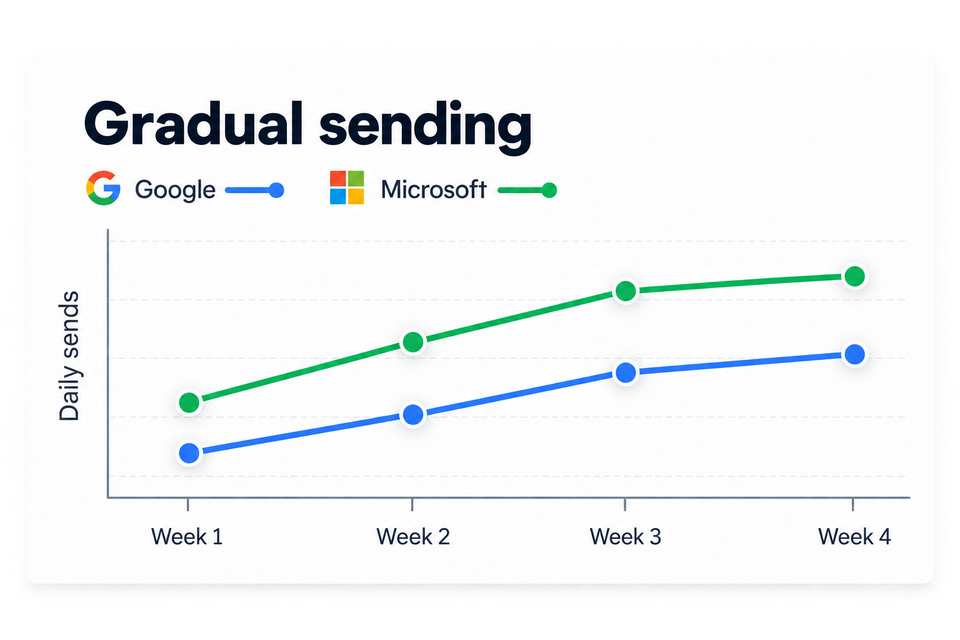
Some email senders have quiet weeks by design. A monthly newsletter, a seasonal shop or a small application's notification address may have little to send between busy periods. A useful warmup plan should fit that calendar.
For low-volume senders, MailSlurp email warmup provides a modest ramp, ongoing maintenance activity and controls to pause or revise the program. The practical question is how that activity fits the next real send: what stays running, who checks it and what needs another test before the campaign goes out.
What maintenance means
During a ramp, the program works toward its configured warmup target. Maintenance is the smaller continuing volume you can choose afterward. In MailSlurp's setup, Continue at the maintenance volume until paused makes that choice explicit.
The Gentle preset targets 10 warmup messages per day over 28 days, then 5 per day in maintenance. Those settings describe the warmup program. They don't mean a five-message maintenance schedule establishes readiness for a much larger newsletter.
The warmup schedule guide explains the other presets and how to read the results. For a quiet sender, a modest plan is often easier to relate to its actual use than selecting a larger target merely because it's available.
A maintenance program also gives you activity to observe between campaigns. A failed credential or a changed sender configuration can become visible while there is still time to investigate before the next planned send.
A sending calendar with room for quiet weeks
Let's take a monthly newsletter as an example. This is a planning exercise, not a tested delivery result: the address stays the same, the provider stays the same, and the next newsletter is due at the end of the month.
A short calendar can bring the background program and that deadline together:
| Part of the month | Production activity | Warmup and review |
|---|---|---|
| Between newsletters | Little or no campaign traffic | Maintenance if enabled; review connection errors and completed observations |
| Content preparation | Draft and approval work | Note any sender, DNS or provider changes since the last send |
| Campaign ready | Final message available | Run a placement test using the actual message and production connection |
| Sending period | Newsletter goes to subscribed recipients | Review provider responses and recipient feedback alongside warmup activity |
| After the send | Bounces, unsubscribes and complaints processed | Record changes that affect the next campaign or warmup schedule |
The exact dates belong to your team. What helps is having a named review before the deadline, rather than discovering an expired credential while somebody is asking whether the newsletter has gone out yet.
A seasonal sender follows the same idea over a longer calendar. The quiet period may last months, and the preparation needs to account for everything that changed during it. The first busy week deserves its own production plan.
Set up a modest program
In Email warmup, select Create warmup, choose the sending connection and complete credential verification and test delivery. For a new sender, choose the new-sender goal and a schedule appropriate to its intended activity.
Customize schedule gives you the current and target daily volume, ramp duration and maintenance volume. It also includes the time zone and local sending window. MailSlurp paces due messages inside that window, so its definition of a sending day is worth checking if the people reviewing it work elsewhere.
The maintenance option is useful when you want continuing background activity after the ramp. If the sender is being retired or no one will be reviewing the program, pause or stop it deliberately. A forgotten scheduled job rarely improves with age.
The warmup documentation explains the available controls. The program's usage view shows the included allowance and the credit weights that apply to your plan, which helps you account for continuing activity during a long quiet period.
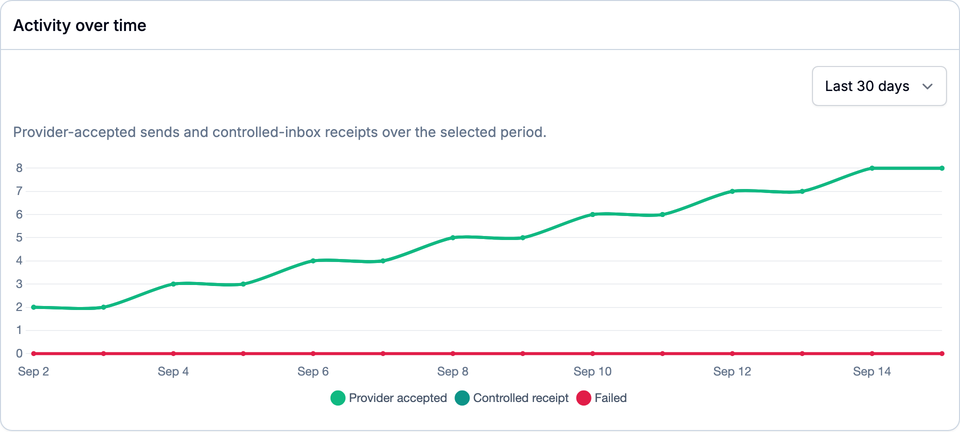
Example app data for a small sender: accepted sends and controlled receipts rise gradually from 2 to 8 a day, with no failed sends in this period. This chart describes sending and receipt, while provider inbox or spam outcomes belong to placement checks.
What deserves a look between sends?
A brief review can cover the connection, recent activity and completed results. The next scheduled send and the local sending window help explain a quiet chart; it may simply be outside the configured hours.
If planned sends repeatedly fail, the provider response is the useful starting point. An invalid credential needs repair and a fresh test delivery. Increasing the schedule would only repeat that failure more often.
When placement coverage is included, provider names, test dates and sample sizes give the results context. MailSlurp offers controlled-inbox observations and premium checkpoints for Gmail, Google Workspace, Outlook.com and Microsoft 365 on eligible plans. A pending check has no completed outcome yet.
An accepted send means the sending provider accepted the request. A controlled receipt or provider placement result tells you what happened farther along the path. These observations stay useful even when there are no customer campaigns that week.
Before a seasonal restart
The first question is what has changed since the last real send. Even a familiar address may now use a different provider, signing configuration or template. A move to another provider belongs in a migration plan; an unresolved delivery incident belongs in a recovery plan.
For an otherwise stable sender, the restart review can focus on a few practical details:
- The connection still works. A fresh test delivery confirms current access; received headers show current authentication.
- The audience records are current. Suppressions and unsubscribes from the previous season remain relevant to this one.
- The final message has been tested. A separate placement test includes the campaign's normal content, links and tracking.
- The production increase has an owner. Someone needs to watch the provider's responses and decide whether to continue or hold the next batch.
Google's sender guidance recommends consistent sending, gradual increases and attention to delivery feedback. For a seasonal restart, the useful application is a production ramp informed by current results rather than an immediate return to the largest historical send.
Does every quiet sender need warmup forever?
The decision depends on how the sender is used and what you want to observe. Maintenance can provide continuing activity and checks between campaigns. A paused program may make sense when the address has no planned use, with a fresh review before it returns.
There isn't a universal idle-day countdown that tells every sender when its reputation has expired. A date alone also doesn't establish readiness: the connection, authentication, audience and current delivery observations matter when sending resumes.
Likewise, customer mail doesn't need to be invented just to fill a calendar. A monthly newsletter can remain monthly. Warmup and maintenance are separately configured activity, and the production schedule can stay centered on messages subscribers expect.