
Email warmup
Documentation navigation
Connect an external sender, ramp message volume gradually, and monitor delivery and provider placement over time.
Email warmup helps a new or recovering sender build a steady sending history. MailSlurp sends paced messages through a connection owned by you, observes controlled-inbox delivery, and can run provider placement checkpoints when your plan includes premium seeds.
Use warmup when introducing a new mailbox, moving a sender to a new provider, repairing a sender after a reputation change, or maintaining low-volume activity between campaigns. Warmup supports deliverability work, but it cannot replace permissioned recipients, correct authentication, or good sending practices.
Start a warmup
- Open Email warmup and select Create warmup.
- Select an existing sending connection or choose a provider to add a new one.
- Verify the credential and complete the test delivery.
- Choose whether you are warming a new sender or repairing an existing sender.
- Select Gentle, Standard, Recovery, or Custom scheduling.
- Choose controlled inboxes or provider placement coverage when available.
- Select managed content or enter a custom subject and plain-text body.
- Create and start the warmup.
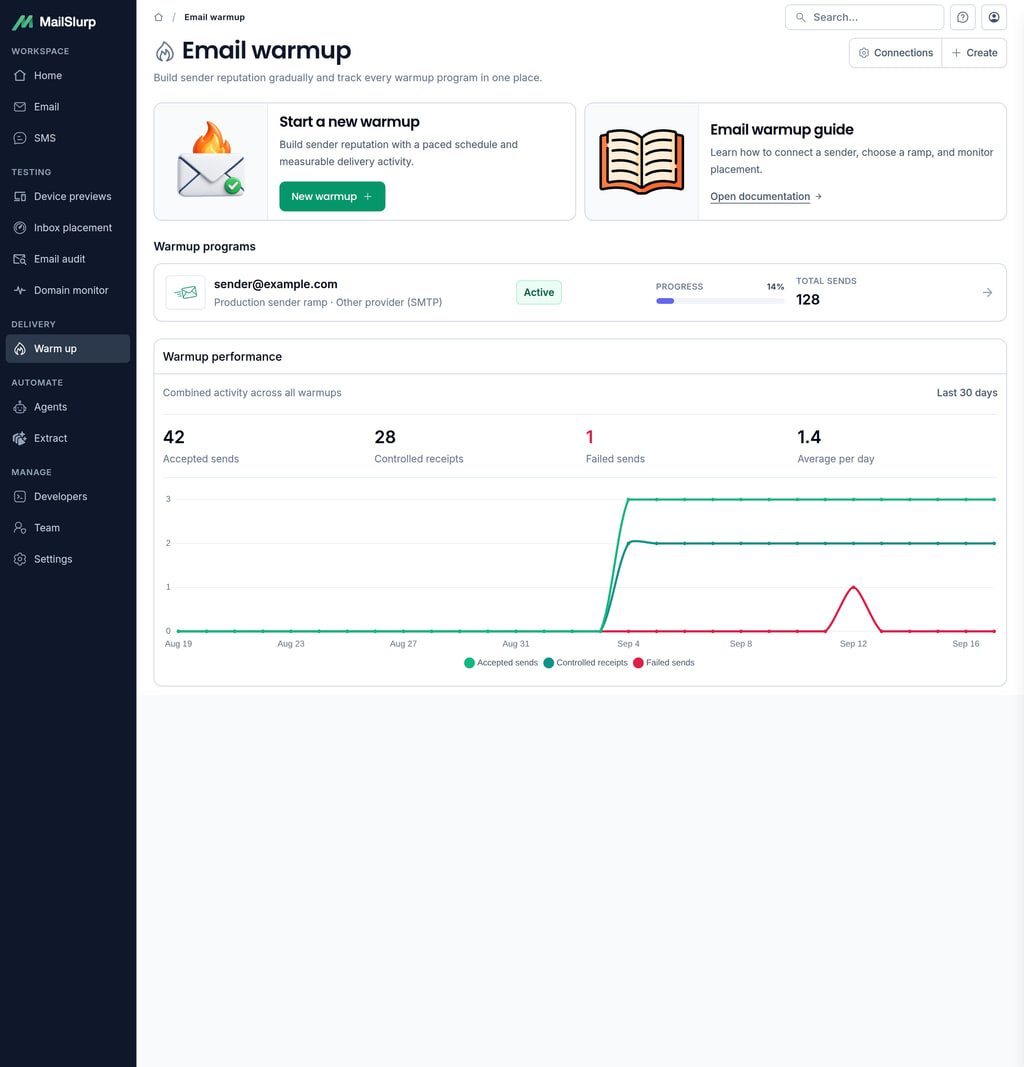
The index lists each sender, status, overall campaign progress, days active, and total sends. The combined activity chart shows accepted warmup sends across all active programs.
Connect a sender
The sender search includes existing reusable connections and the supported provider catalog. Selecting a provider loads its required SMTP or API-key fields. If your provider is not listed, choose Other provider (SMTP) and enter its authenticated SMTP settings.
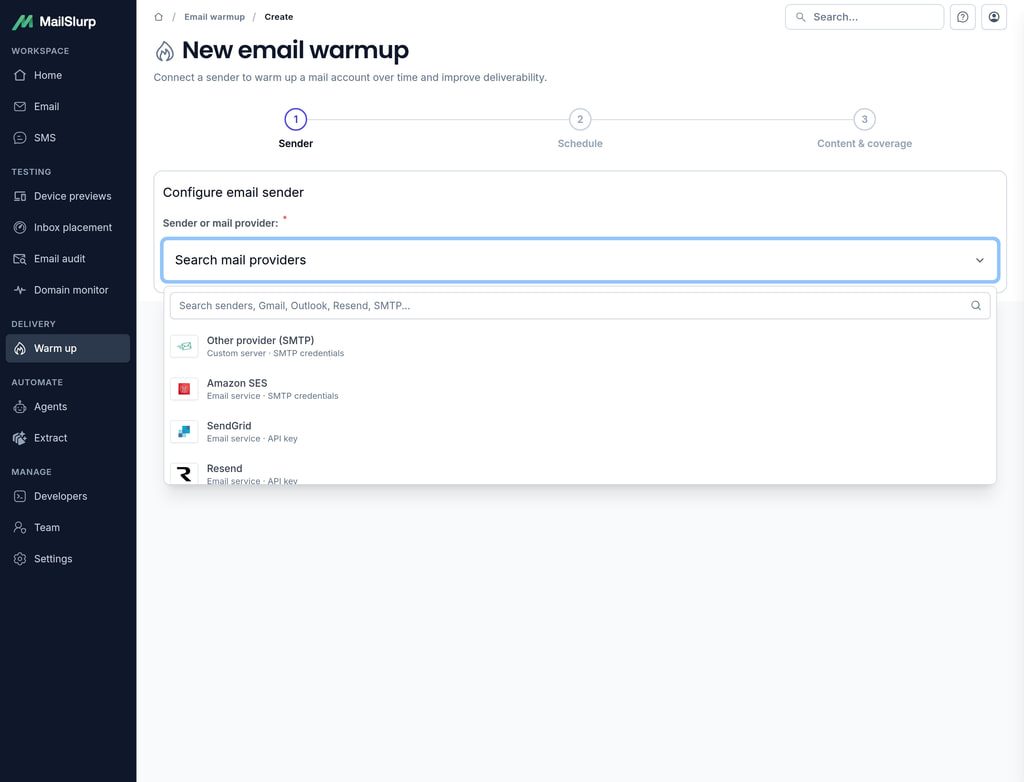
MailSlurp uses the credential only for this customer-owned connection. Native API connections use isolated HTTP clients, and SMTP connections use the server and credential you enter. Amazon SES connections use SES SMTP credentials and do not assume an AWS role.
Choose a goal and schedule
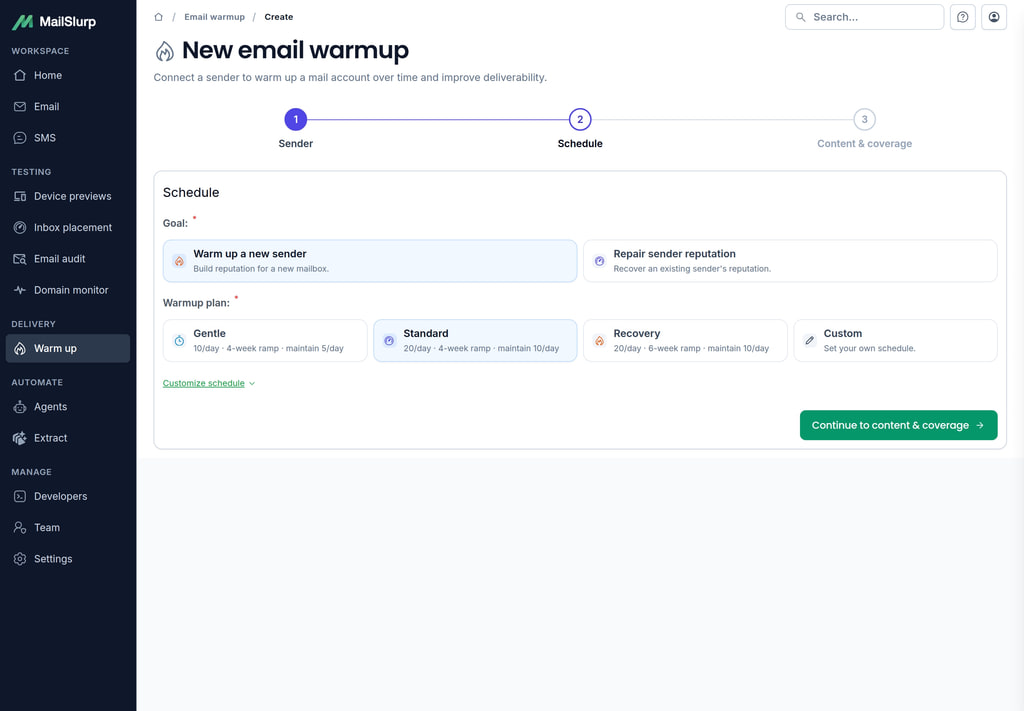
Choose Warm up a new sender for a new mailbox or Repair sender reputation for a sender that needs a slower recovery. The presets store explicit schedule settings:
| Plan | Target volume | Ramp | Maintenance |
|---|---|---|---|
| Gentle | 10 per day | 28 days | 5 per day |
| Standard | 20 per day | 28 days | 10 per day |
| Recovery | 20 per day | 42 days | 10 per day |
| Custom | Your settings | 7-90 days | Your setting |
Open Customize schedule to change the program name, current and target daily volume, ramp duration, maintenance volume, time zone, and local sending window. MailSlurp paces due sends inside that window instead of releasing the daily volume in one burst.
Choose coverage and content
Controlled inboxes provide day-to-day warmup delivery through MailSlurp-managed infrastructure. Premium provider placement checkpoints sample Gmail, Google Workspace, Outlook.com, and Microsoft 365 on eligible plans. Treat checkpoints as directional samples and compare their trend over time.
Managed content varies safe warmup messages for you. Custom content accepts a subject and plain-text body. Keep custom messages natural and transactional; links, tracking, media, scripts, and template markers are rejected.
Monitor and control a warmup
Open a program to see sender identity, status, campaign progress, accepted sends, readiness, adaptive pacing, placement checkpoints, and activity over time. You can pause or resume an active program, edit its schedule, stop it, or delete it after confirmation.
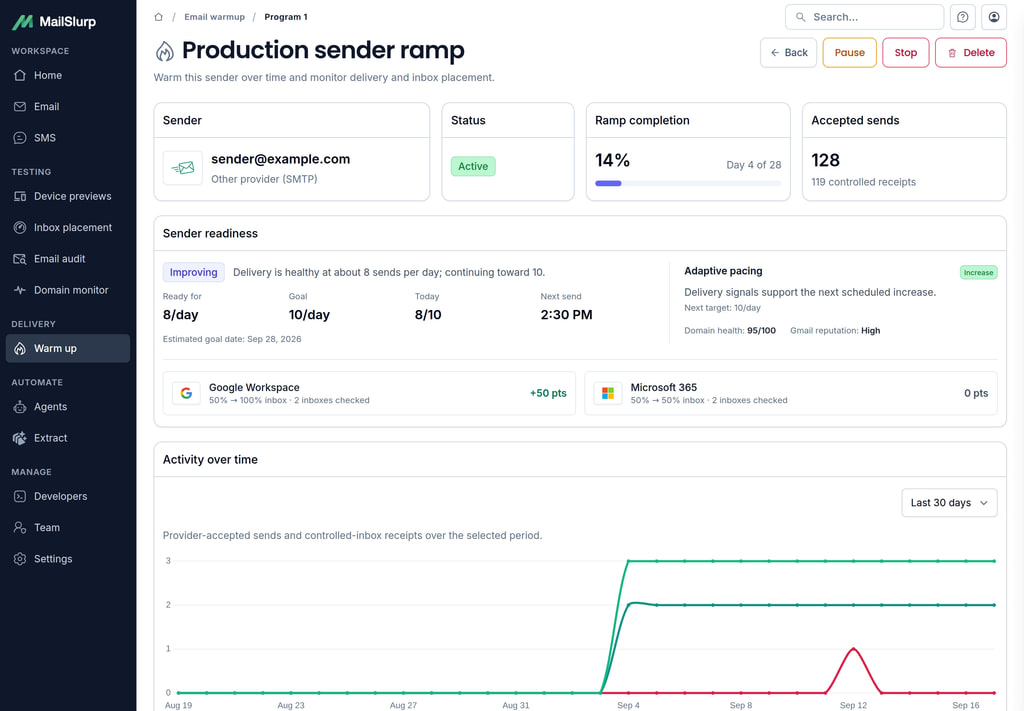
An accepted send counts when the configured provider accepts the outbound request. A later spam, junk, or not-received result remains useful placement evidence and does not undo the send. The warmup page displays included usage and the credit weights applied by your current plan.
Sender capacity and usage
Warmup and automated placement share the same Delivery Sender allocation. Creating and verifying a connection does not allocate a seat; starting a workflow can enable the sender. Pausing keeps its allocation. To release capacity, stop warmup, pause the automations using that connection, and disable the sender in Settings > Sending connections. Disabling a sender does not automatically reduce purchased seat quantity; manage paid capacity separately in your subscription settings.
Included warmup credits follow the UTC calendar month and the active sender allowance. Controlled messages and provider seed messages can have different weights, shown on the usage page. Accepted messages consume credits; definite send failures release their reservations. A warmup placement checkpoint uses warmup credits and does not also consume a standalone inbox placement test. Review both MailSlurp usage and your provider’s recipient limits before increasing volume.
Provider setup guides
Choose a provider for exact credential, server, and preparation instructions. Providers marked planned cannot be connected directly yet.
| Provider | Connection | Availability | Setup guide |
|---|---|---|---|
| Other provider (SMTP) | SMTP | Available | Configure Other provider (SMTP) |
| Gmail | SMTP | Available | Configure Gmail |
| Google Workspace | SMTP | Available | Configure Google Workspace |
| Microsoft 365 | SMTP | Available | Configure Microsoft 365 |
| Outlook.com and Hotmail | Not available | Planned | Configure Outlook.com and Hotmail |
| Yahoo Mail | SMTP | Available | Configure Yahoo Mail |
| Apple iCloud Mail | SMTP | Available | Configure Apple iCloud Mail |
| Fastmail | SMTP | Available | Configure Fastmail |
| Zoho Mail | SMTP | Available | Configure Zoho Mail |
| AOL Mail | SMTP | Available | Configure AOL Mail |
| GMX Mail | SMTP | Available | Configure GMX Mail |
| mail.com | SMTP | Available | Configure mail.com |
| Proton Mail | Not available | Planned | Configure Proton Mail |
| Amazon SES | SMTP | Available | Configure Amazon SES |
| SendGrid | API key | Available | Configure SendGrid |
| Resend | API key | Available | Configure Resend |
| Mailgun | API key | Available | Configure Mailgun |
| Postmark | API key | Available | Configure Postmark |
| Brevo | SMTP | Available | Configure Brevo |
| Mailjet | SMTP | Available | Configure Mailjet |
| SparkPost | SMTP | Available | Configure SparkPost |
| SMTP2GO | SMTP | Available | Configure SMTP2GO |
| SendPulse | SMTP | Available | Configure SendPulse |
| SocketLabs | SMTP | Available | Configure SocketLabs |
| MailerSend | SMTP | Available | Configure MailerSend |
| Mailchimp Transactional (Mandrill) | SMTP | Available | Configure Mailchimp Transactional (Mandrill) |
| Elastic Email | SMTP | Available | Configure Elastic Email |
For a campaign-provider ramp, follow the guide for your sending path: SendGrid IP warmup covers the provider’s IP controls and MailSlurp connection; Marketing Cloud Engagement IP warming covers shared campaign and journey traffic; GoHighLevel email warmup separates domain stages from account limits and mailbox activity.
Warmup best practices
- authenticate the sending domain with SPF, DKIM, and DMARC before starting
- use a stable From address and provider configuration during the ramp
- keep the target volume close to the sender’s expected real use
- pause and investigate repeated delivery failures or a worsening placement trend
- keep recipient acquisition and production campaigns permission based
- avoid changing several sender, content, and DNS variables at the same time
- continue monitoring placement after the ramp reaches maintenance volume
Sending connections are shared with automated inbox placement, so one verified sender can be reused across both workflows.
Automate a program
The warmup REST API uses the same sending connections and programs as the dashboard. First verify a connection you own, complete its test delivery, and copy its connection ID. The example below creates a gentle, controlled-inbox program; creating it does not start sending.
Use Node.js 20 or later. Set MAILSLURP_API_KEY and MAILSLURP_SENDING_CONNECTION_ID in the environment. The two attestations in the request must be true for your sender: you own or are authorized to use it, and your sending practices are permission based. Review the schedule, time zone and account usage before starting the program.
const apiKey = process.env.MAILSLURP_API_KEY;
const connectionId = process.env.MAILSLURP_SENDING_CONNECTION_ID;
if (!apiKey || !connectionId) throw new Error("Set the API key and connection ID");

async function warmupRequest(path, method = "GET", body) {
  const response = await fetch(`https://api.mailslurp.com${path}`, {
    method,
    headers: { "x-api-key": apiKey, "Content-Type": "application/json" },
    body: body === undefined ? undefined : JSON.stringify(body),
    signal: AbortSignal.timeout(30000),
  });
  if (!response.ok) throw new Error(`Warmup API returned ${response.status}`);
  return response.json();
}

const program = await warmupRequest("/email-warmup/programs", "POST", {
  name: "New sender warmup",
  connectionId,
  customerIntent: "NEW_SENDER_WARMUP",
  currentDailyVolume: 0,
  goalDailyVolume: 10,
  schedulePreset: "GENTLE",
  rampDurationDays: 28,
  maintenanceEnabled: true,
  maintenanceDailyVolume: 5,
  sendWindowStart: "09:00",
  sendWindowEnd: "17:00",
  timeZone: "UTC",
  requestedCoverage: "CONTROLLED",
  content: { source: "MANAGED_CONTROL" },
  senderOwnershipAttested: true,
  permissionBasedSendingAttested: true,
});
console.log({ id: program.id, status: program.status, blockers: program.blockers });
Save the returned program ID. After reviewing the configuration, use the same warmupRequest helper to start that program:
const programId = process.env.MAILSLURP_WARMUP_PROGRAM_ID;
if (!programId) throw new Error("Set the warmup program ID returned by creation");
const path = `/email-warmup/programs/${encodeURIComponent(programId)}`;
const current = await warmupRequest(path);
if (current.blockers.length) throw new Error(current.blockers.join(", "));

const started = await warmupRequest(`${path}/start`, "POST", {
  expectedVersion: current.version,
});
console.log({ status: started.status, blockers: started.blockers });

const activity = await warmupRequest(`${path}/analytics?days=7`);
console.log({
  acceptedSends: activity.totalAcceptedSends,
  observedReceipts: activity.totalObservedSends,
  failedSends: activity.totalFailedSends,
  placementChecks: activity.placementChecks,
});
Starting the program initiates its next eligible actions; it does not synchronously deliver a message. The first activity response may contain zero sends while the program waits for its sending window. Read it again after scheduled activity. An accepted send, an observed controlled-inbox receipt and a completed provider placement result are separate outcomes. CONTROLLED coverage does not request premium provider checkpoints; inspect the program’s resolved coverage before expecting them.
Use GET /email-warmup/programs/{programId}/readiness for pacing recommendations and GET /email-warmup/programs/{programId}/placement-checks for provider checkpoints. Commands such as /pause, /resume and /stop also take expectedVersion; fetch the current program before each command. For a version conflict, reread the state and review the intended action instead of blindly retrying. The OpenAPI reference lists supported operations and fields.
Understand readiness and adaptive pacing
Read readiness alongside accepted sends, controlled-inbox receipts and completed placement checkpoints. An accepted send records provider acceptance; a receipt confirms observed arrival, and a placement result records the folder observed at a provider seed. Keep those measurements separate when deciding whether to increase volume.
Adaptive pacing uses available delivery and sender signals to choose the next target. Review the reason shown for a hold or reduced pace before editing the schedule. Missing or unfinished placement data should remain unknown; it is not evidence of inbox success. Compare equivalent sender and provider coverage over time.
Investigate a stalled or failing program
First confirm the sending connection is verified and its credentials are still valid. Check the program state, time zone and sending window: an enabled program outside its window may simply be waiting for the next eligible send.
For repeated send failures, test the connection before increasing volume. For worsening placement, inspect the affected provider, review domain authentication and run a separate placement test. Change one variable at a time where possible and pause the program while a persistent sending problem is investigated.
Move into maintenance
At the end of the ramp, review the evidence against the sender’s intended production use. Set maintenance volume in the program schedule if ongoing activity is needed, or stop the program deliberately. A completed ramp is not a permanent guarantee of future placement.
For a finite program, turn maintenance off when configuring the schedule. Follow the ramp and any final placement checkpoint through to the terminal program state. Days active and accepted-send counts show progress, while observed receipts and completed checkpoint results show what happened to the messages.
Keep recurring placement checks and domain alerts active as real sending volume changes. Include normal campaign volume when planning the sender’s total activity rather than treating warmup traffic as the only mail it sends.
Running this code needs an API key. Get one free