
MailSlurp inbox API
Documentation navigation
Create programmable MailSlurp inboxes, receive and inspect real email, manage attachments, and isolate addresses for tests or application workflows.

MailSlurp inboxes are email addresses. Inboxes can be permanent or disposable. They can have randomly assigned addresses or use custom email domains.
Inboxes are a base entity that can have other features like webhooks, routing rules, forwarding, and SMTP/IMAP access configured using their ID.
Quick links
Inbox overview
Inboxes can send and receive emails and attachments. They can be created and managed using the dashboard or API clients
Creating inboxes
Inboxes can be configured in the MailSlurp dasbhoard or using the API.
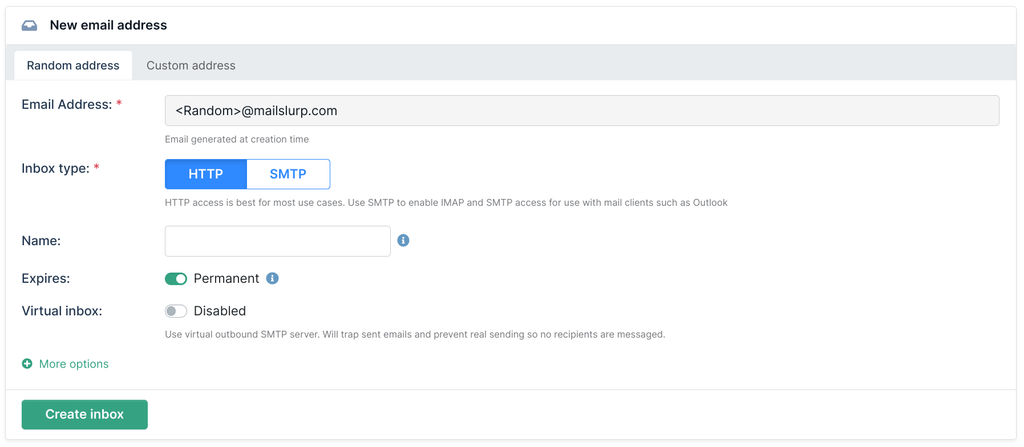
The default SDK create action will create an HTTP inbox with a randomly assigned email addresses.
Javascript
const inbox = await mailslurp.createInbox();
// { id: '123', emailAddress: '123@mailslurp.com' }
You can create more complex examples by passing inbox configuration options.
Javascript
See inbox creation options.
const inbox = await mailslurp.inboxController.createInbox({
  description: 'My inbox',
  name: 'Joe B', // become sender name in email address
  useShortAddress: true,
  expiresIn: 5 * 60 * 1000, // expire in 5 minutes
  inboxType: CreateInboxInboxTypeEnum.SMTP_INBOX, // add smtp access
  tags: ['staging', 'test'],
});
Using custom addresses
To assign a custom email address to an inbox you must use a custom domain. You can use a short email
address by with the useShortAddress option.
Javascript
await mailslurp.inboxController.createInbox({
  emailAddress: 'test@mydomain.com'
})
Plus address aliases
Plus addressing allows you to use +xyz suffix in the local part of an email address. When sending emails to an inbox
you can use +xyz style aliases to partition received emails by the sub-address alias. See
the plus addressing guide for more information.
For production-style retrieval patterns, avoid broad inbox search loops when you already know the full plus address. A more stable flow is:
- Get or create a plus-address entity from the full address (including the
+suffix) and persistplusAddressId+inboxId. - Use wait for matching entities with a
TOmatch against the full plus address. - List messages by
plusAddressIdin the inbox for deterministic results.
See:
Plus-address entities let you persist a specific alias and fetch messages for that alias without scanning the whole inbox.
/inboxes/{inboxId}/plus-addresses/get-or-create
Get or create a plus address by full address
Looks up an inbox plus address using a full email address like `inbox+alias@domain.com`. Returns an existing plus address if found, otherwise creates one. Rejects the request if the full address is already assigned to a real inbox.
Request, parameters, and responses
Path parameters
| Name | Type | Required | Description |
|---|---|---|---|
inboxId | string:uuid | Yes | ID of the inbox you want to target |
Query parameters
| Name | Type | Required | Description |
|---|---|---|---|
fullAddress | string | Yes | Full recipient address including +suffix. Example: `inbox+alias@domain.com` |
Responses
| Status | Schema | Description |
|---|---|---|
200 | PlusAddressDto | OK |
HTTP and SDK snippets
HTTP
POST /inboxes/00000000-0000-4000-8000-000000000000/plus-addresses/get-or-create?fullAddress=value HTTP/1.1
Host: api.mailslurp.com
x-api-key: YOUR_API_KEY
Accept: application/json
cURL
curl -X POST "https://api.mailslurp.com/inboxes/00000000-0000-4000-8000-000000000000/plus-addresses/get-or-create?fullAddress=value" \
  -H "x-api-key: YOUR_API_KEY" \
  -H "Accept: application/json"
JavaScript SDK
import { Configuration, InboxControllerApi } from "mailslurp-client";

const config = new Configuration({ apiKey: "YOUR_API_KEY" });
const inboxController = new InboxControllerApi(config);
const request = {
  "inboxId": "00000000-0000-4000-8000-000000000000",
  "fullAddress": "value"
};

const result = await inboxController.getOrCreateInboxPlusAddress(request);
Python SDK
import mailslurp_client
from mailslurp_client.api.inbox_controller_api import InboxControllerApi

configuration = mailslurp_client.Configuration()
configuration.api_key["x-api-key"] = "YOUR_API_KEY"

with mailslurp_client.ApiClient(configuration) as api_client:
    inboxController = InboxControllerApi(api_client)
result = inboxController.get_or_create_inbox_plus_address("00000000-0000-4000-8000-000000000000", full_address="value")/inboxes/{inboxId}/plus-addresses/{plusAddressId}/emails
Get emails for a given inbox plus address
Returns paginated list of all emails for a given plus alias addresses found for an inbox based on received emails that used the inbox address with a +xyz alias.
Request, parameters, and responses
Path parameters
| Name | Type | Required | Description |
|---|---|---|---|
plusAddressId | string:uuid | Yes | The plus address ID to fetch emails for. |
inboxId | string:uuid | Yes | ID of the inbox you want to send the email from |
Query parameters
| Name | Type | Required | Description |
|---|---|---|---|
page | integer:int32 | No | Optional page index in inbox tracking pixel list pagination |
size | integer:int32 | No | Optional page size in inbox tracking pixel list pagination |
sort | enum: ASC | DESC | No | Optional createdAt sort direction ASC or DESCValues: ASC, DESC |
since | string:date-time | No | Optional filter by created after given date time |
before | string:date-time | No | Optional filter by created before given date time |
Responses
| Status | Schema | Description |
|---|---|---|
200 | PageEmailPreview | OK |
HTTP and SDK snippets
HTTP
GET /inboxes/00000000-0000-4000-8000-000000000000/plus-addresses/00000000-0000-4000-8000-000000000000/emails?page=value&size=value&sort=ASC HTTP/1.1
Host: api.mailslurp.com
x-api-key: YOUR_API_KEY
Accept: application/json
cURL
curl -X GET "https://api.mailslurp.com/inboxes/00000000-0000-4000-8000-000000000000/plus-addresses/00000000-0000-4000-8000-000000000000/emails?page=value&size=value&sort=ASC" \
  -H "x-api-key: YOUR_API_KEY" \
  -H "Accept: application/json"
JavaScript SDK
import { Configuration, InboxControllerApi } from "mailslurp-client";

const config = new Configuration({ apiKey: "YOUR_API_KEY" });
const inboxController = new InboxControllerApi(config);
const request = {
  "plusAddressId": "00000000-0000-4000-8000-000000000000",
  "page": null,
  "size": null,
  "sort": "ASC",
  "inboxId": "00000000-0000-4000-8000-000000000000"
};

const result = await inboxController.getInboxPlusAddressEmailsForPlusAddressId(request);
Python SDK
import mailslurp_client
from mailslurp_client.api.inbox_controller_api import InboxControllerApi

configuration = mailslurp_client.Configuration()
configuration.api_key["x-api-key"] = "YOUR_API_KEY"

with mailslurp_client.ApiClient(configuration) as api_client:
    inboxController = InboxControllerApi(api_client)
    result = inboxController.get_inbox_plus_address_emails_for_plus_address_id("00000000-0000-4000-8000-000000000000", page=NaN, size=NaN, sort="ASC", "00000000-0000-4000-8000-000000000000")
Virtual inboxes
You can create mail traps using the virtual flag. This means the inbox will never send out-bound
emails. It will instead save a sent message but not send the email to any recipients.
Javascript
const mailTrap = await mailslurp.inboxController.createInboxWithOptions({
    createInboxDto: {
        virtualInbox: true,
    },
});
Expiry
Inboxes can be made ephemeral using the expiresIn or expiresAt properties. All
paid plans use permanent inboxes by default.
Javascript
// create an inbox that expires in 5 minutes
const inbox2 = await mailslurp.createInboxWithOptions({
  expiresIn: 5 * 60_000,
});
IMAP/SMTP
Inboxes can be accessed via IMAP and SMTP using the access details for the inbox or at the account level.
const {
    secureSmtpServerHost,
    secureSmtpServerPort,
    secureSmtpUsername,
    secureSmtpPassword,
    smtpServerHost,
    smtpServerPort,
    smtpUsername,
    smtpPassword,
    secureImapServerHost,
    secureImapServerPort,
    secureImapUsername,
    secureImapPassword,
    imapServerHost,
    imapServerPort,
    imapUsername,
    imapPassword,
    mailFromDomain,
} = await mailslurp.inboxController.getImapSmtpAccess({
    inboxId // optional inbox scope
});
For more information see the IMAP/SMTP guide or mail app config.
Configuring address and domain
Here are some common methods for creating inboxes and configuring the email address or domain
// when you don't care about the address (will use the default domain which may change)
const inboxWithRandomAddress = await mailslurp.inboxController.createInboxWithDefaults()
expect(inboxWithRandomAddress.emailAddress).toMatch(/.*/)

// when you want to specify the domain and randomize the part before the @
const inboxWithMailSlurpDomain = await mailslurp.inboxController.createInboxWithOptions({
  createInboxDto: {
    // you can specify a mailslurp domain or your own custom one
    // see https://api.mailslurp.com/available-domains/
    domainName: 'mailslurp.biz'
  }
})
expect(inboxWithMailSlurpDomain.domain).toEqual('mailslurp.biz');
expect(inboxWithMailSlurpDomain.localPart).toMatch(/.*/)

// you can also create with a defined address
const inboxWithSpecificAddress = await mailslurp.inboxController.createInboxWithOptions({
  createInboxDto: {
    emailAddress: `specific-address-${Date.now()}@mailslurp.biz`
  }
})
expect(inboxWithSpecificAddress.emailAddress).toMatch(/specific-address-\d+@mailslurp.biz/)

// use a random domain from a larger list of mailslurp domains
const inboxWithDomainPool= await mailslurp.inboxController.createInboxWithOptions({
  createInboxDto: {
    useDomainPool: true,
    useShortAddress: true
  }
})
expect(inboxWithDomainPool.domain).not.toContain('mailslurp.biz');
All create options
For all inbox creation options see the CreateInboxDto schema in your integration:
Show CreateInboxDto schema
Options for creating an inbox. An inbox has a real email address that can send and receive emails. Inboxes can be permanent or expire at a given time. Inboxes are either `SMTP` or `HTTP` mailboxes. `SMTP` inboxes are processed by a mail server running at `mailslurp.mx` while `HTTP` inboxes are processed by AWS SES backed mailservers. An inbox email address is randomly assigned by default ending in either `mailslurp.com` or (if `useDomainPool` is enabled) ending in a similar domain such as `mailslurp.xyz` (selected at random). To specify an address use a custom domain: either pass the `emailAddress` options with ` @ `. To create a randomized address for your domain set the `domainName` to th...
| Property | Required | Type | Format | Description |
|---|---|---|---|---|
emailAddress | No | string | A custom email address to use with the inbox. Defaults to null. When null MailSlurp will assign a random email address to the inbox such as `123@mailslurp.com`. If you use the `useDomainPool` option when the email address is null it will generate an email address with a more varied domain ending such as `123@mailslurp.info` or `123@mailslurp.biz`. When a cu... | |
domainName | No | string | FQDN domain name for the domain you have verified. Will be appended with a randomly assigned recipient name. Use the `emailAddress` option instead to specify the full custom inbox. | |
domainId | No | string:uuid | ID of custom domain to use for email address. | |
name | No | string | Optional name of the inbox. Displayed in the dashboard for easier search and used as the sender name when sending emails. | |
description | No | string | Optional description of the inbox for labelling purposes. Is shown in the dashboard and can be used with | |
useDomainPool | No | boolean | Use the MailSlurp domain name pool with this inbox when creating the email address. Defaults to null. If enabled the inbox will be an email address with a domain randomly chosen from a list of the MailSlurp domains. This is useful when the default `@mailslurp.com` email addresses used with inboxes are blocked or considered spam by a provider or receiving se... | |
tags | No | string[] | Tags that inbox has been tagged with. Tags can be added to inboxes to group different inboxes within an account. You can also search for inboxes by tag in the dashboard UI. | |
expiresAt | No | string:date-time | Optional inbox expiration date. If null then this inbox is permanent and the emails in it won't be deleted. If an expiration date is provided or is required by your plan the inbox will be closed when the expiration time is reached. Expired inboxes still contain their emails but can no longer send or receive emails. An ExpiredInboxRecord is created when an i... | |
favourite | No | boolean | Is the inbox a favorite. Marking an inbox as a favorite is typically done in the dashboard for quick access or filtering | |
expiresIn | No | integer:int64 | Number of milliseconds that inbox should exist for | |
allowTeamAccess | No | boolean | DEPRECATED (team access is always true). Grant team access to this inbox and the emails that belong to it for team members of your organization. | |
inboxType | No | enum: HTTP_INBOX | SMTP_INBOX | Type of inbox. HTTP inboxes are faster and better for most cases. SMTP inboxes are more suited for public facing inbound messages (but cannot send). | |
virtualInbox | No | boolean | Virtual inbox prevents any outbound emails from being sent. It creates sent email records but will never send real emails to recipients. Great for testing and faking email sending. | |
useShortAddress | No | boolean | Use a shorter email address under 31 characters | |
prefix | No | string | Prefix to add before the email address for easier labelling or identification. |
Use the options-based create endpoint when you need custom addresses, custom domains, expiration, virtual inboxes, tags, or SMTP inbox behavior.
/inboxes/withOptions
Create an inbox with options. Extended options for inbox creation.
Additional endpoint that allows inbox creation with request body options. Can be more flexible that other methods for some clients.
Request, parameters, and responses
Request body (required)
| Field | Type | Required | Description |
|---|---|---|---|
emailAddress | string | No | A custom email address to use with the inbox. Defaults to null. When null MailSlurp will assign a random email address to the inbox such as `123@mailslurp.com`. If you use the `useDomainPool` option when the email address is null it will generate an email address with a more varied domain ending such as `123@mailslurp.info` or `123@mailslurp.biz`. When a cu... |
domainName | string | No | FQDN domain name for the domain you have verified. Will be appended with a randomly assigned recipient name. Use the `emailAddress` option instead to specify the full custom inbox. |
domainId | string:uuid | No | ID of custom domain to use for email address. |
name | string | No | Optional name of the inbox. Displayed in the dashboard for easier search and used as the sender name when sending emails. |
description | string | No | Optional description of the inbox for labelling purposes. Is shown in the dashboard and can be used with |
useDomainPool | boolean | No | Use the MailSlurp domain name pool with this inbox when creating the email address. Defaults to null. If enabled the inbox will be an email address with a domain randomly chosen from a list of the MailSlurp domains. This is useful when the default `@mailslurp.com` email addresses used with inboxes are blocked or considered spam by a provider or receiving se... |
tags | string[] | No | Tags that inbox has been tagged with. Tags can be added to inboxes to group different inboxes within an account. You can also search for inboxes by tag in the dashboard UI. |
expiresAt | string:date-time | No | Optional inbox expiration date. If null then this inbox is permanent and the emails in it won't be deleted. If an expiration date is provided or is required by your plan the inbox will be closed when the expiration time is reached. Expired inboxes still contain their emails but can no longer send or receive emails. An ExpiredInboxRecord is created when an i... |
favourite | boolean | No | Is the inbox a favorite. Marking an inbox as a favorite is typically done in the dashboard for quick access or filtering |
expiresIn | integer:int64 | No | Number of milliseconds that inbox should exist for |
allowTeamAccess | boolean | No | DEPRECATED (team access is always true). Grant team access to this inbox and the emails that belong to it for team members of your organization. |
inboxType | enum: HTTP_INBOX | SMTP_INBOX | No | Type of inbox. HTTP inboxes are faster and better for most cases. SMTP inboxes are more suited for public facing inbound messages (but cannot send). |
virtualInbox | boolean | No | Virtual inbox prevents any outbound emails from being sent. It creates sent email records but will never send real emails to recipients. Great for testing and faking email sending. |
useShortAddress | boolean | No | Use a shorter email address under 31 characters |
prefix | string | No | Prefix to add before the email address for easier labelling or identification. |
{
  "emailAddress": "user@example.com",
  "domainName": "example.com",
  "domainId": "00000000-0000-4000-8000-000000000000",
  "name": "Example name",
  "description": "value",
  "useDomainPool": true
}
Responses
| Status | Schema | Description |
|---|---|---|
201 | InboxDto | Created |
HTTP and SDK snippets
HTTP
POST /inboxes/withOptions HTTP/1.1
Host: api.mailslurp.com
x-api-key: YOUR_API_KEY
Accept: application/json
Content-Type: application/json

{
  "emailAddress": "user@example.com",
  "domainName": "example.com",
  "domainId": "00000000-0000-4000-8000-000000000000",
  "name": "Example name",
  "description": "value",
  "useDomainPool": true
}
cURL
curl -X POST "https://api.mailslurp.com/inboxes/withOptions" \
  -H "x-api-key: YOUR_API_KEY" \
  -H "Accept: application/json" \
  -H "Content-Type: application/json" \
  --data '{"emailAddress":"user@example.com","domainName":"example.com","domainId":"00000000-0000-4000-8000-000000000000","name":"Example name","description":"value","useDomainPool":true}'
JavaScript SDK
import { Configuration, InboxControllerApi } from "mailslurp-client";

const config = new Configuration({ apiKey: "YOUR_API_KEY" });
const inboxController = new InboxControllerApi(config);
const request = {
  "createInboxDto": {
    "emailAddress": "user@example.com",
    "domainName": "example.com",
    "domainId": "00000000-0000-4000-8000-000000000000",
    "name": "Example name",
    "description": "value",
    "useDomainPool": true
  }
};

const result = await inboxController.createInboxWithOptions(request);
Python SDK
import mailslurp_client
from mailslurp_client.api.inbox_controller_api import InboxControllerApi

configuration = mailslurp_client.Configuration()
configuration.api_key["x-api-key"] = "YOUR_API_KEY"

with mailslurp_client.ApiClient(configuration) as api_client:
    inboxController = InboxControllerApi(api_client)
    create_inbox_dto = {
      "emailAddress": "user@example.com",
      "domainName": "example.com",
      "domainId": "00000000-0000-4000-8000-000000000000",
      "name": "Example name",
      "description": "value",
      "useDomainPool": True
    }
    result = inboxController.create_inbox_with_options(create_inbox_dto)
Fetching inboxes
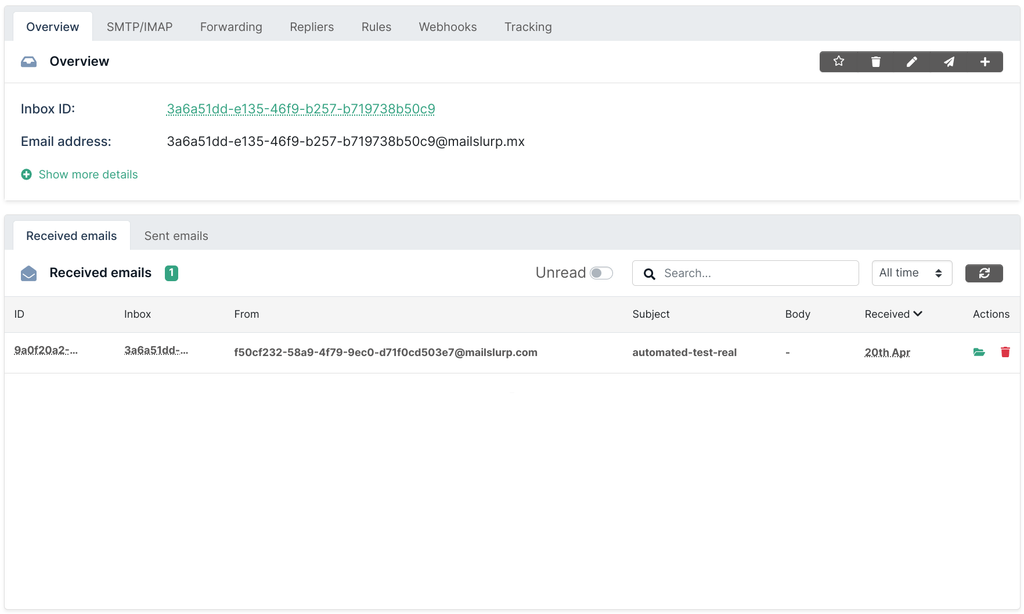
You can list and fetch inboxes using the API.
Listing inboxes
Inbox results are paginated. Pass a starting index and page size to paginate results.
Javascript
const mailslurp = new MailSlurp(config);

// get paginated inboxes
const [index, size] = [0, 20];
const pageInboxes = await mailslurp.getAllInboxes(0, 20);

expect(pageInboxes.size).toEqual(size);
expect(pageInboxes.number).toEqual(index);
Get an inbox by ID
Inboxes can be fetched using their ID.
Javascript
const mailslurp = new MailSlurp(config);
const { id: inboxId } = await mailslurp.createInbox();
const inbox = await mailslurp.getInbox(inboxId);
expect(inbox.id).toEqual(inboxId);
Delete an inbox
You can delete inboxes using the ID.
Javascript
await mailslurp.inboxController.deleteInbox({
  inboxId: inbox.id,
});
Fetch emails in an inbox
Emails can be fetched for an inbox.
Javascript
const emails = await mailslurp.inboxController.getEmails({
    inboxId: inbox.id,
    unreadOnly: true,
});
expect(emails.length).toBeDefined();
Use the paginated inbox email endpoint when you need stable listing, sorting, and connector synchronization controls.
/inboxes/{inboxId}/emails/paginated
Get inbox emails paginated
Get a paginated list of emails in an inbox. Does not hold connections open.
Request, parameters, and responses
Path parameters
| Name | Type | Required | Description |
|---|---|---|---|
inboxId | string:uuid | Yes | Id of inbox that emails belongs to |
Query parameters
| Name | Type | Required | Description |
|---|---|---|---|
page | integer:int32 | No | Optional page index in inbox emails list pagination |
size | integer:int32 | No | Optional page size in inbox emails list pagination |
sort | enum: ASC | DESC | No | Optional createdAt sort direction ASC or DESCValues: ASC, DESC |
since | string:date-time | No | Optional filter by received after given date time |
before | string:date-time | No | Optional filter by received before given date time |
syncConnectors | boolean | No | Sync connectors before fetching emails |
Responses
| Status | Schema | Description |
|---|---|---|
200 | PageEmailPreview | OK |
HTTP and SDK snippets
HTTP
GET /inboxes/00000000-0000-4000-8000-000000000000/emails/paginated?page=value&size=value&sort=ASC HTTP/1.1
Host: api.mailslurp.com
x-api-key: YOUR_API_KEY
Accept: application/json
cURL
curl -X GET "https://api.mailslurp.com/inboxes/00000000-0000-4000-8000-000000000000/emails/paginated?page=value&size=value&sort=ASC" \
  -H "x-api-key: YOUR_API_KEY" \
  -H "Accept: application/json"
JavaScript SDK
import { Configuration, InboxControllerApi } from "mailslurp-client";

const config = new Configuration({ apiKey: "YOUR_API_KEY" });
const inboxController = new InboxControllerApi(config);
const request = {
  "page": null,
  "size": null,
  "sort": "ASC",
  "inboxId": "00000000-0000-4000-8000-000000000000"
};

const result = await inboxController.getInboxEmailsPaginated(request);
Python SDK
import mailslurp_client
from mailslurp_client.api.inbox_controller_api import InboxControllerApi

configuration = mailslurp_client.Configuration()
configuration.api_key["x-api-key"] = "YOUR_API_KEY"

with mailslurp_client.ApiClient(configuration) as api_client:
    inboxController = InboxControllerApi(api_client)
    result = inboxController.get_inbox_emails_paginated(page=NaN, size=NaN, sort="ASC", "00000000-0000-4000-8000-000000000000")
Inbox automations
Inboxes are component of many MailSlurp features:
| Feature | Description |
|---|---|
| AI transform | Transform emails and attachments into data |
| Webhooks | Trigger actions based on email events |
| External connections | Connect inboxes to external email accounts |
| Forwarding | Forward emails to other email addresses |
| Routing rules | Block and allows emails based on content matching |
| Alias proxy | Mask an inbox with a proxy email address |
| Auto reply | Send replies to inbound emails |
| Mail trap | Capture outbound emails but do not send them |
| Custom domains | Use custom email addresses with inboxes |
| IMAP/SMTP | Send and receive emails using IMAP and SMTP |
We will cover more email methods on the email page.