
Real device email previews with MailSlurp
Documentation navigation
Create MailSlurp device preview runs for delivered or imported email, compare Gmail, Outlook, mobile, and desktop results, and share review evidence.
Device previews show how an email looks in real mail clients before you send it. MailSlurp renders the message across targets such as Gmail, Outlook, Apple Mail, iPhone, Android, and desktop clients so marketing, product, QA, support, and engineering teams can approve the same visual evidence.
Use device previews when a message needs to look right everywhere it matters: campaign launches, product announcements, onboarding emails, OTP messages, password resets, invoices, and release-critical templates.
Choose the workflow that fits your role:
| If you want to | Start here |
|---|---|
| Review an email without writing code | Dashboard workflow |
| Reuse a standard set of clients for every campaign | Target profiles |
| Automate rendering in a test suite, CI job, or app | Developers |
Provider Guides
Provider guides show how to send the final test message from an email platform to a MailSlurp render address. This table will expand as more provider workflows are added.
| Provider guide | Workflow |
|---|---|
 Braze Braze |
Send a Braze test email or paste exported HTML, then compare Gmail, Outlook, iPhone, and Android renders |
 Brevo Brevo |
Add the render address to the Brevo Test List, send the finished email, and review all client renders |
 Constant Contact Constant Contact |
Send a Constant Contact test email to the render address, then compare the completed client captures |
 GetResponse GetResponse |
Send a one-contact GetResponse newsletter to the render address, then compare the completed client captures |
 HubSpot HubSpot |
Send a one-contact HubSpot marketing email to the render address, then review the selected client matrix |
 Kit Kit |
Send a Kit Broadcast test email to the render address, then review the finished device matrix |
 MailerLite MailerLite |
Send a verified MailerLite test email to the render address, then review every selected client |
 Mailchimp Mailchimp |
Send a Mailchimp test email to a render address, then review the completed client screenshots |
 Mailjet Mailjet |
Send a Mailjet campaign test to the render address, then compare Gmail, Outlook, iPhone, and Android |
 Omnisend Omnisend |
Send an Omnisend campaign test to the render address, then approve the completed client screenshots |
 Klaviyo Klaviyo |
Send a Klaviyo preview email with realistic profile data, then review the completed client renders |
 Salesforce Salesforce |
Send a published Salesforce marketing email to a render address, then compare mobile and Outlook results |
Watch the device preview tutorial
This walkthrough shows the dashboard flow from choosing an email and render targets through reviewing client screenshots.
Run a preview in the dashboard
The create page keeps the source, targets, and start action in one workflow:
- Open Device previews and choose Start new render.
- Select the email clients and devices that matter for the send.
- Choose a stored MailSlurp email, paste HTML, import an
.emlfile, or send to a render address. - Start the preview run.
- Review screenshots as each target finishes.
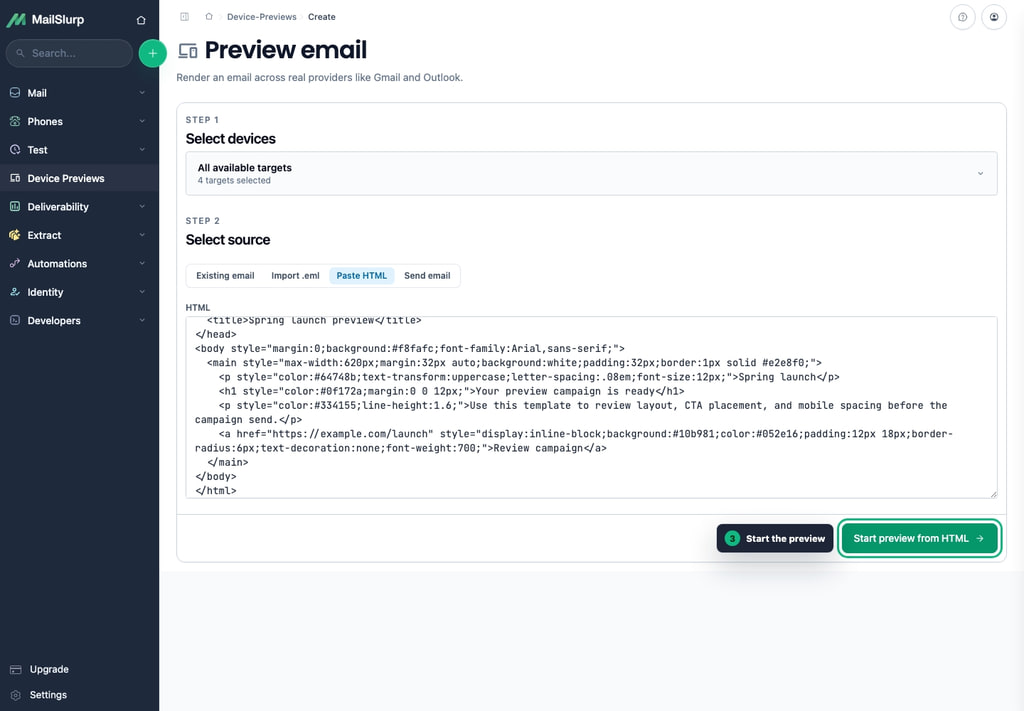
Runs are asynchronous. Completed target screenshots appear while slower clients are still rendering, so you can begin reviewing a partial result instead of waiting for every target.
Choose how to add your email
Different teams begin with different source material. Choose the path that matches where the email lives today.
| If you have | Use this flow | Best for |
|---|---|---|
| A received or sent MailSlurp email | Open the email and click View in Mail Clients | Inbox-based QA, transactional tests, support investigations, and messages already captured by MailSlurp |
| A template body before a real send | Paste HTML | Design review, lifecycle template QA, build artifacts, and quick pre-send checks |
| An exported campaign or fixture | Import an .eml file |
Campaign tools, client handoffs, local fixtures, and messages created outside MailSlurp |
| A campaign tool or manual sender | Send to an emailondevice.com render address |
Non-code approval flows and ESP workflows that can send email |
| A custom app or test suite | Use the API | CI, visual regression checks, release gates, and repeatable QA |
From a MailSlurp inbox
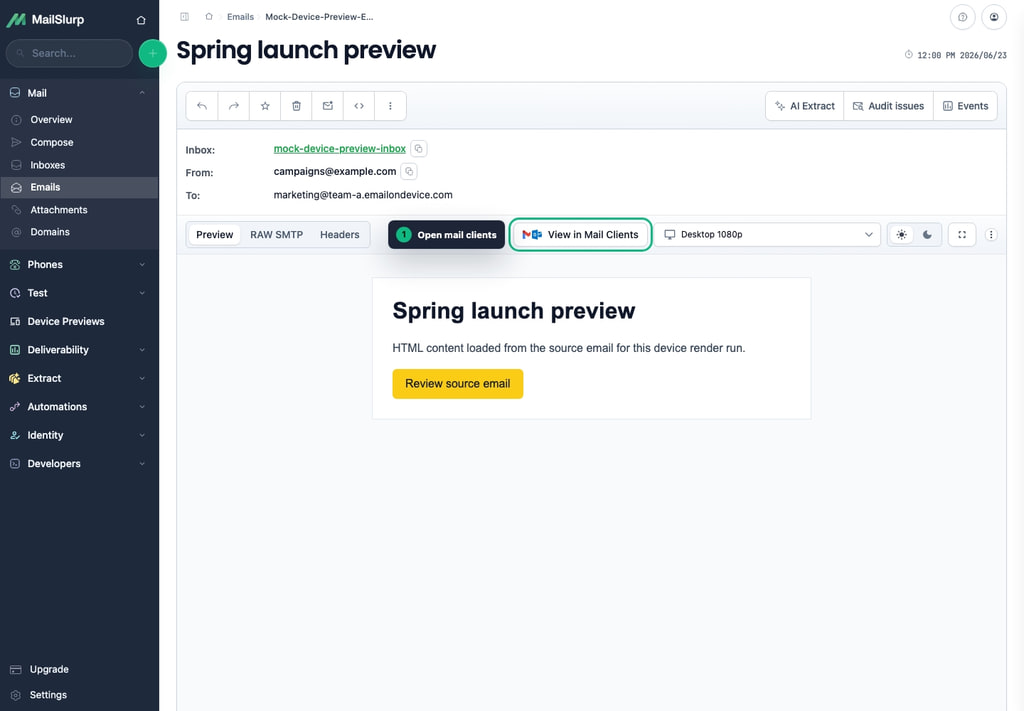
Send the email to a MailSlurp inbox, open the received message, and click View in Mail Clients. MailSlurp opens the preview create page with that email selected so you can choose targets and start the run.
This path is natural when the email already appears in MailSlurp through a test, SMTP delivery, inbound route, or manual send.
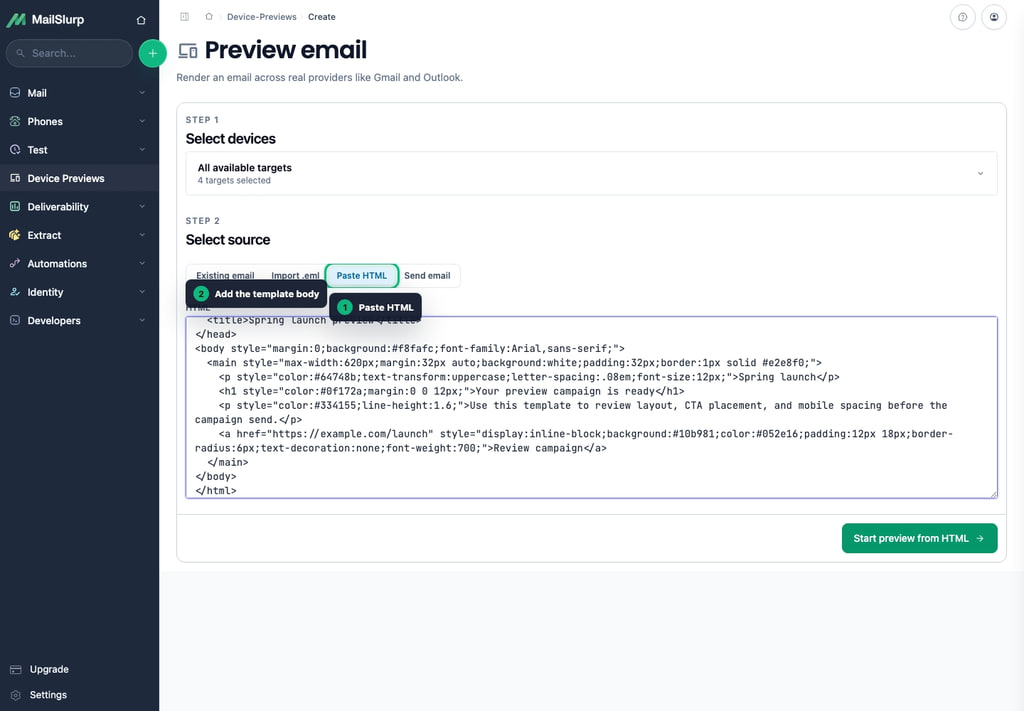
Paste HTML
Paste HTML when the template is ready to inspect but has not been sent as a full email yet. This is useful for reviewing a lifecycle template, campaign draft, or build output before connecting it to a real sender.
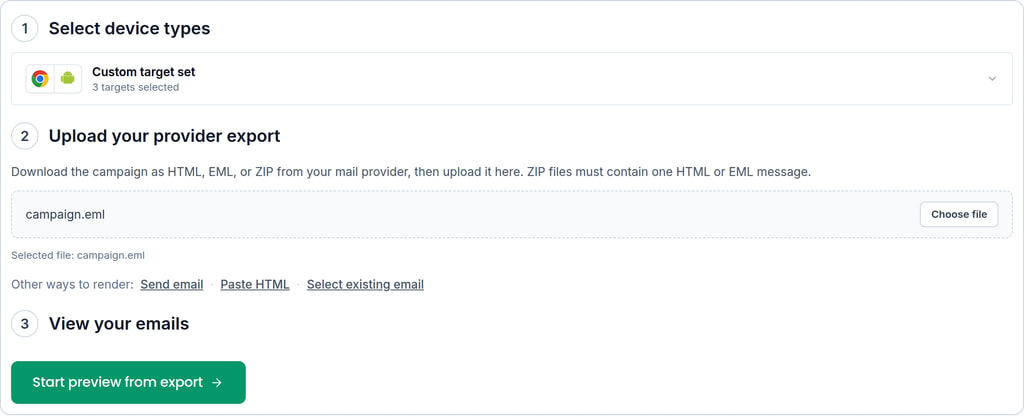
Import an exported email
Use .eml import when you have a complete exported message from a campaign tool, desktop mail client, customer report, or fixture. Importing the full message keeps headers, body parts, and attachments together for the render.
Send to a device render email address
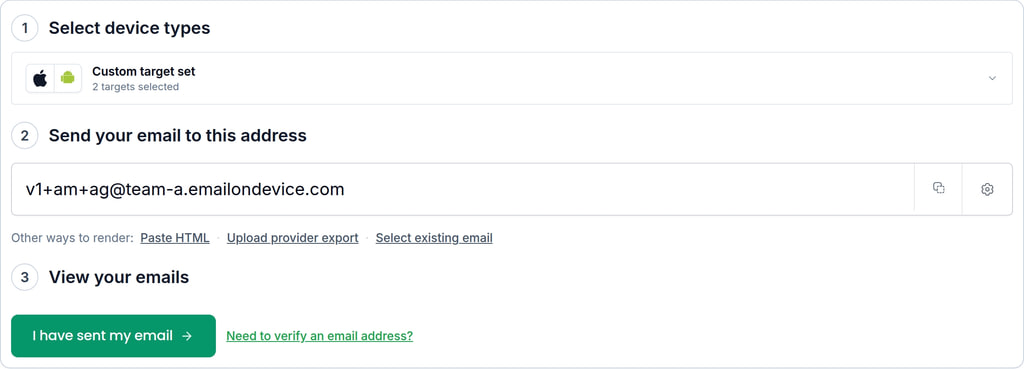
A render email address lets any tool start a preview by sending email. MailSlurp can assign an address under emailondevice.com, then your campaign tool, ESP, test suite, or mail client sends the message to that address.
The address has three parts:
marketing@acme.emailondevice.com
|-------| |--| |-----------------|
 profile  subdomain  render domain
- The local part is the profile, such as
marketing,qa, orall. - The subdomain is assigned to your account and can be changed to match your organization if the name is available.
- The domain is
emailondevice.com.
Profiles let you create named target sets for projects, teams, or campaigns. Sending to any local part at your subdomain still starts a render using the default target set, so a missed or new profile name does not block the review.
Use the API
Use the API when device previews are part of an automated workflow. The dashboard is best for manual review, while the API is best for CI, visual regression checks, release gates, stored evidence, and repeatable QA. See Developers for SDK and endpoint examples.
Configure render targets
A render target is one email-client context, such as Gmail in Chrome, Outlook on Windows, Apple Mail on macOS, Gmail on Android, or Mail on iPhone. Each target represents a place where a real recipient might read the message.
Expand Select device types to choose targets individually. The category filters let you narrow the list to desktop, mobile, tablet, or dark-mode clients. Select or deselect the currently shown targets, then clear the filters to review the complete selection. New or uncategorized targets remain available rather than disappearing from the selector.
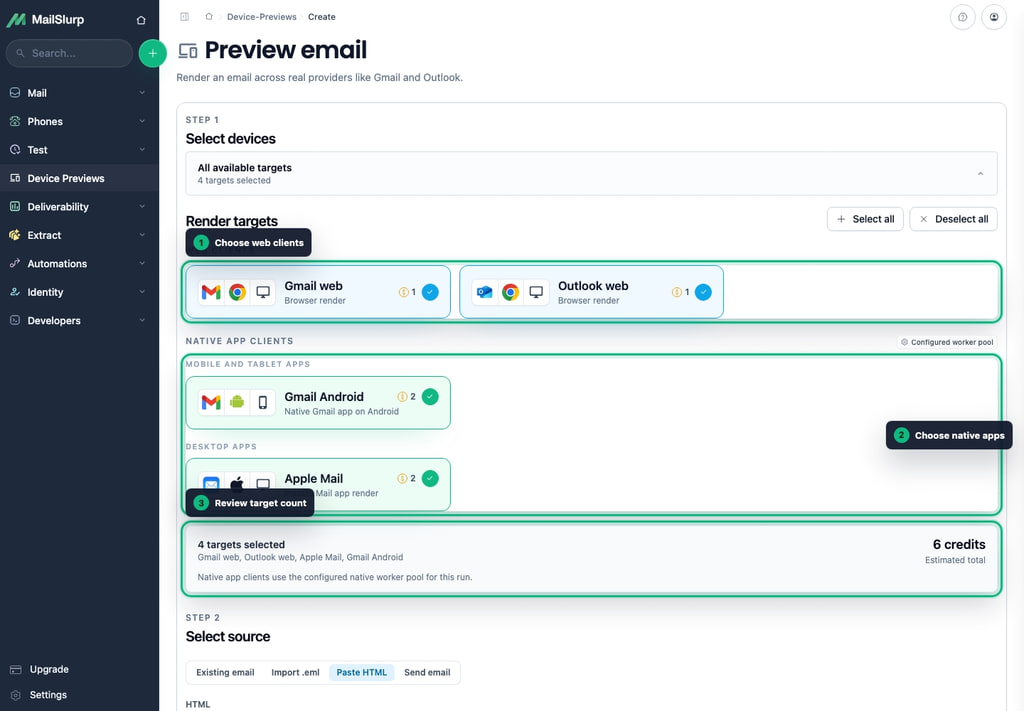
Choose the smallest set that represents your audience for routine checks, then add more clients for release-critical or cross-client investigations.
Save a reusable target profile
Profiles keep a named set of targets for a campaign, product, or team:
- Open Device preview profiles from the render-address settings.
- Create a profile and give it a display name.
- Set its local part, such as
marketing,qa, ortransactional. - Choose the clients that belong to the profile and save it.
- Select the profile in the dashboard or send email to its render address.
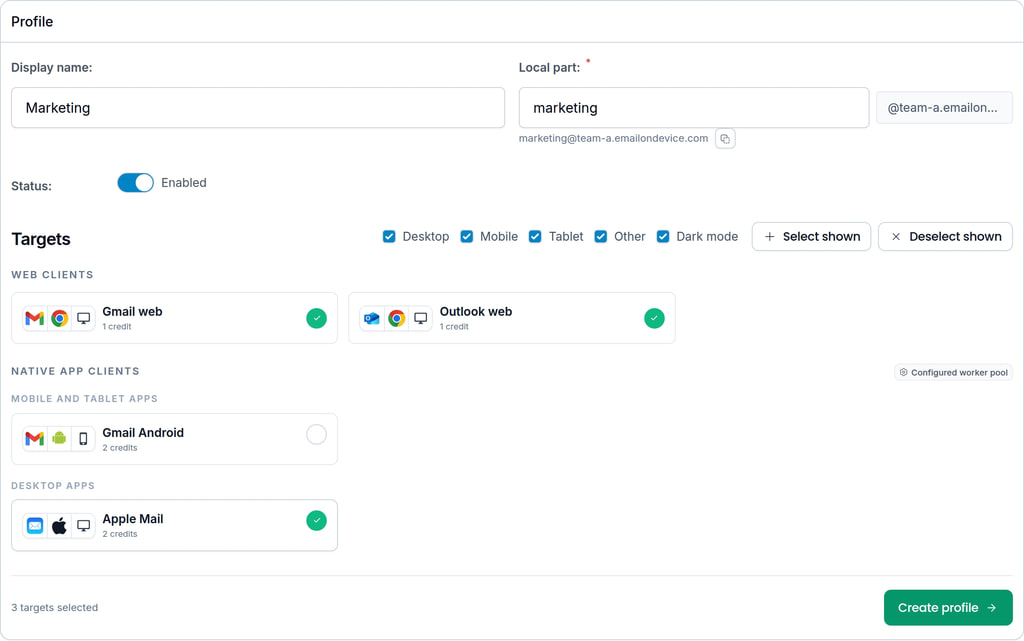
The local part becomes the first segment of the profile render address. This lets an ESP or campaign tool start the correct target set simply by sending to the matching address.
Review the results
The result page shows the source email, run status, completion percentage, automatic email and domain checks, and each target screenshot. Use the status filters to focus on completed, failed, or still-running targets, and switch between grid and masonry layouts when one view makes comparison easier.
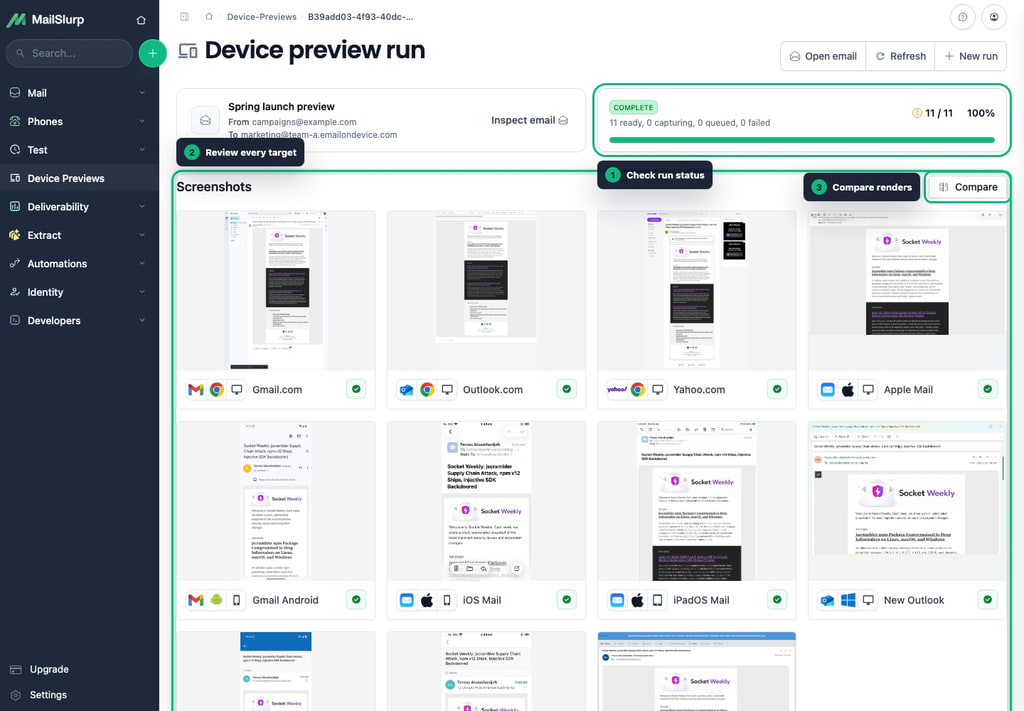
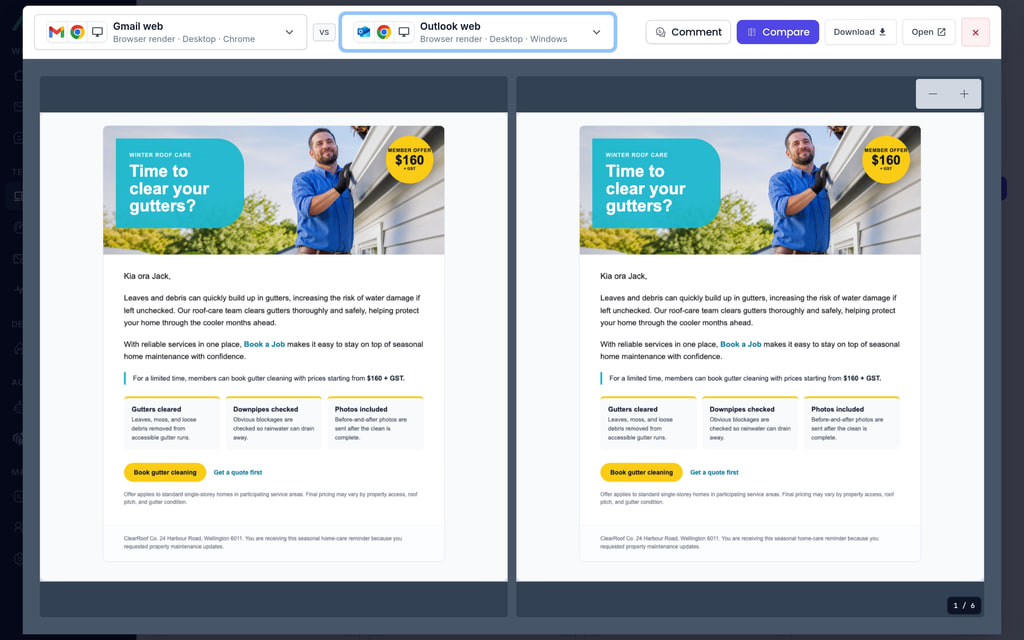
Open any screenshot to inspect the full client render. From the viewer you can move between targets, add a target-specific comment, compare another client beside it, download the image, or open the original image in a separate tab.
Compare renders
Use comparisons when a layout problem only appears in one client or when a new version needs approval against a previous run.
Compare two clients in the same run
Open a screenshot and switch on compare mode. Select a second target to view the current client beside another client, such as Gmail beside Yahoo, Outlook beside Apple Mail, or mobile beside desktop.
Compare with a previous run
MailSlurp stores run history, so you can choose an earlier render as a baseline and compare the runs side by side. This is useful after template edits, copy changes, image swaps, footer changes, or release approvals.
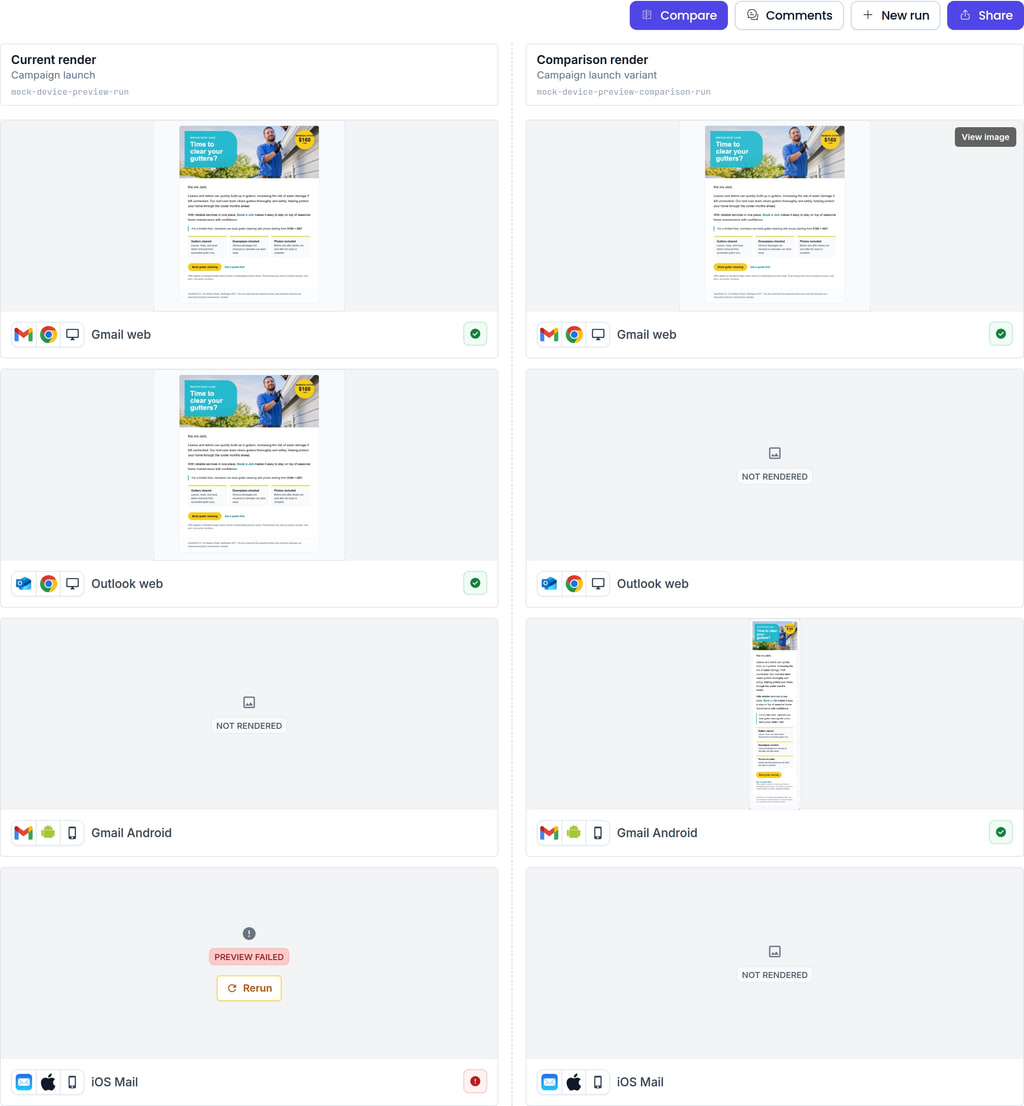
For manual review, compare the screenshots and focus on layout shifts, missing images, CTA visibility, dark or light mode changes, and client-specific spacing differences. For automated review, store the approved baseline run ID and compare image files in your visual regression workflow.
Add comments and resolve review notes
Use comments to keep review decisions with the render evidence instead of splitting feedback across chat threads:
- Add a run comment for feedback that applies to the whole email.
- Add a target comment from an individual screenshot for a client-specific issue.
- Resolve a comment when the change has been accepted or fixed.
- Reopen a resolved comment if the issue returns in a later review.
Comments identify their target where applicable, making it clear whether feedback concerns the entire campaign or one client render.
Share results
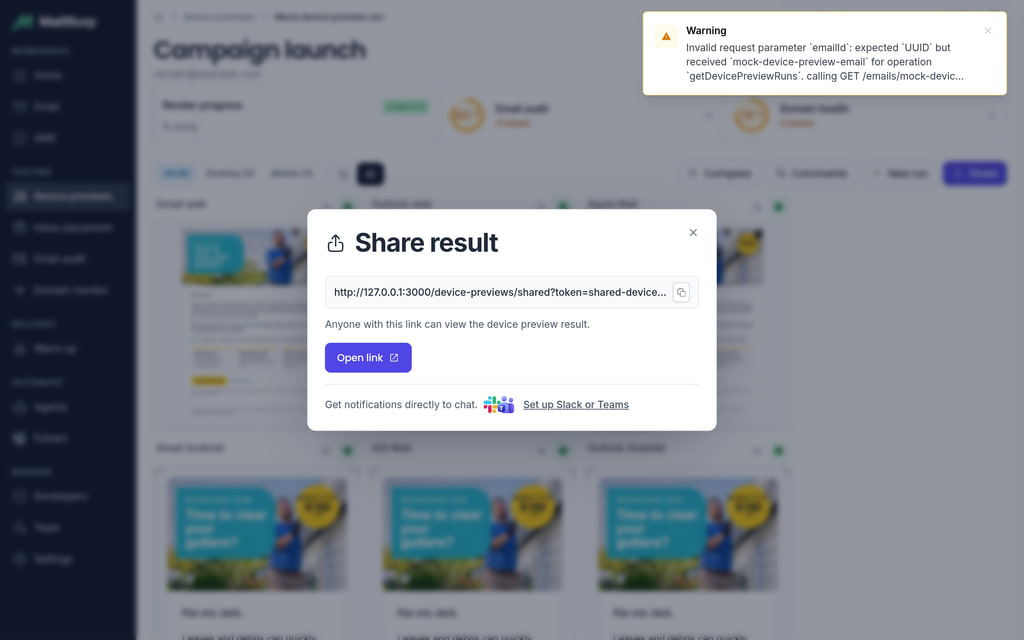
Create a share link when reviewers need to open the result without an API key. Shared results are useful for marketing, product, legal, support, client, or release approval because everyone sees the same screenshot evidence.
- Open the completed run and choose Share.
- Create a public result link.
- Copy the link, open it for inspection, or send it through Slack or Microsoft Teams.
- Revoke the share link when external access is no longer needed.
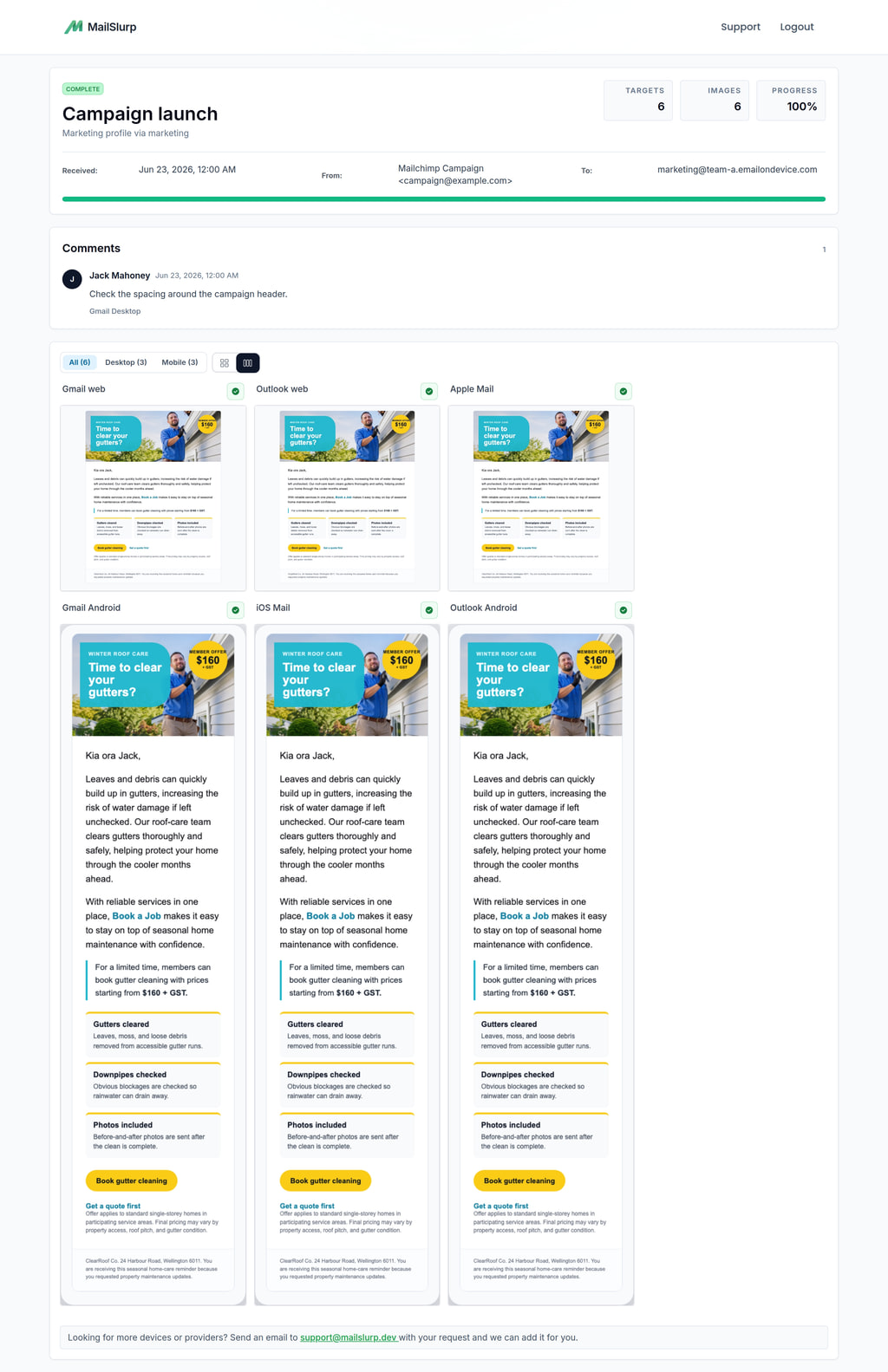
The public result page shows the run state, message details, comments, and available screenshots without exposing the reviewer's MailSlurp account.
Notify reviewers in Slack or Microsoft Teams
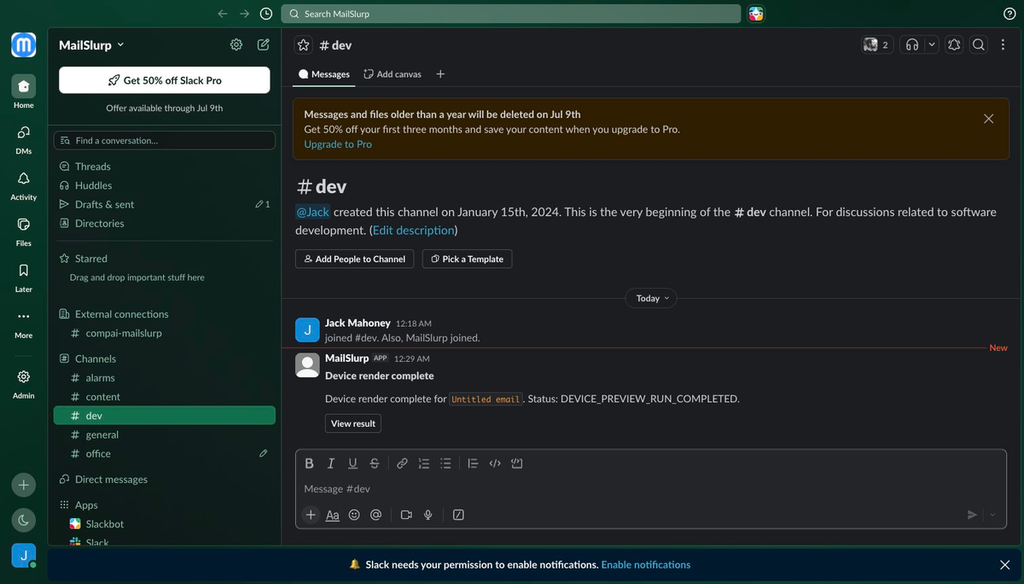
Device preview notifications can send Slack or Microsoft Teams messages when a run starts, completes, fails, or partially completes. Completion messages can include a link to the shareable result page so reviewers can open the screenshots from the channel where approval already happens.
Open Device preview notifications in the MailSlurp dashboard to connect Slack or Microsoft Teams, choose the channel or chat destination, create a rule, and send a test notification.
Slack render notifications
Use Slack when render reviews happen in a Slack channel.
- Open Configure Slack.
- Approve the MailSlurp Notifications app in Slack.
- Return to MailSlurp, load channels, and add the channel to notify.
- Create a notification rule and send a test notification.
Microsoft Teams render notifications
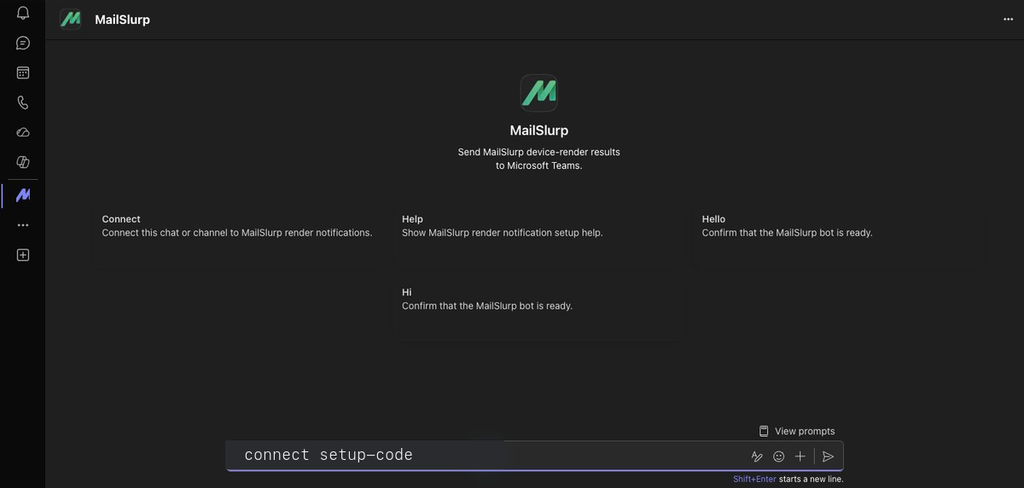
Use Microsoft Teams when render reviews happen in a Teams chat or channel.
- Open Configure Teams.
- Sign in with a Microsoft work or school account if Teams asks.
- Press Send on the prefilled MailSlurp connect message in Teams.
- Return to MailSlurp, wait for confirmation, then create a notification rule and send a test notification.
Go beyond rendering: links, images, and sender health
Device previews answer "how does the email look?" Pair them with MailSlurp health checks when you also need to know whether the message is safe to send and whether the sending domain is healthy.
Check email health with Email Audit
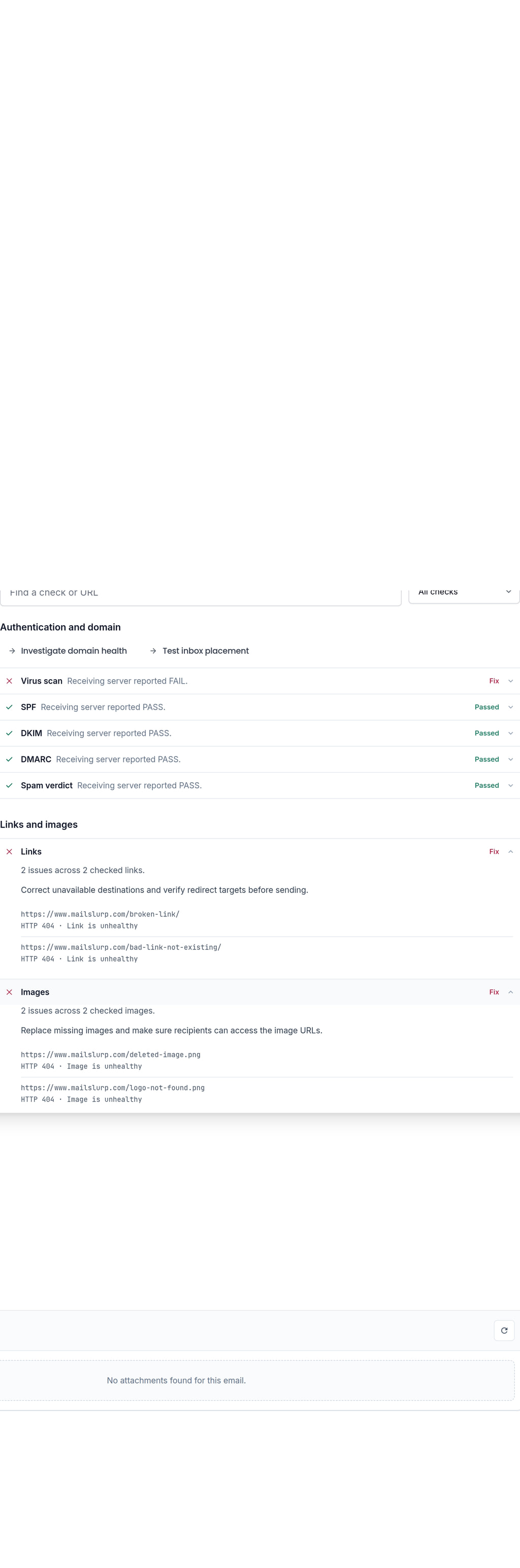
Email Audit checks the message itself. Use it after or alongside a device preview to find missing links, broken images, HTML issues, accessibility and client-support risks, spam/reputation signals, and content problems that a screenshot alone might not show.
Monitor sender domain health with Domain Monitor
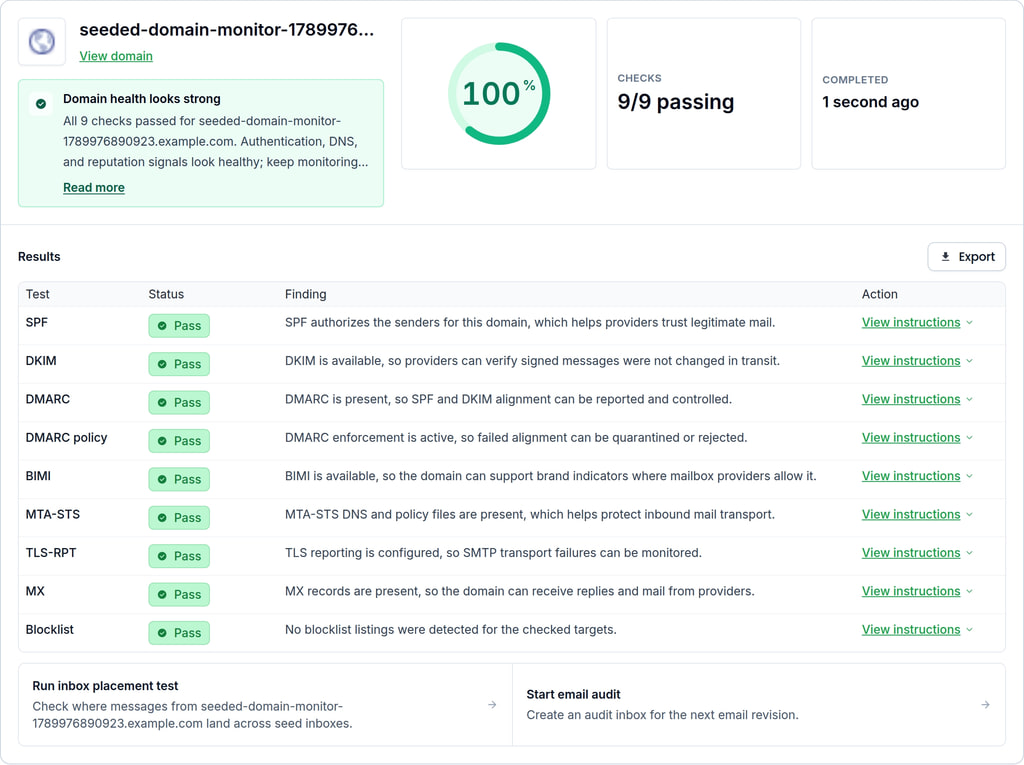
Domain Monitor watches sender-domain health over time. Use it to monitor SPF, DKIM, DMARC, MX, TLS reporting, MTA-STS, BIMI, and blocklist signals so a good-looking email is also sent from a healthy domain.
What to review before sending
Focus on the details that break real launches:
- Hero image, headline, and primary CTA visibility.
- Image loading, image scaling, and responsive spacing.
- Mobile tap targets and desktop layout width.
- Font fallback, typography, and line-height differences.
- Footer, unsubscribe, legal, and required content.
- Dark or light client behavior when it matters to your audience.
- Broken links, broken images, and sender-domain health through Email Audit and Domain Monitor.
Developers
The dashboard gives teams a visual review workflow. The API gives implementation teams the same device preview system for CI, release gates, fixtures, internal dashboards, approval evidence, and production QA.
Core API objects
The API works around a few core objects:
| Object | What it means |
|---|---|
| Native target | A concrete email client and platform, such as ios_mail_physical_device or gmail_android_emulator. Use nativeTargets; the older providers field is deprecated. |
| Preview run | A render job for one email, raw MIME import, HTML import, or render-address submission. |
| Result | The completed run details, target states, and screenshot records. |
| Screenshot | A rendered image for one target. Screenshots can be downloaded through authenticated or shared URLs. |
| Share link | A public tokenized result view that lets reviewers open screenshots without an API key. |
| Render email address | A temporary address that starts a render when an email is sent to it. |
Developer render workflows
| If you have | Use this flow | Why |
|---|---|---|
| A received or sent MailSlurp email | Create a run from the stored emailId |
Best for tests, CI, and email QA already using MailSlurp inboxes. |
A campaign export or .eml fixture |
Import the MIME or upload the .eml file |
Preserves the real headers, body parts, and attachments from an external tool. |
| A template body before it has been sent | Create a run from raw HTML | Fastest way to preview template markup before a full email pipeline exists. |
| A campaign tool, ESP, or manual sender | Send the email to a render address | Lets non-code tools trigger a render by sending email. |
| A one-off manual review | Use the dashboard | Useful for stakeholders who need to inspect screenshots without writing code. |
SDK setup
Create the MailSlurp client once and call device preview operations through mailslurp.devicePreviewsController.
// Read the API key from the environment so examples can run locally and in CI.
const apiKey = process.env.MAILSLURP_API_KEY || process.env.API_KEY;

// Device render methods live on mailslurp.devicePreviewsController.
const mailslurp = new MailSlurp({ apiKey });
Choose native device targets
List device preview targets before creating a run. Use GET /device-preview-targets for the stable catalog of visible native targets. This catalog route is intended for documentation, UI target pickers, and simple runtime discovery, so call it directly with fetch instead of looking for an SDK method.
// The catalog endpoint is public and does not require an API key.
// Use it to build target selectors without tying the list to worker availability.
const response = await fetch("https://api.mailslurp.com/device-preview-targets");

if (!response.ok) {
  throw new Error(`Could not load device preview targets: ${response.status}`);
}

const targetCatalog = await response.json();
console.log(targetCatalog);
// Rough shape:
// {
//   targets: [
//     {
//       target: "ios_mail_physical_device",
//       client: "Apple Mail",
//       platform: "iOS",
//       formFactor: "phone",
//       engine: "native",
//       creditCost: 1,
//       timeoutSeconds: 120,
//       ...
//     }
//   ]
// }
Use the availability endpoint only when an authenticated workflow also needs current worker health, queue, or status details.
// List native device targets and their current availability before creating a run.
const nativeTargetAvailability =
  await mailslurp.devicePreviewsController.getDevicePreviewNativeTargetAvailability();

console.log(nativeTargetAvailability);
// Rough shape:
// {
//   enabled: true,
//   heartbeatOfflineAfterSeconds: 60,
//   targets: [
//     { target: "ios_mail_physical_device", status: "AVAILABLE", enabled: true, ... }
//   ]
// }
/emails/device-previews/native-targets/availability
Get native device preview target availability
Returns live native device preview target availability for authenticated API clients, including worker health, queue, timeout, and status fields. Use `/device-preview-targets` when you need the stable catalog without transient availability data.
Request, parameters, and responses
Responses
| Status | Schema | Description |
|---|---|---|
200 | DevicePreviewNativeTargetAvailabilityListDto | OK |
HTTP and SDK snippets
HTTP
GET /emails/device-previews/native-targets/availability HTTP/1.1
Host: api.mailslurp.com
x-api-key: YOUR_API_KEY
Accept: application/json
cURL
curl -X GET "https://api.mailslurp.com/emails/device-previews/native-targets/availability" \
  -H "x-api-key: YOUR_API_KEY" \
  -H "Accept: application/json"
JavaScript SDK
import { Configuration, DevicePreviewsControllerApi } from "mailslurp-client";

const config = new Configuration({ apiKey: "YOUR_API_KEY" });
const devicePreviewsController = new DevicePreviewsControllerApi(config);

const result = await devicePreviewsController.getDevicePreviewNativeTargetAvailability();
Python SDK
import mailslurp_client
from mailslurp_client.api.device_previews_controller_api import DevicePreviewsControllerApi

configuration = mailslurp_client.Configuration()
configuration.api_key["x-api-key"] = "YOUR_API_KEY"

with mailslurp_client.ApiClient(configuration) as api_client:
    devicePreviewsController = DevicePreviewsControllerApi(api_client)
    result = devicePreviewsController.get_device_preview_native_target_availability()
For examples and quick tests, pick one known native target. Production code can present the catalog to users or store a small target set for each workflow.
// See /docs/device-previews/ for the current device list.
const nativeTarget = "ios_mail_physical_device";

// Use one native target to keep this example focused and quick to run.
const renderOptions = {
  nativeTargets: [nativeTarget],
};
Use target IDs exactly as returned by the catalog or availability endpoint. Avoid legacy provider names; a provider can map to more than one native target and no longer describes the render surface precisely enough.
If a request includes an unknown native target, MailSlurp rejects the run request with a client error. Use the stable catalog when building forms or saved target sets, and treat availability as a live health signal rather than the source of truth for what MailSlurp supports.
Available render targets
Use the render target catalog to choose the email clients and device contexts that should be included in a device preview run. The table below is rendered at build time and also tries to refresh from /device-preview-targets in the browser. If the live catalog request fails, the static catalog remains visible.
Device preview target catalog
Current native render targets for email client previews. The static table is refreshed in the browser when the live catalog endpoint is reachable.
| Target | Client | Platform | Surface | Appearance | Timeout | Credits |
|---|---|---|---|---|---|---|
| apple_mail_macos | Apple Mail | macOSdesktop | native app | light | 120s | 1 |
| gmail_android_emulator | Gmail | Androidmobile tablet | native app | light | 480s | 1 |
| gmail_android_emulator_dark | Gmail | Androidmobile tablet | native app | dark | 480s | 1 |
| gmail_chromium_web_dark | Gmail | Chromiumweb | webmail | dark | 300s | 1 |
| gmail_ios_physical_device | Gmail | iOSmobile tablet | native app | light | 180s | 1 |
| gmail_chromium_web | Gmail Web | Chromiumweb | webmail | light | 300s | 1 |
| ios_mail_physical_device | iOS Mail | iOSmobile tablet | native app | light | 180s | 1 |
| ipados_mail_physical_device | iPadOS Mail | iPadOSmobile tablet | native app | light | 480s | 1 |
| outlook_new_windows | New Outlook | Windowsdesktop | native app | light | 150s | 1 |
| outlook_android_emulator | Outlook | Androidmobile tablet | native app | light | 480s | 1 |
| outlook_android_emulator_dark | Outlook | Androidmobile tablet | native app | dark | 480s | 1 |
| outlook_classic_windows | Outlook Classic | Windowsdesktop | native app | light | 150s | 1 |
| outlook_ios_physical_device | Outlook | iOSmobile tablet | native app | light | 180s | 1 |
| outlook_chromium_web | Outlook Web | Chromiumweb | webmail | light | 300s | 1 |
| yahoo_chromium_web | Yahoo Mail | Chromiumweb | webmail | light | 300s | 1 |
Create runs from stored email
Use this path when the message already exists in MailSlurp. It is the most common automation pattern for tests and CI: create or receive the email, store the emailId, and then render that email on the selected native targets.
// Create a temporary inbox and send it HTML so there is a stored email to render.
const existingInbox = await mailslurp.createInboxWithOptions({
  expiresIn: 300_000,
  name: "device-render-existing-email",
});

await mailslurp.sendEmail(existingInbox.id, {
  to: [existingInbox.emailAddress],
  subject: "Device render from an existing email",
  body: `
    <!doctype html>
    <html>
      <body>
        <h1>Device render from an existing email</h1>
        <p>This email was sent to a MailSlurp inbox first.</p>
      </body>
    </html>
  `,
  isHTML: true,
});

const existingEmail = await mailslurp.waitForLatestEmail(existingInbox.id, 60_000);

// Render the stored email by passing its emailId and native targets.
const existingEmailRun = await mailslurp.devicePreviewsController.createDevicePreviewRun({
  emailId: existingEmail.id,
  createDevicePreviewOptions: {
    nativeTargets: ["ios_mail_physical_device"],
  },
});
/emails/{emailId}/device-previews
Create a new device preview run for an email
Request, parameters, and responses
Path parameters
| Name | Type | Required | Description |
|---|---|---|---|
emailId | string:uuid | Yes |
Request body
| Field | Type | Required | Description |
|---|---|---|---|
nativeTargets | string[] | No | Optional native mail-client target keys to request for rendering. Null leaves native target selection to ESP configuration. Values are forwarded to ESP so newly deployed ESP targets can be used before this API's enum list is updated. |
{
  "nativeTargets": [
    "apple_mail_macos"
  ]
}
Responses
| Status | Schema | Description |
|---|---|---|
200 | CreateDevicePreviewRunResult | OK |
HTTP and SDK snippets
HTTP
POST /emails/00000000-0000-4000-8000-000000000000/device-previews HTTP/1.1
Host: api.mailslurp.com
x-api-key: YOUR_API_KEY
Accept: application/json
Content-Type: application/json

{
  "nativeTargets": [
    "apple_mail_macos"
  ]
}
cURL
curl -X POST "https://api.mailslurp.com/emails/00000000-0000-4000-8000-000000000000/device-previews" \
  -H "x-api-key: YOUR_API_KEY" \
  -H "Accept: application/json" \
  -H "Content-Type: application/json" \
  --data '{"nativeTargets":["apple_mail_macos"]}'
JavaScript SDK
import { Configuration, DevicePreviewsControllerApi } from "mailslurp-client";

const config = new Configuration({ apiKey: "YOUR_API_KEY" });
const devicePreviewsController = new DevicePreviewsControllerApi(config);
const request = {
  "emailId": "00000000-0000-4000-8000-000000000000",
  "createDevicePreviewOptions": {
    "nativeTargets": [
      "apple_mail_macos"
    ]
  }
};

const result = await devicePreviewsController.createDevicePreviewRun(request);
Python SDK
import mailslurp_client
from mailslurp_client.api.device_previews_controller_api import DevicePreviewsControllerApi

configuration = mailslurp_client.Configuration()
configuration.api_key["x-api-key"] = "YOUR_API_KEY"

with mailslurp_client.ApiClient(configuration) as api_client:
    devicePreviewsController = DevicePreviewsControllerApi(api_client)
    create_device_preview_options = {
      "nativeTargets": [
        "apple_mail_macos"
      ]
    }
    result = devicePreviewsController.create_device_preview_run("00000000-0000-4000-8000-000000000000", create_device_preview_options)
If an email might already have an active run, use ensureDevicePreviewRun. It returns the active run when possible and starts a new one only when needed.
// Ensure reuses an active render for the email when possible; otherwise it starts one.
const ensuredExistingEmailRun = await mailslurp.devicePreviewsController.ensureDevicePreviewRun({
  emailId: existingEmail.id,
  createDevicePreviewOptions: {
    nativeTargets: ["ios_mail_physical_device"],
  },
});
/emails/{emailId}/device-previews/latest
Return active run for email or create one when none exists
Request, parameters, and responses
Path parameters
| Name | Type | Required | Description |
|---|---|---|---|
emailId | string:uuid | Yes |
Request body
| Field | Type | Required | Description |
|---|---|---|---|
nativeTargets | string[] | No | Optional native mail-client target keys to request for rendering. Null leaves native target selection to ESP configuration. Values are forwarded to ESP so newly deployed ESP targets can be used before this API's enum list is updated. |
{
  "nativeTargets": [
    "apple_mail_macos"
  ]
}
Responses
| Status | Schema | Description |
|---|---|---|
200 | CreateDevicePreviewRunResult | OK |
HTTP and SDK snippets
HTTP
PUT /emails/00000000-0000-4000-8000-000000000000/device-previews/latest HTTP/1.1
Host: api.mailslurp.com
x-api-key: YOUR_API_KEY
Accept: application/json
Content-Type: application/json

{
  "nativeTargets": [
    "apple_mail_macos"
  ]
}
cURL
curl -X PUT "https://api.mailslurp.com/emails/00000000-0000-4000-8000-000000000000/device-previews/latest" \
  -H "x-api-key: YOUR_API_KEY" \
  -H "Accept: application/json" \
  -H "Content-Type: application/json" \
  --data '{"nativeTargets":["apple_mail_macos"]}'
JavaScript SDK
import { Configuration, DevicePreviewsControllerApi } from "mailslurp-client";

const config = new Configuration({ apiKey: "YOUR_API_KEY" });
const devicePreviewsController = new DevicePreviewsControllerApi(config);
const request = {
  "emailId": "00000000-0000-4000-8000-000000000000",
  "createDevicePreviewOptions": {
    "nativeTargets": [
      "apple_mail_macos"
    ]
  }
};

const result = await devicePreviewsController.ensureDevicePreviewRun(request);
Python SDK
import mailslurp_client
from mailslurp_client.api.device_previews_controller_api import DevicePreviewsControllerApi

configuration = mailslurp_client.Configuration()
configuration.api_key["x-api-key"] = "YOUR_API_KEY"

with mailslurp_client.ApiClient(configuration) as api_client:
    devicePreviewsController = DevicePreviewsControllerApi(api_client)
    create_device_preview_options = {
      "nativeTargets": [
        "apple_mail_macos"
      ]
    }
    result = devicePreviewsController.ensure_device_preview_run("00000000-0000-4000-8000-000000000000", create_device_preview_options)
Create runs from imported email
Imports are useful when the email was produced outside MailSlurp: a campaign platform export, a local build artifact, a customer-supplied .eml, or a fixture generated by a test.
Import into an inbox first
Import the raw RFC822 message into a MailSlurp inbox, then render the imported email by ID. This gives you a durable stored email record as well as the preview run.
// Import a raw RFC822 email into an inbox, then render the imported email.
const importInbox = await mailslurp.createInboxWithOptions({
  expiresIn: 300_000,
  name: "device-render-inbox-import",
});

const importedRawMime = [
  "From: Example Sender <sender@example.test>",
  `To: ${importInbox.emailAddress}`,
  "Subject: Device render from an inbox import",
  `Message-ID: <device-render-inbox-import-${Date.now()}@example.test>`,
  "MIME-Version: 1.0",
  'Content-Type: text/html; charset="UTF-8"',
  "",
  "<!doctype html><html><body><h1>Device render from an inbox import</h1></body></html>",
].join("\r\n");

const importedEmail = await mailslurp.inboxController.importEmailIntoInbox({
  inboxId: importInbox.id,
  importEmailOptions: {
    rawEmailBase64: Buffer.from(importedRawMime, "utf8").toString("base64"),
    externalId: `inbox-import-${Date.now()}`,
    runPipeline: false,
    overrideMessageId: true,
  },
});

const inboxImportRun = await mailslurp.devicePreviewsController.createDevicePreviewRun({
  emailId: importedEmail.id,
  createDevicePreviewOptions: {
    nativeTargets: ["ios_mail_physical_device"],
  },
});
Import base64 raw MIME directly
Use direct import when you already have the full MIME content and do not need to store it in an inbox first.
// Build a complete RFC822/MIME message and base64 encode it for import.
const rawMimeForBase64Import = [
  "From: Example Sender <sender@example.test>",
  "To: recipient@example.test",
  "Subject: Device render from base64 raw MIME",
  `Message-ID: <device-render-base64-${Date.now()}@example.test>`,
  "MIME-Version: 1.0",
  'Content-Type: text/html; charset="UTF-8"',
  "",
  "<!doctype html><html><body><h1>Device render from base64 raw MIME</h1></body></html>",
].join("\r\n");

const rawMimeImportRun = await mailslurp.devicePreviewsController.createDevicePreviewRunFromImport({
  createDevicePreviewImportOptions: {
    rawEmailBase64: Buffer.from(rawMimeForBase64Import, "utf8").toString("base64"),
    sourceAlias: "raw-mime-base64-example",
    externalId: `raw-mime-import-${Date.now()}`,
    options: {
      nativeTargets: ["ios_mail_physical_device"],
    },
  },
});
/emails/device-previews/import
Create a device preview run from imported raw MIME
Request, parameters, and responses
Request body (required)
| Field | Type | Required | Description |
|---|---|---|---|
rawEmailBase64 | string | Yes | Base64 encoded RFC822/MIME email contents. This should be the full raw email including headers and body, such as the bytes from an `.eml` file. |
sourceAlias | string | No | Optional source label to attach to the preview run. |
externalId | string | No | Optional external source ID for correlating this import with another system. |
options | CreateDevicePreviewOptions | No |
{
  "rawEmailBase64": "user@example.com",
  "sourceAlias": "value",
  "externalId": "00000000-0000-4000-8000-000000000000",
  "options": {
    "nativeTargets": [
      "apple_mail_macos"
    ]
  }
}
Responses
| Status | Schema | Description |
|---|---|---|
200 | CreateDevicePreviewRunResult | OK |
HTTP and SDK snippets
HTTP
POST /emails/device-previews/import HTTP/1.1
Host: api.mailslurp.com
x-api-key: YOUR_API_KEY
Accept: application/json
Content-Type: application/json

{
  "rawEmailBase64": "user@example.com",
  "sourceAlias": "value",
  "externalId": "00000000-0000-4000-8000-000000000000",
  "options": {
    "nativeTargets": [
      "apple_mail_macos"
    ]
  }
}
cURL
curl -X POST "https://api.mailslurp.com/emails/device-previews/import" \
  -H "x-api-key: YOUR_API_KEY" \
  -H "Accept: application/json" \
  -H "Content-Type: application/json" \
  --data '{"rawEmailBase64":"user@example.com","sourceAlias":"value","externalId":"00000000-0000-4000-8000-000000000000","options":{"nativeTargets":["apple_mail_macos"]}}'
JavaScript SDK
import { Configuration, DevicePreviewsControllerApi } from "mailslurp-client";

const config = new Configuration({ apiKey: "YOUR_API_KEY" });
const devicePreviewsController = new DevicePreviewsControllerApi(config);
const request = {
  "createDevicePreviewImportOptions": {
    "rawEmailBase64": "user@example.com",
    "sourceAlias": "value",
    "externalId": "00000000-0000-4000-8000-000000000000",
    "options": {
      "nativeTargets": [
        "apple_mail_macos"
      ]
    }
  }
};

const result = await devicePreviewsController.createDevicePreviewRunFromImport(request);
Python SDK
import mailslurp_client
from mailslurp_client.api.device_previews_controller_api import DevicePreviewsControllerApi

configuration = mailslurp_client.Configuration()
configuration.api_key["x-api-key"] = "YOUR_API_KEY"

with mailslurp_client.ApiClient(configuration) as api_client:
    devicePreviewsController = DevicePreviewsControllerApi(api_client)
    create_device_preview_import_options = {
      "rawEmailBase64": "user@example.com",
      "sourceAlias": "value",
      "externalId": "00000000-0000-4000-8000-000000000000",
      "options": {
        "nativeTargets": [
          "apple_mail_macos"
        ]
      }
    }
    result = devicePreviewsController.create_device_preview_run_from_import(create_device_preview_import_options)
Upload an EML file
Use multipart import for .eml files from email clients, campaign tools, or fixtures on disk.
// Upload an .eml file as multipart/form-data and create a render from it.
const emlUploadMime = [
  "From: Example Sender <sender@example.test>",
  "To: recipient@example.test",
  "Subject: Device render from EML upload",
  `Message-ID: <device-render-eml-upload-${Date.now()}@example.test>`,
  "MIME-Version: 1.0",
  'Content-Type: text/html; charset="UTF-8"',
  "",
  "<!doctype html><html><body><h1>Device render from an EML upload</h1></body></html>",
].join("\r\n");

const emlUploadFile = new Blob([emlUploadMime], { type: "message/rfc822" });
emlUploadFile.name = "device-render-example.eml";

const emlUploadRun = await mailslurp.devicePreviewsController.createDevicePreviewRunFromMultipartImport({
  file: emlUploadFile,
  sourceAlias: "eml-upload-example",
  externalId: `eml-upload-${Date.now()}`,
  nativeTargets: ["ios_mail_physical_device"],
});
/emails/device-previews/import/multipart
Create a device preview run from multipart EML upload
Request, parameters, and responses
Query parameters
| Name | Type | Required | Description |
|---|---|---|---|
sourceAlias | string | No | |
externalId | string | No | |
nativeTargets | string[] | No |
Request body
Responses
| Status | Schema | Description |
|---|---|---|
200 | CreateDevicePreviewRunResult | OK |
HTTP and SDK snippets
HTTP
POST /emails/device-previews/import/multipart?sourceAlias=value&externalId=00000000-0000-4000-8000-000000000000&nativeTargets=value HTTP/1.1
Host: api.mailslurp.com
x-api-key: YOUR_API_KEY
Accept: application/json
cURL
curl -X POST "https://api.mailslurp.com/emails/device-previews/import/multipart?sourceAlias=value&externalId=00000000-0000-4000-8000-000000000000&nativeTargets=value" \
  -H "x-api-key: YOUR_API_KEY" \
  -H "Accept: application/json"
JavaScript SDK
import { Configuration, DevicePreviewsControllerApi } from "mailslurp-client";

const config = new Configuration({ apiKey: "YOUR_API_KEY" });
const devicePreviewsController = new DevicePreviewsControllerApi(config);
const request = {
  "sourceAlias": "value",
  "externalId": "00000000-0000-4000-8000-000000000000",
  "nativeTargets": [
    "value"
  ]
};

const result = await devicePreviewsController.createDevicePreviewRunFromMultipartImport(request);
Python SDK
import mailslurp_client
from mailslurp_client.api.device_previews_controller_api import DevicePreviewsControllerApi

configuration = mailslurp_client.Configuration()
configuration.api_key["x-api-key"] = "YOUR_API_KEY"

with mailslurp_client.ApiClient(configuration) as api_client:
    devicePreviewsController = DevicePreviewsControllerApi(api_client)
    result = devicePreviewsController.create_device_preview_run_from_multipart_import(source_alias="value", external_id="00000000-0000-4000-8000-000000000000", native_targets=["value"])
Send raw MIME bytes
Use raw import when the request body should be the RFC822 bytes themselves.
// Send RFC822 bytes directly as the request body for a raw MIME import.
const rawMimeBytes = [
  "From: Example Sender <sender@example.test>",
  "To: recipient@example.test",
  "Subject: Device render from raw MIME bytes",
  `Message-ID: <device-render-raw-bytes-${Date.now()}@example.test>`,
  "MIME-Version: 1.0",
  'Content-Type: text/html; charset="UTF-8"',
  "",
  "<!doctype html><html><body><h1>Device render from raw MIME bytes</h1></body></html>",
].join("\r\n");

const rawMimeBytesFile = new Blob([rawMimeBytes], { type: "message/rfc822" });
rawMimeBytesFile.name = "device-render-raw-bytes.eml";

// The second argument is RequestInit; its body sends the raw MIME bytes.
const rawMimeBytesRun = await mailslurp.devicePreviewsController.createDevicePreviewRunFromRawImport(
  {
    sourceAlias: "raw-mime-bytes-example",
    externalId: `raw-mime-bytes-${Date.now()}`,
    nativeTargets: ["ios_mail_physical_device"],
  },
  {
    body: rawMimeBytesFile,
  },
);
/emails/device-previews/import/raw
Create a device preview run from raw MIME bytes
Request, parameters, and responses
Query parameters
| Name | Type | Required | Description |
|---|---|---|---|
sourceAlias | string | No | |
externalId | string | No | |
nativeTargets | string[] | No |
Responses
| Status | Schema | Description |
|---|---|---|
200 | CreateDevicePreviewRunResult | OK |
HTTP and SDK snippets
HTTP
POST /emails/device-previews/import/raw?sourceAlias=value&externalId=00000000-0000-4000-8000-000000000000&nativeTargets=value HTTP/1.1
Host: api.mailslurp.com
x-api-key: YOUR_API_KEY
Accept: application/json
cURL
curl -X POST "https://api.mailslurp.com/emails/device-previews/import/raw?sourceAlias=value&externalId=00000000-0000-4000-8000-000000000000&nativeTargets=value" \
  -H "x-api-key: YOUR_API_KEY" \
  -H "Accept: application/json"
JavaScript SDK
import { Configuration, DevicePreviewsControllerApi } from "mailslurp-client";

const config = new Configuration({ apiKey: "YOUR_API_KEY" });
const devicePreviewsController = new DevicePreviewsControllerApi(config);
const request = {
  "sourceAlias": "value",
  "externalId": "00000000-0000-4000-8000-000000000000",
  "nativeTargets": [
    "value"
  ]
};

const result = await devicePreviewsController.createDevicePreviewRunFromRawImport(request);
Python SDK
import mailslurp_client
from mailslurp_client.api.device_previews_controller_api import DevicePreviewsControllerApi

configuration = mailslurp_client.Configuration()
configuration.api_key["x-api-key"] = "YOUR_API_KEY"

with mailslurp_client.ApiClient(configuration) as api_client:
    devicePreviewsController = DevicePreviewsControllerApi(api_client)
    result = devicePreviewsController.create_device_preview_run_from_raw_import(source_alias="value", external_id="00000000-0000-4000-8000-000000000000", native_targets=["value"])
Create runs from raw HTML
Raw HTML import is best for template QA before a full email has been sent. Provide a subject, sender, recipient, and HTML body so the renderer can build a realistic message envelope.
// Send HTML directly to the device preview API without first storing an email.
const htmlImportRun = await mailslurp.devicePreviewsController.createDevicePreviewRunFromHtmlImport({
  createDevicePreviewHtmlImportOptions: {
    html: `
      <!doctype html>
      <html>
        <body>
          <h1>Device render from raw HTML</h1>
          <p>This render was created directly from an HTML string.</p>
        </body>
      </html>
    `,
    subject: "Device render from raw HTML",
    from: "Example Sender <sender@example.test>",
    to: "recipient@example.test",
    sourceAlias: "raw-html-example",
    externalId: `html-import-${Date.now()}`,
    options: {
      nativeTargets: ["ios_mail_physical_device"],
    },
  },
});
The JavaScript SDK exposes this as createDevicePreviewRunFromHtmlImport. If your generated client does not include the method yet, upgrade the SDK before using HTML imports from code.
/emails/device-previews/import/html
Create a device preview run from HTML
Request, parameters, and responses
Request body (required)
| Field | Type | Required | Description |
|---|---|---|---|
html | string | Yes | HTML body to wrap into a minimal RFC822/MIME message before creating the device preview run. |
subject | string | No | Optional email subject for the generated MIME. |
from | string | No | Optional From address for the generated MIME. |
to | string | No | Optional To address for the generated MIME. |
sourceAlias | string | No | Optional source label to attach to the preview run. |
externalId | string | No | Optional external source ID for correlating this import with another system. |
options | CreateDevicePreviewOptions | No |
{
  "html": "value",
  "subject": "Hello from MailSlurp",
  "from": "user@example.com",
  "to": "user@example.com",
  "sourceAlias": "value",
  "externalId": "00000000-0000-4000-8000-000000000000"
}
Responses
| Status | Schema | Description |
|---|---|---|
200 | CreateDevicePreviewRunResult | OK |
HTTP and SDK snippets
HTTP
POST /emails/device-previews/import/html HTTP/1.1
Host: api.mailslurp.com
x-api-key: YOUR_API_KEY
Accept: application/json
Content-Type: application/json

{
  "html": "value",
  "subject": "Hello from MailSlurp",
  "from": "user@example.com",
  "to": "user@example.com",
  "sourceAlias": "value",
  "externalId": "00000000-0000-4000-8000-000000000000"
}
cURL
curl -X POST "https://api.mailslurp.com/emails/device-previews/import/html" \
  -H "x-api-key: YOUR_API_KEY" \
  -H "Accept: application/json" \
  -H "Content-Type: application/json" \
  --data '{"html":"value","subject":"Hello from MailSlurp","from":"user@example.com","to":"user@example.com","sourceAlias":"value","externalId":"00000000-0000-4000-8000-000000000000"}'
JavaScript SDK
import { Configuration, DevicePreviewsControllerApi } from "mailslurp-client";

const config = new Configuration({ apiKey: "YOUR_API_KEY" });
const devicePreviewsController = new DevicePreviewsControllerApi(config);
const request = {
  "createDevicePreviewHtmlImportOptions": {
    "html": "value",
    "subject": "Hello from MailSlurp",
    "from": "user@example.com",
    "to": "user@example.com",
    "sourceAlias": "value",
    "externalId": "00000000-0000-4000-8000-000000000000"
  }
};

const result = await devicePreviewsController.createDevicePreviewRunFromHtmlImport(request);
Python SDK
import mailslurp_client
from mailslurp_client.api.device_previews_controller_api import DevicePreviewsControllerApi

configuration = mailslurp_client.Configuration()
configuration.api_key["x-api-key"] = "YOUR_API_KEY"

with mailslurp_client.ApiClient(configuration) as api_client:
    devicePreviewsController = DevicePreviewsControllerApi(api_client)
    create_device_preview_html_import_options = {
      "html": "value",
      "subject": "Hello from MailSlurp",
      "from": "user@example.com",
      "to": "user@example.com",
      "sourceAlias": "value",
      "externalId": "00000000-0000-4000-8000-000000000000"
    }
    result = devicePreviewsController.create_device_preview_run_from_html_import(create_device_preview_html_import_options)
Create runs by sending to a render address
A render email address lets any tool start a render by sending an email. This is useful for campaign platforms, QA handoffs, and non-code approval flows.
First create the temporary render address with the native target options you want:
// Create a temporary render email address. Email sent here starts a render run.
const renderEmailAddress = await mailslurp.devicePreviewsController.createDevicePreviewImportAddress({
  createDevicePreviewIngestAddressOptions: {
    options: {
      nativeTargets: ["ios_mail_physical_device"],
    },
  },
});
/emails/device-previews/import-addresses
Create a temporary email address for device preview import
Request, parameters, and responses
Request body
| Field | Type | Required | Description |
|---|---|---|---|
options | CreateDevicePreviewOptions | No |
{
  "options": {
    "nativeTargets": [
      "apple_mail_macos"
    ]
  }
}
Responses
| Status | Schema | Description |
|---|---|---|
200 | DevicePreviewIngestAddressDto | OK |
HTTP and SDK snippets
HTTP
POST /emails/device-previews/import-addresses HTTP/1.1
Host: api.mailslurp.com
x-api-key: YOUR_API_KEY
Accept: application/json
Content-Type: application/json

{
  "options": {
    "nativeTargets": [
      "apple_mail_macos"
    ]
  }
}
cURL
curl -X POST "https://api.mailslurp.com/emails/device-previews/import-addresses" \
  -H "x-api-key: YOUR_API_KEY" \
  -H "Accept: application/json" \
  -H "Content-Type: application/json" \
  --data '{"options":{"nativeTargets":["apple_mail_macos"]}}'
JavaScript SDK
import { Configuration, DevicePreviewsControllerApi } from "mailslurp-client";

const config = new Configuration({ apiKey: "YOUR_API_KEY" });
const devicePreviewsController = new DevicePreviewsControllerApi(config);
const request = {
  "createDevicePreviewIngestAddressOptions": {
    "options": {
      "nativeTargets": [
        "apple_mail_macos"
      ]
    }
  }
};

const result = await devicePreviewsController.createDevicePreviewImportAddress(request);
Python SDK
import mailslurp_client
from mailslurp_client.api.device_previews_controller_api import DevicePreviewsControllerApi

configuration = mailslurp_client.Configuration()
configuration.api_key["x-api-key"] = "YOUR_API_KEY"

with mailslurp_client.ApiClient(configuration) as api_client:
    devicePreviewsController = DevicePreviewsControllerApi(api_client)
    create_device_preview_ingest_address_options = {
      "options": {
        "nativeTargets": [
          "apple_mail_macos"
        ]
      }
    }
    result = devicePreviewsController.create_device_preview_import_address(create_device_preview_ingest_address_options)
Use the import-address lookup endpoint if you need to confirm the session details after creating the address.
/emails/device-previews/import-addresses/{sessionId}
Get temporary device preview import address status
Request, parameters, and responses
Path parameters
| Name | Type | Required | Description |
|---|---|---|---|
sessionId | string:uuid | Yes |
Responses
| Status | Schema | Description |
|---|---|---|
200 | DevicePreviewIngestAddressDto | OK |
HTTP and SDK snippets
HTTP
GET /emails/device-previews/import-addresses/00000000-0000-4000-8000-000000000000 HTTP/1.1
Host: api.mailslurp.com
x-api-key: YOUR_API_KEY
Accept: application/json
cURL
curl -X GET "https://api.mailslurp.com/emails/device-previews/import-addresses/00000000-0000-4000-8000-000000000000" \
  -H "x-api-key: YOUR_API_KEY" \
  -H "Accept: application/json"
JavaScript SDK
import { Configuration, DevicePreviewsControllerApi } from "mailslurp-client";

const config = new Configuration({ apiKey: "YOUR_API_KEY" });
const devicePreviewsController = new DevicePreviewsControllerApi(config);
const request = {
  "sessionId": "00000000-0000-4000-8000-000000000000"
};

const result = await devicePreviewsController.getDevicePreviewImportAddress(request);
Python SDK
import mailslurp_client
from mailslurp_client.api.device_previews_controller_api import DevicePreviewsControllerApi

configuration = mailslurp_client.Configuration()
configuration.api_key["x-api-key"] = "YOUR_API_KEY"

with mailslurp_client.ApiClient(configuration) as api_client:
    devicePreviewsController = DevicePreviewsControllerApi(api_client)
    result = devicePreviewsController.get_device_preview_import_address("00000000-0000-4000-8000-000000000000")
Then send an email to the address. The example below sends from a MailSlurp HTTP inbox, but the same address can receive from another mail client or campaign system.
// Send HTML from a MailSlurp HTTP inbox to the render address.
const mailSenderInbox = await mailslurp.createInboxWithOptions({
  expiresIn: 300_000,
  name: "device-render-mail-sender",
  inboxType: "HTTP_INBOX",
});

await mailslurp.sendEmail(mailSenderInbox.id, {
  to: [renderEmailAddress.emailAddress],
  subject: "Device render through a render email address",
  body: `
    <!doctype html>
    <html>
      <body>
        <h1>Device render through a render email address</h1>
        <p>MailSlurp creates the render run when this email arrives.</p>
      </body>
    </html>
  `,
  isHTML: true,
});
Use the email-run and email-submission wait endpoints when an automation needs to watch render-address mail arrive.
/emails/device-previews/email-submissions/wait
Wait for received device preview email submissions
Request, parameters, and responses
Query parameters
| Name | Type | Required | Description |
|---|---|---|---|
since | string:date-time | Yes | |
emailDomainId | string:uuid | No | |
profileId | string:uuid | No | |
localPart | string | No | |
limit | integer:int32 | No | |
timeoutMillis | integer:int64 | No | |
pollIntervalMillis | integer:int64 | No |
Responses
| Status | Schema | Description |
|---|---|---|
200 | DevicePreviewEmailSubmissionWaitResult | OK |
HTTP and SDK snippets
HTTP
GET /emails/device-previews/email-submissions/wait?since=value&emailDomainId=00000000-0000-4000-8000-000000000000&profileId=00000000-0000-4000-8000-000000000000 HTTP/1.1
Host: api.mailslurp.com
x-api-key: YOUR_API_KEY
Accept: application/json
cURL
curl -X GET "https://api.mailslurp.com/emails/device-previews/email-submissions/wait?since=value&emailDomainId=00000000-0000-4000-8000-000000000000&profileId=00000000-0000-4000-8000-000000000000" \
  -H "x-api-key: YOUR_API_KEY" \
  -H "Accept: application/json"
JavaScript SDK
import { Configuration, DevicePreviewsControllerApi } from "mailslurp-client";

const config = new Configuration({ apiKey: "YOUR_API_KEY" });
const devicePreviewsController = new DevicePreviewsControllerApi(config);
const request = {
  "since": "value",
  "emailDomainId": "00000000-0000-4000-8000-000000000000",
  "profileId": "00000000-0000-4000-8000-000000000000"
};

const result = await devicePreviewsController.waitForDevicePreviewEmailSubmissions(request);
Python SDK
import mailslurp_client
from mailslurp_client.api.device_previews_controller_api import DevicePreviewsControllerApi

configuration = mailslurp_client.Configuration()
configuration.api_key["x-api-key"] = "YOUR_API_KEY"

with mailslurp_client.ApiClient(configuration) as api_client:
    devicePreviewsController = DevicePreviewsControllerApi(api_client)
result = devicePreviewsController.wait_for_device_preview_email_submissions(since="value", email_domain_id="00000000-0000-4000-8000-000000000000", profile_id="00000000-0000-4000-8000-000000000000")/emails/device-previews/email-runs/wait
Wait for device preview runs created from account email domains
Request, parameters, and responses
Query parameters
| Name | Type | Required | Description |
|---|---|---|---|
since | string:date-time | Yes | |
emailDomainId | string:uuid | No | |
profileId | string:uuid | No | |
localPart | string | No | |
limit | integer:int32 | No | |
timeoutMillis | integer:int64 | No | |
pollIntervalMillis | integer:int64 | No | |
hydrateThumbnail | boolean | No | Hydrate each returned run with a nullable primary screenshot thumbnail URL. |
Responses
| Status | Schema | Description |
|---|---|---|
200 | DevicePreviewIngestRunWaitResult | OK |
HTTP and SDK snippets
HTTP
GET /emails/device-previews/email-runs/wait?since=value&emailDomainId=00000000-0000-4000-8000-000000000000&profileId=00000000-0000-4000-8000-000000000000 HTTP/1.1
Host: api.mailslurp.com
x-api-key: YOUR_API_KEY
Accept: application/json
cURL
curl -X GET "https://api.mailslurp.com/emails/device-previews/email-runs/wait?since=value&emailDomainId=00000000-0000-4000-8000-000000000000&profileId=00000000-0000-4000-8000-000000000000" \
  -H "x-api-key: YOUR_API_KEY" \
  -H "Accept: application/json"
JavaScript SDK
import { Configuration, DevicePreviewsControllerApi } from "mailslurp-client";

const config = new Configuration({ apiKey: "YOUR_API_KEY" });
const devicePreviewsController = new DevicePreviewsControllerApi(config);
const request = {
  "since": "value",
  "emailDomainId": "00000000-0000-4000-8000-000000000000",
  "profileId": "00000000-0000-4000-8000-000000000000"
};

const result = await devicePreviewsController.waitForDevicePreviewEmailRuns(request);
Python SDK
import mailslurp_client
from mailslurp_client.api.device_previews_controller_api import DevicePreviewsControllerApi

configuration = mailslurp_client.Configuration()
configuration.api_key["x-api-key"] = "YOUR_API_KEY"

with mailslurp_client.ApiClient(configuration) as api_client:
    devicePreviewsController = DevicePreviewsControllerApi(api_client)
    result = devicePreviewsController.wait_for_device_preview_email_runs(since="value", email_domain_id="00000000-0000-4000-8000-000000000000", profile_id="00000000-0000-4000-8000-000000000000")
Wait for a run
Render work is asynchronous. Start the run, keep the runId, then poll until the run is complete or partially complete. A partial completion can still contain useful screenshots when one target fails or times out.
// Poll until the run completes or the timeout elapses.
const completed = await mailslurp.devicePreviewsController.waitForDevicePreviewRun({
  runId,
  timeoutMillis: 60_000,
  pollIntervalMillis: 2_000,
});

assert.equal(completed.timedOut, false);
assert.match(completed.run.status, /COMPLETE|PARTIAL_COMPLETE/);
/emails/device-previews/{runId}/wait
Wait for device preview run to complete
Request, parameters, and responses
Path parameters
| Name | Type | Required | Description |
|---|---|---|---|
runId | string:uuid | Yes |
Query parameters
| Name | Type | Required | Description |
|---|---|---|---|
timeoutMillis | integer:int64 | No | |
pollIntervalMillis | integer:int64 | No |
Responses
| Status | Schema | Description |
|---|---|---|
200 | DevicePreviewRunWaitResult | OK |
HTTP and SDK snippets
HTTP
GET /emails/device-previews/00000000-0000-4000-8000-000000000000/wait?timeoutMillis=value&pollIntervalMillis=value HTTP/1.1
Host: api.mailslurp.com
x-api-key: YOUR_API_KEY
Accept: application/json
cURL
curl -X GET "https://api.mailslurp.com/emails/device-previews/00000000-0000-4000-8000-000000000000/wait?timeoutMillis=value&pollIntervalMillis=value" \
  -H "x-api-key: YOUR_API_KEY" \
  -H "Accept: application/json"
JavaScript SDK
import { Configuration, DevicePreviewsControllerApi } from "mailslurp-client";

const config = new Configuration({ apiKey: "YOUR_API_KEY" });
const devicePreviewsController = new DevicePreviewsControllerApi(config);
const request = {
  "runId": "00000000-0000-4000-8000-000000000000",
  "timeoutMillis": null,
  "pollIntervalMillis": null
};

const result = await devicePreviewsController.waitForDevicePreviewRun(request);
Python SDK
import mailslurp_client
from mailslurp_client.api.device_previews_controller_api import DevicePreviewsControllerApi

configuration = mailslurp_client.Configuration()
configuration.api_key["x-api-key"] = "YOUR_API_KEY"

with mailslurp_client.ApiClient(configuration) as api_client:
    devicePreviewsController = DevicePreviewsControllerApi(api_client)
result = devicePreviewsController.wait_for_device_preview_run("00000000-0000-4000-8000-000000000000", timeout_millis=NaN, poll_interval_millis=NaN)/emails/device-previews/{runId}
Get device preview run status
Request, parameters, and responses
Path parameters
| Name | Type | Required | Description |
|---|---|---|---|
runId | string:uuid | Yes |
Responses
| Status | Schema | Description |
|---|---|---|
200 | DevicePreviewRunDto | OK |
HTTP and SDK snippets
HTTP
GET /emails/device-previews/00000000-0000-4000-8000-000000000000 HTTP/1.1
Host: api.mailslurp.com
x-api-key: YOUR_API_KEY
Accept: application/json
cURL
curl -X GET "https://api.mailslurp.com/emails/device-previews/00000000-0000-4000-8000-000000000000" \
  -H "x-api-key: YOUR_API_KEY" \
  -H "Accept: application/json"
JavaScript SDK
import { Configuration, DevicePreviewsControllerApi } from "mailslurp-client";

const config = new Configuration({ apiKey: "YOUR_API_KEY" });
const devicePreviewsController = new DevicePreviewsControllerApi(config);
const request = {
  "runId": "00000000-0000-4000-8000-000000000000"
};

const result = await devicePreviewsController.getDevicePreviewRun(request);
Python SDK
import mailslurp_client
from mailslurp_client.api.device_previews_controller_api import DevicePreviewsControllerApi

configuration = mailslurp_client.Configuration()
configuration.api_key["x-api-key"] = "YOUR_API_KEY"

with mailslurp_client.ApiClient(configuration) as api_client:
    devicePreviewsController = DevicePreviewsControllerApi(api_client)
    result = devicePreviewsController.get_device_preview_run("00000000-0000-4000-8000-000000000000")
Handle partial, failed, or unwanted runs
Run status tells you whether the overall preview has finished, but target-level status tells you which clients rendered successfully. A partially completed run can still be useful for review, especially when the important target screenshots are present.
Use these operations when a render needs follow-up:
- Rerun selected native targets when a target failed or the template changed only for a small client set.
- Cancel a run that is no longer needed.
- Delete a run when its screenshots should be removed from account history.
- Send feedback when a target screenshot looks wrong or a device client needs investigation.
/emails/device-previews/{runId}/targets/rerun
Rerun selected failed device preview targets in the same run
Request, parameters, and responses
Path parameters
| Name | Type | Required | Description |
|---|---|---|---|
runId | string:uuid | Yes |
Request body (required)
| Field | Type | Required | Description |
|---|---|---|---|
targetIds | string:uuid[] | Yes | Device preview target IDs to rerun within the existing run. Use target IDs from DevicePreviewRunResultsDto.targets. |
failedOnly | boolean | Yes | When true, only selected targets in failed terminal states are rerun. Defaults to true. |
{
  "targetIds": [
    "00000000-0000-4000-8000-000000000000"
  ],
  "failedOnly": true
}
Responses
| Status | Schema | Description |
|---|---|---|
200 | RerunDevicePreviewTargetsResult | OK |
HTTP and SDK snippets
HTTP
POST /emails/device-previews/00000000-0000-4000-8000-000000000000/targets/rerun HTTP/1.1
Host: api.mailslurp.com
x-api-key: YOUR_API_KEY
Accept: application/json
Content-Type: application/json

{
  "targetIds": [
    "00000000-0000-4000-8000-000000000000"
  ],
  "failedOnly": true
}
cURL
curl -X POST "https://api.mailslurp.com/emails/device-previews/00000000-0000-4000-8000-000000000000/targets/rerun" \
  -H "x-api-key: YOUR_API_KEY" \
  -H "Accept: application/json" \
  -H "Content-Type: application/json" \
  --data '{"targetIds":["00000000-0000-4000-8000-000000000000"],"failedOnly":true}'
JavaScript SDK
import { Configuration, DevicePreviewsControllerApi } from "mailslurp-client";

const config = new Configuration({ apiKey: "YOUR_API_KEY" });
const devicePreviewsController = new DevicePreviewsControllerApi(config);
const request = {
  "runId": "00000000-0000-4000-8000-000000000000",
  "rerunDevicePreviewTargetsOptions": {
    "targetIds": [
      "00000000-0000-4000-8000-000000000000"
    ],
    "failedOnly": true
  }
};

const result = await devicePreviewsController.rerunDevicePreviewTargets(request);
Python SDK
import mailslurp_client
from mailslurp_client.api.device_previews_controller_api import DevicePreviewsControllerApi

configuration = mailslurp_client.Configuration()
configuration.api_key["x-api-key"] = "YOUR_API_KEY"

with mailslurp_client.ApiClient(configuration) as api_client:
    devicePreviewsController = DevicePreviewsControllerApi(api_client)
    rerun_device_preview_targets_options = {
      "targetIds": [
        "00000000-0000-4000-8000-000000000000"
      ],
      "failedOnly": True
    }
result = devicePreviewsController.rerun_device_preview_targets("00000000-0000-4000-8000-000000000000", rerun_device_preview_targets_options)/emails/device-previews/{runId}/cancel
Cancel a running device preview run
Request, parameters, and responses
Path parameters
| Name | Type | Required | Description |
|---|---|---|---|
runId | string:uuid | Yes |
Request body
| Field | Type | Required | Description |
|---|---|---|---|
reason | string | No |
{
  "reason": "value"
}
Responses
| Status | Schema | Description |
|---|---|---|
200 | CancelDevicePreviewRunResult | OK |
HTTP and SDK snippets
HTTP
POST /emails/device-previews/00000000-0000-4000-8000-000000000000/cancel HTTP/1.1
Host: api.mailslurp.com
x-api-key: YOUR_API_KEY
Accept: application/json
Content-Type: application/json

{
  "reason": "value"
}
cURL
curl -X POST "https://api.mailslurp.com/emails/device-previews/00000000-0000-4000-8000-000000000000/cancel" \
  -H "x-api-key: YOUR_API_KEY" \
  -H "Accept: application/json" \
  -H "Content-Type: application/json" \
  --data '{"reason":"value"}'
JavaScript SDK
import { Configuration, DevicePreviewsControllerApi } from "mailslurp-client";

const config = new Configuration({ apiKey: "YOUR_API_KEY" });
const devicePreviewsController = new DevicePreviewsControllerApi(config);
const request = {
  "runId": "00000000-0000-4000-8000-000000000000",
  "cancelDevicePreviewRunOptions": {
    "reason": "value"
  }
};

const result = await devicePreviewsController.cancelDevicePreviewRun(request);
Python SDK
import mailslurp_client
from mailslurp_client.api.device_previews_controller_api import DevicePreviewsControllerApi

configuration = mailslurp_client.Configuration()
configuration.api_key["x-api-key"] = "YOUR_API_KEY"

with mailslurp_client.ApiClient(configuration) as api_client:
    devicePreviewsController = DevicePreviewsControllerApi(api_client)
    cancel_device_preview_run_options = {
      "reason": "value"
    }
result = devicePreviewsController.cancel_device_preview_run("00000000-0000-4000-8000-000000000000", cancel_device_preview_run_options)/emails/device-previews/{runId}
Delete local device preview run data
Request, parameters, and responses
Path parameters
| Name | Type | Required | Description |
|---|---|---|---|
runId | string:uuid | Yes |
Responses
| Status | Schema | Description |
|---|---|---|
200 | DeleteDevicePreviewRunResult | OK |
HTTP and SDK snippets
HTTP
DELETE /emails/device-previews/00000000-0000-4000-8000-000000000000 HTTP/1.1
Host: api.mailslurp.com
x-api-key: YOUR_API_KEY
Accept: application/json
cURL
curl -X DELETE "https://api.mailslurp.com/emails/device-previews/00000000-0000-4000-8000-000000000000" \
  -H "x-api-key: YOUR_API_KEY" \
  -H "Accept: application/json"
JavaScript SDK
import { Configuration, DevicePreviewsControllerApi } from "mailslurp-client";

const config = new Configuration({ apiKey: "YOUR_API_KEY" });
const devicePreviewsController = new DevicePreviewsControllerApi(config);
const request = {
  "runId": "00000000-0000-4000-8000-000000000000"
};

const result = await devicePreviewsController.deleteDevicePreviewRun(request);
Python SDK
import mailslurp_client
from mailslurp_client.api.device_previews_controller_api import DevicePreviewsControllerApi

configuration = mailslurp_client.Configuration()
configuration.api_key["x-api-key"] = "YOUR_API_KEY"

with mailslurp_client.ApiClient(configuration) as api_client:
    devicePreviewsController = DevicePreviewsControllerApi(api_client)
result = devicePreviewsController.delete_device_preview_run("00000000-0000-4000-8000-000000000000")/emails/device-previews/feedback
Create device preview feedback
Request, parameters, and responses
Request body (required)
| Field | Type | Required | Description |
|---|---|---|---|
source | enum: API_SERVICE | LAB_USER | END_USER | SYSTEM | Yes | |
category | enum: GENERAL | RUN_QUALITY | SCREENSHOT_QUALITY | PROVIDER_ISSUE | BUG_REPORT | FEATURE_REQUEST | Yes | |
status | enum: OPEN | ACKNOWLEDGED | RESOLVED | DISMISSED | No | |
rating | integer:int32 | No | |
runId | string:uuid | No | |
targetId | string:uuid | No | |
screenshotId | string:uuid | No | |
provider | enum: GMAIL | OUTLOOK | YAHOO | No | |
title | string | No | |
comment | string | No | |
internalNote | string | No | |
sessionId | string | No | |
liveViewUrl | string | No | |
metadata | map<string, string> | No |
{
  "source": "API_SERVICE",
  "category": "GENERAL",
  "status": "OPEN",
  "rating": 1,
  "runId": "00000000-0000-4000-8000-000000000000",
  "targetId": "00000000-0000-4000-8000-000000000000"
}
Responses
| Status | Schema | Description |
|---|---|---|
200 | DevicePreviewFeedbackDto | OK |
HTTP and SDK snippets
HTTP
POST /emails/device-previews/feedback HTTP/1.1
Host: api.mailslurp.com
x-api-key: YOUR_API_KEY
Accept: application/json
Content-Type: application/json

{
  "source": "API_SERVICE",
  "category": "GENERAL",
  "status": "OPEN",
  "rating": 1,
  "runId": "00000000-0000-4000-8000-000000000000",
  "targetId": "00000000-0000-4000-8000-000000000000"
}
cURL
curl -X POST "https://api.mailslurp.com/emails/device-previews/feedback" \
  -H "x-api-key: YOUR_API_KEY" \
  -H "Accept: application/json" \
  -H "Content-Type: application/json" \
  --data '{"source":"API_SERVICE","category":"GENERAL","status":"OPEN","rating":1,"runId":"00000000-0000-4000-8000-000000000000","targetId":"00000000-0000-4000-8000-000000000000"}'
JavaScript SDK
import { Configuration, DevicePreviewsControllerApi } from "mailslurp-client";

const config = new Configuration({ apiKey: "YOUR_API_KEY" });
const devicePreviewsController = new DevicePreviewsControllerApi(config);
const request = {
  "createDevicePreviewFeedbackOptions": {
    "source": "API_SERVICE",
    "category": "GENERAL",
    "status": "OPEN",
    "rating": 1,
    "runId": "00000000-0000-4000-8000-000000000000",
    "targetId": "00000000-0000-4000-8000-000000000000"
  }
};

const result = await devicePreviewsController.createDevicePreviewFeedback(request);
Python SDK
import mailslurp_client
from mailslurp_client.api.device_previews_controller_api import DevicePreviewsControllerApi

configuration = mailslurp_client.Configuration()
configuration.api_key["x-api-key"] = "YOUR_API_KEY"

with mailslurp_client.ApiClient(configuration) as api_client:
    devicePreviewsController = DevicePreviewsControllerApi(api_client)
    create_device_preview_feedback_options = {
      "source": "API_SERVICE",
      "category": "GENERAL",
      "status": "OPEN",
      "rating": 1,
      "runId": "00000000-0000-4000-8000-000000000000",
      "targetId": "00000000-0000-4000-8000-000000000000"
    }
    result = devicePreviewsController.create_device_preview_feedback(create_device_preview_feedback_options)
List and retrieve runs
Use email-scoped listing when you are showing render history for a single stored email. Use account-scoped listing for overview pages, dashboards, or audit tools.
// Fetch one run directly, then list runs by email and account.
const run = await mailslurp.devicePreviewsController.getDevicePreviewRun({
  runId,
});

const emailRuns = await mailslurp.devicePreviewsController.getDevicePreviewRuns({
  emailId: existingEmail.id,
  limit: 10,
  hydrateThumbnail: true,
});

const accountRuns = await mailslurp.devicePreviewsController.getDevicePreviewRunsForAccount({
  limit: 10,
  hydrateThumbnail: true,
});

const paginatedAccountRuns =
  await mailslurp.devicePreviewsController.getDevicePreviewRunsForAccountOffsetPaginated({
    page: 0,
    size: 10,
    sort: "DESC",
    hydrateThumbnail: true,
  });
/emails/{emailId}/device-previews
List previous device preview runs for an email
Request, parameters, and responses
Path parameters
| Name | Type | Required | Description |
|---|---|---|---|
emailId | string:uuid | Yes |
Query parameters
| Name | Type | Required | Description |
|---|---|---|---|
limit | integer:int32 | No | |
hydrateThumbnail | boolean | No | Hydrate each returned run with a nullable primary screenshot thumbnail URL. |
Responses
| Status | Schema | Description |
|---|---|---|
200 | DevicePreviewRunDto[] | OK |
HTTP and SDK snippets
HTTP
GET /emails/00000000-0000-4000-8000-000000000000/device-previews?limit=value&hydrateThumbnail=true HTTP/1.1
Host: api.mailslurp.com
x-api-key: YOUR_API_KEY
Accept: application/json
cURL
curl -X GET "https://api.mailslurp.com/emails/00000000-0000-4000-8000-000000000000/device-previews?limit=value&hydrateThumbnail=true" \
  -H "x-api-key: YOUR_API_KEY" \
  -H "Accept: application/json"
JavaScript SDK
import { Configuration, DevicePreviewsControllerApi } from "mailslurp-client";

const config = new Configuration({ apiKey: "YOUR_API_KEY" });
const devicePreviewsController = new DevicePreviewsControllerApi(config);
const request = {
  "emailId": "00000000-0000-4000-8000-000000000000",
  "limit": null,
  "hydrateThumbnail": true
};

const result = await devicePreviewsController.getDevicePreviewRuns(request);
Python SDK
import mailslurp_client
from mailslurp_client.api.device_previews_controller_api import DevicePreviewsControllerApi

configuration = mailslurp_client.Configuration()
configuration.api_key["x-api-key"] = "YOUR_API_KEY"

with mailslurp_client.ApiClient(configuration) as api_client:
    devicePreviewsController = DevicePreviewsControllerApi(api_client)
result = devicePreviewsController.get_device_preview_runs("00000000-0000-4000-8000-000000000000", limit=NaN, hydrate_thumbnail=True)/emails/device-previews
List previous device preview runs for account
Request, parameters, and responses
Query parameters
| Name | Type | Required | Description |
|---|---|---|---|
limit | integer:int32 | No | |
hydrateThumbnail | boolean | No | Hydrate each returned run with a nullable primary screenshot thumbnail URL. |
Responses
| Status | Schema | Description |
|---|---|---|
200 | DevicePreviewRunDto[] | OK |
HTTP and SDK snippets
HTTP
GET /emails/device-previews?limit=value&hydrateThumbnail=true HTTP/1.1
Host: api.mailslurp.com
x-api-key: YOUR_API_KEY
Accept: application/json
cURL
curl -X GET "https://api.mailslurp.com/emails/device-previews?limit=value&hydrateThumbnail=true" \
  -H "x-api-key: YOUR_API_KEY" \
  -H "Accept: application/json"
JavaScript SDK
import { Configuration, DevicePreviewsControllerApi } from "mailslurp-client";

const config = new Configuration({ apiKey: "YOUR_API_KEY" });
const devicePreviewsController = new DevicePreviewsControllerApi(config);
const request = {
  "limit": null,
  "hydrateThumbnail": true
};

const result = await devicePreviewsController.getDevicePreviewRunsForAccount(request);
Python SDK
import mailslurp_client
from mailslurp_client.api.device_previews_controller_api import DevicePreviewsControllerApi

configuration = mailslurp_client.Configuration()
configuration.api_key["x-api-key"] = "YOUR_API_KEY"

with mailslurp_client.ApiClient(configuration) as api_client:
    devicePreviewsController = DevicePreviewsControllerApi(api_client)
    result = devicePreviewsController.get_device_preview_runs_for_account(limit=NaN, hydrate_thumbnail=True)
Read results and image URLs
Results include the run, targets, screenshot records, and image URLs. Private screenshot URLs require authentication or a signed S3 URL; public URLs come from a share link.
// Results include targets plus screenshot records with private image URLs.
const results = await mailslurp.devicePreviewsController.getDevicePreviewRunResults({
  runId,
});

const imageUrls = results.screenshots
  .flatMap((screenshot) => [
    screenshot.accessUrl,
    screenshot.liveViewUrl,
    screenshot.deepLinkUrl,
  ])
  .filter(Boolean);

console.log(imageUrls);
/emails/device-previews/{runId}/results
Get device preview run results
Request, parameters, and responses
Path parameters
| Name | Type | Required | Description |
|---|---|---|---|
runId | string:uuid | Yes |
Responses
| Status | Schema | Description |
|---|---|---|
200 | DevicePreviewRunResultsDto | OK |
HTTP and SDK snippets
HTTP
GET /emails/device-previews/00000000-0000-4000-8000-000000000000/results HTTP/1.1
Host: api.mailslurp.com
x-api-key: YOUR_API_KEY
Accept: application/json
cURL
curl -X GET "https://api.mailslurp.com/emails/device-previews/00000000-0000-4000-8000-000000000000/results" \
  -H "x-api-key: YOUR_API_KEY" \
  -H "Accept: application/json"
JavaScript SDK
import { Configuration, DevicePreviewsControllerApi } from "mailslurp-client";

const config = new Configuration({ apiKey: "YOUR_API_KEY" });
const devicePreviewsController = new DevicePreviewsControllerApi(config);
const request = {
  "runId": "00000000-0000-4000-8000-000000000000"
};

const result = await devicePreviewsController.getDevicePreviewRunResults(request);
Python SDK
import mailslurp_client
from mailslurp_client.api.device_previews_controller_api import DevicePreviewsControllerApi

configuration = mailslurp_client.Configuration()
configuration.api_key["x-api-key"] = "YOUR_API_KEY"

with mailslurp_client.ApiClient(configuration) as api_client:
    devicePreviewsController = DevicePreviewsControllerApi(api_client)
    result = devicePreviewsController.get_device_preview_run_results("00000000-0000-4000-8000-000000000000")
Download screenshot images
Download private screenshots through the authenticated API when your app needs to store evidence, attach results to a report, or compare images in a test workflow.
// Download a private screenshot image through the authenticated API.
const screenshotImage = await mailslurp.devicePreviewsController.getDevicePreviewRunScreenshot({
  runId,
  screenshotId: primaryScreenshot.screenshotId,
});
/emails/device-previews/{runId}/screenshots/{screenshotId}/image
Get a device preview screenshot image
Request, parameters, and responses
Path parameters
| Name | Type | Required | Description |
|---|---|---|---|
runId | string:uuid | Yes | |
screenshotId | string:uuid | Yes |
Responses
| Status | Schema | Description |
|---|---|---|
200 | string:byte | OK |
HTTP and SDK snippets
HTTP
GET /emails/device-previews/00000000-0000-4000-8000-000000000000/screenshots/00000000-0000-4000-8000-000000000000/image HTTP/1.1
Host: api.mailslurp.com
x-api-key: YOUR_API_KEY
Accept: application/json
cURL
curl -X GET "https://api.mailslurp.com/emails/device-previews/00000000-0000-4000-8000-000000000000/screenshots/00000000-0000-4000-8000-000000000000/image" \
  -H "x-api-key: YOUR_API_KEY" \
  -H "Accept: application/json"
JavaScript SDK
import { Configuration, DevicePreviewsControllerApi } from "mailslurp-client";

const config = new Configuration({ apiKey: "YOUR_API_KEY" });
const devicePreviewsController = new DevicePreviewsControllerApi(config);
const request = {
  "runId": "00000000-0000-4000-8000-000000000000",
  "screenshotId": "00000000-0000-4000-8000-000000000000"
};

const result = await devicePreviewsController.getDevicePreviewRunScreenshot(request);
Python SDK
import mailslurp_client
from mailslurp_client.api.device_previews_controller_api import DevicePreviewsControllerApi

configuration = mailslurp_client.Configuration()
configuration.api_key["x-api-key"] = "YOUR_API_KEY"

with mailslurp_client.ApiClient(configuration) as api_client:
    devicePreviewsController = DevicePreviewsControllerApi(api_client)
    result = devicePreviewsController.get_device_preview_run_screenshot("00000000-0000-4000-8000-000000000000", "00000000-0000-4000-8000-000000000000")
Compare with previous runs
Device previews are most useful when you can compare the current render against an earlier approved version. MailSlurp stores run history, so you can use an earlier run as a baseline and review the new screenshots beside it.
For automated comparison:
- Track the approved baseline run ID in your app, or list previous runs for the same stored email.
- Fetch results for the baseline run and the current run.
- Match target results by native target ID.
- Download the private screenshots, or use public screenshot URLs from share links.
- Compare the image files in your visual regression tool, then store the current run ID as the next baseline when approved.
Use share links when product, marketing, legal, or customer stakeholders need to compare results without an API key. Revoke a share link after approval if the screenshots should no longer be public.
Add comments and review feedback
Comments in the MailSlurp dashboard use the device preview feedback API. Attach a comment to the run for general review notes, or include a target and screenshot ID when the note applies to one rendered client. Keep comments private to the workspace; use a public share link when an external reviewer needs access without a MailSlurp account.
const comment = await devicePreviewApi.createDevicePreviewFeedback({
  createDevicePreviewFeedbackOptions: {
    source: "END_USER",
    category: "NOTE",
    status: "OPEN",
    runId,
    targetId,
    screenshotId,
    title: "Screenshot comment",
    comment: "The CTA wraps in this client. Please check the mobile width.",
    metadata: {
      reviewKind: "TEAM_COMMENT",
      reviewVisibility: "WORKSPACE",
      authorLabel: "QA review",
      targetLabel: "Gmail Android",
    },
  },
});

const comments = await devicePreviewApi.getDevicePreviewFeedbackItems({
  runId,
  category: "NOTE",
  page: 0,
  size: 100,
});

await devicePreviewApi.updateDevicePreviewFeedback({
  feedbackId: comment.id,
  updateDevicePreviewFeedbackOptions: {
    status: "RESOLVED",
  },
});
Set the status back to OPEN to reopen a resolved comment. Store target-specific IDs from the run results rather than matching on display labels, because labels can change as the target catalog evolves.
/emails/device-previews/feedback
List device preview feedback
Request, parameters, and responses
Query parameters
| Name | Type | Required | Description |
|---|---|---|---|
page | integer:int32 | No | |
size | integer:int32 | No | |
source | enum: API_SERVICE | LAB_USER | END_USER | SYSTEM | No | Values: API_SERVICE, LAB_USER, END_USER, SYSTEM |
runId | string:uuid | No | |
status | enum: OPEN | ACKNOWLEDGED | RESOLVED | DISMISSED | No | Values: OPEN, ACKNOWLEDGED, RESOLVED, DISMISSED |
provider | enum: GMAIL | OUTLOOK | YAHOO | No | Values: GMAIL, OUTLOOK, YAHOO |
category | enum: GENERAL | RUN_QUALITY | SCREENSHOT_QUALITY | PROVIDER_ISSUE | BUG_REPORT | FEATURE_REQUEST | No | Values: GENERAL, RUN_QUALITY, SCREENSHOT_QUALITY, PROVIDER_ISSUE, BUG_REPORT, FEATURE_REQUEST, NOTE |
search | string | No |
Responses
| Status | Schema | Description |
|---|---|---|
200 | DevicePreviewFeedbackListDto | OK |
HTTP and SDK snippets
HTTP
GET /emails/device-previews/feedback?page=value&size=value&source=API_SERVICE HTTP/1.1
Host: api.mailslurp.com
x-api-key: YOUR_API_KEY
Accept: application/json
cURL
curl -X GET "https://api.mailslurp.com/emails/device-previews/feedback?page=value&size=value&source=API_SERVICE" \
  -H "x-api-key: YOUR_API_KEY" \
  -H "Accept: application/json"
JavaScript SDK
import { Configuration, DevicePreviewsControllerApi } from "mailslurp-client";

const config = new Configuration({ apiKey: "YOUR_API_KEY" });
const devicePreviewsController = new DevicePreviewsControllerApi(config);
const request = {
  "page": null,
  "size": null,
  "source": "API_SERVICE"
};

const result = await devicePreviewsController.getDevicePreviewFeedbackItems(request);
Python SDK
import mailslurp_client
from mailslurp_client.api.device_previews_controller_api import DevicePreviewsControllerApi

configuration = mailslurp_client.Configuration()
configuration.api_key["x-api-key"] = "YOUR_API_KEY"

with mailslurp_client.ApiClient(configuration) as api_client:
    devicePreviewsController = DevicePreviewsControllerApi(api_client)
result = devicePreviewsController.get_device_preview_feedback_items(page=NaN, size=NaN, source="API_SERVICE")/emails/device-previews/feedback
Create device preview feedback
Request, parameters, and responses
Request body (required)
| Field | Type | Required | Description |
|---|---|---|---|
source | enum: API_SERVICE | LAB_USER | END_USER | SYSTEM | Yes | |
category | enum: GENERAL | RUN_QUALITY | SCREENSHOT_QUALITY | PROVIDER_ISSUE | BUG_REPORT | FEATURE_REQUEST | Yes | |
status | enum: OPEN | ACKNOWLEDGED | RESOLVED | DISMISSED | No | |
rating | integer:int32 | No | |
runId | string:uuid | No | |
targetId | string:uuid | No | |
screenshotId | string:uuid | No | |
provider | enum: GMAIL | OUTLOOK | YAHOO | No | |
title | string | No | |
comment | string | No | |
internalNote | string | No | |
sessionId | string | No | |
liveViewUrl | string | No | |
metadata | map<string, string> | No |
{
  "source": "API_SERVICE",
  "category": "GENERAL",
  "status": "OPEN",
  "rating": 1,
  "runId": "00000000-0000-4000-8000-000000000000",
  "targetId": "00000000-0000-4000-8000-000000000000"
}
Responses
| Status | Schema | Description |
|---|---|---|
200 | DevicePreviewFeedbackDto | OK |
HTTP and SDK snippets
HTTP
POST /emails/device-previews/feedback HTTP/1.1
Host: api.mailslurp.com
x-api-key: YOUR_API_KEY
Accept: application/json
Content-Type: application/json

{
  "source": "API_SERVICE",
  "category": "GENERAL",
  "status": "OPEN",
  "rating": 1,
  "runId": "00000000-0000-4000-8000-000000000000",
  "targetId": "00000000-0000-4000-8000-000000000000"
}
cURL
curl -X POST "https://api.mailslurp.com/emails/device-previews/feedback" \
  -H "x-api-key: YOUR_API_KEY" \
  -H "Accept: application/json" \
  -H "Content-Type: application/json" \
  --data '{"source":"API_SERVICE","category":"GENERAL","status":"OPEN","rating":1,"runId":"00000000-0000-4000-8000-000000000000","targetId":"00000000-0000-4000-8000-000000000000"}'
JavaScript SDK
import { Configuration, DevicePreviewsControllerApi } from "mailslurp-client";

const config = new Configuration({ apiKey: "YOUR_API_KEY" });
const devicePreviewsController = new DevicePreviewsControllerApi(config);
const request = {
  "createDevicePreviewFeedbackOptions": {
    "source": "API_SERVICE",
    "category": "GENERAL",
    "status": "OPEN",
    "rating": 1,
    "runId": "00000000-0000-4000-8000-000000000000",
    "targetId": "00000000-0000-4000-8000-000000000000"
  }
};

const result = await devicePreviewsController.createDevicePreviewFeedback(request);
Python SDK
import mailslurp_client
from mailslurp_client.api.device_previews_controller_api import DevicePreviewsControllerApi

configuration = mailslurp_client.Configuration()
configuration.api_key["x-api-key"] = "YOUR_API_KEY"

with mailslurp_client.ApiClient(configuration) as api_client:
    devicePreviewsController = DevicePreviewsControllerApi(api_client)
    create_device_preview_feedback_options = {
      "source": "API_SERVICE",
      "category": "GENERAL",
      "status": "OPEN",
      "rating": 1,
      "runId": "00000000-0000-4000-8000-000000000000",
      "targetId": "00000000-0000-4000-8000-000000000000"
    }
result = devicePreviewsController.create_device_preview_feedback(create_device_preview_feedback_options)/emails/device-previews/feedback/{feedbackId}
Get a single device preview feedback item
Request, parameters, and responses
Path parameters
| Name | Type | Required | Description |
|---|---|---|---|
feedbackId | string:uuid | Yes |
Responses
| Status | Schema | Description |
|---|---|---|
200 | DevicePreviewFeedbackDto | OK |
HTTP and SDK snippets
HTTP
GET /emails/device-previews/feedback/00000000-0000-4000-8000-000000000000 HTTP/1.1
Host: api.mailslurp.com
x-api-key: YOUR_API_KEY
Accept: application/json
cURL
curl -X GET "https://api.mailslurp.com/emails/device-previews/feedback/00000000-0000-4000-8000-000000000000" \
  -H "x-api-key: YOUR_API_KEY" \
  -H "Accept: application/json"
JavaScript SDK
import { Configuration, DevicePreviewsControllerApi } from "mailslurp-client";

const config = new Configuration({ apiKey: "YOUR_API_KEY" });
const devicePreviewsController = new DevicePreviewsControllerApi(config);
const request = {
  "feedbackId": "00000000-0000-4000-8000-000000000000"
};

const result = await devicePreviewsController.getDevicePreviewFeedback(request);
Python SDK
import mailslurp_client
from mailslurp_client.api.device_previews_controller_api import DevicePreviewsControllerApi

configuration = mailslurp_client.Configuration()
configuration.api_key["x-api-key"] = "YOUR_API_KEY"

with mailslurp_client.ApiClient(configuration) as api_client:
    devicePreviewsController = DevicePreviewsControllerApi(api_client)
result = devicePreviewsController.get_device_preview_feedback("00000000-0000-4000-8000-000000000000")/emails/device-previews/feedback/{feedbackId}
Update device preview feedback
Request, parameters, and responses
Path parameters
| Name | Type | Required | Description |
|---|---|---|---|
feedbackId | string:uuid | Yes |
Request body (required)
| Field | Type | Required | Description |
|---|---|---|---|
status | enum: OPEN | ACKNOWLEDGED | RESOLVED | DISMISSED | No | |
rating | integer:int32 | No | |
title | string | No | |
comment | string | No | |
internalNote | string | No | |
appendInternalNote | boolean | No | |
sessionId | string | No | |
liveViewUrl | string | No | |
metadata | map<string, string> | No |
{
  "status": "OPEN",
  "rating": 1,
  "title": "value",
  "comment": "value",
  "internalNote": "value",
  "appendInternalNote": true
}
Responses
| Status | Schema | Description |
|---|---|---|
200 | DevicePreviewFeedbackDto | OK |
HTTP and SDK snippets
HTTP
PUT /emails/device-previews/feedback/00000000-0000-4000-8000-000000000000 HTTP/1.1
Host: api.mailslurp.com
x-api-key: YOUR_API_KEY
Accept: application/json
Content-Type: application/json

{
  "status": "OPEN",
  "rating": 1,
  "title": "value",
  "comment": "value",
  "internalNote": "value",
  "appendInternalNote": true
}
cURL
curl -X PUT "https://api.mailslurp.com/emails/device-previews/feedback/00000000-0000-4000-8000-000000000000" \
  -H "x-api-key: YOUR_API_KEY" \
  -H "Accept: application/json" \
  -H "Content-Type: application/json" \
  --data '{"status":"OPEN","rating":1,"title":"value","comment":"value","internalNote":"value","appendInternalNote":true}'
JavaScript SDK
import { Configuration, DevicePreviewsControllerApi } from "mailslurp-client";

const config = new Configuration({ apiKey: "YOUR_API_KEY" });
const devicePreviewsController = new DevicePreviewsControllerApi(config);
const request = {
  "feedbackId": "00000000-0000-4000-8000-000000000000",
  "updateDevicePreviewFeedbackOptions": {
    "status": "OPEN",
    "rating": 1,
    "title": "value",
    "comment": "value",
    "internalNote": "value",
    "appendInternalNote": true
  }
};

const result = await devicePreviewsController.updateDevicePreviewFeedback(request);
Python SDK
import mailslurp_client
from mailslurp_client.api.device_previews_controller_api import DevicePreviewsControllerApi

configuration = mailslurp_client.Configuration()
configuration.api_key["x-api-key"] = "YOUR_API_KEY"

with mailslurp_client.ApiClient(configuration) as api_client:
    devicePreviewsController = DevicePreviewsControllerApi(api_client)
    update_device_preview_feedback_options = {
      "status": "OPEN",
      "rating": 1,
      "title": "value",
      "comment": "value",
      "internalNote": "value",
      "appendInternalNote": True
    }
    result = devicePreviewsController.update_device_preview_feedback("00000000-0000-4000-8000-000000000000", update_device_preview_feedback_options)
Share results publicly
Create a share link when reviewers need a browser-friendly result page without using an API key. Shared results expose public image URLs and can be revoked later.
// Create a share link, then read public image URLs from the shared result.
const shareLink = await mailslurp.devicePreviewsController.createDevicePreviewShareLink({
  runId,
  createDevicePreviewShareLinkOptions: {
    label: "Device render example share link",
  },
});

const shareLinks = await mailslurp.devicePreviewsController.getDevicePreviewShareLinks({
  runId,
});

const sharedResult = await mailslurp.devicePreviewsController.getDevicePreviewSharedResult({
  shareToken: shareLink.token,
});

const publicImageUrls = sharedResult.screenshots
  .map((screenshot) => screenshot.imageUrl)
  .filter(Boolean);

const publicScreenshotImage =
  await mailslurp.devicePreviewsController.getDevicePreviewSharedResultScreenshot({
    shareToken: shareLink.token,
    screenshotId: sharedResult.screenshots[0].screenshotId,
  });
List existing share links before creating a new approval link for the same run. This helps dashboards avoid creating duplicate public links for the same review.
/emails/device-previews/{runId}/share-links
List share links for a device preview run
Request, parameters, and responses
Path parameters
| Name | Type | Required | Description |
|---|---|---|---|
runId | string:uuid | Yes |
Responses
| Status | Schema | Description |
|---|---|---|
200 | DevicePreviewShareLinkDto[] | OK |
HTTP and SDK snippets
/emails/device-previews/{runId}/share-links
Create a share link for a device preview run
Request, parameters, and responses
Path parameters
| Name | Type | Required | Description |
|---|---|---|---|
runId | string:uuid | Yes |
Request body
| Field | Type | Required | Description |
|---|---|---|---|
label | string | No | |
expiresAt | string:date-time | No |
{
  "label": "value",
  "expiresAt": "2026-06-21T00:00:00.000Z"
}
Responses
| Status | Schema | Description |
|---|---|---|
200 | DevicePreviewShareLinkDto | OK |
HTTP and SDK snippets
/emails/device-previews/share/{shareToken}
Get a public shared device preview result
Request, parameters, and responses
Path parameters
| Name | Type | Required | Description |
|---|---|---|---|
shareToken | string | Yes |
Responses
| Status | Schema | Description |
|---|---|---|
200 | DevicePreviewSharedResultDto | OK |
HTTP and SDK snippets
/emails/device-previews/share/{shareToken}/screenshots/{screenshotId}/image
Get a public shared device preview screenshot image
Request, parameters, and responses
Path parameters
| Name | Type | Required | Description |
|---|---|---|---|
shareToken | string | Yes | |
screenshotId | string:uuid | Yes |
Responses
| Status | Schema | Description |
|---|---|---|
200 | string:byte | OK |
HTTP and SDK snippets
/emails/device-previews/share-links/{shareLinkId}
Revoke a device preview share link
Request, parameters, and responses
Path parameters
| Name | Type | Required | Description |
|---|---|---|---|
shareLinkId | string:uuid | Yes |
Responses
| Status | Schema | Description |
|---|---|---|
200 | DeleteDevicePreviewShareLinkResult | OK |