
Use inbound TXT/SMS
Documentation navigation
Create MailSlurp phone numbers, send and receive SMS, wait for OTP codes, and test mobile messaging workflows from the dashboard or API.

MailSlurp supports creation and management of real mobile phone numbers in multiple regions. Phone numbers can receive inbound SMS text messages that can be read and received in code, tests, or online.

A common use for SMS is testing OTP codes. See the tutorials for examples:
Creating phone numbers
First add a phone plan to your account subscription. Then provision a phone number for the plan in the MailSlurp dashboard or using the API.
Variants
Some regions support phone number variants such as Mobile and Toll Free. These variants affect the type of number allocated on our networks. Choosing the right variant can improve receipt of SMS messages from short-code numbers.
Create in dashboard
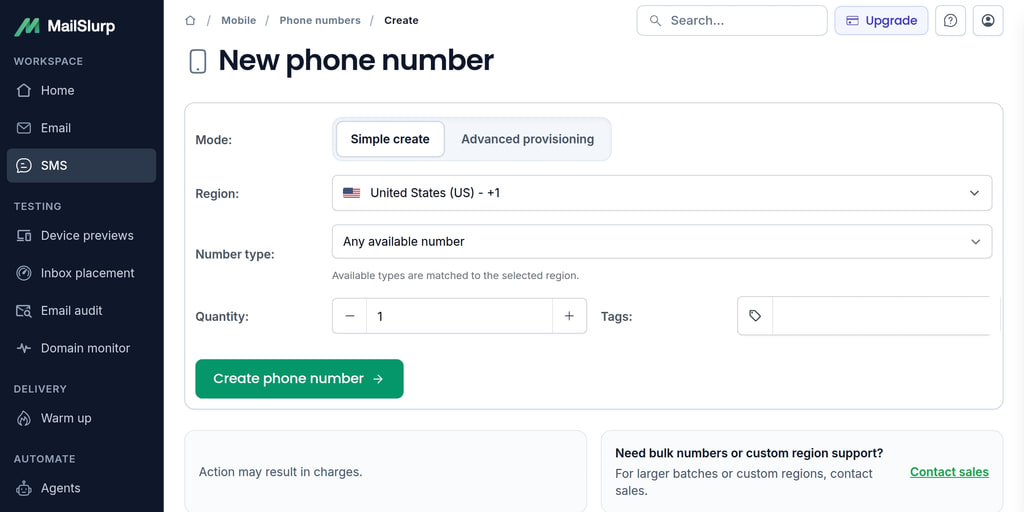
To assign a new phone number, use the dashboard phone number page. You can select from a range of countries and pricing plans.
Create phone number programmatically
To enable API phone creation you must first have a paid plan and enable API creation on the phone number overview page in the dashboard.
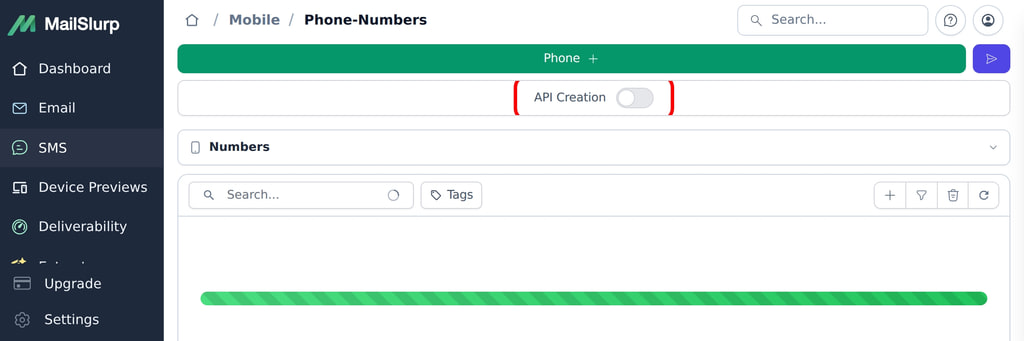
Once enabled you can call the create phone number endpoints:
const phone = await mailslurp.phoneController.createPhoneNumber({
  createPhoneNumberOptions: {
    name: 'Sales inbound',
    phoneCountry: CreatePhoneNumberOptionsPhoneCountryEnum.US,
  }
})
expect(phone.phoneNumber).toContain('+1')
Info. Each create phone number call bills your account for a phone number rental of one month. This is because telecom providers only rent phone numbers for a minimum of one month.
The phone creation endpoint is the API surface for provisioning numbers after API creation is enabled for your account.
/phone
Add phone number to your account. Only works if you have already added a plan and an initial phone number in your account and acknowledged the pricing and terms of service by enabling API phone creation.
Create new phone number
Request, parameters, and responses
Request body (required)
| Field | Type | Required | Description |
|---|---|---|---|
phoneCountry | enum: US | GB | AU | CA | EE | HK | Yes | |
name | string | No | |
description | string | No | |
tags | string[] | No | |
schedule | enum: MONTHLY | YEARLY | No | |
phoneNumberEndpointOverride | string | No | |
phoneNumberVariant | enum: LOCAL | MOBILE | TOLL_FREE | No | |
phoneProvider | enum: T1 | T2 | No | |
phoneLineFilter | enum: ANY | OTP_FRIENDLY | NON_VOIP | No | Line-quality preference for simple phone number provisioning |
{
  "phoneCountry": "US",
  "name": "Example name",
  "description": "value",
  "tags": [
    "example"
  ],
  "schedule": "MONTHLY",
  "phoneNumberEndpointOverride": "value"
}
Responses
| Status | Schema | Description |
|---|---|---|
200 | PhoneNumberDto | OK |
HTTP and SDK snippets
HTTP
POST /phone HTTP/1.1
Host: api.mailslurp.com
x-api-key: YOUR_API_KEY
Accept: application/json
Content-Type: application/json

{
  "phoneCountry": "US",
  "name": "Example name",
  "description": "value",
  "tags": [
    "example"
  ],
  "schedule": "MONTHLY",
  "phoneNumberEndpointOverride": "value"
}
cURL
curl -X POST "https://api.mailslurp.com/phone" \
  -H "x-api-key: YOUR_API_KEY" \
  -H "Accept: application/json" \
  -H "Content-Type: application/json" \
  --data '{"phoneCountry":"US","name":"Example name","description":"value","tags":["example"],"schedule":"MONTHLY","phoneNumberEndpointOverride":"value"}'
JavaScript SDK
import { Configuration, PhoneControllerApi } from "mailslurp-client";

const config = new Configuration({ apiKey: "YOUR_API_KEY" });
const phoneController = new PhoneControllerApi(config);
const request = {
  "createPhoneNumberOptions": {
    "phoneCountry": "US",
    "name": "Example name",
    "description": "value",
    "tags": [
      "example"
    ],
    "schedule": "MONTHLY",
    "phoneNumberEndpointOverride": "value"
  }
};

const result = await phoneController.createPhoneNumber(request);
Python SDK
import mailslurp_client
from mailslurp_client.api.phone_controller_api import PhoneControllerApi

configuration = mailslurp_client.Configuration()
configuration.api_key["x-api-key"] = "YOUR_API_KEY"

with mailslurp_client.ApiClient(configuration) as api_client:
    phoneController = PhoneControllerApi(api_client)
    create_phone_number_options = {
      "phoneCountry": "US",
      "name": "Example name",
      "description": "value",
      "tags": [
        "example"
      ],
      "schedule": "MONTHLY",
      "phoneNumberEndpointOverride": "value"
    }
    result = phoneController.create_phone_number(create_phone_number_options)
Listing phone numbers
Phone numbers have an ID and a number. When fetching the phone number use the ID. Use the PhoneControllerApi to manage phone numbers.
const mailslurp = new MailSlurp({ apiKey });
// fetch a phone number (must create phone numbers in the dashboard first)
const { content: [phoneNumber] } = await mailslurp.phoneController.getPhoneNumbers({
  size: 1,
  phoneCountry: GetPhoneNumbersPhoneCountryEnum.US
});
expect(phoneNumber.phoneNumber).toEqual('+19108074451');
You can fetch numbers directly using the getBy methods:
const phoneBy = await mailslurp.phoneController.getPhoneNumberByName({
  name: 'Sales inbound'
})
View SMS messages
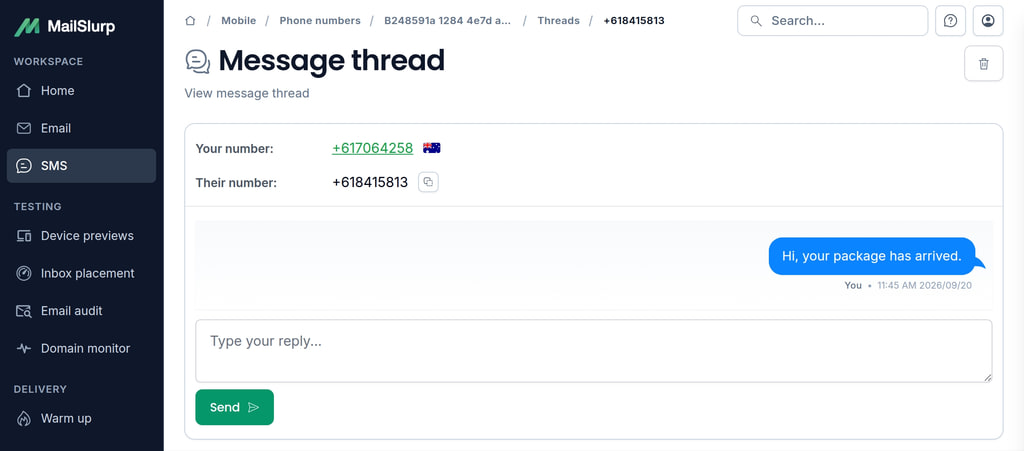
In the dashboard you can view TXT message threads in the phones section:
Use the SmsControllerApi to view and download SMS messages.
const result = await mailslurp.smsController.getSmsMessagesPaginated({
  phoneNumber: phoneNumber.id
});
expect(result.totalElements).toBeGreaterThan(0);
// content contains array of sms messages
expect(result.content[0].body).toContain('Your code');
You can fetch individual messages using the message's ID.
// fetch a message
const txtMessage = await mailslurp.smsController.getSmsMessage({
  smsId: sms.id // UUID of the SMS message
});
expect(txtMessage.read).toEqual(true);
expect(txtMessage.fromNumber).toEqual('+13252527014');
For tests that need to list, inspect, or parse SMS content after receipt, pair phone-number message listing with direct SMS reads and code extraction.
/phone/numbers/{phoneNumberId}/sms
List SMS messages for a phone number
Get SMS messages for a phone number
Request, parameters, and responses
Path parameters
| Name | Type | Required | Description |
|---|---|---|---|
phoneNumberId | string:uuid | Yes |
Query parameters
| Name | Type | Required | Description |
|---|---|---|---|
page | integer:int32 | No | Optional page index in SMS list pagination |
size | integer:int32 | No | Optional page size in SMS list pagination. Maximum size is 100. Use page index and sort to page through larger results |
sort | enum: ASC | DESC | No | Optional createdAt sort direction ASC or DESCValues: ASC, DESC |
unreadOnly | boolean | No | Optional filter for unread SMS only. All SMS are considered unread until they are viewed in the dashboard or requested directly |
since | string:date-time | No | Optional filter SMSs received after given date time |
before | string:date-time | No | Optional filter SMSs received before given date time |
search | string | No | Optional search filter |
favourite | boolean | No | Optionally filter results for favourites only |
Responses
| Status | Schema | Description |
|---|---|---|
200 | PageSmsProjection | OK |
HTTP and SDK snippets
HTTP
GET /phone/numbers/00000000-0000-4000-8000-000000000000/sms?page=value&size=value&sort=ASC HTTP/1.1
Host: api.mailslurp.com
x-api-key: YOUR_API_KEY
Accept: application/json
cURL
curl -X GET "https://api.mailslurp.com/phone/numbers/00000000-0000-4000-8000-000000000000/sms?page=value&size=value&sort=ASC" \
  -H "x-api-key: YOUR_API_KEY" \
  -H "Accept: application/json"
JavaScript SDK
import { Configuration, PhoneControllerApi } from "mailslurp-client";

const config = new Configuration({ apiKey: "YOUR_API_KEY" });
const phoneController = new PhoneControllerApi(config);
const request = {
  "phoneNumberId": "00000000-0000-4000-8000-000000000000",
  "page": null,
  "size": null,
  "sort": "ASC"
};

const result = await phoneController.getSmsByPhoneNumber(request);
Python SDK
import mailslurp_client
from mailslurp_client.api.phone_controller_api import PhoneControllerApi

configuration = mailslurp_client.Configuration()
configuration.api_key["x-api-key"] = "YOUR_API_KEY"

with mailslurp_client.ApiClient(configuration) as api_client:
    phoneController = PhoneControllerApi(api_client)
result = phoneController.get_sms_by_phone_number("00000000-0000-4000-8000-000000000000", page=NaN, size=NaN, sort="ASC")/sms/{smsId}
Get SMS content including body. Expects SMS to exist by ID. For SMS that may not have arrived yet use the WaitForController.
Returns a SMS summary object with content.
Request, parameters, and responses
Path parameters
| Name | Type | Required | Description |
|---|---|---|---|
smsId | string:uuid | Yes |
Responses
| Status | Schema | Description |
|---|---|---|
200 | SmsDto | OK |
HTTP and SDK snippets
HTTP
GET /sms/00000000-0000-4000-8000-000000000000 HTTP/1.1
Host: api.mailslurp.com
x-api-key: YOUR_API_KEY
Accept: application/json
cURL
curl -X GET "https://api.mailslurp.com/sms/00000000-0000-4000-8000-000000000000" \
  -H "x-api-key: YOUR_API_KEY" \
  -H "Accept: application/json"
JavaScript SDK
import { Configuration, SmsControllerApi } from "mailslurp-client";

const config = new Configuration({ apiKey: "YOUR_API_KEY" });
const smsController = new SmsControllerApi(config);
const request = {
  "smsId": "00000000-0000-4000-8000-000000000000"
};

const result = await smsController.getSmsMessage(request);
Python SDK
import mailslurp_client
from mailslurp_client.api.sms_controller_api import SmsControllerApi

configuration = mailslurp_client.Configuration()
configuration.api_key["x-api-key"] = "YOUR_API_KEY"

with mailslurp_client.ApiClient(configuration) as api_client:
    smsController = SmsControllerApi(api_client)
result = smsController.get_sms_message("00000000-0000-4000-8000-000000000000")/sms/{smsId}/codes
Extract verification codes from an SMS
Extract one-time passcodes and verification tokens from SMS body content. Deterministic `PATTERN` extraction is available now. Use method flags to control fallback behavior for QA.
Request, parameters, and responses
Path parameters
| Name | Type | Required | Description |
|---|---|---|---|
smsId | string:uuid | Yes | ID of SMS to extract codes from |
Request body
| Field | Type | Required | Description |
|---|---|---|---|
method | enum: AUTO | PATTERN | LLM | OCR | OCR_THEN_LLM | No | Extraction strategy for verification codes. Unsupported strategies may fall back when allowFallback is true. |
allowFallback | boolean | No | Allow fallback to deterministic pattern extraction when the selected method is unavailable. |
minLength | integer:int32 | No | Minimum code length to consider. Typical OTP values are between 4 and 8 characters. |
maxLength | integer:int32 | No | Maximum code length to consider. |
maxCandidates | integer:int32 | No | Maximum number of code candidates to return. Best candidate is also returned separately. |
customPatterns | string[] | No | Optional custom regex patterns for code extraction. Each pattern should have either one capture group for the code or match the full code directly. |
{
  "method": "AUTO",
  "allowFallback": true,
  "minLength": 4,
  "maxLength": 10,
  "maxCandidates": 5,
  "customPatterns": [
    "value"
  ]
}
Responses
| Status | Schema | Description |
|---|---|---|
200 | ExtractCodesResult | OK |
HTTP and SDK snippets
HTTP
POST /sms/00000000-0000-4000-8000-000000000000/codes HTTP/1.1
Host: api.mailslurp.com
x-api-key: YOUR_API_KEY
Accept: application/json
Content-Type: application/json

{
  "method": "AUTO",
  "allowFallback": true,
  "minLength": 4,
  "maxLength": 10,
  "maxCandidates": 5,
  "customPatterns": [
    "value"
  ]
}
cURL
curl -X POST "https://api.mailslurp.com/sms/00000000-0000-4000-8000-000000000000/codes" \
  -H "x-api-key: YOUR_API_KEY" \
  -H "Accept: application/json" \
  -H "Content-Type: application/json" \
  --data '{"method":"AUTO","allowFallback":true,"minLength":4,"maxLength":10,"maxCandidates":5,"customPatterns":["value"]}'
JavaScript SDK
import { Configuration, SmsControllerApi } from "mailslurp-client";

const config = new Configuration({ apiKey: "YOUR_API_KEY" });
const smsController = new SmsControllerApi(config);
const request = {
  "smsId": "00000000-0000-4000-8000-000000000000",
  "extractCodesOptions": {
    "method": "AUTO",
    "allowFallback": true,
    "minLength": 4,
    "maxLength": 10,
    "maxCandidates": 5,
    "customPatterns": [
      "value"
    ]
  }
};

const result = await smsController.getSmsCodes(request);
Python SDK
import mailslurp_client
from mailslurp_client.api.sms_controller_api import SmsControllerApi

configuration = mailslurp_client.Configuration()
configuration.api_key["x-api-key"] = "YOUR_API_KEY"

with mailslurp_client.ApiClient(configuration) as api_client:
    smsController = SmsControllerApi(api_client)
    extract_codes_options = {
      "method": "AUTO",
      "allowFallback": True,
      "minLength": 4,
      "maxLength": 10,
      "maxCandidates": 5,
      "customPatterns": [
        "value"
      ]
    }
    result = smsController.get_sms_codes("00000000-0000-4000-8000-000000000000", extract_codes_options)
Send SMS
You can send SMS programmatically or using the dashboard.
await mailslurp.phoneController.sendSmsFromPhoneNumber({
  phoneNumberId: sendingNumber,
  sendPhoneNumberOptions: {
    to: '+14155551212',
    message: 'Hello from Mailslurp'
  }
});
Info. Telecom providers impose some regulations on sending. Only send to numbers that have explicitly consented to being contacted. By default MailSlurp only permits sending to numbers that have initiated contact with you. To remove this restriction contact support.
Send a test message
Use the normal send endpoint with a controlled destination and content in test environments:
await mailslurp.phoneController.sendSmsFromPhoneNumber({
  phoneNumberId: sendingNumber,
  sendPhoneNumberOptions: {
    to: '+14155551212',
    message: 'Hello from Mailslurp'
  }
});
Use phone-scoped sending when the sender number matters. For a received inbound message, replies can be sent from the number that received it.
/phone/numbers/{phoneNumberId}/sms
Send TXT message from a phone number
Send SMS from a phone number
Request, parameters, and responses
Path parameters
| Name | Type | Required | Description |
|---|---|---|---|
phoneNumberId | string:uuid | Yes |
Request body (required)
| Field | Type | Required | Description |
|---|---|---|---|
to | string | Yes | |
body | string | Yes |
{
  "to": "+15551234567",
  "body": "Hello from MailSlurp"
}
Responses
| Status | Schema | Description |
|---|---|---|
200 | SentSmsDto | OK |
HTTP and SDK snippets
HTTP
POST /phone/numbers/00000000-0000-4000-8000-000000000000/sms HTTP/1.1
Host: api.mailslurp.com
x-api-key: YOUR_API_KEY
Accept: application/json
Content-Type: application/json

{
  "to": "+15551234567",
  "body": "Hello from MailSlurp"
}
cURL
curl -X POST "https://api.mailslurp.com/phone/numbers/00000000-0000-4000-8000-000000000000/sms" \
  -H "x-api-key: YOUR_API_KEY" \
  -H "Accept: application/json" \
  -H "Content-Type: application/json" \
  --data '{"to":"+15551234567","body":"Hello from MailSlurp"}'
JavaScript SDK
import { Configuration, PhoneControllerApi } from "mailslurp-client";

const config = new Configuration({ apiKey: "YOUR_API_KEY" });
const phoneController = new PhoneControllerApi(config);
const request = {
  "phoneNumberId": "00000000-0000-4000-8000-000000000000",
  "smsSendOptions": {
    "to": "+15551234567",
    "body": "Hello from MailSlurp"
  }
};

const result = await phoneController.sendSmsFromPhoneNumber(request);
Python SDK
import mailslurp_client
from mailslurp_client.api.phone_controller_api import PhoneControllerApi

configuration = mailslurp_client.Configuration()
configuration.api_key["x-api-key"] = "YOUR_API_KEY"

with mailslurp_client.ApiClient(configuration) as api_client:
    phoneController = PhoneControllerApi(api_client)
    sms_send_options = {
      "to": "+15551234567",
      "body": "Hello from MailSlurp"
    }
result = phoneController.send_sms_from_phone_number("00000000-0000-4000-8000-000000000000", sms_send_options)/sms/{smsId}/reply
Send a reply to a received SMS message. Replies are sent from the receiving number.
Reply to an SMS message.
Request, parameters, and responses
Path parameters
| Name | Type | Required | Description |
|---|---|---|---|
smsId | string:uuid | Yes |
Request body (required)
| Field | Type | Required | Description |
|---|---|---|---|
body | string | Yes |
{
  "body": "Hello from MailSlurp"
}
Responses
| Status | Schema | Description |
|---|---|---|
200 | SentSmsDto | OK |
HTTP and SDK snippets
HTTP
POST /sms/00000000-0000-4000-8000-000000000000/reply HTTP/1.1
Host: api.mailslurp.com
x-api-key: YOUR_API_KEY
Accept: application/json
Content-Type: application/json

{
  "body": "Hello from MailSlurp"
}
cURL
curl -X POST "https://api.mailslurp.com/sms/00000000-0000-4000-8000-000000000000/reply" \
  -H "x-api-key: YOUR_API_KEY" \
  -H "Accept: application/json" \
  -H "Content-Type: application/json" \
  --data '{"body":"Hello from MailSlurp"}'
JavaScript SDK
import { Configuration, SmsControllerApi } from "mailslurp-client";

const config = new Configuration({ apiKey: "YOUR_API_KEY" });
const smsController = new SmsControllerApi(config);
const request = {
  "smsId": "00000000-0000-4000-8000-000000000000",
  "smsReplyOptions": {
    "body": "Hello from MailSlurp"
  }
};

const result = await smsController.replyToSmsMessage(request);
Python SDK
import mailslurp_client
from mailslurp_client.api.sms_controller_api import SmsControllerApi

configuration = mailslurp_client.Configuration()
configuration.api_key["x-api-key"] = "YOUR_API_KEY"

with mailslurp_client.ApiClient(configuration) as api_client:
    smsController = SmsControllerApi(api_client)
    sms_reply_options = {
      "body": "Hello from MailSlurp"
    }
    result = smsController.reply_to_sms_message("00000000-0000-4000-8000-000000000000", sms_reply_options)
Wait for new SMS messages
Use the WaitForControllerApi waitForSms methods to hold a connection open until an expected count of SMS messages is present in a phone number
// wait for the latest unread sms
const [sms] = await mailslurp.waitController.waitForSms({
  waitForSmsConditions: {
    count: 1,
    unreadOnly: true,
    phoneNumberId: phoneNumber.id,
    timeout: 30_000
  }
});
// extract a code from body with regex
expect(sms.body).toContain('Your code: 123');
const [, code] = /.+:\s([0-9]{3})/.exec(sms.body);
expect(code).toEqual('123');
This is an important technique for SMS based testing. See the testing guide for more information.
Define BLOCK and ALLOW rules
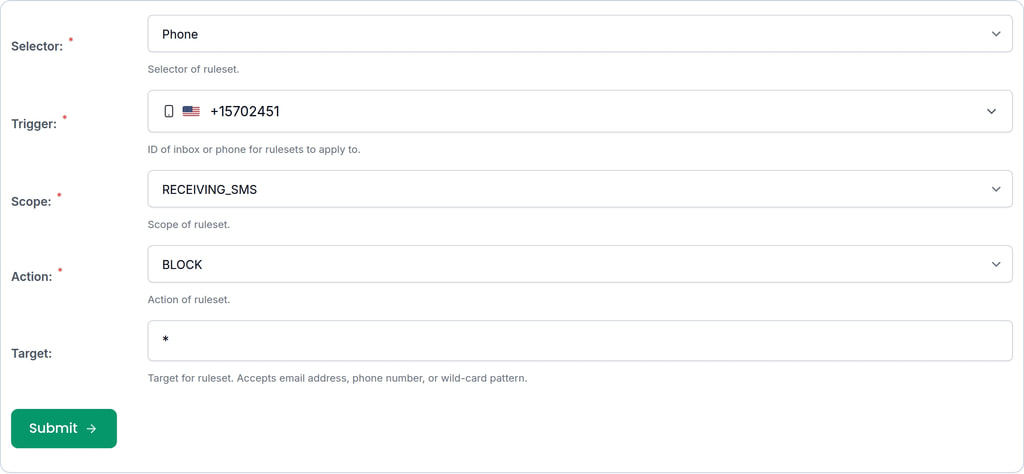
You can define rules for which phone numbers can send SMS to your phone numbers. This is done using rulesets. You can create rulesets that block or allow SMS from specific phone numbers or patterns to prevent any unwanted spam. An example looks like this:
// block SMS spam except for known numbers
const blockAll = await rulesetController.createNewRuleset({
  phoneId: undefined, // account wide block
  createRulesetOptions: {
    action: 'BLOCK',
    scope: 'RECEIVING_SMS',
    target: '*'
  }
})
const allowSpecific = await rulesetController.createNewRuleset({
  phoneId: undefined, // account wide permit
  createRulesetOptions: {
    action: 'ALLOW',
    scope: 'RECEIVING_SMS',
    target: '+1234567890' // replace with a known number
  }
})
In the app dashboard the interface can be found in the automations tab on the phone number overview:
When a test triggers an OTP or MFA flow, wait for the expected SMS instead of sleeping for a fixed delay.
/waitForSms
Wait for an SMS message to match the provided filter conditions such as body contains keyword.
Generic waitFor method that will wait until a phone number meets given conditions or return immediately if already met
Request, parameters, and responses
Request body (required)
| Field | Type | Required | Description |
|---|---|---|---|
phoneNumberId | string:uuid | Yes | ID of phone number to search within and apply conditions to. Essentially filtering the SMS found to give a count. |
limit | integer:int32 | No | Limit results |
count | integer:int64 | Yes | Number of results that should match conditions. Either exactly or at least this amount based on the `countType`. If count condition is not met and the timeout has not been reached the `waitFor` method will retry the operation. |
delayTimeout | integer:int64 | No | Max time in milliseconds to wait between retries if a `timeout` is specified. |
timeout | integer:int64 | Yes | Max time in milliseconds to retry the `waitFor` operation until conditions are met. |
unreadOnly | boolean | No | Apply conditions only to **unread** SMS. All SMS messages begin with `read=false`. An SMS is marked `read=true` when an `SMS` has been returned to the user at least once. For example you have called `getSms`, or you have viewed the SMS in the dashboard. |
countType | enum: EXACTLY | ATLEAST | No | How result size should be compared with the expected size. Exactly or at-least matching result? |
matches | SmsMatchOption[] | No | Conditions that should be matched for an SMS to qualify for results. Each condition will be applied in order to each SMS within a phone number to filter a result list of matching SMSs you are waiting for. |
sortDirection | enum: ASC | DESC | No | Direction to sort matching SMSs by created time |
since | string:date-time | No | ISO Date Time earliest time of SMS to consider. Filter for matching SMSs that were received after this date |
before | string:date-time | No | ISO Date Time latest time of SMS to consider. Filter for matching SMSs that were received before this date |
{
  "phoneNumberId": "00000000-0000-4000-8000-000000000000",
  "count": 1,
  "timeout": 1,
  "limit": 1,
  "delayTimeout": 1,
  "unreadOnly": true
}
Responses
| Status | Schema | Description |
|---|---|---|
200 | SmsPreview[] | OK |
HTTP and SDK snippets
HTTP
POST /waitForSms HTTP/1.1
Host: api.mailslurp.com
x-api-key: YOUR_API_KEY
Accept: application/json
Content-Type: application/json

{
  "phoneNumberId": "00000000-0000-4000-8000-000000000000",
  "count": 1,
  "timeout": 1,
  "limit": 1,
  "delayTimeout": 1,
  "unreadOnly": true
}
cURL
curl -X POST "https://api.mailslurp.com/waitForSms" \
  -H "x-api-key: YOUR_API_KEY" \
  -H "Accept: application/json" \
  -H "Content-Type: application/json" \
  --data '{"phoneNumberId":"00000000-0000-4000-8000-000000000000","count":1,"timeout":1,"limit":1,"delayTimeout":1,"unreadOnly":true}'
JavaScript SDK
import { Configuration, WaitForControllerApi } from "mailslurp-client";

const config = new Configuration({ apiKey: "YOUR_API_KEY" });
const waitForController = new WaitForControllerApi(config);
const request = {
  "waitForSmsConditions": {
    "phoneNumberId": "00000000-0000-4000-8000-000000000000",
    "count": 1,
    "timeout": 1,
    "limit": 1,
    "delayTimeout": 1,
    "unreadOnly": true
  }
};

const result = await waitForController.waitForSms(request);
Python SDK
import mailslurp_client
from mailslurp_client.api.wait_for_controller_api import WaitForControllerApi

configuration = mailslurp_client.Configuration()
configuration.api_key["x-api-key"] = "YOUR_API_KEY"

with mailslurp_client.ApiClient(configuration) as api_client:
    waitForController = WaitForControllerApi(api_client)
    wait_for_sms_conditions = {
      "phoneNumberId": "00000000-0000-4000-8000-000000000000",
      "count": 1,
      "timeout": 1,
      "limit": 1,
      "delayTimeout": 1,
      "unreadOnly": True
    }
result = waitForController.wait_for_sms(wait_for_sms_conditions)/waitForLatestSms
Wait for the latest SMS message to match the provided filter conditions such as body contains keyword.
Wait until a phone number meets given conditions or return immediately if already met
Request, parameters, and responses
Request body (required)
| Field | Type | Required | Description |
|---|---|---|---|
phoneNumberId | string:uuid | Yes | |
timeout | integer:int64 | Yes | |
unreadOnly | boolean | No | |
before | string:date-time | No | |
since | string:date-time | No | |
sortDirection | enum: ASC | DESC | No | |
delay | integer:int64 | No |
{
  "phoneNumberId": "00000000-0000-4000-8000-000000000000",
  "timeout": 1,
  "unreadOnly": true,
  "before": "2026-06-21T00:00:00.000Z",
  "since": "2026-06-21T00:00:00.000Z",
  "sortDirection": "ASC"
}
Responses
| Status | Schema | Description |
|---|---|---|
200 | SmsDto | OK |
HTTP and SDK snippets
HTTP
POST /waitForLatestSms HTTP/1.1
Host: api.mailslurp.com
x-api-key: YOUR_API_KEY
Accept: application/json
Content-Type: application/json

{
  "phoneNumberId": "00000000-0000-4000-8000-000000000000",
  "timeout": 1,
  "unreadOnly": true,
  "before": "2026-06-21T00:00:00.000Z",
  "since": "2026-06-21T00:00:00.000Z",
  "sortDirection": "ASC"
}
cURL
curl -X POST "https://api.mailslurp.com/waitForLatestSms" \
  -H "x-api-key: YOUR_API_KEY" \
  -H "Accept: application/json" \
  -H "Content-Type: application/json" \
  --data '{"phoneNumberId":"00000000-0000-4000-8000-000000000000","timeout":1,"unreadOnly":true,"before":"2026-06-21T00:00:00.000Z","since":"2026-06-21T00:00:00.000Z","sortDirection":"ASC"}'
JavaScript SDK
import { Configuration, WaitForControllerApi } from "mailslurp-client";

const config = new Configuration({ apiKey: "YOUR_API_KEY" });
const waitForController = new WaitForControllerApi(config);
const request = {
  "waitForSingleSmsOptions": {
    "phoneNumberId": "00000000-0000-4000-8000-000000000000",
    "timeout": 1,
    "unreadOnly": true,
    "before": "2026-06-21T00:00:00.000Z",
    "since": "2026-06-21T00:00:00.000Z",
    "sortDirection": "ASC"
  }
};

const result = await waitForController.waitForLatestSms(request);
Python SDK
import mailslurp_client
from mailslurp_client.api.wait_for_controller_api import WaitForControllerApi

configuration = mailslurp_client.Configuration()
configuration.api_key["x-api-key"] = "YOUR_API_KEY"

with mailslurp_client.ApiClient(configuration) as api_client:
    waitForController = WaitForControllerApi(api_client)
    wait_for_single_sms_options = {
      "phoneNumberId": "00000000-0000-4000-8000-000000000000",
      "timeout": 1,
      "unreadOnly": True,
      "before": "2026-06-21T00:00:00.000Z",
      "since": "2026-06-21T00:00:00.000Z",
      "sortDirection": "ASC"
    }
result = waitForController.wait_for_latest_sms(wait_for_single_sms_options)Use SMS webhooks
Have SMS messages sent via HTTP POST to your server with TXT Webhooks
// create a webhook for a phone number to have new SMS sent to your server
const webhook = await mailslurp.webhookController.createWebhookForPhoneNumber({
  phoneNumberId: phoneNumber.id,
  createWebhookOptions: {
    eventName: CreateWebhookOptionsEventNameEnum.NEW_SMS,
    url: 'https://myserver.com',
    name: 'Process SMS'
  }
});