












Set up custom email domains with MailSlurp
Documentation navigation
Create branded email addresses with MailSlurp custom domains, verify DNS, manage sender authentication, and route messages through inboxes and APIs.
Custom domains let you create email addresses on a domain you control, such as my-address@my-site.com. They are useful when a test or application needs the same branded sender identity that customers will see. A verified custom domain also gives you direct control over DNS authentication and sender configuration, which are important foundations for healthy email delivery.
Quick links
Managing domains
To manage custom domains you can use the MailSlurp dashboard domain page.
Creating domains
To create a custom domain make sure your plan supports domains then navigate to the domains section via the inboxes sidebar link.
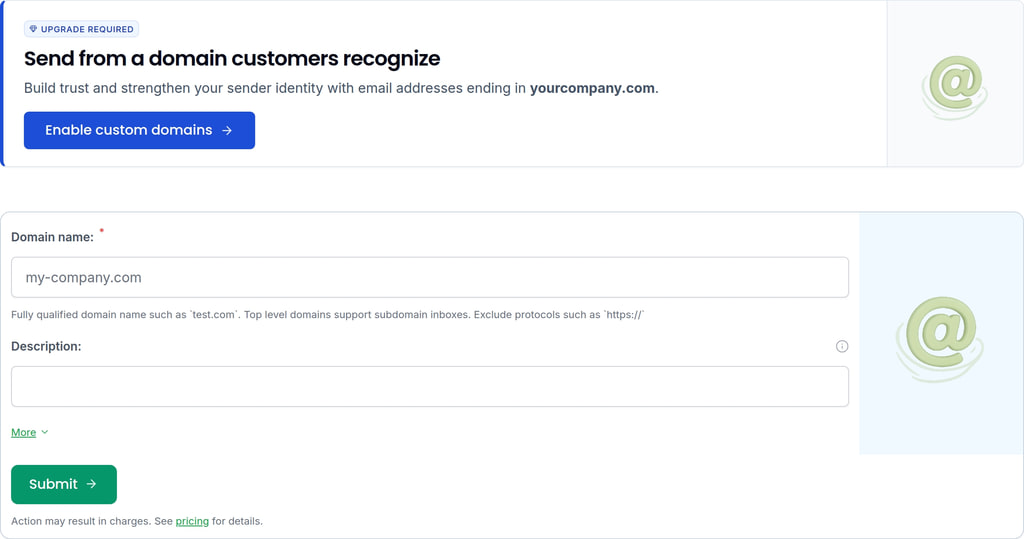
Ensure you have registered your domain name with a domain registrar first then enter the details into the form. You will need to add a DNS record to your domain to verify ownership. This is covered in the next step.
Verifying domains
To use your domain with MailSlurp you must verify ownership. This is done by adding a DNS record to your domain. The DNS records must all be added exactly as shown on the domain page.
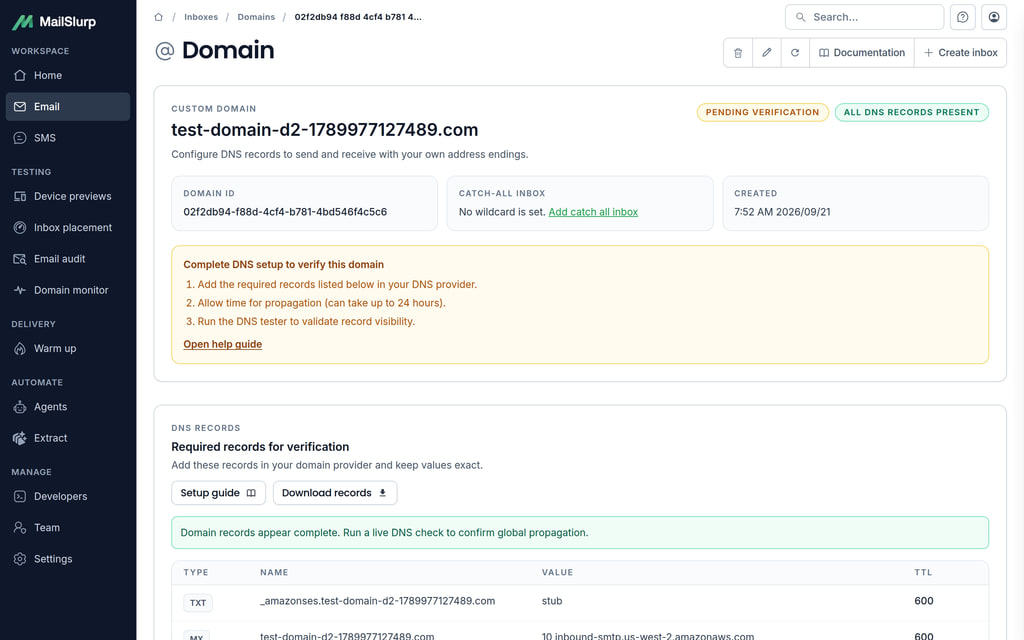
Adding DNS records
On the domain overview page you will see a table with DNS records. You must add these DNS records to your domain registrar DNS settings.
Note. This is an example. Use the unique records provided by the dashboard
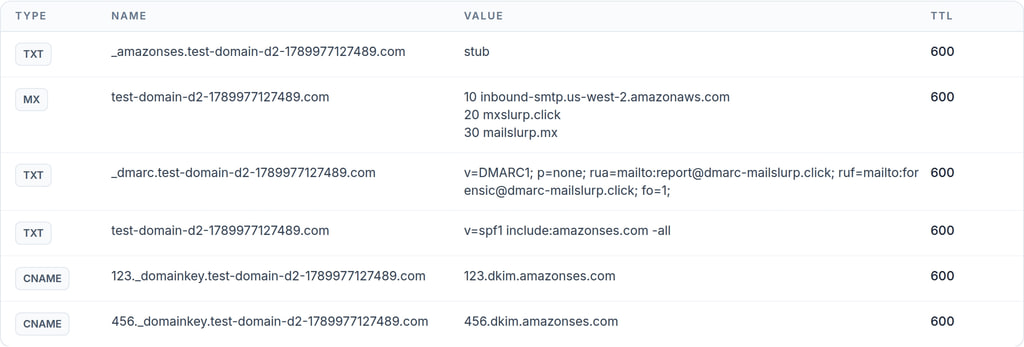
It can take up to 72 hours for DNS changes to be recognized. Reload the domain overview page to check your domain verification status.
Creating custom email addresses
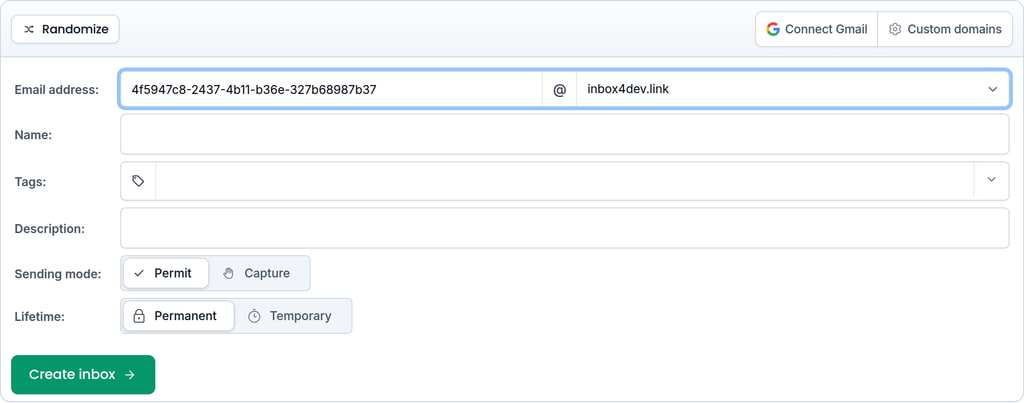
To use your domain with inboxes navigate to the inbox creation page and select the custom domain option. You can then select the domain you want to use from the dropdown and add a local address part as a prefix.
Catch all inboxes
When you create a custom domain, MailSlurp also creates a wildcard catch-all inbox. Catch-all email addresses receive messages that are not addressed to a specific inbox on your domain. You can access the catch-all inbox through the domain object in the API or dashboard, then use it like a regular inbox with forwarding, auto-replies, rulesets, and webhooks.
const domains = await mailslurp.domainController.getDomains();
const desiredDomain = domains.find(
  (d) => d.domainType === DomainPreviewDomainTypeEnum.SMTP_DOMAIN
);
const catchAllInboxId = desiredDomain!.catchAllInboxId;
Using domains with the API
You can add and verify domains with the API as well as in the dashboard. The examples use the MailSlurp SDK for JavaScript, Python, Java or C#; choose a language once and every example on the page switches to it. Install the SDK for your language and set MAILSLURP_API_KEY, then create a client:
JavaScript
import { MailSlurp } from 'mailslurp-client';

export function createClient() {
  const apiKey = process.env.MAILSLURP_API_KEY;
  if (!apiKey) throw new Error('Set MAILSLURP_API_KEY');
  return new MailSlurp({ apiKey });
}
Python
import os

import mailslurp_client


def create_client():
    api_key = os.environ.get("MAILSLURP_API_KEY")
    if not api_key:
        raise RuntimeError("Set MAILSLURP_API_KEY")
    configuration = mailslurp_client.Configuration()
    configuration.api_key["x-api-key"] = api_key
    return mailslurp_client.ApiClient(configuration)
Java
import com.mailslurp.apis.*;
import com.mailslurp.clients.ApiClient;
import com.mailslurp.clients.ApiException;
import com.mailslurp.models.*;
import java.util.List;
import java.util.UUID;
import java.util.stream.Collectors;

final class DomainSetup {
    static ApiClient createClient() {
        String apiKey = System.getenv("MAILSLURP_API_KEY");
        if (apiKey == null || apiKey.trim().isEmpty()) {
            throw new IllegalStateException("Set MAILSLURP_API_KEY");
        }
        ApiClient client = new ApiClient();
        client.setApiKey(apiKey);
        client.setConnectTimeout(10_000);
        client.setReadTimeout(75_000);
        return client;
    }
}
C#
using System;
using System.Collections.Generic;
using System.Linq;
using mailslurp.Api;
using mailslurp.Client;
using mailslurp.Model;

public static class DomainSetup
{
    public static Configuration CreateConfiguration()
    {
        var apiKey = Environment.GetEnvironmentVariable("MAILSLURP_API_KEY");
        if (string.IsNullOrWhiteSpace(apiKey))
            throw new InvalidOperationException("Set MAILSLURP_API_KEY");
        var configuration = new Configuration { Timeout = TimeSpan.FromSeconds(75) };
        configuration.ApiKey.Add("x-api-key", apiKey);
        return configuration;
    }
}
Add a domain
Add a domain or subdomain you control. MailSlurp returns the DNS records to publish:
JavaScript
export async function addDomain(mailslurp, domain) {
  // Add a domain you control, for example test.example.com. Next, publish its DNS records.
  return mailslurp.domainController.createDomain({
    createDomainOptions: { domain, description: 'QA mail domain', createdCatchAllInbox: true },
  });
}
Python
def add_domain(api_client, domain):
    # Add a domain you control, for example test.example.com. Next, publish its DNS records.
    return mailslurp_client.DomainControllerApi(api_client).create_domain(
        mailslurp_client.CreateDomainOptions(
            domain=domain, description="QA mail domain", created_catch_all_inbox=True
        )
    )
Java
public static DomainDto addDomain(ApiClient client, String domain) throws ApiException {
    // Add a domain you control, for example test.example.com. Next, publish its DNS records.
    return new DomainControllerApi(client).createDomain(new CreateDomainOptions()
        .domain(domain)
        .description("QA mail domain")
        .createdCatchAllInbox(true)).execute();
}
C#
public static DomainDto AddDomain(Configuration configuration, string domain)
{
    // Add a domain you control, for example test.example.com. Next, publish its DNS records.
    return new DomainControllerApi(configuration).CreateDomain(new CreateDomainOptions(
        domain: domain, description: "QA mail domain", createdCatchAllInbox: true));
}
Read the DNS records to publish
Add each record at your DNS provider exactly as returned. Required records must exist before verification passes:
JavaScript
export async function dnsRecords(mailslurp, domainId) {
  // Add each record at your DNS provider. Required records must exist before verification passes.
  const domain = await mailslurp.domainController.getDomain({ id: domainId });
  return domain.domainNameRecords.map(record => ({
    type: record.recordType, name: record.name, values: record.recordEntries, ttl: record.ttl, required: record.required,
  }));
}
Python
def dns_records(api_client, domain_id):
    # Add each record at your DNS provider. Required records must exist before verification passes.
    domain = mailslurp_client.DomainControllerApi(api_client).get_domain(domain_id)
    return [
        (record.record_type, record.name, record.record_entries, record.ttl, record.required)
        for record in domain.domain_name_records
    ]
Java
public static List<String> dnsRecords(ApiClient client, UUID domainId) throws ApiException {
    // Add each record at your DNS provider. Required records must exist before verification passes.
    return new DomainControllerApi(client).getDomain(domainId).execute().getDomainNameRecords().stream()
        .map(record -> record.getRecordType() + " " + record.getName() + " " + record.getRecordEntries())
        .collect(Collectors.toList());
}
C#
public static List<string> DnsRecords(Configuration configuration, Guid domainId)
{
    // Add each record at your DNS provider. Required records must exist before verification passes.
    return new DomainControllerApi(configuration).GetDomain(domainId).DomainNameRecords
        .Select(record => $"{record.RecordType} {record.Name} {string.Join(" ", record.RecordEntries)}")
        .ToList();
}
Check verification
Verification runs automatically once the records propagate. Read the status and any missing records:
JavaScript
export async function checkVerified(mailslurp, domainId) {
  // Verification runs automatically after DNS propagates; read the status and any missing records.
  const domain = await mailslurp.domainController.getDomain({ id: domainId });
  return { verified: domain.isVerified, missing: domain.missingRecordsMessage };
}
Python
def check_verified(api_client, domain_id):
    # Verification runs automatically after DNS propagates; read the status and any missing records.
    domain = mailslurp_client.DomainControllerApi(api_client).get_domain(domain_id)
    return domain.is_verified, domain.missing_records_message
Java
public static boolean checkVerified(ApiClient client, UUID domainId) throws ApiException {
    // Verification runs automatically after DNS propagates; read the status and any missing records.
    DomainDto domain = new DomainControllerApi(client).getDomain(domainId).execute();
    if (!Boolean.TRUE.equals(domain.getIsVerified())) System.out.println(domain.getMissingRecordsMessage());
    return Boolean.TRUE.equals(domain.getIsVerified());
}
C#
public static bool CheckVerified(Configuration configuration, Guid domainId)
{
    // Verification runs automatically after DNS propagates; read the status and any missing records.
    var domain = new DomainControllerApi(configuration).GetDomain(domainId);
    if (!domain.IsVerified) Console.WriteLine(domain.MissingRecordsMessage);
    return domain.IsVerified;
}
List your domains
JavaScript
export async function listDomains(mailslurp) {
  const domains = await mailslurp.domainController.getDomains({});
  return domains.map(domain => ({ id: domain.id, domain: domain.domain, verified: domain.isVerified }));
}
Python
def list_domains(api_client):
    domains = mailslurp_client.DomainControllerApi(api_client).get_domains()
    return [(domain.id, domain.domain, domain.is_verified) for domain in domains]
Java
public static List<String> listDomains(ApiClient client) throws ApiException {
    return new DomainControllerApi(client).getDomains().execute().stream()
        .map(domain -> domain.getDomain() + " verified=" + domain.getIsVerified())
        .collect(Collectors.toList());
}
C#
public static List<string> ListDomains(Configuration configuration)
{
    return new DomainControllerApi(configuration).GetDomains()
        .Select(domain => $"{domain.Domain} verified={domain.IsVerified}")
        .ToList();
}
Create an inbox on your domain
Once your domain is verified you can create inboxes with addresses on it:
JavaScript
export async function createInboxOnDomain(mailslurp, domain) {
  // Once verified, create addresses on the domain, such as support@your-domain.
  return mailslurp.createInboxWithOptions({ emailAddress: `support@${domain}`, name: 'Support tests' });
}
Python
def create_inbox_on_domain(api_client, domain):
    # Once verified, create addresses on the domain, such as support@your-domain.
    return mailslurp_client.InboxControllerApi(api_client).create_inbox_with_options(
        mailslurp_client.CreateInboxDto(email_address=f"support@{domain}", name="Support tests")
    )
Java
public static InboxDto createInboxOnDomain(ApiClient client, String domain) throws ApiException {
    // Once verified, create addresses on the domain, such as support@your-domain.
    return new InboxControllerApi(client).createInboxWithOptions(new CreateInboxDto()
        .emailAddress("support@" + domain)
        .name("Support tests")).execute();
}
C#
public static InboxDto CreateInboxOnDomain(Configuration configuration, string domain)
{
    // Once verified, create addresses on the domain, such as support@your-domain.
    return new InboxControllerApi(configuration).CreateInboxWithOptions(
        new CreateInboxDto(emailAddress: $"support@{domain}", name: "Support tests"));
}
The complete domain examples include dependency files for each language. In TypeScript you can also pass the address directly when creating an inbox:
await mailslurp.inboxController.createInbox({
  emailAddress: 'test@mydomain.com'
})
Running this code needs an API key. Get one free