
SMTP and IMAP inbox access with MailSlurp
Documentation navigation
Connect applications and mail clients to MailSlurp with SMTP and IMAP credentials, then send, receive, and inspect messages through standard email protocols.
MailSlurp mailboxes provide IMAP and SMTP access to your email accounts. This allows you to control inboxes using your favourite email client or using SMTP/IMAP libraries in any language you choose. Combine these techniques with the official SDK libraries and API endpoints to build powerful automations and tests.

Server endpoints
MailSlurp servers are found at the following locations:
| Protocol | Host | Port | Alternative ports | TLS | Description |
|---|---|---|---|---|---|
SMTP | mx.mailslurp.com | 25 | 2525 | No | SMTP server |
SMTP | mailslurp.mx | 587 | 2587, 465, 2465 | Yes | SMTP server (secure) |
IMAP | mailslurp.click | 1143 | - | No | IMAP server |
IMAP | mailslurpimap.click | 8993 | 993 | Yes | IMAP server (secure) |
About
This article covers how to use IMAP and SMTP with MailSlurp inboxes. You can use these protocols to send and receive emails from your MailSlurp inboxes. To connect external inboxes instead see the inbox connectors feature. To use MailSlurp with mail clients like Outlook and Mail.app see the email clients guide.
SMTP vs IMAP
- SMTP is the outgoing mailserver for sending emails and
- IMAP is the incoming mailserver for reading emails.
You can use both protocols to interact with MailSlurp inboxes. The SMTP mail servers can also receive emails on your behalf.
Example projects
Here are some code samples hosted on GitHub:
csharp-dotnet-core-8-smtpclient
Csharp Smtp Client Xunitcsharp example repository: csharp-smtp-client-xunit
Curl Imap Smtpcurl example repository: curl-imap-smtp
Golang Imap Examplesgolang example repository: golang-imap-examples
Golang Smtp Client Testgolang example repository: golang-smtp-client-test
Imap Smtp Examplesimap example repository: imap-smtp-examples
Nodejs Nodemailer Smtp Examplenodejs example repository: nodejs-nodemailer-smtp-example
Nodejs Smtp Email Attachments Testnodejs example repository: nodejs-smtp-email-attachments-test
Powershell Imap Smtppowershell example repository: powershell-imap-smtp
Ruby Minitest Netsmtp Exampleruby example repository: ruby-minitest-netsmtp-example
Swift Email Smtp Examplesswift example repository: swift-email-smtp-examples
Telnet Imap Smtp Shtelnet example repository: telnet-imap-smtp-sh
Authentication
You can authenticate IMAP and SMTP request as either an account or a specific inbox. Use
the getImapSmtpAccessDetails method to list access credentials or
view credentials in the dashboard. Credentials can either be account based
or inbox scoped. Use an inbox ID when fetching credentials to scope your access so that clients can only interact with
that inbox.

Access in the dashboard
You can find account-wide IMAP and SMTP access details on the MailSlurp dashboard homepage. Navigate to an inbox to get inbox scoped credentials.
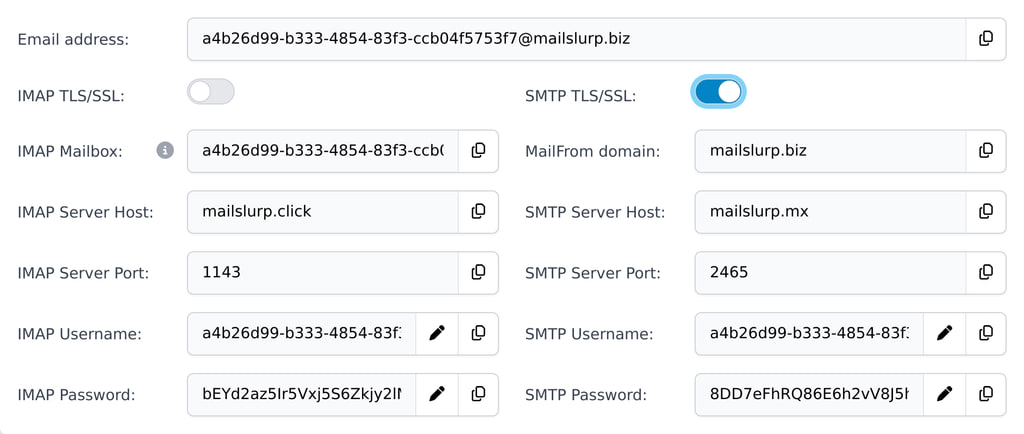
Get access using SDK
You can use the SDK clients to obtain access details for mail servers. Then use these credentials to configure your IMAP and SMTP libraries.
const {
    secureSmtpServerHost,
    secureSmtpServerPort,
    secureSmtpUsername,
    secureSmtpPassword,
    smtpServerHost,
    smtpServerPort,
    smtpUsername,
    smtpPassword,
    secureImapServerHost,
    secureImapServerPort,
    secureImapUsername,
    secureImapPassword,
    imapServerHost,
    imapServerPort,
    imapUsername,
    imapPassword,
    mailFromDomain,
} = await mailslurp.inboxController.getImapSmtpAccess({
    inboxId // optional inbox scope
});
Use terminal and .env file
You can also fetch access details and store them in a .env file. These variables can be sourced during subsequent
IMAP/SMTP
calls.
Bash
# download access details for an inbox as .env file and source
curl -o .env -sXGET "https://api.mailslurp.com/inboxes/imap-smtp-access/env?inboxId=$INBOX_ID" -H"x-api-key:$API_KEY"
# source the .env and connect using variables
source .env
Powershell
# download access details for an inbox as .env file
Set-Location $PSScriptRoot
Invoke-WebRequest -OutFile ".env" -Uri "https://api.mailslurp.com/inboxes/imap-smtp-access/env?inboxId=$inboxId" -Headers @{"x-api-key" = $API_KEY}

# source the .env and connect using variables
Get-Content ".env" | ForEach-Object {
    $keyValue = $_.Split('=', 2)
    if ($keyValue.Count -eq 2)
    {
        $envName = $keyValue[0].Trim()
        $envValue = $keyValue[1].Trim()
        # Remove leading and trailing double quotes from the value
        if ($envValue.StartsWith('"') -and $envValue.EndsWith('"'))
        {
            $envValue = $envValue.Substring(1, $envValue.Length - 2)
        }
        [Environment]::SetEnvironmentVariable($envName, $envValue, [System.EnvironmentVariableTarget]::Process)
    }
}
TLS/SSL security
MailSlurp mailservers support TLS/SSL and STARTTLS using Let's Encrypt certificates issued by ACME. You may need to accept the authority when connecting to the server. Download the root CA certificates here and add them to your trust chain.
IMAP connections
Use IMAP to read emails from MailSlurp inboxes using an IMAP client library or mail program.
Get credentials
Locate the host and port of the IMAP server and the username and password. You can find the username like this:
# get username etc
curl -sXGET "https://api.mailslurp.com/inboxes/imap-smtp-access" \
  -H"x-api-key:$API_KEY" | jq -j '.imapUsername'
Get the password like so:
curl -sXGET "https://api.mailslurp.com/inboxes/imap-access" \
  -H"x-api-key:$API_KEY" | jq -j '.imapPassword'
Or visit the dashboard to view your credentials.
Command line access
Use curl in the command line to connect to MailSlurp inboxes using IMAP. Here are some examples:
Insecure
curl "imap://$IMAP_SERVER_HOST:$IMAP_SERVER_PORT/INBOX" -vu "$IMAP_USERNAME:$IMAP_PASSWORD"
Secure
curl --ssl "imaps://$SECURE_IMAP_SERVER_HOST:$SECURE_IMAP_SERVER_PORT/INBOX" -vu "$SECURE_IMAP_USERNAME:$SECURE_IMAP_PASSWORD"
Programmatic access
Use an IMAP client library for your programming language to connect to MailSlurp inboxes. Here are some examples:
Javascript
const server = await mailslurp.inboxController.getImapAccess({});
const client = new ImapFlow({
  host: server.imapServerHost,
  port: server.imapServerPort,
  secure: false,
  auth: {
    user: server.imapUsername,
    pass: server.imapPassword
  }
});
Mailbox selection
MailSlurp treats inboxes in your account like IMAP mailboxes. In account mode you can select INBOX to read all emails
in your account. In inbox mode you can select the inbox email address as the mailbox name.
UID and SeqNums
IMAP emails have unique identifiers (UIDs) and sequence numbers (SeqNums). Use these to fetch emails and mark them as read.
IMAP UIDs differ from email IDs in MailSlurp. Use IDs to fetch emails using the MailSlurp API and UIDs to fetch emails using IMAP.
IMAP usage
Here is an example using telnet and expect to read email via IMAP:
_auth_plain
spawn telnet $env(HOST) $env(PORT)
expect "* OK*"

send "a1 AUTHENTICATE PLAIN $env(AUTH_PLAIN)\r"
expect "a1 OK*"

send a2 'LIST "" *\r'
expect "a2 *"

send "a3 LOGOUT\r"
expect "*"
IMAP commands
LOGIN
Login to as user and password:
# Login command
curl -vX "LOGIN $IMAP_USERNAME $IMAP_PASSWORD" "imap://mailslurp.click:1143"
LIST
List mailboxes. Use INBOX to list all mailboxes in your account if using account mode access credentials.
curl -X 'LIST "" *' -vu "$IMAP_USERNAME:$IMAP_PASSWORD" "imap://mailslurp.click:1143/$IMAP_MAILBOX"
SELECT
Select a mailbox:
# Select a mailbox
curl -X "SELECT INBOX" -vu "$IMAP_USERNAME:$IMAP_PASSWORD" "imap://mailslurp.click:1143/$IMAP_MAILBOX"
SEARCH
Search for emails:
# Search for unseen messages
curl -X "SEARCH UNSEEN" -vu "$IMAP_USERNAME:$IMAP_PASSWORD" "imap://mailslurp.click:1143/$IMAP_MAILBOX"
FETCH
Fetch email content:
# Fetch messages
curl -X "FETCH 1:* (FLAGS BODY[HEADER.FIELDS (FROM TO SUBJECT DATE)])" -vu "$IMAP_USERNAME:$IMAP_PASSWORD" "imap://mailslurp.click:1143/$IMAP_MAILBOX"
STORE
Delete an email or mark it as read:
# Store command to mark messages as seen
curl -X "STORE 1:* +FLAGS (\Seen)" -vu "$IMAP_USERNAME:$IMAP_PASSWORD" "imap://mailslurp.click:1143/$IMAP_MAILBOX"
SMTP connections
Use SMTP to send emails from MailSlurp inboxes using an SMTP client library.
Note: SMTP connection are only available on inboxes created with the
SMTP_INBOXtype.
Get credentials
You need to know the host and port of the SMTP server plus username and password. You can fetch the username like this:
curl -sXGET "https://api.mailslurp.com/inboxes/smtp-access" \
  -H"x-api-key:$API_KEY" | jq -j '.smtpUsername'
Get the password like so:
curl -sXGET "https://api.mailslurp.com/inboxes/smtp-access" \
  -H"x-api-key:$API_KEY" | jq -j '.smtpPassword'
Or visit the dashboard to view your credentials.
Authentication
MailSlurp SMTP servers support anonymous delivery and sending via AUTH PLAIN, and AUTH LOGIN mechanisms. When using AUTH PLAIN you must encode your username and password as base64 with \0 before each part. Here is an example:
auth_string="\0$USERNAME\0$PASSWORD"
base64_auth=$(echo -ne "$auth_string" | base64)
auth_plain_command="AUTH PLAIN $base64_auth"
Command line access
Use command line tools to quickly send to or from SMTP mailboxes.
Insecure
(echo "HELO test.client"; echo "QUIT") | nc "$SMTP_SERVER_HOST" "$SMTP_SERVER_PORT"
Secure
echo -e "HELO test.client\nQUIT\n" | openssl s_client -connect $SMTP_SERVER_HOST:$SMTP_SERVER_PORT -starttls smtp -quiet
Programmatic access
Use an SMTP client library for your programming language to connect to MailSlurp inboxes. Here is an example using NodeJS and NodeMailer.
Insecure
const transportInsecure = nodemailer.createTransport({
    host: smtpServerHost,
    port: smtpServerPort,
    secure: false,
    auth: {
        user: smtpUsername,
        pass: smtpPassword,
        type: 'PLAIN',
    },
});
await transportInsecure.sendMail({
    from: 'test@mailslurp.dev',
    to: inbox.emailAddress,
    subject: "Test insecure",
})
Secure
const transportSecure = nodemailer.createTransport({
    host: "mailslurp.mx",
    port: 465,
    secure: true,
    tls: {
        rejectUnauthorized: false,
        ciphers: 'SSLv3'
    },
    auth: {
        user: secureSmtpUsername,
        pass: secureSmtpPassword,
        type: 'PLAIN',
    },
});
await transportSecure.sendMail({
    from: 'test@mailslurp.dev',
    to: inbox.emailAddress,
    subject: "Test secure",
    attachments: [
        {
            filename: "example.txt",
            content: Buffer.from('hello world!', 'utf-8')
        }
    ],
})
Creating an SMTP inbox
To access an inbox with SMTP you must create a new inbox using the SMTP_INBOX mailbox type. Once created you
will see a username and password for each protocol in the dashboard. You can also obtain
access credentials using the API.
import { CreateInboxDtoInboxTypeEnum, MailSlurp } from "mailslurp-client";

const apiKey = process.env.API_KEY;
const mailslurp = new MailSlurp({ apiKey });

// create an smtp inbox
const inboxSmtp = await mailslurp.inboxController.createInboxWithOptions({
  createInboxDto: {
    inboxType: CreateInboxDtoInboxTypeEnum.SMTP_INBOX,
  },
});
SMTP usage
Here is a simple example using telnet and expect to send an email via SMTP:
spawn telnet $env(HOST) $env(PORT)
expect "220*"

send "HELO test.mailslurp.com\r"
expect "250*"

# AUTH_STRING="\0$USERNAME\0$PASSWORD"
# USERNAME_PASSWORD_BASE64=$(echo -ne "$AUTH_STRING" | base64)
send "AUTH PLAIN $env(USERNAME_PASSWORD_BASE64)\r"
expect "235*"

# Send MAIL FROM command
send "MAIL FROM: <$env(ADDRESS)>\r"
expect "250*"

# Send RCPT TO command
send "RCPT TO: <$env(ADDRESS)>\r"
expect "250*"

# Start data transfer
send "DATA\r"
expect "354*"

# Send email headers and body
send "From: <$env(ADDRESS)>\r"
send "To: <$env(ADDRESS)>\r"
send "Subject: test\r"
send "\r"
send "this is a test message.\r"
send ".\r"
expect "250*"

# Quit session
send "QUIT\r"
expect "221*"
Sending emails
Curl
# Email content
cat <>email.txt
From: Jack <$SENDER_EMAIL>
To: Joe <$RECIPIENT_EMAIL>
Subject: SMTP example
Date: Mon, 7 Nov 2016 03:45:06

Dear Joe,
How splendid life is.
EOF
# Send email using curl
curl -v --url "smtp://mxslurp.click:2525" \
     --user "$SMTP_USERNAME:$SMTP_PASSWORD" \
     --mail-from "$SENDER_EMAIL" \
     --mail-rcpt "$RECIPIENT_EMAIL" \
     --upload-file email.txt
Delivering emails
You can submit emails to the SMTP mailservers to deliver them to inboxes. Use the MAIL FROM and RCPT TO commands to
specify the sender and recipient. You don't need authentication for this.
Curl
# Deliver email using curl insecure
curl -v --url "smtp://mxslurp.click:2525" \
     --mail-from "$SENDER_EMAIL" \
     --mail-rcpt "$RECIPIENT_EMAIL" \
     --upload-file email.txt \
STARTTLS
# Deliver email using curl with STARTTLS
curl -v --url "smtp://mailslurp.mx:2587" \
     --mail-from "$SENDER_EMAIL" \
     --mail-rcpt "$RECIPIENT_EMAIL" \
     --upload-file email.txt \
     --ssl-reqd
SMTPS
# Deliver email using curl with SMTPS
curl -v --url "smtps://mailslurp.mx:465" \
     --mail-from "$SENDER_EMAIL" \
     --mail-rcpt "$RECIPIENT_EMAIL" \
     --upload-file email.txt \
SMTPS+SSL
# Deliver email using curl with SMTPS encrypted
curl -v --url "smtps://mailslurp.mx:465" \
     --mail-from "$SENDER_EMAIL" \
     --mail-rcpt "$RECIPIENT_EMAIL" \
     --upload-file email.txt \
     --ssl-reqd
SMTP code examples
See the examples repository for more uses.
Javascript
describe("testing smtp", function () {
    it("can create an mailbox and get email preview urls", async function () {
        const apiKey = process.env.API_KEY;
        if (!apiKey) {
            throw new Error("Please set API_KEY environment variable")
        }
        const mailslurp = new MailSlurp({apiKey, fetchApi})
        const access = await mailslurp.getImapSmtpAccessDetails();
        expect(access).toBeTruthy();

        const inbox1 = await mailslurp.createInboxWithOptions({inboxType: 'SMTP_INBOX'})
        const inbox2 = await mailslurp.createInboxWithOptions({inboxType: 'SMTP_INBOX'})

        const transporter = nodemailer.createTransport({
            host: access.smtpServerHost,
            port: access.smtpServerPort,
            secure: false,
            auth: {
                user: access.smtpUsername,
                pass: access.smtpPassword
            },
        });

        const sent = await transporter.sendMail({
            from: inbox1.emailAddress,
            to: inbox2.emailAddress,
            subject: "From inbox 1 to inbox 2",
            text: "Hi there",
            attachments: [
                {
                    filename: "example.txt",
                    content: Buffer.from('hello world!', 'utf-8')
                }
            ],
        });
        expect(sent).toBeTruthy()

        const email = await mailslurp.waitForLatestEmail(inbox2.id, 30_000, true);
        expect(email.subject).toEqual("From inbox 1 to inbox 2")
        expect(email.attachments.length).toEqual(1)
        const accessUrls = await mailslurp.emailController.getEmailPreviewURLs({emailId: email.id})

        // access these urls in browser to view email content
        expect(accessUrls.plainHtmlBodyUrl).toContain("https://api.mailslurp.com")
        expect(accessUrls.rawSmtpMessageUrl).toContain("https://api.mailslurp.com")
    });
});
Java
@Test
public void canSendWithSmtp() throws MessagingException, ApiException {
    CreateInboxDto opts = new CreateInboxDto();
    opts.setInboxType(CreateInboxDto.InboxTypeEnum.SMTP_INBOX);
    InboxControllerApi inboxControllerApi = new InboxControllerApi(apiClient);
    InboxDto inbox = inboxControllerApi.createInboxWithOptions(opts).execute();

    ImapSmtpAccessDetails server = inboxControllerApi.getImapSmtpAccess().inboxId(inbox.getId()).execute();

    Properties prop = new Properties();
    prop.put("mail.smtp.auth", "true");
    prop.put("mail.transport.protocol", "smtp");
    prop.put("mail.smtp.starttls.enable", "false");
    prop.put("mail.smtp.host", server.getSmtpServerHost());
    prop.put("mail.smtp.port", server.getSmtpServerPort());


    class SMTPAuthenticator extends javax.mail.Authenticator {
        public PasswordAuthentication getPasswordAuthentication() {
            String username = server.getSmtpUsername();
            String password = server.getSmtpPassword();
            return new PasswordAuthentication(username, password);
        }
    }

    Authenticator auth = new SMTPAuthenticator();
    Session mailSession = Session.getDefaultInstance(prop, auth);
    mailSession.setDebug(true);

    Message message = new MimeMessage(mailSession);
    message.setFrom(new InternetAddress(inbox.getEmailAddress()));
    message.setRecipients(Message.RecipientType.TO, InternetAddress.parse(inbox.getEmailAddress()));
    message.setSubject("Test subject");

    String msg = "This is my first email";

    MimeBodyPart mimeBodyPart = new MimeBodyPart();
    mimeBodyPart.setContent(msg, "text/html; charset=utf-8");

    Multipart multipart = new MimeMultipart();
    multipart.addBodyPart(mimeBodyPart);

    message.setContent(multipart);

    Transport.send(message);
}
PHP
// create inbox
$create = new \MailSlurp\Models\CreateInboxDto(["inbox_type"=>"SMTP_INBOX"]);
$inbox = $inboxController->createInboxWithOptions($create);
$this->assertTrue($inbox->getInboxType() == "SMTP_INBOX");
// create smtp
$server = $inboxController->getImapSmtpAccess();
$mail = new PHPMailer(true);
try {
    $mail->SMTPDebug = SMTP::DEBUG_SERVER;
    $mail->isSMTP();
    $mail->Host = $server->getSmtpServerHost();
    $mail->Port = $server->getSmtpServerPort();
    $mail->SMTPAutoTLS = false;
    $mail->SMTPAuth = false;
    $mail->setFrom("test@gmail.com", 'Test1');
    $mail->addAddress($inbox->getEmailAddress(), 'Test2');
    $mail->isHTML(true);
    $mail->Subject = 'Test subject';
    $mail->Body = 'This is test HTML body <b>in bold!</b>';
    $mail->addAttachment($this->pathToAttachment2);
    // now connect and send
    $mail->send();
    echo 'Message has been sent';
} catch (Exception $e) {
    echo "Message could not be sent. Mailer Error: {$mail->ErrorInfo}";
}
if ($mail->ErrorInfo) {
    echo $mail->ErrorInfo;
}
$this->assertTrue($mail->ErrorInfo == '');
Python
with mailslurp_client.ApiClient(configuration) as api_client:
    inbox_controller = mailslurp_client.InboxControllerApi(api_client)
    inbox1 = inbox_controller.create_inbox_with_options(CreateInboxDto(inbox_type="SMTP_INBOX"))
    inbox2 = inbox_controller.create_inbox()
    assert "@mailslurp" in inbox1.email_address

    # get smtp imap access
    smtp_access = inbox_controller.get_imap_smtp_access(inbox_id=inbox1.id)
    msg = "Subject: Test subject\r\n\r\nThis is the body"

    with SMTP(host=smtp_access.smtp_server_host, port=smtp_access.smtp_server_port) as smtp:
        smtp.login(user=smtp_access.smtp_username, password=smtp_access.smtp_password)
        smtp.sendmail(from_addr=inbox1.email_address, to_addrs=[inbox2.email_address], msg=msg)
        smtp.quit()

    wait_for_controller = mailslurp_client.WaitForControllerApi(api_client)
    email = wait_for_controller.wait_for_latest_email(inbox_id=inbox2.id)
    assert "Test subject" in email.subject
Ruby
inbox_controller = MailSlurpClient::InboxControllerApi.new

# create two inboxes
inbox1 = inbox_controller.create_inbox_with_options({ inboxType: 'SMTP_INBOX' })
inbox2 = inbox_controller.create_inbox

expect(inbox1.email_address).to include('@mailslurp.mx')

# get smtp access for inbox
smtp_access = inbox_controller.get_imap_smtp_access({ inbox_id: inbox1.id })

# compose email
message = <<~MESSAGE_END
  From: #{inbox1.email_address}
  To: #{inbox2.email_address}
  Subject: Test smtp email

  This is a test
MESSAGE_END

Net::SMTP.start(smtp_access.smtp_server_host, smtp_access.smtp_server_port, 'greeting.your.domain',
                smtp_access.smtp_username, smtp_access.smtp_password, :plain) do |smtp|
  # send email
  smtp.send_message message, inbox1.email_address, inbox2.email_address
end
Resources
For more information please see the following links: