
Email API and message workflows
Documentation navigation
Send, receive, search, and inspect emails and attachments with MailSlurp inbox APIs for applications, automations, and end-to-end tests.

MailSlurp can send and receive emails and attachments. Let us cover some common functions.
Quick links
Sending emails
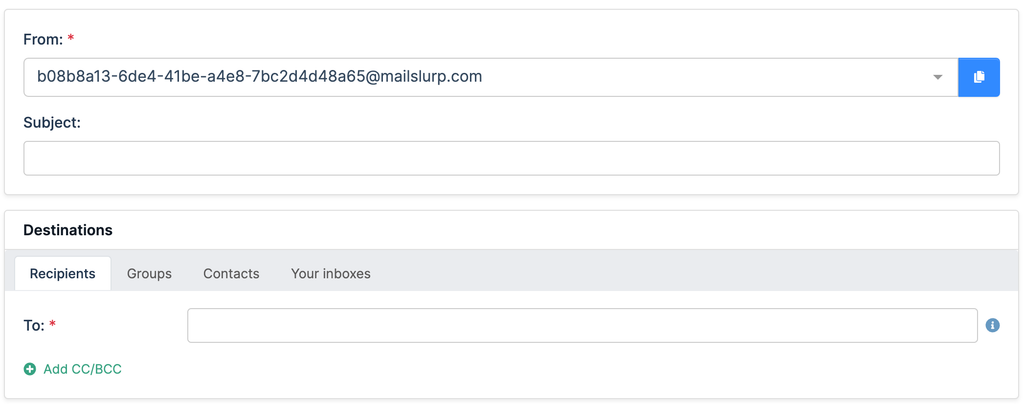
To send emails first create an inbox. Then use the dashboard compose page or the sendEmail methods on the inbox controller.
Javascript
const inbox = await mailslurp.createInbox();
const options = {
  to: [emailAddress],
  subject: 'Hello',
  body: 'Welcome',
};
const sent = await mailslurp.sendEmail(inbox.id, options);
expect(sent.subject).toContain('Hello');
Info. Sending to non-MailSlurp domains is enabled for free accounts. Paid accounts must use double opt-in consent to send external recipients or whitelist domains with support.
Sending attachments
To send attachments first upload the attachment using the attachment controller:
Javascript
const mailslurp = new MailSlurp(config);

// read a file as a base64 encoded string
const pathToAttachment = path.join(__dirname + '/attachment.txt');
const fileBase64Encoded = await fs.promises.readFile(pathToAttachment, {
  encoding: 'base64',
});

// upload the attachment as base64 string and get attachment id
const [attachmentId] =
  await mailslurp.attachmentController.uploadAttachment({
    uploadAttachmentOptions: {
      base64Contents: fileBase64Encoded,
      contentType: 'text/plain',
      filename: path.basename(pathToAttachment),
    },
  });
Then send an email using the attachment ID.
Javascript
await mailslurp.sendEmail(inbox.id!, {
  to: [inbox.emailAddress!],
  subject: 'attachment test',
  attachments: [attachmentId.toString()],
});
Validating email recipients
You can verify recipients when sending emails:
Javascript
// send an email 5 seconds from now
await mailslurp.inboxController.sendWithSchedule({
  inboxId: inbox.id,
  sendAtNowPlusSeconds: 5,
  validateBeforeEnqueue: true,
  sendEmailOptions: {
    to: [inbox.emailAddress],
    subject: 'test-schedule-123',
    body: '🌭',
    filterBouncedRecipients: true,
    validateEmailAddresses:
      SendEmailOptionsValidateEmailAddressesEnum.VALIDATE_FILTER_REMOVE_INVALID,
  },
});
See the verification guide for more options.
Use content templates

You can create email templates that support moustache style variables.
Javascript
const template = await mailslurp.templateController.createTemplate({
  createTemplateOptions: {
    name: 'Welcome email',
    content: 'Hello {{firstName}}. Welcome to {{brandName}}.',
  },
});
expect(template.id).toBeTruthy();
expect(template.variables).toEqual([
  {
    name: 'firstName',
    variableType: TemplateVariableVariableTypeEnum.STRING,
  },
  {
    name: 'brandName',
    variableType: TemplateVariableVariableTypeEnum.STRING,
  },
]);
Then send email using the template and pass variables for replacement.
Javascript
const templateObject = await mailslurp.templateController.getTemplate({
  templateId,
});
expect(templateObject.content).toContain(
  'Hello {{firstName}}. Welcome to {{brandName}}.'
);
const sent = await mailslurp.sendEmail(inboxId, {
  to: [emailAddress],
  subject: 'Welcome {{firstName}}',
  template: templateId,
  templateVariables: {
    firstName: 'Sally',
    brandName: 'My Company',
  } as any,
});
Sending with schedule
You can send email with a delay or scheduled delivery time like so:
Javascript
// send an email 5 minutes in future using a date
const milliseconds = 5 * 60 * 1000;
const timeObject = new Date(new Date().getTime() + milliseconds);
await mailslurp.inboxController.sendWithSchedule({
  inboxId: inbox.id,
  sendAtTimestamp: timeObject,
  validateBeforeEnqueue: true,
  sendEmailOptions: {
    to: [inbox.emailAddress],
    subject: 'test-schedule-later',
    body: '⏰',
    filterBouncedRecipients: true,
  },
});
Sending with queues
Use the sending queue to ensure emails are retried if they fail or your account experiences temporary limits.
Javascript
await mailslurp.inboxController.sendEmailWithQueue({
  inboxId: inboxId,
  sendEmailOptions: {
    to: [recipient],
    subject: 'Sent with a queue',
    body:
      'Use queues to allow recovery of failed email ' +
      'sending when account reaches limits or has payment issues',
  },
  // validate before adding to queue to fail early
  validateBeforeEnqueue: false,
});
Sending with SMTP/IMAP
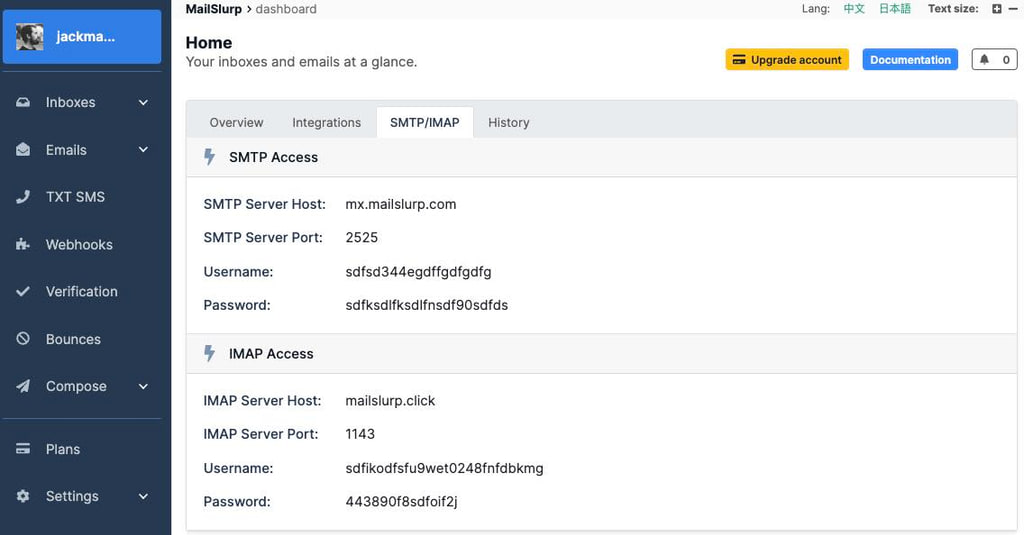
Create an SMTP type inbox. Then use the IMAP or SMTP access details to access the inbox in code or from a mail client.
Javascript
// create an inbox using MailSlurp client
const mailslurp = new MailSlurp({ apiKey: process.env.API_KEY! });
const inbox = await mailslurp.createInboxWithOptions({
  inboxType: CreateInboxDtoInboxTypeEnum.SMTP_INBOX,
});
// get smtp access details for mailbox
const server = await mailslurp.inboxController.getImapSmtpAccess({
  inboxId: inbox.id,
});
// Create auth plain transport
const transport = nodemailer.createTransport({
  host: server.smtpServerHost,
  port: server.smtpServerPort,
  secure: false,
  auth: {
    user: server.smtpUsername,
    pass: server.smtpPassword,
    type: 'PLAIN',
  },
});
// Send email
const sent = await transport.sendMail({
  from: inbox.emailAddress,
  to: inbox.emailAddress,
  subject: 'Test outbound email',
  text: 'Can I send on behalf?',
  html: '<b>Hello world</b>',
});
See the IMAP SMTP guide for more information.
Sent emails
Each sent email can be accessed with the SentEmail controller:
Javascript
const sentEmails = await mailslurp.sentController.getSentEmails({
  inboxId: inbox.id,
});
expect(sentEmails!!.content!!.length).toBeDefined();
Delivery status
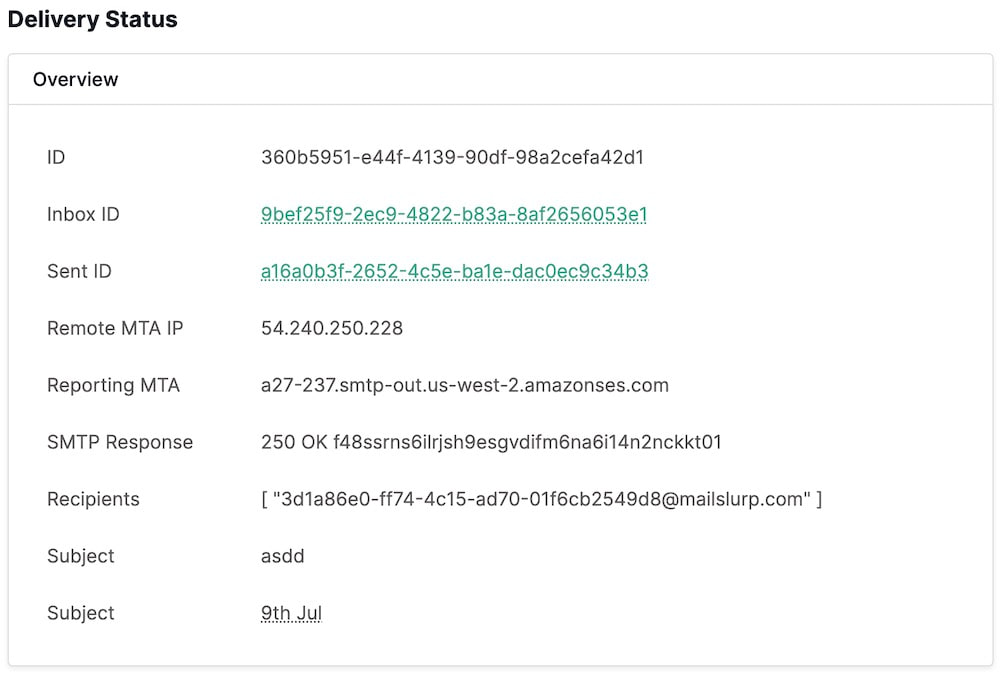
When emails are delivered an event is created. You can subscribe to delivery events using webhooks or view them in the dashboard.
Receiving emails
Inboxes receive emails. You can use the InboxController and EmailController to read email or use webhooks to have emails sent to your server directly.
Read emails in dashboard
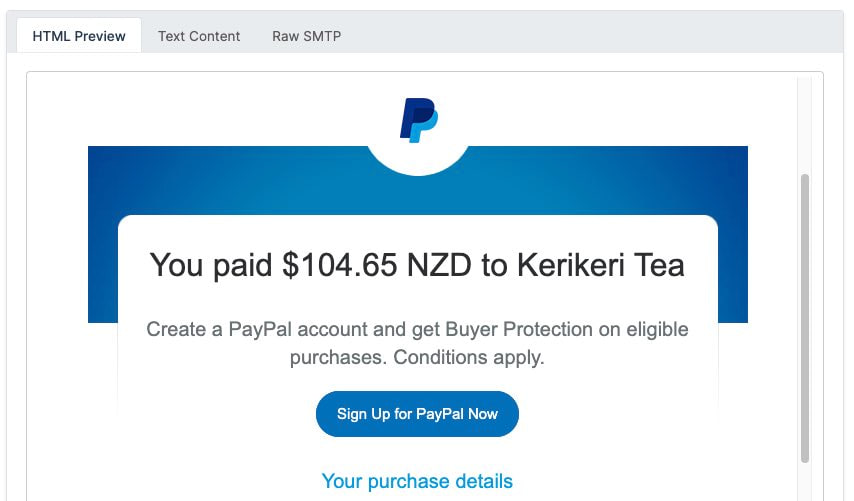
The dashboard provides HTML previews for received emails:
Fetch emails in code
Emails are stored in the inbox that receives them. You can fetch emails directly using the inbox controller.
Javascript
const emails = await mailslurp.inboxController.getEmails({
    inboxId: inbox.id,
    unreadOnly: true,
});
expect(emails.length).toBeDefined();
Use the email controller when you need the hydrated message body, browser preview URLs, or extracted links from an email.
/emails/{emailId}
Get hydrated email (headers and body)
Returns parsed email content including headers and body fields. Accessing hydrated content may mark the email as read depending on read-state rules.
Request, parameters, and responses
Path parameters
| Name | Type | Required | Description |
|---|---|---|---|
emailId | string:uuid | Yes |
Responses
| Status | Schema | Description |
|---|---|---|
200 | Email | OK |
HTTP and SDK snippets
HTTP
GET /emails/00000000-0000-4000-8000-000000000000 HTTP/1.1
Host: api.mailslurp.com
x-api-key: YOUR_API_KEY
Accept: application/json
cURL
curl -X GET "https://api.mailslurp.com/emails/00000000-0000-4000-8000-000000000000" \
  -H "x-api-key: YOUR_API_KEY" \
  -H "Accept: application/json"
JavaScript SDK
import { Configuration, EmailControllerApi } from "mailslurp-client";

const config = new Configuration({ apiKey: "YOUR_API_KEY" });
const emailController = new EmailControllerApi(config);
const request = {
  "emailId": "00000000-0000-4000-8000-000000000000"
};

const result = await emailController.getEmail(request);
Python SDK
import mailslurp_client
from mailslurp_client.api.email_controller_api import EmailControllerApi

configuration = mailslurp_client.Configuration()
configuration.api_key["x-api-key"] = "YOUR_API_KEY"

with mailslurp_client.ApiClient(configuration) as api_client:
    emailController = EmailControllerApi(api_client)
result = emailController.get_email("00000000-0000-4000-8000-000000000000")/emails/{emailId}/links
Extract links from an email HTML body
Parses HTML content and extracts link URLs (`href`). For non-HTML emails this endpoint returns a validation error.
Request, parameters, and responses
Path parameters
| Name | Type | Required | Description |
|---|---|---|---|
emailId | string:uuid | Yes | ID of email to fetch text for |
Query parameters
| Name | Type | Required | Description |
|---|---|---|---|
selector | string | No | Optional HTML query selector for links |
Responses
| Status | Schema | Description |
|---|---|---|
200 | EmailLinksResult | OK |
HTTP and SDK snippets
HTTP
GET /emails/00000000-0000-4000-8000-000000000000/links?selector=value HTTP/1.1
Host: api.mailslurp.com
x-api-key: YOUR_API_KEY
Accept: application/json
cURL
curl -X GET "https://api.mailslurp.com/emails/00000000-0000-4000-8000-000000000000/links?selector=value" \
  -H "x-api-key: YOUR_API_KEY" \
  -H "Accept: application/json"
JavaScript SDK
import { Configuration, EmailControllerApi } from "mailslurp-client";

const config = new Configuration({ apiKey: "YOUR_API_KEY" });
const emailController = new EmailControllerApi(config);
const request = {
  "emailId": "00000000-0000-4000-8000-000000000000",
  "selector": "value"
};

const result = await emailController.getEmailLinks(request);
Python SDK
import mailslurp_client
from mailslurp_client.api.email_controller_api import EmailControllerApi

configuration = mailslurp_client.Configuration()
configuration.api_key["x-api-key"] = "YOUR_API_KEY"

with mailslurp_client.ApiClient(configuration) as api_client:
    emailController = EmailControllerApi(api_client)
    result = emailController.get_email_links("00000000-0000-4000-8000-000000000000", selector="value")
Download attachments
You can download attachments by using the attachment ID.
Javascript
const attachmentDto =
  await mailslurp.attachmentController.downloadAttachmentAsBase64Encoded({
    attachmentId,
  });
expect(attachmentDto.base64FileContents).toBeTruthy();
const content = new Buffer(
  attachmentDto.base64FileContents!,
  'base64'
).toString('utf-8');
expect(content).toContain('test content');
// access the base64 content
expect(attachmentDto.sizeBytes).toBeTruthy();
expect(attachmentDto.contentType).toBeTruthy();
See the attachments page for more information.
Attachment downloads can be scoped to the email and attachment IDs, with byte and base64 variants available in the API reference.
/emails/{emailId}/attachments/{attachmentId}
Get email attachment bytes. Returned as `octet-stream` with content type header. If you have trouble with byte responses try the `downloadAttachmentBase64` response endpoints and convert the base 64 encoded content to a file or string.
Returns attachment bytes by attachment ID. Use attachment IDs from email payloads or attachment listing endpoints.
Request, parameters, and responses
Path parameters
| Name | Type | Required | Description |
|---|---|---|---|
emailId | string:uuid | Yes | ID of email |
attachmentId | string | Yes | ID of attachment |
Query parameters
| Name | Type | Required | Description |
|---|---|---|---|
apiKey | string | No | Can pass apiKey in url for this request if you wish to download the file in a browser. Content type will be set to original content type of the attachment file. This is so that browsers can download the file correctly. |
Responses
| Status | Schema | Description |
|---|---|---|
default | string:byte | default response |
HTTP and SDK snippets
HTTP
GET /emails/00000000-0000-4000-8000-000000000000/attachments/00000000-0000-4000-8000-000000000000?apiKey=value HTTP/1.1
Host: api.mailslurp.com
x-api-key: YOUR_API_KEY
Accept: application/json
cURL
curl -X GET "https://api.mailslurp.com/emails/00000000-0000-4000-8000-000000000000/attachments/00000000-0000-4000-8000-000000000000?apiKey=value" \
  -H "x-api-key: YOUR_API_KEY" \
  -H "Accept: application/json"
JavaScript SDK
import { Configuration, EmailControllerApi } from "mailslurp-client";

const config = new Configuration({ apiKey: "YOUR_API_KEY" });
const emailController = new EmailControllerApi(config);
const request = {
  "emailId": "00000000-0000-4000-8000-000000000000",
  "attachmentId": "00000000-0000-4000-8000-000000000000",
  "apiKey": "value"
};

const result = await emailController.downloadAttachment(request);
Python SDK
import mailslurp_client
from mailslurp_client.api.email_controller_api import EmailControllerApi

configuration = mailslurp_client.Configuration()
configuration.api_key["x-api-key"] = "YOUR_API_KEY"

with mailslurp_client.ApiClient(configuration) as api_client:
    emailController = EmailControllerApi(api_client)
    result = emailController.download_attachment("00000000-0000-4000-8000-000000000000", "00000000-0000-4000-8000-000000000000", api_key="value")
Spam review
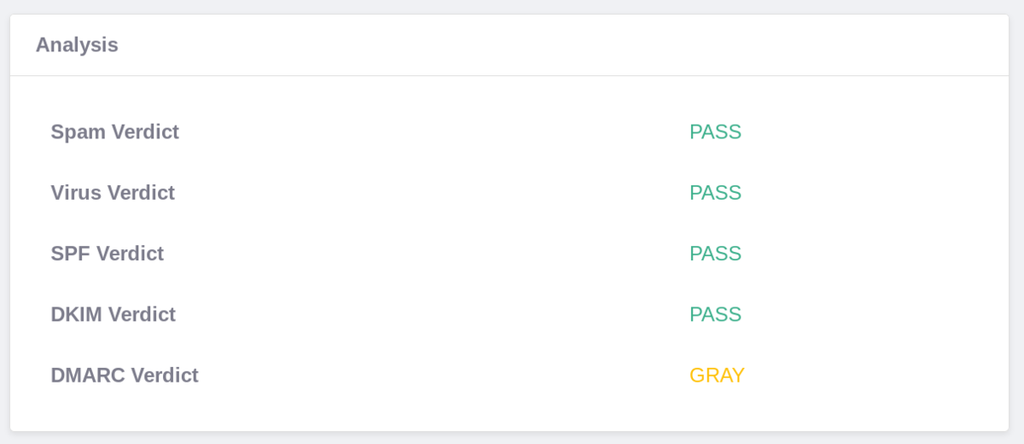
Every email is automatically scanned for viruses and spam ratings. You can access these on the email object.
Javascript
// fetch the email and review spam analysis
expect(email.analysis?.dkimVerdict).toEqual('PASS');
expect(email.analysis?.spamVerdict).toEqual('PASS');
// other verdicts available
expect(email.analysis?.dmarcVerdict).toBeDefined();
expect(email.analysis?.spfVerdict).toBeDefined();
expect(email.analysis?.virusVerdict).toBeDefined();
Wait for emails
The email wait for methods allow you to hold a request open until matching emails are found. This is very useful for receiving emails in tests when after you have performed an action.
Javascript
const user = await myApp.signUp(testInbox.emailAddress!);

// verify that confirmation email was sent by your app
const timeout = 30000;
const email = await mailslurp.waitForLatestEmail(testInbox.id, timeout);

// confirm the user using the code
const [_, verificationCode] = /your code is "([0-9]{6})"/g.exec(
  email.body!
)!;

// do something with code like verifying an account
await myApp.confirmUser(verificationCode);
You can create complex search terms to match for email contents:
Javascript
const matchingEmails = await mailslurp.waitForMatchingEmails(
  {
    // match for emails with no attachments
    conditions: [
      {
        condition: ConditionOptionConditionEnum.HAS_ATTACHMENTS,
        value: ConditionOptionValueEnum.FALSE,
      },
    ],
    // match for emails from a specific email address
    matches: [
      {
        field: MatchOptionFieldEnum.FROM,
        should: MatchOptionShouldEnum.CONTAIN,
        value: inbox.emailAddress,
      },
    ],
  },
  1,
  inbox.id,
  timeout,
  unreadOnly
);
Receive email with webhooks
The best way to receive emails at scale is by using webhooks.
Javascript
await mailslurp.webhookController.createWebhook({
  inboxId: inbox.id,
  createWebhookOptions: {
    eventName: CreateWebhookOptionsEventNameEnum.NEW_EMAIL,
    url: slackIncomingWebhookUrl,
    // custom request body for slack uses {{subject}} to insert
    // the subject from the standard NEW_EMAIL payload
    requestBodyTemplate: `{"text":"New message: {{subject}}"}`,
  },
});
Receive emails from connectors
If you have connected a 3rd party email account with MailSlurp inbox connectors you can synchronize emails between them using the connector controller. Emails are also synchronized during wait for methods and if you pass a syncConnectors argument to fetch email commands. This means MailSlurp will pull new emails from your external mailbox before returning results.
Test email content
MailSlurp provides many features for testing the rendering, validity, and client-support of email content. You can use MailSlurp to check spam ratings, DKIM/DMARC/SPF records, CSS/HTML feature support, cross-device rendering, broken links and more.
Content checks can run directly against the hydrated email body. Use regex matching for OTP extraction, content-part reads for multipart messages, and preview URLs when a browser-rendered view is useful.
/emails/{emailId}/contentMatch
Run regex against hydrated email body and return matches
Executes a Java regex pattern over hydrated email body text and returns the full match plus capture groups. Pattern syntax follows Java `Pattern` rules.
Request, parameters, and responses
Path parameters
| Name | Type | Required | Description |
|---|---|---|---|
emailId | string:uuid | Yes | ID of email to match against |
Request body (required)
| Field | Type | Required | Description |
|---|---|---|---|
pattern | string | Yes | Java style regex pattern. Do not include the typical `/` at start or end of regex in some languages. Given an example `your code is: 12345` the pattern to extract match looks like `code is: (\d{6})`. This will return an array of matches with the first matching the entire pattern and the subsequent matching the groups: `['code is: 123456', '123456']` See htt... |
{
  "pattern": "value"
}
Responses
| Status | Schema | Description |
|---|---|---|
200 | EmailContentMatchResult | OK |
HTTP and SDK snippets
HTTP
POST /emails/00000000-0000-4000-8000-000000000000/contentMatch HTTP/1.1
Host: api.mailslurp.com
x-api-key: YOUR_API_KEY
Accept: application/json
Content-Type: application/json

{
  "pattern": "value"
}
cURL
curl -X POST "https://api.mailslurp.com/emails/00000000-0000-4000-8000-000000000000/contentMatch" \
  -H "x-api-key: YOUR_API_KEY" \
  -H "Accept: application/json" \
  -H "Content-Type: application/json" \
  --data '{"pattern":"value"}'
JavaScript SDK
import { Configuration, EmailControllerApi } from "mailslurp-client";

const config = new Configuration({ apiKey: "YOUR_API_KEY" });
const emailController = new EmailControllerApi(config);
const request = {
  "emailId": "00000000-0000-4000-8000-000000000000",
  "contentMatchOptions": {
    "pattern": "value"
  }
};

const result = await emailController.getEmailContentMatch(request);
Python SDK
import mailslurp_client
from mailslurp_client.api.email_controller_api import EmailControllerApi

configuration = mailslurp_client.Configuration()
configuration.api_key["x-api-key"] = "YOUR_API_KEY"

with mailslurp_client.ApiClient(configuration) as api_client:
    emailController = EmailControllerApi(api_client)
    content_match_options = {
      "pattern": "value"
    }
result = emailController.get_email_content_match("00000000-0000-4000-8000-000000000000", content_match_options)/emails/{emailId}/contentPart
Get email content part by content type
Extracts one MIME body part by `contentType` and optional `index`, returned in a structured DTO with metadata.
Request, parameters, and responses
Path parameters
| Name | Type | Required | Description |
|---|---|---|---|
emailId | string:uuid | Yes | ID of email to match against |
Query parameters
| Name | Type | Required | Description |
|---|---|---|---|
contentType | string | Yes | Content type |
strict | boolean | No | Strict content type match |
index | integer:int32 | No | Index of content type part if multiple |
Responses
| Status | Schema | Description |
|---|---|---|
200 | EmailContentPartResult | OK |
HTTP and SDK snippets
HTTP
GET /emails/00000000-0000-4000-8000-000000000000/contentPart?contentType=value&strict=true&index=value HTTP/1.1
Host: api.mailslurp.com
x-api-key: YOUR_API_KEY
Accept: application/json
cURL
curl -X GET "https://api.mailslurp.com/emails/00000000-0000-4000-8000-000000000000/contentPart?contentType=value&strict=true&index=value" \
  -H "x-api-key: YOUR_API_KEY" \
  -H "Accept: application/json"
JavaScript SDK
import { Configuration, EmailControllerApi } from "mailslurp-client";

const config = new Configuration({ apiKey: "YOUR_API_KEY" });
const emailController = new EmailControllerApi(config);
const request = {
  "emailId": "00000000-0000-4000-8000-000000000000",
  "contentType": "value",
  "strict": true,
  "index": null
};

const result = await emailController.getEmailContentPart(request);
Python SDK
import mailslurp_client
from mailslurp_client.api.email_controller_api import EmailControllerApi

configuration = mailslurp_client.Configuration()
configuration.api_key["x-api-key"] = "YOUR_API_KEY"

with mailslurp_client.ApiClient(configuration) as api_client:
    emailController = EmailControllerApi(api_client)
result = emailController.get_email_content_part("00000000-0000-4000-8000-000000000000", content_type="value", strict=True, index=NaN)/emails/{emailId}/urls
Get email URLs for viewing in browser or downloading
Returns precomputed URLs for preview and raw message access for the specified email.
Request, parameters, and responses
Path parameters
| Name | Type | Required | Description |
|---|---|---|---|
emailId | string:uuid | Yes |
Responses
| Status | Schema | Description |
|---|---|---|
200 | EmailPreviewUrls | OK |
HTTP and SDK snippets
HTTP
GET /emails/00000000-0000-4000-8000-000000000000/urls HTTP/1.1
Host: api.mailslurp.com
x-api-key: YOUR_API_KEY
Accept: application/json
cURL
curl -X GET "https://api.mailslurp.com/emails/00000000-0000-4000-8000-000000000000/urls" \
  -H "x-api-key: YOUR_API_KEY" \
  -H "Accept: application/json"
JavaScript SDK
import { Configuration, EmailControllerApi } from "mailslurp-client";

const config = new Configuration({ apiKey: "YOUR_API_KEY" });
const emailController = new EmailControllerApi(config);
const request = {
  "emailId": "00000000-0000-4000-8000-000000000000"
};

const result = await emailController.getEmailPreviewURLs(request);
Python SDK
import mailslurp_client
from mailslurp_client.api.email_controller_api import EmailControllerApi

configuration = mailslurp_client.Configuration()
configuration.api_key["x-api-key"] = "YOUR_API_KEY"

with mailslurp_client.ApiClient(configuration) as api_client:
    emailController = EmailControllerApi(api_client)
    result = emailController.get_email_preview_ur_ls("00000000-0000-4000-8000-000000000000")