
AI agent inboxes and MailSlurp MCP
Documentation navigation
Give Claude or another AI agent a real email address, then use MailSlurp MCP or a scoped key to handle messages, threads, attachments, drafts, and replies.
Overview
MailSlurp gives AI agents real email addresses and a supervised workspace for using them. An agent can read messages, search an inbox, inspect threads and attachments, prepare drafts, and reply according to the role and inbox access you grant.
Agent email uses the same MailSlurp inboxes, emails, drafts, and threads as the rest of your account. The agent workspace is a focused view over those resources: it shows which conversations a specific agent handled, what it did, what needs human review, and how it is performing. You do not need to maintain a separate copy of each mailbox for an agent.
Use agent access for:
- support and operations agents that triage or answer inbound email
- human-in-the-loop agents that prepare drafts for approval
- agents that extract data from messages and attachments
- QA agents that read OTP, verification, password reset, and test emails
- tenant-specific or environment-specific agents that must not see unrelated inboxes
For a broader look at programmable inboxes, phone numbers, SMS OTP codes, and agent messaging workflows, see email and SMS for AI agents.
Give Claude Its Own Email Address
Create a MailSlurp inbox, open Agents, and add an AI client connection. Copy https://api.mailslurp.com/mcp into Claude as a remote MCP server, complete OAuth in your browser, and assign the inbox to the connection. Claude can then read and reply from that address within the role and inbox scope you approved.
You can use a new MailSlurp address, an address on your own domain, or a connected Gmail or Outlook inbox. The mailbox remains visible in MailSlurp, where you can review conversations, drafts, failures, and activity or revoke access without changing the address.
Follow the MailSlurp MCP setup guide for Claude Code commands, OAuth, scoped keys, and safe first tasks.
Receive SMS OTP Codes With An AI Agent
Provision a real MailSlurp phone number from the dashboard or standard REST API, then receive verification texts through the API or a webhook. Your agent runtime can wait for the message, extract the code, and use it in an approved sign-in, MFA, or test workflow while the number and message history remain available for review.
Use the scoped Agent REST API for assigned phone numbers and SMS. Keep number provisioning and assignment in the operator setup flow; the running agent only needs the permissions for its assigned resources. Call agentGetCapabilities to discover effective access. Check your MCP client’s tool list separately rather than assuming every REST operation is exposed there. See Playwright SMS testing for a browser-test example.
Quick Start
- Open Agents in the MailSlurp dashboard.
- Connect an OAuth-capable MCP client, or create a scoped key for a custom agent.
- Choose the agent role and the inboxes it can access.
- Send a message to one of those inboxes.
- Ask the agent to read the message and prepare a draft without sending it.
- Return to the agent workspace to review the conversation and recorded actions.
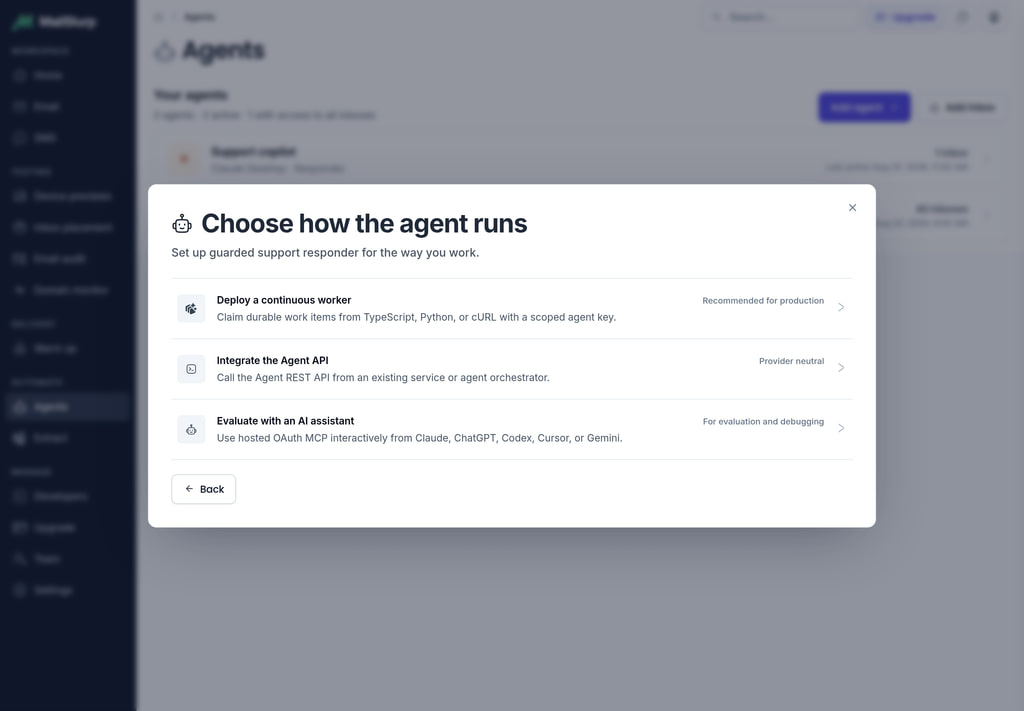
Choose A Connection Method
MailSlurp supports two connection models. Both create a named agent connection with a role, inbox scopes, and activity history.
| Method | Choose It When |
|---|---|
| MCP OAuth | You use Claude, ChatGPT, Cursor, or another OAuth-capable remote MCP client and do not want to copy an API key into it. |
| Scoped agent key | You own the service or background worker, need server-to-server authentication, or use an MCP client that accepts a manually configured request header. |
Use OAuth when the client supports remote MCP authorization. It is the shortest setup and keeps credential exchange inside the authorization flow. Use a scoped key when you own the runtime, need server-to-server authentication, or need to control the request code directly.
Connect With MCP OAuth
From Agents, select Add agent, choose AI client, and copy the MailSlurp MCP URL:
https://api.mailslurp.com/mcpAdd that URL as a remote MCP server in the AI client. The client starts OAuth and opens the MailSlurp authorization screen in your browser.

On the authorization screen:
- Confirm the client name.
- Give the agent a recognizable name.
- Choose the narrowest role that can complete the task.
- Select one or more inboxes, use inbox tags, or deliberately grant all-inbox access.
- Review the requested MCP capabilities.
- Select Authorize connection.
MailSlurp returns the browser to the client after approval. The resulting token is linked to the named connection and its granted scopes. It is not a Gmail or Outlook OAuth token, and the AI client does not receive the connector credentials for an underlying mailbox.

OAuth is also the easiest connection to revoke. Open the agent’s Settings page and select Revoke connection to remove that client’s access immediately.
Create A Scoped Agent Key
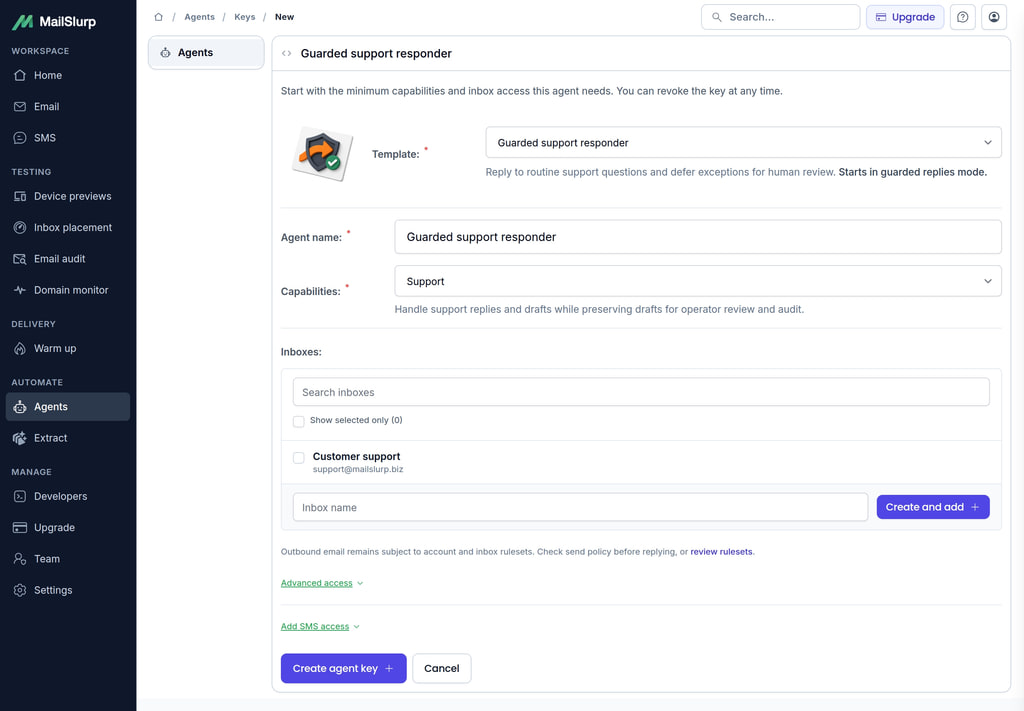
Choose Custom agent when your application will call the Agent REST API or when your MCP client expects an API key header.
- Enter an agent name.
- Choose a role.
- Select inbox IDs, inbox tags, or account-wide inbox access.
- Create the key.
- Copy the secret immediately. The raw key is only shown once.
Send the key as x-api-key to the Agent REST API. For an MCP client that supports custom headers, use:
{
  "mcpServers": {
    "mailslurp": {
      "url": "https://api.mailslurp.com/mcp",
      "headers": {
        "x-api-key": "YOUR_AGENT_API_KEY"
      }
    }
  }
}
Keep one key per agent, tenant, environment, or independently revocable workflow. Disable a key from the agent’s Settings page when you want to pause access without deleting the connection record.
Choose An Agent Role
Start with the least-privilege role. You can change the role and inbox access later from the agent workspace.
| Role | Access And Best Fit |
|---|---|
AGENT_READ_ONLY |
Read scoped inbox email for triage, summaries, extraction, monitoring, and QA checks. |
AGENT_DRAFT_ONLY |
Read email and create or edit drafts without sending. Use when a person must approve customer communication. |
AGENT_RESPONDER |
Read email, reply, and send drafts for trusted autonomous response workflows. |
AGENT_SUPPORT |
Read email, create drafts, and send replies for support workflows. |
AGENT_INBOX_MANAGER |
Hold inbox-management permissions and scoped read access for custom inbox-provisioning integrations. |
OAuth also limits the connection to the MCP scopes requested by the client and granted during authorization. A role never expands access beyond the selected inbox resources.
The hosted MCP email tools currently use the inbox manager role’s read access. Create or connect the inbox from the MailSlurp dashboard, or use your provisioning integration, then assign the resulting inbox to the agent.
For external customer conversations, AGENT_DRAFT_ONLY is the safest starting point. It provides an early proof that the agent understands the mailbox while keeping the final send action with a person.
Connect Inboxes
An agent can use any inbox represented in MailSlurp:
- create a hosted MailSlurp inbox in seconds
- connect an existing Gmail mailbox through Google OAuth
- connect Outlook or another provider through IMAP and SMTP
- create inboxes on a domain you control
- grant access to an existing MailSlurp inbox

To add a mailbox to an existing agent, open that agent’s Inboxes or Settings page and select Add inbox. Starting the flow from the agent workspace records the connection intent. After MailSlurp creates or connects the inbox, it adds that inbox to the originating agent and returns you to the agent workflow.
You can also create or connect inboxes through the normal Inboxes area first, then select them in the agent’s settings. Regular inbox flows continue to work independently of Agents.
Inbox IDs, Tags, And All-Inbox Access
Choose a scope based on how the mailbox set changes:
| Scope | Behavior And Best Fit |
|---|---|
| Inbox IDs | Access only to selected inboxes. Use for one agent per customer, queue, or mailbox. |
| Inbox tags | Access follows matching tags. Use for changing groups such as support, refunds, staging, or tenant-acme. |
| All inboxes | Access includes the account’s inbox inventory. Reserve this for trusted internal agents that genuinely need broad mailbox coverage. |
An agent key or OAuth token must pass both permission and resource-scope checks. Knowing an email or inbox ID does not bypass those checks.
Run The First Safe Task
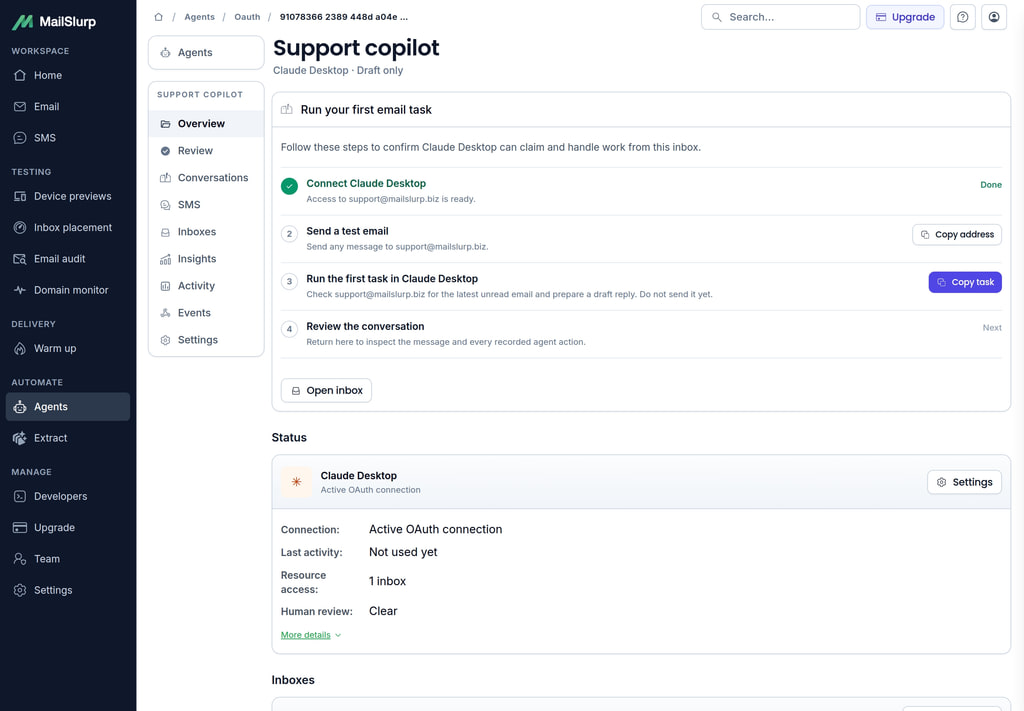
After the first connection, MailSlurp shows a guided activation task using one of the assigned inboxes. Send a real test message to the displayed address, then use the supplied prompt in the agent client.
For a draft-capable role, the first prompt asks the agent to prepare a reply without sending it. For a read-only role, it asks for a summary. This produces a visible conversation and activity trail while keeping the first run low risk.
Agent Workspace
Select an agent from the roster to open its workspace. Each workspace keeps seven related views together: Overview, Review, Conversations, Inboxes, Insights, Activity, and Settings.
Overview
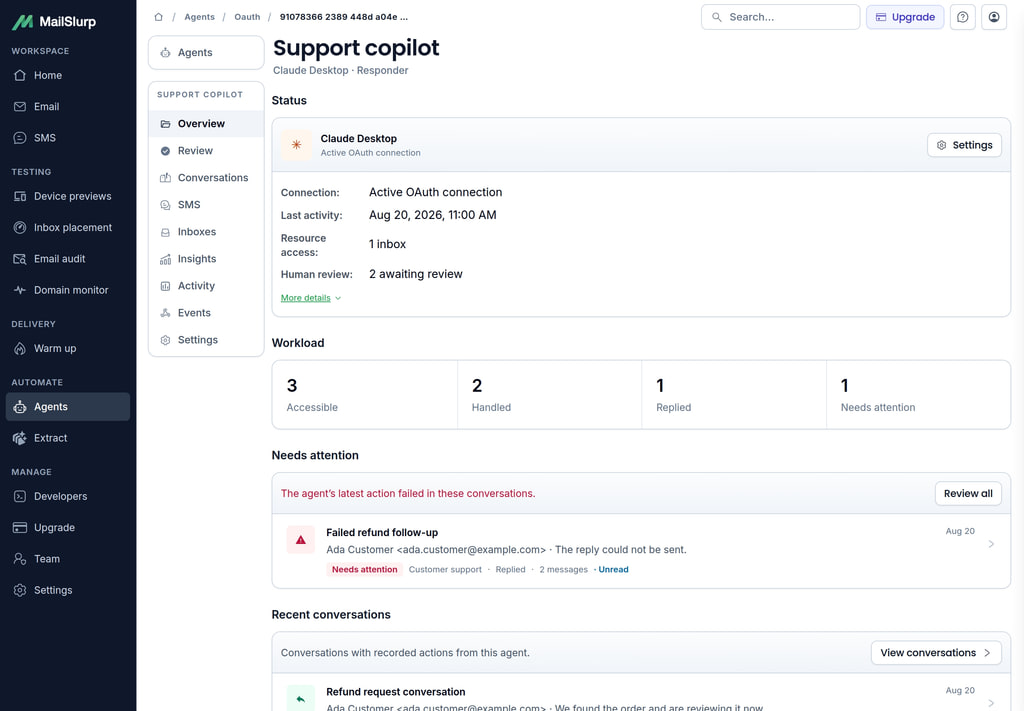
Overview answers the immediate operational questions: Is the connection active? What can it do? Which inboxes can it see? How many conversations has it handled, replied to, left unread, or marked for attention?
It also shows recent conversations and failed actions so an operator can move directly to the work that needs intervention.
Human Review
The Review queue combines drafts awaiting a person and conversations whose latest agent action failed. Filter between all items, failures, and drafts, then open a conversation to inspect its context.
Use this view for human-in-the-loop support, approvals, regulated communication, refunds, or any workflow where an agent should prepare work but a person owns the final decision. Draft review opens the normal MailSlurp draft editor, so a person can edit and send using the existing email workflow.

Conversations
The Conversations page is the main operating view for agents that handle many messages. It separates:
- Handled by agent: threads with at least one recorded action from this connection
- All accessible: threads in inboxes the agent can access, including those it has not touched
Search by subject, sender, or message text. Filter by outcome, inbox, date range, or attention state, then sort and page through large result sets. Outcomes distinguish replied, drafted, read, failed, and available conversations.
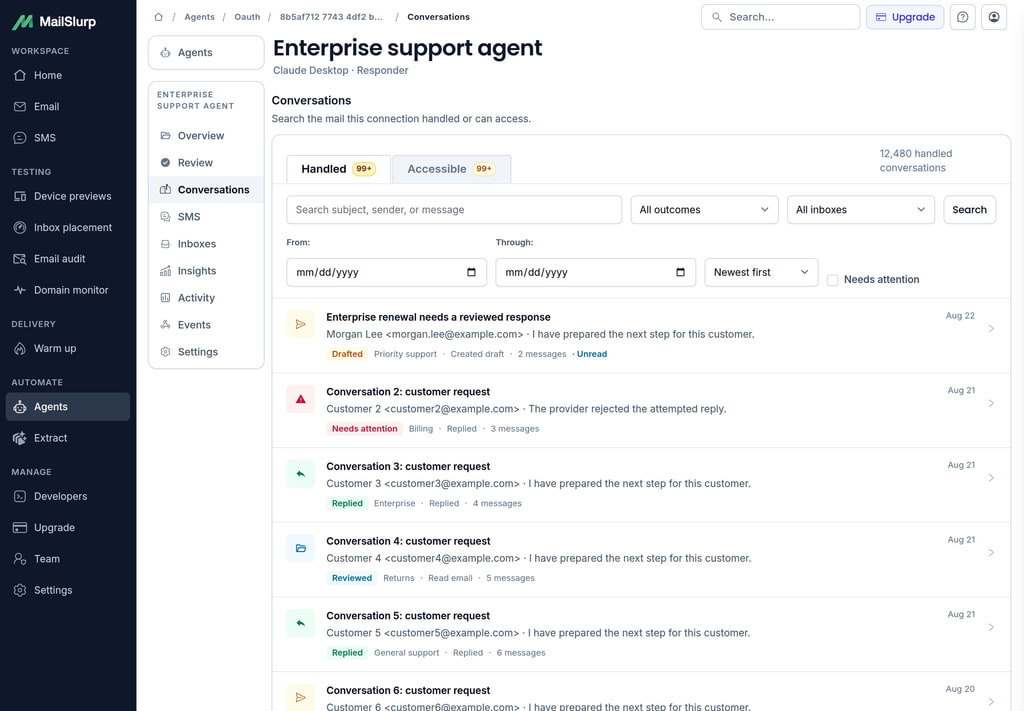
Open a conversation to see customer and sent messages interleaved with recorded agent actions in one timeline. Successful reads, draft changes, replies, and failures appear where they occurred, so an operator can understand the sequence without cross-referencing a separate log.
Use Previous and Next to work through a queue while preserving the list filters and page position.

Inboxes
The Inboxes page shows every resolved mailbox available to the agent and the handled, replied, unread, and attention counts for each one. Use it to spot overloaded queues, confirm scope, open the underlying inbox, or add another mailbox.
These are the same inbox entities shown in the normal MailSlurp inbox area. Agent access adds authorization and reporting metadata; it does not duplicate or relabel the email data.
Insights
The Insights page summarizes the last 7, 30, or 90 days. It reports:
- handled conversation volume
- reply rate
- human review rate
- failure rate
- median time to the first agent action
- outcome trends over time
- handled, replied, reviewed, and first-action performance by inbox
Use these metrics to decide whether an agent needs a narrower task, better prompting, different mailbox ownership, or more human review. Compare inbox rows before expanding a workflow to a larger queue.

Activity And Audit
The Activity page is the technical audit trail for the connection. Each record can include the action type, success or failure state, MCP tool name, inbox, email, draft, bounded error detail, and timestamp.
Use Conversations to understand customer work and Activity to debug credentials, tool calls, provider errors, and unexpected automation. Activity is paginated and can be sorted newest or oldest first.

Settings And Revocation
Settings controls the agent name, role, inbox IDs, inbox tags, and account-wide access. It also provides the connection lifecycle action:
- OAuth connections can be revoked immediately.
- Scoped keys can be disabled and enabled.
Review Settings after a pilot, when an agent changes responsibilities, when a customer or tenant is removed, or before expanding from draft-only to autonomous sending.

MCP Tools
The hosted MCP endpoint exposes scoped tools for inbox discovery, message handling, attachments, replies, and drafts:
mailslurp.list_accessible_inboxesmailslurp.list_inbox_emailsmailslurp.search_inbox_emailsmailslurp.get_latest_inbox_emailmailslurp.get_email_summarymailslurp.get_emailmailslurp.get_email_threadmailslurp.list_email_attachmentsmailslurp.extract_email_attachment_textmailslurp.reply_to_emailmailslurp.create_email_draftmailslurp.list_email_draftsmailslurp.get_email_draftmailslurp.update_email_draftmailslurp.send_email_draftmailslurp.delete_email_draft
Read and search tools require scoped read access. Reply and draft-send tools require their corresponding send permissions. Draft create, update, list, get, and delete use the draft permissions granted by the role and OAuth scopes.
MailSlurp implements stateless Streamable HTTP for MCP. Tool calls pass through the same agent permission and resource-scope checks as the Agent REST API, and their outcomes feed the agent workspace.
Create Agent Keys By API
Create an agent key using a standard MailSlurp API key that can manage API keys:
curl -X POST "https://api.mailslurp.com/account/agent-api-keys" \
  -H "x-api-key: $MAILSLURP_API_KEY" \
  -H "Content-Type: application/json" \
  -d '{
    "agentName": "support-triage-agent",
    "role": "AGENT_DRAFT_ONLY",
    "accountWide": false,
    "inboxIds": ["00000000-0000-0000-0000-000000000000"],
    "inboxTags": []
  }'
List existing agent keys:
curl "https://api.mailslurp.com/account/agent-api-keys" \
  -H "x-api-key: $MAILSLURP_API_KEY"
Review agent activity:
curl "https://api.mailslurp.com/account/agent-api-keys/activity?apiKeyEntityId=AGENT_KEY_ENTITY_ID" \
  -H "x-api-key: $MAILSLURP_API_KEY"
Agent REST API
For long-running services, follow workers, claims and human review. For assigned phones and authenticator devices, see SMS and TOTP access.
Agent REST endpoints are under /agent and require an agent key with the relevant role and inbox scope.
| Operation | Endpoint |
|---|---|
| List scoped inbox emails | GET /agent/inboxes/{inboxId}/emails |
| Wait for the latest scoped email | GET /agent/inboxes/{inboxId}/emails/latest |
| Get an email summary | GET /agent/emails/{emailId}/summary |
| Get a full email | GET /agent/emails/{emailId} |
| Reply to an email | POST /agent/emails/{emailId}/reply |
| Create a draft | POST /agent/inboxes/{inboxId}/drafts |
| List drafts | GET /agent/inboxes/{inboxId}/drafts |
| Get a draft | GET /agent/inboxes/{inboxId}/drafts/{draftId} |
| Update a draft | PATCH /agent/inboxes/{inboxId}/drafts/{draftId} |
| Send a draft | POST /agent/inboxes/{inboxId}/drafts/{draftId}/send |
| Delete a draft | DELETE /agent/inboxes/{inboxId}/drafts/{draftId} |
Draft create and update endpoints use the MailSlurp SendEmailOptions shape, but save the message instead of sending it. The draft-send operation is separate so a workflow can keep generation and delivery as distinct permission boundaries.
Recommended Operating Patterns
- Start external-facing agents in
AGENT_DRAFT_ONLYand promote them only after reviewing real outcomes. - Give each customer, tenant, or environment its own agent connection and inbox scope.
- Use inbox tags when an agent should follow a changing queue.
- Keep broad all-inbox access for trusted internal workflows.
- Store scoped keys in a secret manager and revoke or disable retired connections.
- Treat inbound email bodies, links, and attachments as untrusted input.
- Use Review for customer work, Conversations for supervision, Insights for improvement, and Activity for technical debugging.
- Continue using standard MailSlurp inbox, email, webhook, SMS, rendering, and deliverability features alongside agent-scoped access.