












Email Warmup: How to Start a Sender and Choose a Schedule
Set up email warmup with a verified sender, choose a gradual schedule, and read delivery and inbox placement results before increasing volume.
A new email sender needs a steady start. Whether you are introducing a mailbox, moving a newsletter to another provider, or preparing a new notification domain, a gradual sending plan gives you time to spot delivery problems before more recipients are affected.
Email warmup is the process of building sending activity gradually while checking how the sender behaves. MailSlurp email warmup runs paced messages through your own sending connection, tracks controlled-inbox delivery, and supports provider placement checkpoints on eligible plans. You choose the sender, schedule and coverage, then review the results as the program runs.
What are you warming up?
The word "sender" can describe several parts of an email system. Let's do a quick refresh to define the terms.
- Mailbox warmup concerns an individual sending address and its activity. This is often what people mean by inbox warmup.
- Domain warmup concerns a new sending domain or subdomain, including the identity used to authenticate its messages.
- IP warmup concerns the sending server's Internet Protocol address. A dedicated IP has its own sending history, even when the domain is familiar.
These can change together, which is where the terminology gets a little tangled. Moving the same address to another provider can change its outgoing IP and authentication path. Creating a new From address does not necessarily give it a new dedicated IP.
Your provider may also manage a dedicated-IP ramp alongside the mailbox or domain work. The IP warmup and domain warmup guide explains how SendGrid and Amazon SES infrastructure ramps fit with a sender program.
What needs to be ready first?
The easiest starting point is the address and provider you plan to keep using. A short note of the From address, sending domain, provider and message type will come in handy when you compare results later.
Three things are worth sorting out before the first scheduled send:
- Authentication. Sender Policy Framework (SPF) authorizes sending infrastructure. DomainKeys Identified Mail (DKIM) signs messages. Domain-based Message Authentication, Reporting and Conformance (DMARC) checks whether a passing authentication identity aligns with the visible From domain. A received message shows how that authentication actually worked on the sending path.
- Provider access. The credential must be valid for the chosen connection, and the provider must permit the address to send. The connection's test delivery gives you an early check that those pieces work together.
- Production recipient handling. Consent, unsubscribe processing, bounce suppression and complaint handling still belong in the system that sends your real campaigns. Warmup activity is an additional stream of mail.
The email header analyzer helps inspect authentication on a received message. Domain authentication monitoring can continue those checks after DNS changes.
Google's sender guidelines recommend consistent sending, gradual increases and monitoring of delivery responses and reputation. Those principles are useful when deciding whether a planned increase is appropriate for your own traffic.
Connect the sender in MailSlurp
Open Email warmup, select Create warmup, and choose an existing sending connection or a provider from the catalog. The provider choice determines which credential or server fields you need.
For an authenticated SMTP connection, enter the server settings for your provider. SMTP stands for Simple Mail Transfer Protocol, the protocol used to send mail between systems. For a supported native connection, follow the provider-specific fields instead. Amazon SES uses SES SMTP credentials in this workflow.
Connect a custom SMTP sender
Choose Other provider (SMTP) when your service supplies an authenticated SMTP connection. Use its outgoing submission settings, rather than the IMAP settings used to read a mailbox.
| MailSlurp field | Value to obtain from your provider |
|---|---|
| From email | An address this account is authorized to send from |
| SMTP host | The outgoing server name, without an https:// prefix |
| SMTP port and Security | The provider's matching port and encryption mode |
| SMTP username and password | SMTP credentials or an eligible app password, which may differ from your normal login |
For example, a provider that specifies port 587 with STARTTLS needs both of those settings selected. A provider that specifies port 465 with implicit TLS needs that pair instead. STARTTLS and implicit TLS establish encryption differently; changing the port alone does not change the connection mode.
Verify the credential, then complete the test delivery. A successful login checks access to the server; the delivery check also exercises the authorized sender and recipient path. If the first passes and the second fails, inspect the provider's sender-verification or recipient restrictions before changing the password. The SMTP warmup troubleshooting guide separates those errors from connection, TLS and quota failures.
The connection should exercise the service you intend to use. Warming news@example.com through one relay does not test a campaign sent through another relay with different authentication and IPs. MailSlurp reuses verified sending connections, so you can use the same connection for the warmup program and a separate placement test of your final campaign.
The provider setup guides cover the exact preparation for named connections, including SES credentials and regional settings. Keep credentials in the connection settings, out of application logs and shared setup notes.
Choose the program goal
Select Warm up a new sender for a new mailbox. If you are working on an existing sender after a reputation problem, choose Repair sender reputation and use the recovery workflow to decide what to fix and record first.
For a Google-hosted mailbox, the Gmail warmup guide also explains how to account for ordinary replies and campaign activity alongside the program.
Which email warmup schedule makes sense?
A preset gives you a starting point without asking you to invent a sending calendar from scratch. MailSlurp offers these schedules:
| Preset | Target warmup volume | Ramp duration | Maintenance volume |
|---|---|---|---|
| Gentle | 10 messages/day | 28 days | 5 messages/day |
| Standard | 20 messages/day | 28 days | 10 messages/day |
| Recovery | 20 messages/day | 42 days | 10 messages/day |
| Custom | Your settings | 7-90 days | Your setting |
These numbers describe the warmup program. They are not recommended campaign volumes, a provider sending allowance, or a promise that reputation will be ready on the last day.
Customize schedule shows the current daily volume, target volume, ramp duration, maintenance volume, time zone and local sending window. MailSlurp paces due sends within that window. For a low-volume sender, Gentle may match the intended activity more closely than choosing the largest available target.
The sender's workload includes production messages too. A quiet warmup program can share an address with a rather less quiet newsletter launch, and the receiving provider sees the combined traffic. It's worth agreeing on the timing with the person running that campaign.
How long should you warm up an email domain before a campaign?
MailSlurp's new-sender presets provide a 28-day ramp, which gives you a concrete period to plan around. There isn't a universal number of days after which every domain is ready for a campaign. Readiness also depends on current delivery observations and the size and nature of the next send.
A useful review happens when the final campaign is available, while there is still time to change the plan:
| What you find | What it means for the campaign |
|---|---|
| Stable connection and completed delivery observations | A basis for testing the final message and planning a gradual production increase |
| Repeated provider rejections or worsening placement | Time to investigate the response and sender configuration before increasing traffic |
| Pending checks or a very small sample | More uncertainty to resolve; an empty result isn't a successful check |
| A new provider, domain or materially different message | A changed sending path or message that deserves fresh testing |
Suppose a newsletter is due on day 29 of a 28-day ramp. If the latest check is unresolved, the calendar hasn't answered the delivery question. A smaller planned production step, another completed test or a revised launch date may be appropriate, depending on the evidence and the people responsible for the send.
Monitoring remains useful in maintenance, especially when a new template or a larger production send comes along. The low-volume and seasonal sender guide covers quieter periods between sends.
Where do the warmup messages go?
Controlled inboxes provide day-to-day delivery observations through MailSlurp-managed infrastructure. Premium placement checkpoints sample Gmail, Google Workspace, Outlook.com and Microsoft 365 on eligible plans. The useful coverage is the set of providers your recipients actually use.
Managed content supplies varied warmup messages. Custom content takes a subject and plain-text body. The warmup workflow rejects links, tracking, media, scripts and template markers in that custom content.
A separate inbox placement test can check the actual campaign or product email, including its normal links and tracking. That answers a different question: how the message you will send to customers performs through the production sender.
What do the first results tell you?
Once the program starts, its activity and readiness views begin to tell the story: planned and accepted sends, the next send, an explanation of the pacing, and any completed placement results.
Three observations tell you different things:
| Observation | What it establishes |
|---|---|
| Accepted send | The configured sending provider accepted the outbound request. |
| Controlled inbox receipt | The message reached the controlled destination used for that delivery observation. |
| Provider placement checkpoint | A sampled provider inbox reported a location or a not-received result for the check. |
An accepted send remains an accepted send if a later placement check reports spam or junk. The placement result adds the destination's part of the story to the earlier submission result.
The provider breakdown and sample size give a percentage its context. A small sample can reveal something worth investigating, though it won't tell you the inbox rate for your entire customer list. A few comparable checks, with notes about any sender or template changes, make the trend much easier to read.
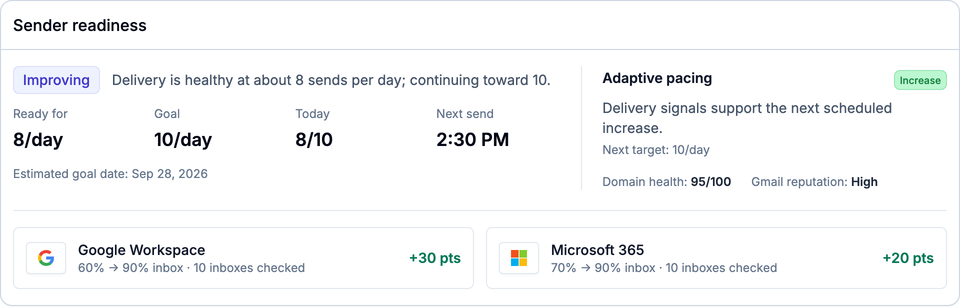
Example data in the MailSlurp app. The sender is ready for 8 warmup sends per day toward a 10-per-day goal; that is separate from the sampled inbox-placement percentages below it. Your program's results will differ.
When to pause or change the plan
If there is no activity, check the program status, sender connection and next scheduled send. Confirm the time zone and sending window before treating a quiet period as a failure.
If sending fails repeatedly, inspect the provider response and connection. Repair a rejected credential or sender-verification issue before increasing volume. If a placement checkpoint is still in progress, wait for its results before treating the absence of a percentage as a successful check.
A worsening provider trend deserves investigation even when the accepted-send total is rising. A stable sender configuration makes it easier to compare another completed checkpoint and work out whether authentication or recent production changes explain the difference. MailSlurp supports pausing, resuming and editing the program so you can keep the schedule aligned with that review. The email warmup API provides program controls and results for applications that automate this review.
Questions before your first warmup
Can I use the same connection for placement testing?
Yes. MailSlurp's sending connections are shared with automated inbox placement. A verified connection can support both the warmup program and a separate test of your real message.
Does a successful warmup test prove my campaign will reach the inbox?
It tells you about the tested sender, message and destinations. A test of the final campaign and feedback from real recipients fill in the rest. A change to content, links, audience or sending volume changes what you are evaluating.
How do I choose a warmup tool?
Sending connections, schedule controls and readable results are good places to start. The email warmup tools comparison includes a practical evaluation checklist for those decisions.
For hands-on setup, the SMTP warmup guide covers connection checks and first-send errors. Once the program is running, reading warmup placement results helps you compare checkpoints and record the next decision.