












Email Sender Reputation Recovery: A Practical Warmup Plan
Build a sender reputation recovery plan after fixing delivery problems. Configure paced warmup, compare provider checkpoints and keep a useful daily review log.
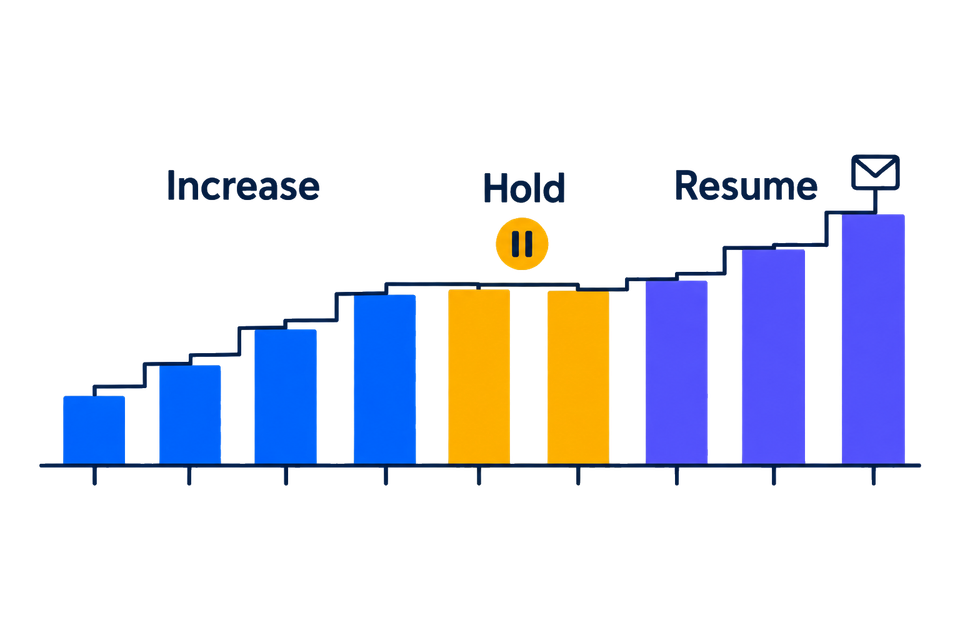
When a familiar sender starts landing in spam, getting the next send right matters more than making up for lost volume. The way forward starts with understanding what changed, then rebuilding a steady sending pattern as the cause is repaired.
That continuing work is sender reputation recovery. It becomes much more useful once the delivery problem is clear enough for a specific correction. MailSlurp email warmup provides a reputation-repair goal, a paced Recovery schedule and readiness information to help you follow the sender as you work.
This guide covers the period between fixing the initial issue and deciding that a larger send is justified. If the failure is still a mystery, the transactional email spam-diagnosis guide is a useful starting point. A rejected send, a delayed message and a message in junk require different first actions.
What changed for this sender?
A useful starting note describes the failure as specifically as possible. "Our open rate fell" is less specific than "messages from the same From address reached Gmail but appeared in junk in the completed Outlook check after the provider change."
Useful evidence includes the sending provider's response, a received message's authentication results, a provider-specific placement observation and the date of the last configuration change. The affected sender and traffic type matter too: a newsletter problem may have a different scope from a password-reset problem.
Those details point toward the initial repair:
| Finding | What to resolve before increasing activity |
|---|---|
| Credential or sender-verification failure | Repair the connection and complete a fresh test delivery. |
| Authentication changed after a DNS or provider edit | Correct the configuration and inspect authentication on a newly received message. |
| Production bounces or complaints increased | Investigate the recipient source, suppression and recent campaign changes. |
| One provider reports worsening placement | Preserve its results and compare that provider separately in subsequent checks. |
| A provider imposed a restriction | Work through its stated remediation and sending limits before resuming affected traffic. |
An active recovery program should accompany that repair. Continuing the same problematic production campaign makes the result harder to interpret and can work against the recovery effort.
A starting point for the next review
A short record of the sender's current state gives the next review something to compare:
- From address, sending provider and relevant connection;
- the known issue and correction, with dates;
- current production volume and planned warmup volume, recorded separately;
- a completed placement check, including provider names and sample sizes;
- any available provider feedback, such as delivery errors or complaint reporting.
Missing information can simply be marked unavailable. A provider with no completed check has no result yet, so there's no percentage to interpret.
Results are easier to compare while the sender stays stable. Changes to the DKIM signing domain, address, content or production volume deserve a note because they change the conditions of the next check.
Configure a MailSlurp recovery program
Open Email warmup, choose Create warmup, and select the existing sending connection. Verify it if needed and complete the test delivery. Choose Repair sender reputation, then Recovery.
The documented Recovery preset targets 20 warmup messages per day over a 42-day ramp, with 10 per day for maintenance. These are program settings, not a recovery deadline or a recommendation for your production campaign volume. The warmup documentation has the current preset details.
Customize schedule shows the initial and target volumes, ramp duration, maintenance, time zone and sending window. The schedule should make sense for this sender's intended use. A longer ramp does not make an unresolved authentication or recipient problem safe to ignore.
For coverage, controlled inboxes provide routine delivery observations; eligible plans can add placement checkpoints for Gmail, Google Workspace, Outlook.com and Microsoft 365. Warmup can use managed content or a permitted custom plain-text message. A separate test of the production message covers its actual links, layout and tracking.
What the readiness view tells you
MailSlurp's Sender readiness view shows the daily volume the sender is ready for, the goal, today's accepted and planned sends, and the next send. Its Adaptive pacing section explains the current pacing and next target.
The explanation helps when the next target differs from your goal. Both values are useful in the review: one describes the next step, the other where you intend to end up. An estimated goal date is useful for planning reviews; the completed results still determine what you know about delivery.
Placement deltas can show changes between the baseline and latest provider observations, with the latest sample size. Comparing warmup results by provider keeps an improvement in one destination from hiding an unresolved result in another.
The connected domain-health and Gmail reputation information can add context where available. Absent information can remain marked unavailable in the review.
A recovery log you can borrow
A short daily note helps whoever is responsible for the next send, including you next week. This manual template can go into an incident document or spreadsheet; the fields are for your observations.
Review date and time zone:
Sender and sending provider:
Issue being repaired:
Last corrective change and time:

Warmup planned today:
Warmup accepted today:
Production volume in the same period:
Connection or delivery errors:

Adaptive pacing explanation:
Next warmup target:
Last completed placement check and time:
Provider results and sample sizes:
Pending, failed or unavailable checks:
Other provider feedback:

Decision: continue / hold / pause and investigate
Reason and next verification:
Owner and next review time:
For example, suppose a program accepted its scheduled messages while the latest placement check is still waiting for results. The note would show successful acceptance and pending placement. "Delivery recovered" would be getting ahead of the result.
Once the check completes, its result and time belong in the next entry, with the earlier note retained for context. A current percentage without its test date can make an old result look like evidence for today's change.
What should change the plan?
Repeated send failures: inspect the provider response and connection first. Pause the warmup if continuing would only repeat the same failure, repair the cause and complete a fresh test before resuming.
A worsening completed placement result: hold off on increasing affected production traffic while you investigate. Compare the same provider and look for sender, content or traffic changes since the earlier check. A small sample warrants another observation, not an invented certainty about the whole audience.
A missing or failed checkpoint: mark the result unavailable and inspect the check state. MailSlurp's placement view distinguishes checks in progress from unavailable results. A missing percentage is not a reason to conclude either recovery or failure of the sender.
Rising production complaints or deferrals: review the actual campaign and recipient handling with the sending team. Google's sender guidance advises reducing volume when messages bounce or are deferred, then increasing slowly after the error rate decreases. Keep that production decision separate from the warmup program's accepted-send count.
How long does sender reputation recovery take?
There is no fixed deadline that applies to every sender. The original problem, subsequent traffic and the receiving provider's observations all affect the process. A configured 42-day ramp tells you how the program is planned, not when a mailbox provider must change a classification.
It helps to agree in advance on what would justify the next production increase. For example, you might require a repaired connection, passing authentication on a fresh message, several comparable completed checkpoints without a worsening trend, and acceptable production feedback under your provider's guidance.
Agreeing on those criteria early makes the later conversation easier, especially if a launch date is approaching.
Return to normal sending carefully
Once the cause is repaired and the results support moving forward, a controlled production change lets you see how the sender responds. An inbox placement test of the actual message can accompany that change and become the next entry in the recovery notes.
Changing one thing at a time gives you a better chance of identifying the cause if the problem returns. The maintenance phase and continuing placement checks give you a way to keep observing the sender after the initial ramp.
Should I create a new domain instead?
The existing sender's failure details are still useful when considering a migration. A repeated recipient, authentication or content problem can follow the move. The provider migration guide covers preparation and checks for the new path.
Should I count warmup sends as customer deliveries?
They measure different activity. Warmup counts describe the program you configured. Production delivery and customer actions belong to the actual messages your application or campaign sends.
What is the first step in MailSlurp?
Verify the sender connection, record the starting results and choose the reputation-repair goal. The warmup setup instructions cover the program settings and allowance to check before activation.