
guides
What Is the Body of an Email? Meaning, Structure, Examples, and Testing
Learn what the body of an email is, how it differs from headers and subjects, and how to test, extract, and automate email body content.
Use with your tools
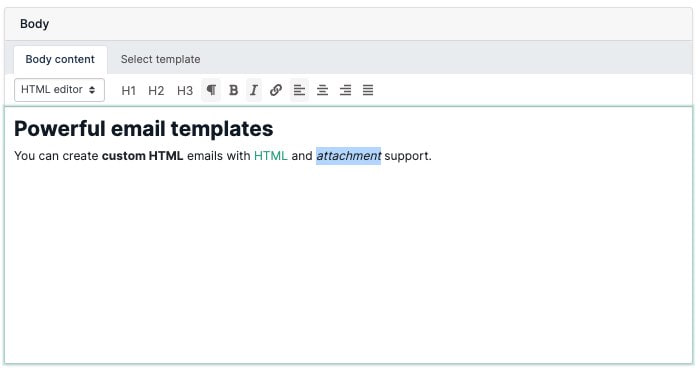
The body of an email is the main message you read after opening it: the text, images, links and other content below the subject and sender details.
But for real teams, that answer is not enough.
You need to know where the body starts, how it differs from headers and subject lines, what belongs in it, and how to test it before a broken message reaches customers.
Quick answer
The body of an email is the main content area of the message.
It usually includes:
- the greeting
- the explanation or context
- the main action or CTA
- supporting details
- footer content such as support, legal, or unsubscribe information
It does not include:
- the SMTP envelope
- message headers
- the subject line
- mailbox metadata such as routing and authentication results
That distinction matters because teams often debug the wrong part of the message.
Email body in APIs and tests
In email APIs, the body is often exposed in more than one form:
| Body value | What it means | What to test |
|---|---|---|
| Plain text body | The readable text version of the email | OTP codes, fallback links, support instructions, invoice details |
| HTML body | The rendered markup version of the email | Buttons, layout, merge fields, tracking links, branded content |
| Body preview | A short snippet or generated summary | Inbox preview text and quick triage views |
| Raw MIME content | The full message source with boundaries and parts | Debugging parsing, multipart, attachment, or encoding issues |
For a person reading an inbox, "body" usually means the visible message. For a developer or QA team, it can mean the specific field your test, parser, webhook, or automation reads.
MailSlurp helps teams capture the delivered email, inspect the body, extract links and codes, and assert that the content matches the workflow. That matters because a template can compile successfully while the received body is still missing the link, code, amount, or instruction the user needs.
Body email meaning
"Body email" and "email body" refer to the same part of a message: the content below the subject and sender details.
Examples of email body content include:
- "Click the button below to verify your account."
- "Your password reset link expires in 10 minutes."
- "Invoice INV-1042 is attached."
- "Reply above this line to update your support ticket."
For product teams, the body is where the workflow either succeeds or fails. If the confirmation link, OTP code, invoice total, or support instruction is wrong, delivery status alone will not catch the problem.
Email structure at a glance
Here is the quickest useful map of an email:
| Part | What it does |
|---|---|
| Envelope | routes the message between servers |
| Headers | describe sender, recipient, routing, auth, and metadata |
| Subject line | summarizes the message before open |
| Preheader | gives preview text in many inboxes |
| Body | contains the main content the recipient reads and acts on |
| Footer | carries secondary support, legal, or preference content |
The body is the part users experience most directly, but it only works well when the surrounding layers are also correct.
What belongs in the body of an email
The body should help the recipient do one thing clearly.
Examples:
- confirm an account
- reset a password
- review an order
- approve an action
- understand a policy update
- reply to a support request
That usually means the body needs:
- a clear opening line
- the reason the email was sent
- the most important action near the top
- supporting detail without clutter
- a useful fallback path if the main CTA fails
The body is not just "all the words under the subject line." It is the action layer of the message.
Plain text body vs HTML body
Most production email has two body representations:
- a plain text body
- an HTML body
Plain text body
Best for:
- accessibility fallback
- simple notifications
- debugging and transport clarity
- clients with limited HTML support
HTML body
Best for:
- stronger layout control
- buttons and richer CTA treatment
- structured product and billing content
- branding and visual hierarchy
The right model is usually both. A good plain text version is not optional hygiene. It is part of making the message robust.
Email body vs preheader vs footer
The body is the main message area, but it often includes pieces with different jobs:
- The preheader is preview text that appears near the subject in many inboxes.
- The opening body copy explains why the recipient received the email.
- The primary body section contains the action, link, code, table, invoice, or update.
- The footer carries support, legal, unsubscribe, or preference information.
Do not treat those parts as interchangeable. A password reset link belongs in the body where the user can act on it. A legal address belongs in the footer. A short preview belongs in the preheader. Each part should be tested for the job it performs.
Why the body of an email matters so much
The body is where most user-facing email failures become visible.
Common examples:
- the reset link is broken
- the OTP code is missing
- the CTA points to the wrong environment
- personalization tags render incorrectly
- important detail is buried under visual clutter
When the body fails, the message may still show as "sent" and "delivered." That is why content-level testing matters.
Common mistakes in email bodies
Burying the primary action
If the recipient has to scroll through paragraphs before the main action appears, the message is already doing too much.
Overloading one email with too many goals
One email should not try to teach, upsell, support, and warn all at the same time unless there is a very clear hierarchy.
Relying on images to carry meaning
Important instructions or CTAs should not exist only inside an image.
Shipping broken dynamic content
The body often contains the highest-risk dynamic values:
- names
- totals
- dates
- account identifiers
- links
- codes
If the body is dynamic, it must be tested with real message capture.
Ignoring mobile readability
The body is frequently read in a narrow viewport. Long blocks, oversized tables, and weak spacing reduce comprehension quickly.
How the body differs from headers
This is a common source of confusion.
Headers tell receiving systems and mailbox clients how the message was sent.
The body tells the recipient what the message means and what to do next.
Headers answer questions like:
- who sent this?
- which domain signed it?
- what path did it take?
The body answers questions like:
- why did I get this?
- what happens next?
- where do I click?
For message debugging, teams often need both:
- Email header analyzer for the transport and auth story
- body-level assertions for the user-visible story
How to write a stronger email body
Use this order:
- state the reason for the email immediately
- put the main action near the top
- keep supporting detail only if it helps the user complete the task
- give a fallback path if the main CTA fails
- close with useful support or preference information
This works for transactional, lifecycle, support, and security emails.
How to test the body of an email
The useful test is not "the template compiled."
The useful test is:
- the body rendered correctly
- the expected dynamic fields were present
- the CTA pointed to the right place
- the plain text and HTML versions stayed usable
- the message arrived in time for the workflow
For high-value paths, test:
- one happy path
- one fallback path
- one edge case with long values or unusual data
- one mobile or client-sensitive view
For developer workflows, create a generated inbox with the email address API, send the message from your application, then assert the received body. For one-off checks, use the fake email generator to capture a real message without wiring a full test suite.
Body assertions to add first
| Workflow | Body content to assert | MailSlurp tool |
|---|---|---|
| Signup verification | Code or confirmation link, account identifier, expiry text | Authentication testing |
| Password reset | Reset link, expiry time, fallback instructions | Email integration testing |
| Invoice or receipt | Amount, currency, due date, attachment reference | Extract platform |
| Support intake | Customer reply text, ticket marker, attachments | Email automation routing |
| Campaign QA | CTA link, unsubscribe link, footer, plain text fallback | Device previews |
The strongest checks read the body that actually arrived, not just the template object your application attempted to send.
Extracting body content from email
Once the email is captured, the next step is often extraction.
Use MailSlurp to:
- extract OTP codes, reset links, and magic links from delivered body content
- parse HTML links from the body
- match body content with regular expressions
- send body data to webhooks or downstream systems
- turn unstructured body text into structured fields with AI extraction
Start with Extract email content for code-level examples, then use AI email parsing and structured extraction when the body contains variable data such as orders, claims, receipts, lead requests, or support tickets.
How MailSlurp helps
MailSlurp helps teams validate the body that actually arrived:
- use Email Sandbox to capture the real message in a controlled inbox
- use Email integration testing to assert the presence of links, codes, totals, and other critical body content
- use Extract email content to retrieve body text, links, and matching patterns from received emails
- use AI email parsing and structured extraction when the body needs to become JSON, spreadsheet rows, or workflow data
- use Free Email Render and Device previews when the body needs visual review before a campaign or template change ships
- use Email deliverability test when body quality needs to be checked alongside inbox outcomes
- use Email header analyzer when body problems may be tied to a deeper sender or routing issue
That is how teams stop treating email-body QA like a manual preview task.
Related pages
- Dynamic email
- Extract email content
- AI email parsing and structured extraction
- Email types
- HTML mailto links
- Parts of an email address
FAQ
What is the body of an email in simple terms?
It is the main content area of the message that the recipient reads after opening the email.
Is the subject line part of the body?
No. The subject line is separate from the body.
What is body text in an email?
Body text is the written content inside the email body. It can appear in plain text, HTML, or both.
Are headers part of the email body?
No. Headers are message metadata used by systems and clients. The body is the main readable content.
What should I test in an email body first?
Start with the elements that directly affect the workflow: the main CTA, any links or codes, the critical dynamic fields, and mobile readability.
Final take
The body of an email is where the message either helps the user act or gets in the way. Keep it clear, keep it structured, and test the received body the same way you test the rest of your product workflow.