
guides
Testing email-related functionality with MailSlurp
Practical guide to email testing with MailSlurp across Cypress, Playwright, Selenium, Robot Framework, and other automation stacks.

Quick guides
Jump straight to common workflows:
- CypressJS Plugin documentation
- CypressJS Plugin source
- CypressJS Javascript
- Playwright email testing
- Playwright OTP SMS test
- Selenium Java
- Robotframework Python
- Cucumber Ruby
- Nightwatch Firebase
- Webdriver wdio
Why test with real emails?
Most applications depend on email for core product behavior:
- account creation and verification
- password reset and recovery
- security alerts and compliance notices
- transactional updates and notifications
Mocking email alone often misses production failures. Real inbox testing gives you deterministic end-to-end coverage.
Core testing pattern
Use a fresh inbox per test run. Then:
- Trigger the workflow in your app.
- Wait for the email to arrive.
- Assert required fields and links.
- Continue the user journey using extracted tokens or URLs.
This keeps tests isolated and repeatable.
Creating inboxes
Create an empty inbox with a random email address.
const inbox = await mailslurp.createInbox();
The result includes an inbox id and address:
{
  "id": "123",
  "emailAddress": "123@mailslurp.com"
}
Sending emails
You can send test emails directly from MailSlurp when needed.
await mailslurp.sendEmail(inboxId, { to: [emailAddress], body: "Hello" });
Receiving emails in tests
After your app sends an email, use waitFor APIs to retrieve it.
await mailslurp.waitForLatestEmail(inboxId, timeout, unreadOnly);
Example application trigger and wait flow:
const myApp = {
  async sendWelcomeEmail(emailAddress: string) {
    await mailslurp.sendEmail(config.inboxId, {
      to: [emailAddress],
      subject: "Welcome!",
    });
  },
};
test("our app can send a welcome email", async () => {
  const testInbox = await mailslurp.createInbox();

  await myApp.sendWelcomeEmail(testInbox.emailAddress);

  const welcome = await mailslurp.waitForLatestEmail(testInbox.id, timeout);

  expect(welcome.subject).toBe("Welcome!");
});
Extracting content for assertions
Read the body and assert business-critical values.
const email = await mailslurp.waitForLatestEmail(inbox.id);
console.log(email.body);
Extract values with regex when needed:
await mailslurp.sendEmail(inbox.id, {
  to: [inbox.emailAddress],
  body: 'Hi. Your code is "123456"',
});

// fetch an email
const email = await mailslurp.waitForLatestEmail(inbox.id);

// execute a regular express capture group on the body and
// destructure the matching group into a variable
const [_, verificationCode] = /your code is "([0-9]{6})"/gi.exec(email.body) ?? [];
expect(verificationCode).toEqual("123456");

// do something with code like verifying an account
// myApp.confirmUser(verificationCode);
Special character note
Some providers encode symbols in HTML entities. If regex checks fail unexpectedly, inspect encoded body content first.
// Example: '=' encoded as '='
const [_, code] = /\?code=([^'\"]+)/g.exec(body);
Framework integrations
MailSlurp supports multiple languages and test stacks.
CypressJS
Configure command/request timeouts so wait methods can complete:
{
  "defaultCommandTimeout": 30000,
  "requestTimeout": 30000
}
Add a custom command or use the official plugin:
const mailslurp = new MailSlurp({ apiKey: process.env.API_KEY! });
Cypress.Commands.add('createInbox', () => mailslurp.createInbox());
Usage example:
cy.createInbox((inbox) => {
cy.get("#sign-up-email").type(inbox.emailAddress);
// etc
Playwright
Use MailSlurp SDKs (Node, Java, CSharp, Python) in Playwright suites.
// wait for the latest unread sms
const [sms] = await mailslurp.waitController.waitForSms({
  waitForSmsConditions: {
    count: 1,
    unreadOnly: true,
    phoneNumberId: phoneNumber.id,
    timeout: 30_000,
  },
});
// extract a code from body with regex
expect(sms.body).toContain("Your code: 123");
const [, code] = /.+:\s([0-9]{3})/.exec(sms.body)!!;
expect(code).toEqual("123");
Selenium
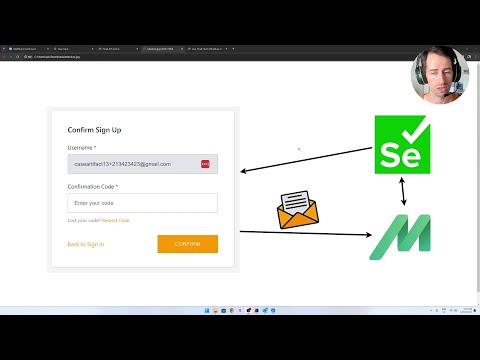
See Csharp Selenium example or Java Selenium guide.
/**
 * Create a real email address with MailSlurp and use it to start sign-up on the playground
 */
@Test
public void test3_canCreateEmailAddressAndSignUp() throws ApiException {
    // create a real, randomized email address with MailSlurp to represent a user
    InboxControllerApi inboxControllerApi = new InboxControllerApi(mailslurpClient);
    inbox = inboxControllerApi.createInbox(null,null,null,null,null,null,null, null, null);

    // check the inbox was created
    assertNotNull(inbox.getId());
    assertTrue(inbox.getEmailAddress().contains("@mailslurp.com"));

    // fill the playground app's sign-up form with the MailSlurp
    // email address and a random password
    driver.findElement(By.name("email")).sendKeys(inbox.getEmailAddress());
    driver.findElement(By.name("password")).sendKeys(TEST_PASSWORD);

    // submit the form to trigger the playground's email confirmation process
    // we will need to receive the confirmation email and extract a code
    driver.findElement(By.cssSelector("[data-test=sign-up-create-account-button]")).click();
}
Jest
See Jest example project.
Production-ready checklist
- Test all critical user journeys with real inboxes
- Assert links/tokens and follow-through behavior
- Add deliverability diagnostics before major releases
- Fail CI on email regressions
- Track ownership for sender/auth changes
For deliverability and pre-send validation, pair this guide with: