










Testing email with Cypress test email accounts
Test email accounts for CypressJS. End-to-end testing with real email addresses using MailSlurp Cypress plugin.
Use with your tools
Cypress is a popular end-to-end testing framework for NodeJS. With the MailSlurp plugin you can test applications using real email addresses. MailSlurp is a free email account API with official support for Cypress. Here is a full example on how to test an web application sign up process using Cypress and MailSlurp:
Quick guides
- CypressJS Plugin documentation
- CypressJS Plugin source
- See the examples on github or the Cypress guide to get started.
Disposable email addresses in Cypress JS
MailSlurp has an official plugin for CypressJS that allows you to create throwaway email inboxes on demand during tests.
npm install --save-dev cypress-mailslurp
Setup email client
MailSlurp is free but requires an API Key. Get yours by creating a free account. Set the environment variable CYPRESS_MAILSLURP_API_KEY or use the cypress.json file env property:
CYPRESS_MAILSLURP_API_KEY=your-api-key cypress run
The package json for your project should look something like this:
{
  "name": "javascript-cypress-mailslurp-plugin",
  "version": "1.0.0",
  "description": "Example cypress-mailslurp plugin usage",
  "scripts": {
    "test": "cypress run",
    "dev": "cypress open"
  },
  "author": "",
  "license": "MIT",
  "dependencies": {
    "cypress": "^10.5.0",
    "cypress-mailslurp": "^1.5.0",
    "typescript": "^4.4.4"
  },
  "devDependencies": {
    "debug": "^4.3.2"
  }
}
Creating email inboxes
Create inboxes using the cy.mailslurp() method to obtain a mailslurp instance and then call instance methods such as createInbox.
// use cypress-mailslurp plugin to create an email address before test
before(function () {
    cy.log("Wrap inbox before test")
    return cy.mailslurp()
        .then(mailslurp => mailslurp.createInbox())
        .then(inbox => {
            cy.log(`Inbox id ${inbox.id}`)
            // save inbox id and email address to this (make sure you use function and not arrow syntax)
            cy.wrap(inbox.id).as('inboxId')
            cy.wrap(inbox.emailAddress).as('emailAddress')
        })
});
Example test
Here is an example that signs up for a user account on the demo app at playground.mailslurp.com
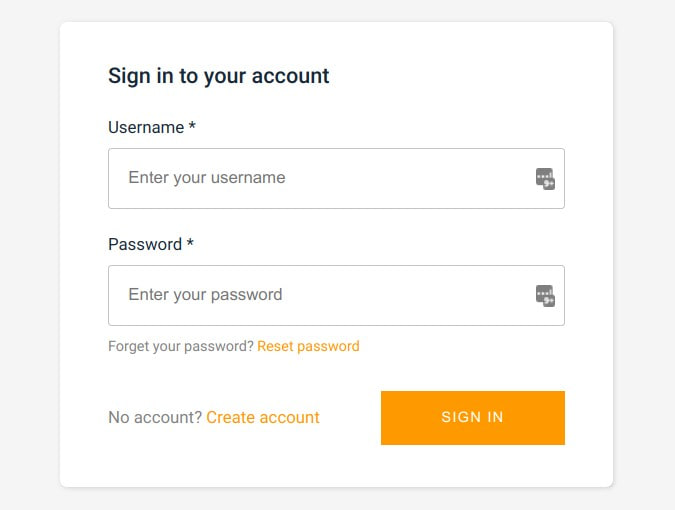
Here is the code using cypress in typescript:
/// <reference types="cypress-mailslurp" />

describe("user sign up test with mailslurp plugin", function () {
    //<gen>cypress_plugin_before
    // use cypress-mailslurp plugin to create an email address before test
    before(function () {
        cy.log("Wrap inbox before test")
        return cy.mailslurp()
            .then(mailslurp => mailslurp.createInbox())
            .then(inbox => {
                cy.log(`Inbox id ${inbox.id}`)
                // save inbox id and email address to this (make sure you use function and not arrow syntax)
                cy.wrap(inbox.id).as('inboxId')
                cy.wrap(inbox.emailAddress).as('emailAddress')
            })
    });
    //</gen>
    //<gen>cypress_plugin_01
    it("01 - can load the demo application", function () {
        // get wrapped email address and assert contains a mailslurp email address
        expect(this.emailAddress).to.contain("@mailslurp");
        // visit the demo application
        cy.visit("https://playground.mailslurp.com")
        cy.title().should('contain', 'React App');
    });
    //</gen>
    //<gen>cypress_plugin_02
    // use function instead of arrow syntax to access aliased values on this
    it("02 - can sign up using email address", function () {
        // click sign up and fill out the form
        cy.get("[data-test=sign-in-create-account-link]").click()
        // use the email address and a test password
        cy.get("[name=email]").type(this.emailAddress).trigger('change');
        cy.get("[name=password]").type('test-password').trigger('change');
        // click the submit button
        cy.get("[data-test=sign-up-create-account-button]").click();
    });
    //</gen>
    //<gen>cypress_plugin_03
    it("03 - can receive confirmation code by email", function () {
        // app will send user an email containing a code, use mailslurp to wait for the latest email
        cy.mailslurp()
            // use inbox id and a timeout of 30 seconds
            .then(mailslurp => mailslurp.waitForLatestEmail(this.inboxId, 30000, true))
            // extract the confirmation code from the email body
            .then(email => /.*verification code is (\d{6}).*/.exec(email.body!!)!![1])
            // fill out the confirmation form and submit
            .then(code => {
                cy.get("[name=code]").type(code).trigger('change');
                cy.get("[data-test=confirm-sign-up-confirm-button]").click();
            })
    });
    //</gen>
    //<gen>cypress_plugin_04
    // fill out sign in form
    it("04 - can sign in with confirmed account", function () {
        // use the email address and a test password
        cy.get("[data-test=username-input]").type(this.emailAddress).trigger('change');
        cy.get("[data-test=sign-in-password-input]").type('test-password').trigger('change');
        // click the submit button
        cy.get("[data-test=sign-in-sign-in-button]").click();
    });
    //</gen>
    //<gen>cypress_plugin_05
    // can see authorized welcome screen
    it("05 - can see welcome screen", function () {
        // click sign up and fill out the form
        cy.get("h1").should("contain", "Welcome");
    });
    //</gen>
});
This video runs the same kind of test step by step: it creates a MailSlurp inbox, signs up with its address, waits for the verification email, then extracts the code and enters it in the app.
Automate a two-factor login test
The same plugin covers a login that asks for a second code. For an SMS code, register the test account with a MailSlurp phone number, sign in with the password, then wait for the new text on that number and type its code. Capture since before submitting the password so the test ignores codes from earlier runs. The selectors below are placeholders for your own login form:
it('signs in with an SMS verification code', function () {
  const since = new Date()
  cy.visit('/login')
  cy.get('[name=email]').type(Cypress.env('TEST_USER_EMAIL'))
  cy.get('[name=password]').type(Cypress.env('TEST_USER_PASSWORD'), { log: false })
  cy.get('[type=submit]').click()

  cy.mailslurp()
    .then({ timeout: 60_000 }, mailslurp =>
      mailslurp.waitController.waitForLatestSms({
        waitForSingleSmsOptions: {
          phoneNumberId: Cypress.env('MAILSLURP_PHONE_ID'),
          unreadOnly: true,
          since,
          timeout: 60_000,
        },
      }),
    )
    .then(sms => {
      const code = /\b([0-9]{6})\b/.exec(sms.body ?? '')?.[1]
      if (!code) throw new Error('The SMS did not contain a six-digit code')
      cy.get('[name=code]').type(code)
      cy.get('[type=submit]').click()
    })

  cy.contains('Signed in').should('be.visible')
})
For a code sent by email, give the account a MailSlurp inbox address instead and wait with mailslurp.waitForLatestEmail(inboxId, 60_000, true). Run SMS tests one at a time when they share a number, or give each worker its own. The Cypress SMS example on GitHub runs a complete signup with a real SMS code.