










How to test a company email signature on real devices
See four employee email signatures in seven device previews. Compare iPad and iPhone wrapping, classic and new Outlook, and Gmail dark mode before rollout.
Imagine it's Friday afternoon at a print fair. The printer needs a decision, the vans are arriving after dark, and somebody has just asked which entrance has a ramp. Four people reply. Each has a perfectly good reason to put a different thing under their name.
That's my favourite way to test a company email signature. Give the reader something to do. Can the printer find Mara's proof link on a phone? Can the driver reach Ivo's night desk? Can a visitor read Noor's directions with their screen in dark mode?
I made four fictional signatures for the fair and put them through seven MailSlurp previews. One job title picked up an extra line on the iPhone. A round publisher's mark became a little green square in classic Outlook. The most colourful signature did surprisingly well after dark. Here's what I'd approve and what I'd change before handing these footers to a whole team.
Four email signatures worth taking to the proofing table
The idea for giving each employee a different job came from BulkSignature's collection of email signature templates by role. For this test I wrote four original footers. The names and companies are fictional, the telephone number is reserved for examples, and the web links are sample destinations.
| Person | What the reader needs | What went into the footer |
|---|---|---|
| Mara Bell, Fieldroom Press | Approve a print proof | A two-column layout with the publisher's initials, her full title and a proof link |
| Ivo Chen, Lantern Dispatch | Call the right desk after hours | A serif sign-off with the shift, time zone and a tap-to-call number |
| Noor Vale, Paper Moon Print Fair | Find the step-free entrance | A navy visitor card with white text and one gold directions link |
| Tess Reed, Red Pencil Studio | Send a correction straight back | Two lines of live text with her role and a linked email address |
Tess is my control. If an elaborate footer makes it harder to contact someone than those two lines do, the extra design has some explaining to do.
I put all four beneath the same short message and used Paste HTML in MailSlurp Device Previews. That let me compare the same source across a physical iPhone and iPad, two Windows Outlook apps, Outlook.com, and the Gmail Android app in light and dark mode. Gmail ran on an emulator with an IMAP mailbox. Each screenshot records an opened message. For a company rollout I'd also send from the employee's actual signature editor, which can change the HTML along the way.
Download the four-signature HTML email to try the same comparison with your longest job title and local contact details.
What about tablets? Compare the iPad with the iPhone
Mara's official title is "Director of Partnerships & Community Programmes." On the iPad it sits neatly between her name and the company. On the iPhone the line breaks after the ampersand. The proof link moves down, stays together, and still belongs unmistakably to Mara. I'd approve both.
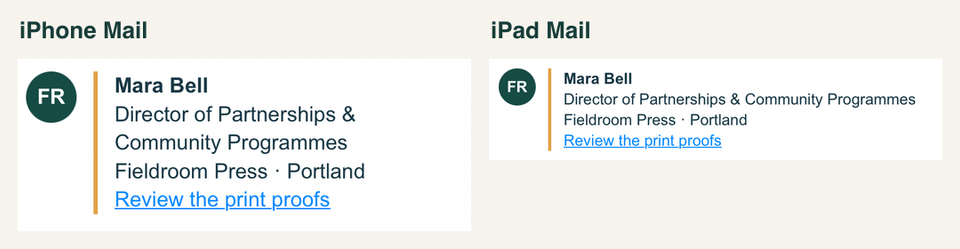
The Gmail phone captures broke the same title one word later, leaving "Programmes" alone on the second line. If somebody asks for a maximum character count, show them these pictures. A line of identical text can break in two different places on two phones.
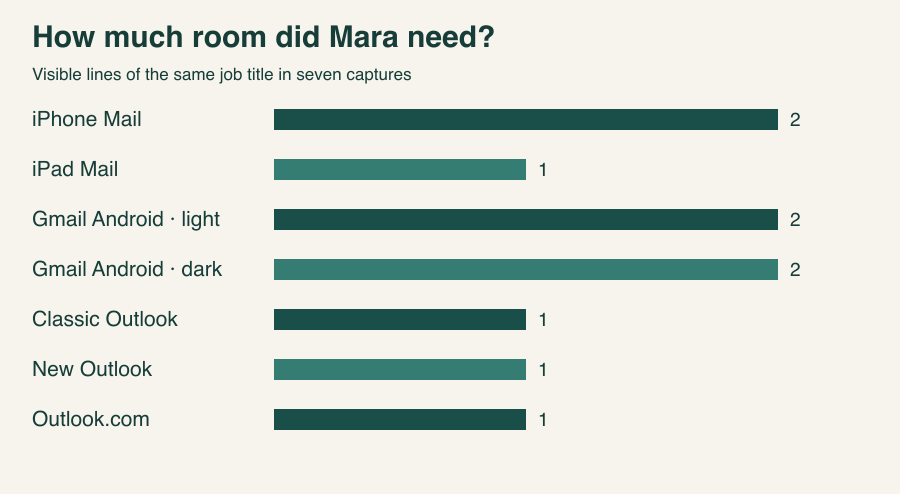
For your own tablet test, start with the longest name and title in the directory. Then open a reply in a narrow pane or split view. The capture above covers one iPad view. The useful acceptance test is whether someone can still see which person owns the phone number or link after the text wraps.
Is testing an email signature in Outlook important?
Yes, especially if a customer will approve your work from a Windows desk. Ask which Outlook they use. Classic Outlook for Windows and new Outlook for Windows are separate desktop apps. Outlook.com is webmail in a browser. Outlook for iOS and Android are further targets if your recipients use them. Microsoft documents how to identify the version and how the two Windows apps coexist. Microsoft's Outlook version guide
Mara's initials are ordinary letters on a green background. Padding and rounded corners give them a seal shape. Classic Outlook displayed a tiny square hugging the letters. Her name, job title and proof link still lined up. New Outlook left more room for the badge, although a viewer overlay obscures its centre in this capture. Outlook.com showed the round initials clearly.

I'd accept the square for a proof email. If the round seal is a brand requirement, I'd export a small PNG with the circle already in the artwork, keep the company name in live text, and repeat the test with images enabled and blocked.
Which email clients have the most market share?
Litmus measured more than 1.5 billion opens in September 2026. Apple accounted for 76.56%, Gmail 16.10%, desktop Outlook 3.48% and Outlook.com 0.29%. Apple includes privacy-protected opens, and Litmus groups several desktop Outlook versions together. Those figures describe tracked opens across Litmus customers. They can't tell you how many of your own buyers use classic versus new Outlook. Litmus email client market share and methodology
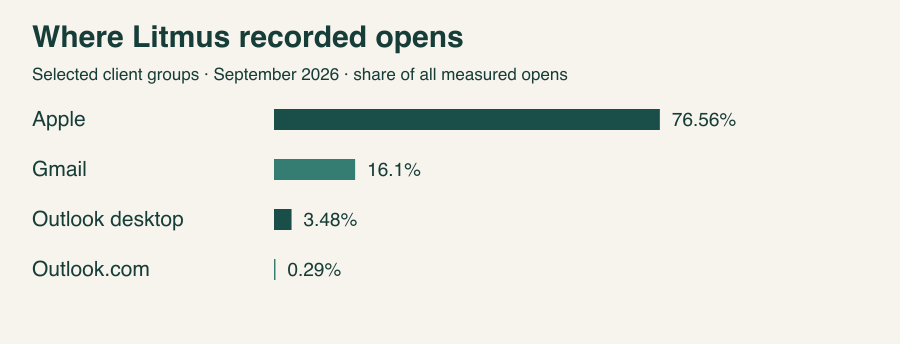
Start with Apple Mail and Gmail for broad coverage. Then add the app used by the person who must act. If the printer opens every proof in classic Outlook, that one desk earns a place in the test.
Why test email signatures in dark mode in 2026?
Noor's gold "Visitor access & step-free entrance" link was the one I worried about. In the Gmail Android capture, switching to dark mode turned the white message surround almost black. But the visitor card kept its navy background, and the gold lettering stayed easy to pick out. The subtler change was next door: Mara's bright divider became a muted brown and Ivo's phone number shifted to a paler blue.
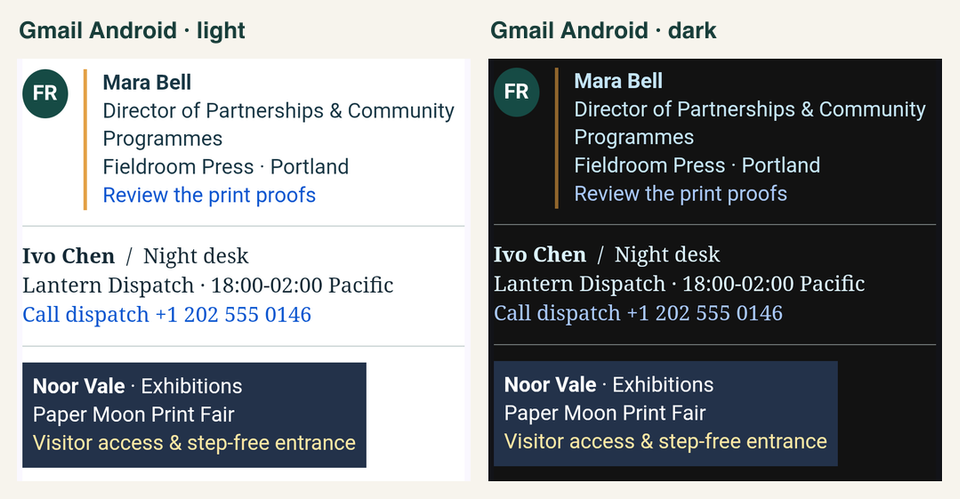
For this design I'd keep the card and give the link an explicit underline. Its wording already tells a visitor where it goes. The underline would give them a second cue when the app changes the colour. On a transparent logo, inspect the darkest letters and the empty space around them. A dark wordmark may need a light keyline or a solid backing. Our HTML signature compatibility tests show that failure with an actual transparent logo.
Can I use an animated email signature in Outlook or Gmail?
You can test one, but a screenshot only proves what was visible at capture time. A printer's telephone number that appears halfway through a loop is a particularly bad gamble. Put the full name and contact action in the HTML and make the first frame useful on its own. Then open a delivered copy in the Outlook edition and Gmail account type your customers use and watch a full loop. For the design itself, see our animated email signature guide.
How I would sign off a company-wide rollout
- Install one signature through the normal employee workflow. Paste it into the Outlook or Gmail editor, or assign it through the company's signature manager. Send a new message, a reply and a forward to a test inbox. This catches the wrong reply signature, duplicated footers and formatting changes introduced at installation.
- Render the delivered copy. In MailSlurp Device Previews, select your clients and send to the render address shown. Compare the result with the HTML proof. Zoom in on long titles, the first contact link and any logo that touches the background.
- Try the action on a handset. Open a copy on the phone, tap the number and inspect the dialled digits before placing a call. Open the directions link and check that it lands on the accessible entrance. A screenshot can show a readable link. Only following it tests the destination.
- Read the third reply. A full visitor card can be lovely once and exhausting three times. Give staff a short reply variant like Tess's, with a name and one contact route. Send the conversation back through the same clients and save the accepted captures with the template.
My sign-off question for the fair is still the printer's question from the first line. Hand the phone to somebody who hasn't seen the design and ask which number they'd call. If they can find Ivo and tell when his shift starts, the night desk signature has earned its space.