










Test Supabase MFA with Playwright and a virtual authenticator
Enroll a Supabase TOTP factor, sign in again with a password, and verify that a fresh authenticator code raises the same user's session from aal1 to aal2.
By MailSlurpPublished
Use with your tools

A user can have an authenticator enrolled and still be signed in with only a password. That distinction matters when you test a Supabase app. If you stop at the account screen or check only that a factor exists, a broken challenge form can go unnoticed. Look at the assurance level of the session before and after the user enters a code.
We'll sign up with a real test email, enroll an authenticator, then start over in a fresh browser as a returning user. Playwright operates the forms. MailSlurp supplies the inbox for signup and a virtual authenticator for the test account, so nobody has to scan a QR code on their personal phone.
How does TOTP work for two-factor authentication?
During enrollment, Supabase gives the user's authenticator a shared secret. The authenticator uses that secret and the current time to generate a short-lived code. The user types the code into your app, which submits it to Supabase for verification. The email that confirmed signup and the code from the authenticator are two different steps. Supabase TOTP guide
Set up the example
Clone the account security example. Open its directory and use Node.js 22.13 or newer. In a staging Supabase project, enable email confirmation and TOTP enrollment and verification. Configure SMTP to deliver to test addresses and allow the callback http://localhost:3000/.
npm ci
npx playwright install chromium
cp .env.example .env.local
Set VITE_SUPABASE_URL and VITE_SUPABASE_PUBLISHABLE_KEY for the browser app. Set MAILSLURP_API_KEY for the Node test runner, using an account with inbox and virtual MFA device access. Run npm test -- --grep 'returning account'. The runner creates a new inbox, follows the signup confirmation, and records the Supabase user ID before enrollment.
Enroll the test user's authenticator
Choose Set up authenticator on the account page. Supabase returns the QR image the app displays and the equivalent authenticator URI. Playwright reads that enrollment response from its own staging account. The runner registers the URI with MailSlurp and retrieves the first code:
const device = await mail.mfaController.createTotpDeviceForOtpAuthUrl({
  createTotpDeviceOtpAuthUrlOptions: { otpAuthUrl: factor.totp.uri }
});
const { code } = await mail.mfaController.getTotpDeviceCode({ id: device.id });
await page.getByLabel('Authenticator code').fill(code);
await page.getByRole('button', { name: 'Verify authenticator' }).click();
The URI can generate future codes. Keep it out of traces and screenshots. After Supabase accepts the first code, sign out. This ends the enrollment session so the next check exercises the returning user's challenge.
Check the session before and after the challenge
Sign in with the email and password in a fresh Playwright context. The sample calls auth.mfa.getAuthenticatorAssuranceLevel(). Supabase returned aal1 for the current session and aal2 as the available level. That pair tells your app to ask for the second factor.
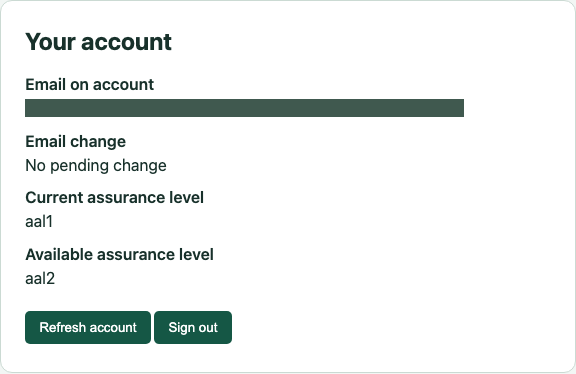
Read a fresh code from the same virtual device. If it still matches the enrollment code or is about to expire, let the time window roll over. The form obtains the user's verified TOTP factor and calls Supabase:
const { error } = await auth.mfa.challengeAndVerify({ factorId, code });
if (error) throw error;
Reload the account page and check the current assurance level again. In the example it changed to aal2, and the user ID still matched the one recorded at signup.
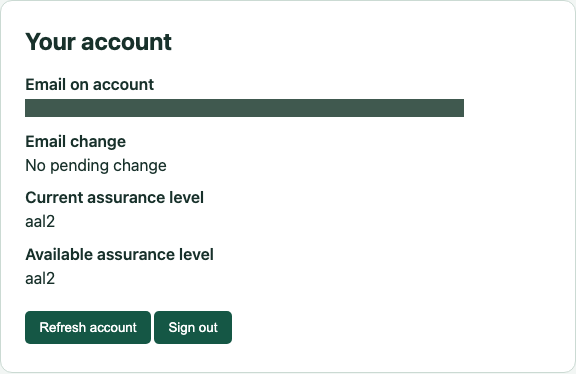
If the second browser already shows aal2 before you enter its code, check whether the test reused the enrollment context or a saved browser state. If your application uses this level to protect data, extend the test with a request to that protected operation at each level. The sample checks the Supabase session itself.