
blog
Why Emails Break in Outlook: Seven Problems to Check
Identify the Outlook version, diagnose seven common email rendering symptoms, make a practical editor or template change, and verify the repaired campaign.
"It looks broken in Outlook" is enough to stop a campaign, but not enough to repair it. Outlook Classic for Windows, New Outlook for Windows, Outlook on the web, Outlook for Mac, and the iOS and Android apps are different targets. A fix aimed at the wrong one can waste the review window or create a new problem elsewhere.
Start by naming the affected client and capturing the visible symptom. Then make the smallest supported change and render the delivered email again in that same target.
First, ask which Outlook is showing the problem
Ask the reviewer for:
- Outlook Classic, New Outlook, Outlook on the web, Mac, iOS, or Android
- operating system and app version when available
- light or dark mode
- a full screenshot plus a closer crop of the affected section
- the campaign or template revision
- whether images were allowed to load
Do not apply one rendering-engine explanation to every Outlook client. Mailchimp's Outlook troubleshooting article documents Word-based behavior and common symptoms in Outlook for Windows. Microsoft separately documents New Outlook for Windows as a WebView2-based experience inspired by Outlook on the web. That architecture difference does not tell you whether one particular CSS rule works; the named client capture does.
Once you know the target, use the email rendering QA checklist to reproduce the delivered message.
A real Classic Outlook failure and repair
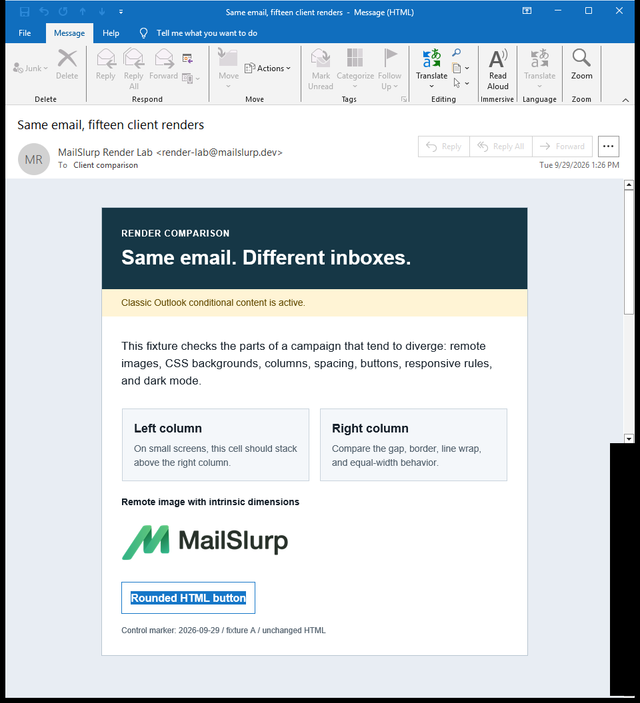
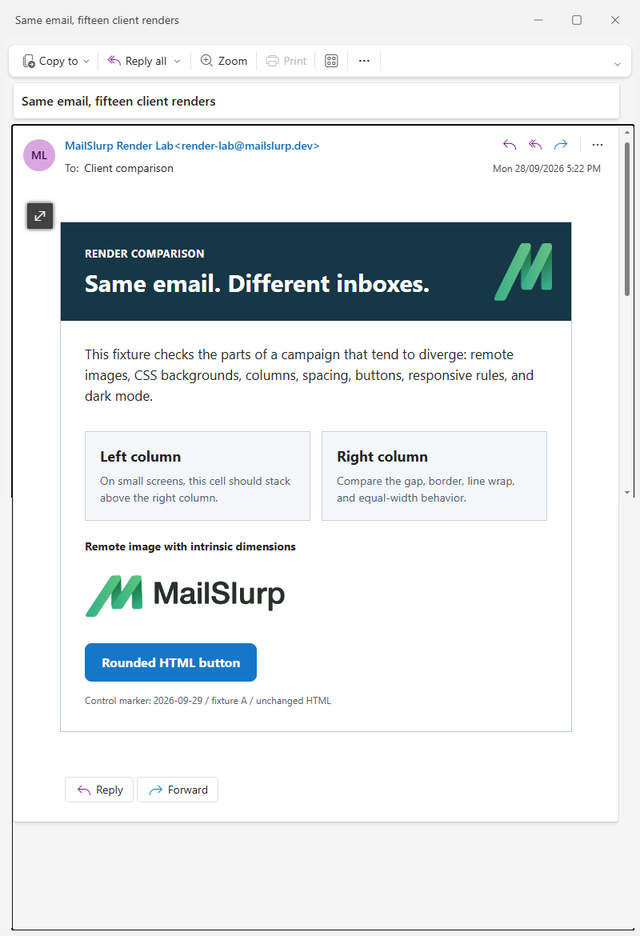
The same controlled .eml was rendered in Outlook Classic and New Outlook. It used a CSS background logo in the hero and an ordinary HTML link styled as a rounded blue button. New Outlook displayed both treatments. Classic showed neither treatment as intended: the background logo was absent and the CTA lost its blue fill.
Original in Outlook Classic
Same EML in New Outlook
The repaired version replaced the CSS background logo with a normal image inside the hero table and added a VML-backed CTA for Classic. It also set the hero text color directly after an intermediate run showed that inherited white text was not reliable enough.
Before
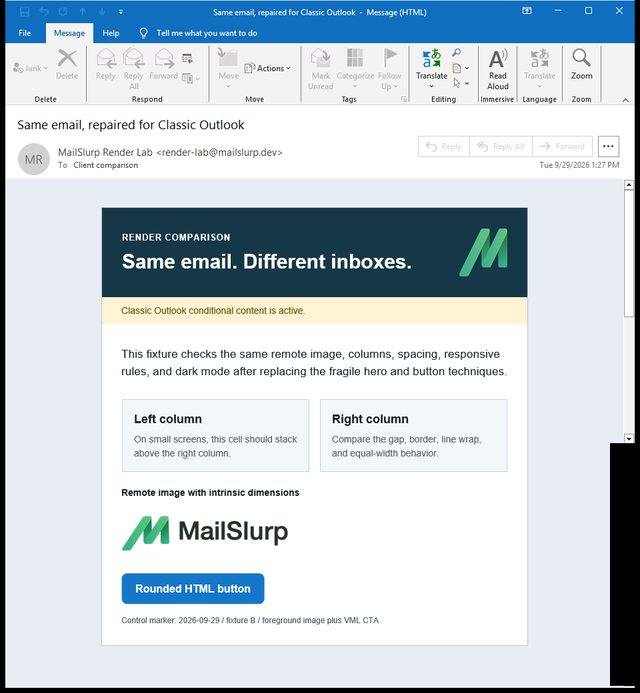
This is the useful standard for an Outlook fix: name the client, preserve the failing result, change one mechanism, and rerender the complete message. The Outlook preview guide includes direct links for Classic, New Outlook, web, iOS, and Android plus the full cross-client test.
Seven Outlook email symptoms and the next useful check
| What the reviewer sees | What to capture before editing | Who will probably need the report |
|---|---|---|
| 1. Image is too large, clipped, or stretched | Source asset name and dimensions, a full screenshot, a close crop, and the exact Outlook target | The campaign editor for an ESP image block; the template developer for coded dimensions or containers |
| 2. Spacing or padding disappears | The exact missing space and whether it belongs to an image, cell, paragraph, or layout rule | The campaign editor for ESP blocks; the template developer for table or CSS spacing |
| 3. Columns collapse or appear in the wrong order | Source order, nesting, total width, expanded content, and the client width | The template owner, with the campaign editor checking the intended reading order |
| 4. Background image is missing | The fallback surface, readable HTML text, and whether the artwork contains essential information | The campaign editor if the background can be simplified; the template developer for a client-specific treatment |
| 5. Button loses its shape, fill, or padding | Fill, label, border, padding, destination, and the exact client that failed | The campaign editor for an ESP button; the template developer for a coded button |
| 6. Font or line break changes | Intended font, fallback font, container width, and the longest realistic content | The designer or template owner, depending on whether the fix is typographic or structural |
| 7. Dark mode hides text, logo, or CTA | Exact mode, affected element, surrounding color, and whether the asset is transparent | The brand owner for an asset change; the template owner for HTML or CSS changes |
Use the table to route the problem, not diagnose it from memory. A broken New Outlook button and a broken Classic Outlook button may need different repairs even when the screenshots look similar.
1. Images are cropped, rescaled, or unexpectedly large
Check the original asset size, the dimensions in the final delivered HTML, and the width of its containing table or content block. An image can look correct in the editor because the editor constrains it while the received message exposes a missing or conflicting dimension.
Use an image sized for the role it performs, set deliberate dimensions through the ESP or template, and keep important text outside the image. If a tall all-in-one campaign image is clipped, split the design into meaningful content blocks rather than turning the entire message into one picture.
2. Spacing and padding move
Identify exactly which space disappeared. "The section is cramped" may mean image margins, table-cell padding, paragraph spacing, or a line-height change.
If the campaign uses an ESP, try its maintained image, text, spacer, and button blocks before adding one-off CSS. For a coded template, keep the repaired structure simple and use email-safe table layout where the affected client needs it. Rerun the same target after each change.
3. Columns break or stack badly
Complex desktop rows are common failure points. Check the total width, nested tables, empty cells, source order, and any content that can expand, such as a long URL or personalized company name.
The customer should still receive a clear sequence even if the columns stack. Put the heading, image, copy, and CTA in a source order that remains understandable when a client ignores part of the desktop arrangement.
4. A background image disappears
Background artwork should not carry the only copy, price, expiry date, or CTA. Provide a solid fallback color with readable HTML text, then decide whether the visual still needs a client-specific implementation.
This is a useful place to simplify. A campaign that communicates clearly without the background is safer than one whose core offer vanishes when the artwork does.
5. A button changes shape or loses contrast
Check whether the label is still readable and whether the link remains usable. Border-only and heavily styled buttons are more vulnerable than a clear action with a solid fill and strong label contrast.
Use the ESP's supported button component when it produces the intended result. A template developer can use an email-safe coded button where needed. After the visual repair, open the link from a test message and confirm it points to the right environment and offer.
6. Fonts and line breaks change
Email clients may substitute a fallback font, and the replacement can take more horizontal space. That can move a CTA, break a heading into too many lines, or widen a personalized row.
Choose fallback fonts deliberately. Give text enough space to wrap, avoid placing critical copy inside narrow columns, and test the longest realistic name, code, or translated phrase used by the campaign.
7. Dark mode removes contrast
Test logos, text, buttons, links, and dividers separately. A transparent dark wordmark can disappear on a transformed background while the CTA remains fine. A border-only button can fail even when the logo passes.
Use the dark mode email preview guide for the asset and contrast workflow. Do not assume one CSS rule repairs every Outlook version.
What to send your designer or email developer
Make the report reproducible:
- Client: New Outlook for Windows, Outlook Classic, web, iOS, or Android
- Mode: light or dark
- Campaign: name and exact revision
- Capture: full screenshot and affected-section crop
- Expected: what should remain visible, aligned, or clickable
- Observed: the specific image, spacing, column, button, font, or contrast problem
- Source: final test email or
.eml, not only an editor screenshot
For example: "New Outlook for Windows, dark mode, campaign revision 4: the blue CTA is visible but its dark label is unreadable. Expected white label on the solid button. The same revision passes Outlook on the web." That is much easier to act on than "Outlook broke the CTA."
Verify the repair in the affected client
Send the revision through the provider that will deliver the campaign, so the retest includes its final HTML and footer. The Mailchimp walkthrough explains its test-send and merge-tag checks; the Brevo walkthrough shows how to add a render recipient to the Test List. Keep the same named Outlook target for the before-and-after comparison.
- Correct one supported part of the template.
- Send the complete revised email through the same ESP path.
- Render it in the Outlook client that showed the failure.
- Compare the result with the original capture.
- Open the CTA or critical link in a safe test environment.
- Check one additional priority client for a regression.
- Save the campaign revision and result link with approval.
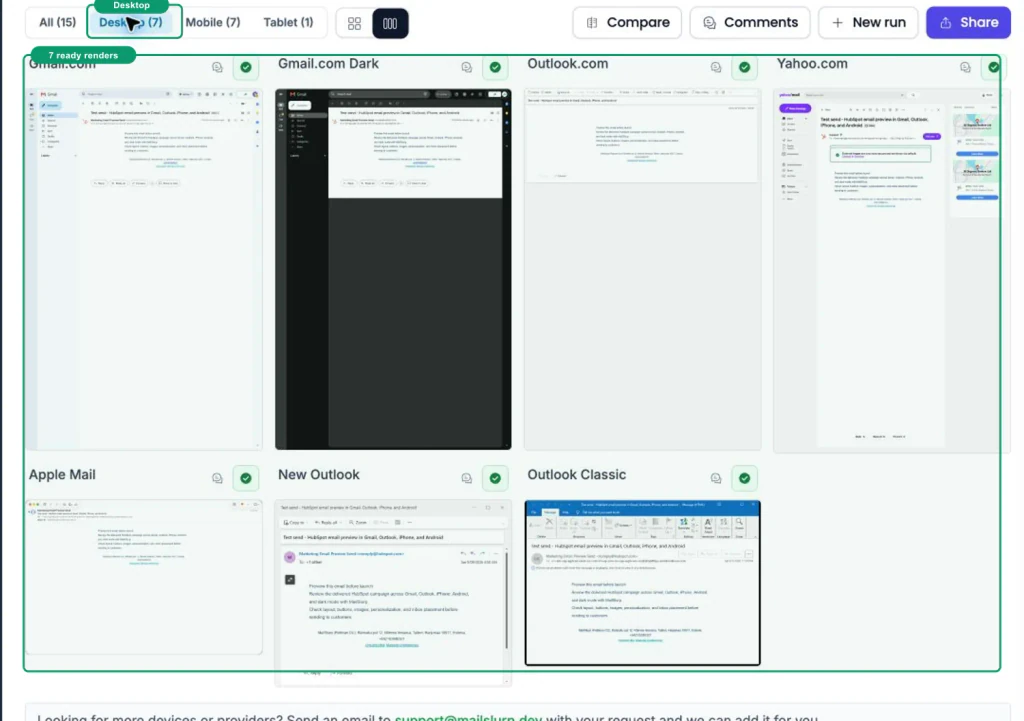
Do not approve from a code change alone. The approval check is the received, repaired email in the client that failed.
Save an Outlook check in campaign approval
- The exact Outlook client and mode are recorded.
- The final ESP revision was sent.
- Images load and use the intended dimensions.
- Spacing and columns preserve the reading order.
- The primary CTA is visible, readable, and linked correctly.
- Font fallbacks and realistic personalization fit.
- Logo, text, and buttons pass the selected dark-mode target.
- The repair was rerun in the affected client.
- One additional priority client was checked for regressions.
Frequently asked questions
Why does my email look different in Outlook?
Different Outlook clients can interpret delivered HTML, CSS, images, fonts, and dark-mode colors differently. Compare the same delivered revision in the named targets, record the visible symptom, and fix the client that actually failed instead of treating Outlook as one application.
Does every Outlook version use Microsoft Word to render email?
Do not assume that. Word-based explanations are relevant to Outlook Classic for Windows behavior, while Microsoft documents New Outlook for Windows as a WebView2-based experience. If the reviewer is unsure which app they use, ask for its About or Help details and test Classic and New Outlook separately.
Can I fix Outlook rendering in my email editor?
Often, yes. Duplicate the campaign or work in a test copy, then try the editor's maintained image, spacer, column, or button block. A coded template may need an email developer, but either route ends with the same check: send the complete revision and rerender it in the affected client.
Should the email look identical in every client?
No. Define acceptance around a readable message, clear hierarchy, recognizable brand, and usable action. Small differences in font metrics or spacing are acceptable when they do not hide information, reverse the reading order, or make the CTA hard to use.
Turn "broken in Outlook" into a testable repair
Identify the client, name the symptom, repair the affected element, and send the complete email again. The email rendering QA checklist provides the procedure, and MailSlurp device previews keep the named result with the campaign review.