









Test Better Auth magic links on Railway previews with Playwright
Send real magic links from two Better Auth previews on Railway. Check the email destination, read the signed-in account and verify the other preview returns 401.
By MailSlurpPublished
Use with your tools
Two pull requests can have identical sign-in forms and different public URLs. Railway gives each preview its own environment, and Better Auth can email a link that opens a session. If both deployments inherit the same base URL, a tester can click the link, see a working account page, and spend the rest of the afternoon testing the wrong build.
To catch that mistake, send an email from each preview and read it before opening the link. MailSlurp gives Playwright a separate inbox for each user. The test checks the destination in the message, signs in to the issuing preview, then takes the same browser to the other preview to verify that it is still signed out.
What is a magic link?
A magic link is a sign-in URL containing a temporary credential. In this example Better Auth generates the verification URL and passes it to the app's mail function. After the recipient follows it, Better Auth establishes a session and redirects to /account. The origin in the email determines which preview handles verification. The callback path determines where the browser goes afterward. Better Auth magic-link plugin
Start with two local previews
Open the runnable Better Auth example. Use Node.js 22.13 or newer. From better-auth-preview, copy the environment template and set MAILSLURP_API_KEY in .env.local. Use a test account that can send email and create, read and delete inboxes.
npm ci
npx playwright install chromium
cp .env.example .env.local
# Set MAILSLURP_API_KEY before running the test.
npm test
The test starts two Better Auth servers, each with its own signing secret and SQLite database. One listens on localhost, the other on 127.0.0.1. Separate hostnames matter here because two ports on the same hostname can still share cookies. MailSlurp sends both messages over HTTPS and receives them in separate inboxes.
Check the URL before consuming the link
Playwright submits the first preview's form and waits for a message addressed to its assigned inbox. The runner extracts the link with the path /api/auth/magic-link/verify. Check its origin and its callback before telling the browser to open it. The check below fails immediately if a preview inherited the base URL of the main site:
const verification = new URL(linkFromEmail);
expect(verification.origin).toBe(origin);
expect(verification.searchParams.get('callbackURL')).toBe('/account');
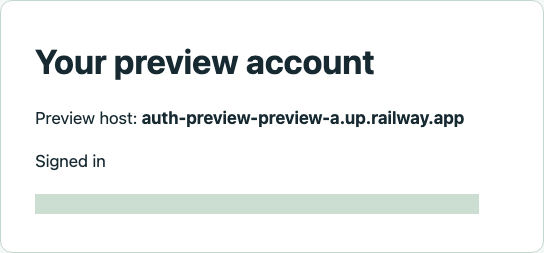
After navigation, the runner reloads /account. That route reads the browser's session on the server. It must return HTTP 200 and the email address that received the link. The example's home page shows the same identity beside the current host.
Take the signed-in browser to the other preview
Keep the same Playwright context. A new context would be signed out everywhere and could hide a session shared between previews. Navigate directly to the other preview's account endpoint:
const account = await page.reload();
expect(account.status()).toBe(200);
expect((await account.json()).email).toBe(inbox.emailAddress);
const other = await page.goto(otherOrigin + '/account');
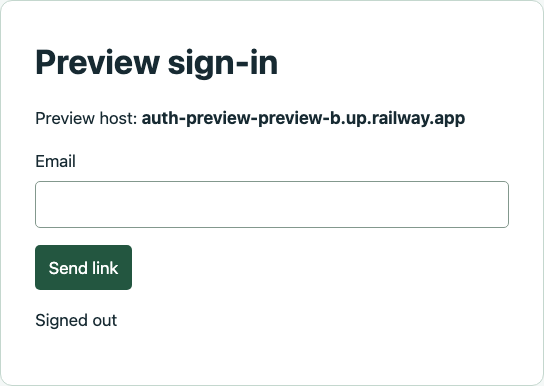
expect(other.status()).toBe(401);
Run the test against two Railway environments
We deployed the head commits of two draft pull requests to separate Railway environments. One changes the authenticated heading and the other adds autocomplete to the sign-in field. That makes the two builds distinguishable even before checking their session responses. Each PR links to its preview. First pull request · Second pull request
Use the example directory as the service root and npm start as the start command. Give each environment a Railway-generated public domain. The server uses RAILWAY_PUBLIC_DOMAIN to construct its HTTPS origin. If you set PREVIEW_ORIGIN explicitly, set it separately in each environment. A copied production value will override the generated domain. Railway environments and PR domains
Set a separate BETTER_AUTH_SECRET on each service. Give each one its own sender inbox ID, a MailSlurp Agent Responder key scoped to that sender (MAILSLURP_SENDER_KEY), and the address of its allowed TEST_RECIPIENT. The server sends only to that address. Its in-memory database is suitable for a single disposable replica and clears on restart. Keep the workspace API key on the Playwright runner.
On the runner, set PREVIEW_ORIGIN_A and PREVIEW_ORIGIN_B to the two HTTPS origins, without trailing slashes. Set TEST_INBOX_ID_A and TEST_INBOX_ID_B to the corresponding recipient inbox IDs. Run npm run test:hosted. The same checks run in both directions, with a new recipient and browser context for each direction. The hosted runner leaves those configured inboxes in place.
What are common challenges when integrating better auth systems?
Two failures can look like a successful login in a preview: the email opens the wrong build, or the browser carries a session from one build to another. The URL in the message and the response from each account endpoint tell you which happened.
If the link points to the wrong domain, inspect the sending environment's base URL. If it reaches the right domain but the account disappears on reload, check the service's signing secret, database lifetime, and whether the service restarted between the two requests. If both hosts return 200 in the same browser, inspect shared cookie domains and the session data available to each deployment.
These two previews were deployed explicitly from their PR commits. To automate creation and cleanup in your own project, connect the GitHub repository, enable PR Environments in Railway's project settings and give the base service a Railway-generated domain. Railway can then create a domain for each PR and remove its environment when the PR closes.