
guides
How to preview an email in Yahoo Mail
Preview a delivered email in Yahoo Mail and check images, desktop width, columns, buttons, typography, and the complete campaign before sending.
An ESP preview can tell you that the campaign blocks fit together. A Yahoo Mail render tells you what the delivered message looks like after the ESP has assembled the MIME, hosted or rewritten images, added tracking, and sent the email into a real client.
MailSlurp currently offers a Yahoo Mail web target. On September 29, 2026, we sent the same controlled .eml used for the Outlook, Gmail, and Apple comparisons into Yahoo Mail. The screenshot below is the exact result, not a mock inbox or a design export.
Run the Yahoo Mail preview
Open the Yahoo Mail render target. You can:
- paste HTML for a quick draft check;
- upload an
.emlexported from your sending system; or - send the final campaign test to the temporary target-specific address.
Use the third option for launch approval when possible. It includes the ESP's version of the message, not only the HTML that went into its editor.
What the controlled Yahoo Mail render showed
The fixture contained a 640-pixel message container, a CSS background logo, two table columns, a remote wordmark image with explicit dimensions, a rounded HTML CTA, a hidden preheader, and dark-mode rules.
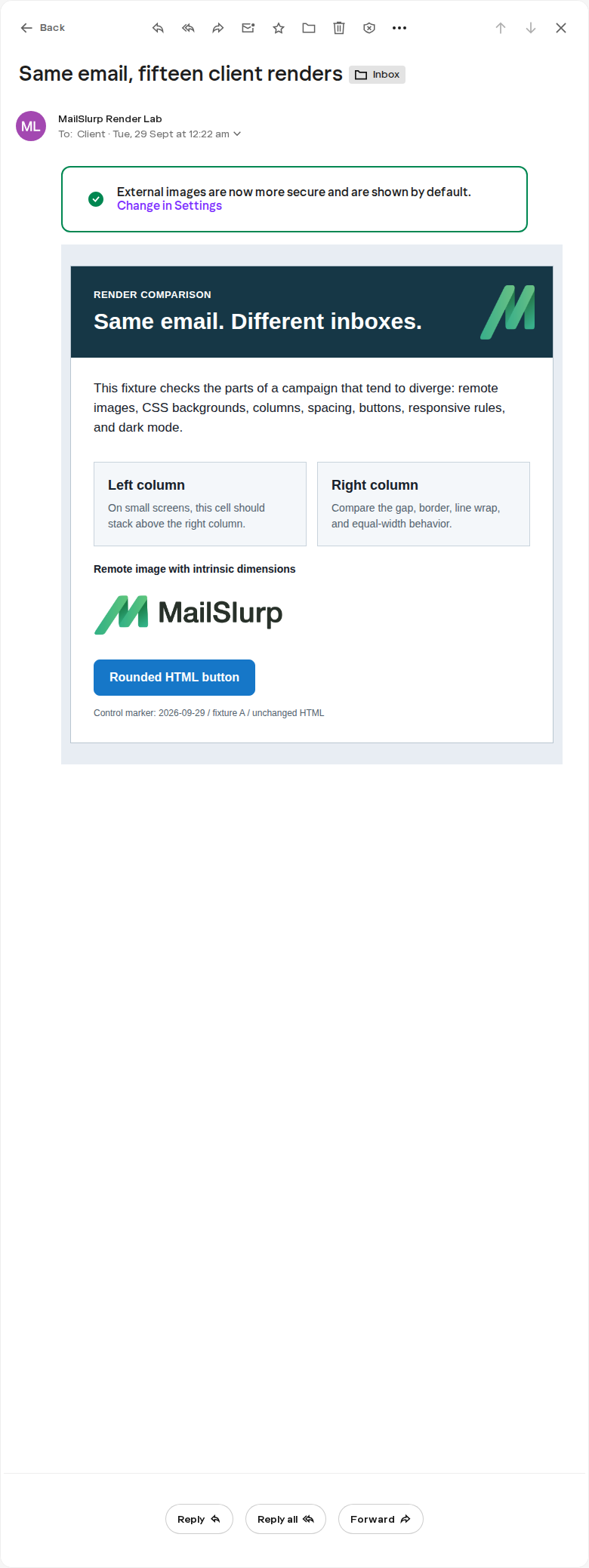
The result confirms several useful points about this message revision:
- the 640-pixel container fit the Yahoo reading pane;
- both columns remained side by side and readable;
- the CSS background logo appeared in the hero;
- the remote wordmark loaded at the intended size;
- the blue CTA kept its fill, padding, label contrast, and rounded corners;
- the client placed an external-image notice outside the email content.
That last item is a reminder that customers see your campaign inside a product. Browser chrome, security notices, sender details, image controls, reply actions, and available reading width all compete with the message. A clean HTML export does not show that context.
The same email did not behave the same everywhere
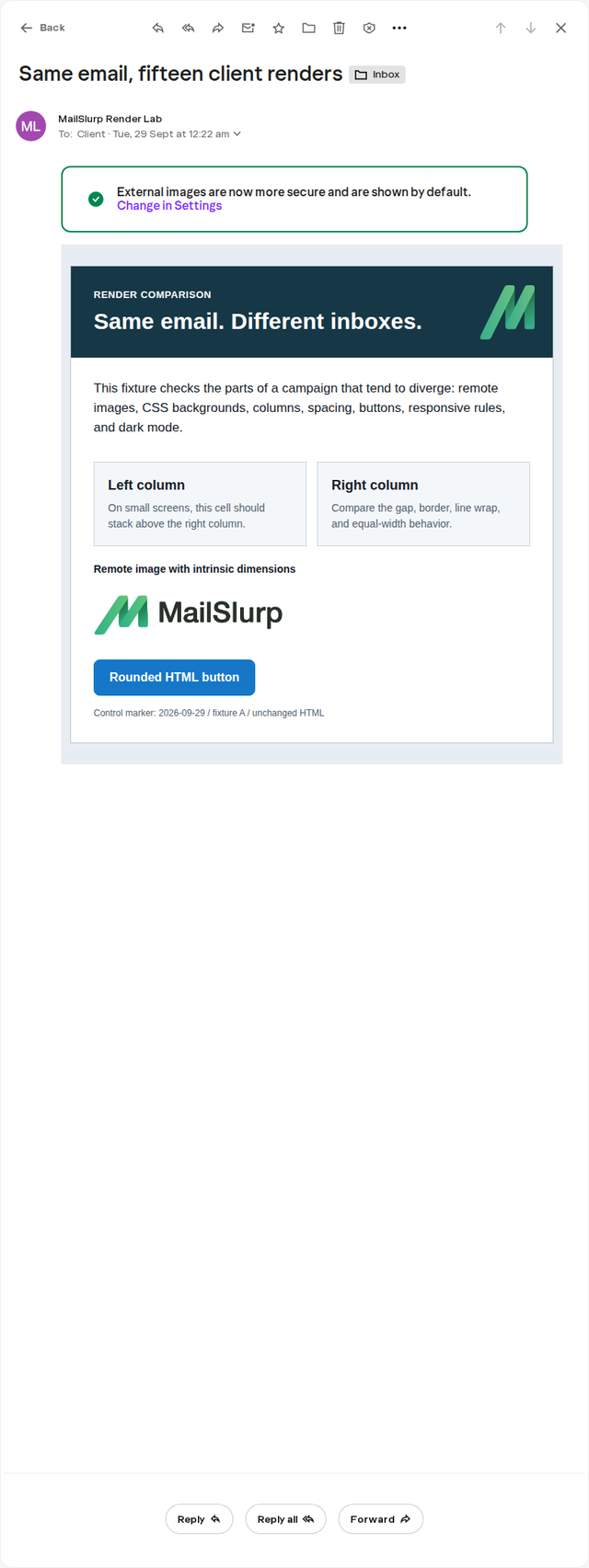
Yahoo Mail and Outlook on the web gave this fixture a broadly similar message layout, but their app chrome and reading panes differed. Outlook Classic, however, omitted the hero background image and lost the ordinary button treatment.
Yahoo Mail web
Outlook on the web
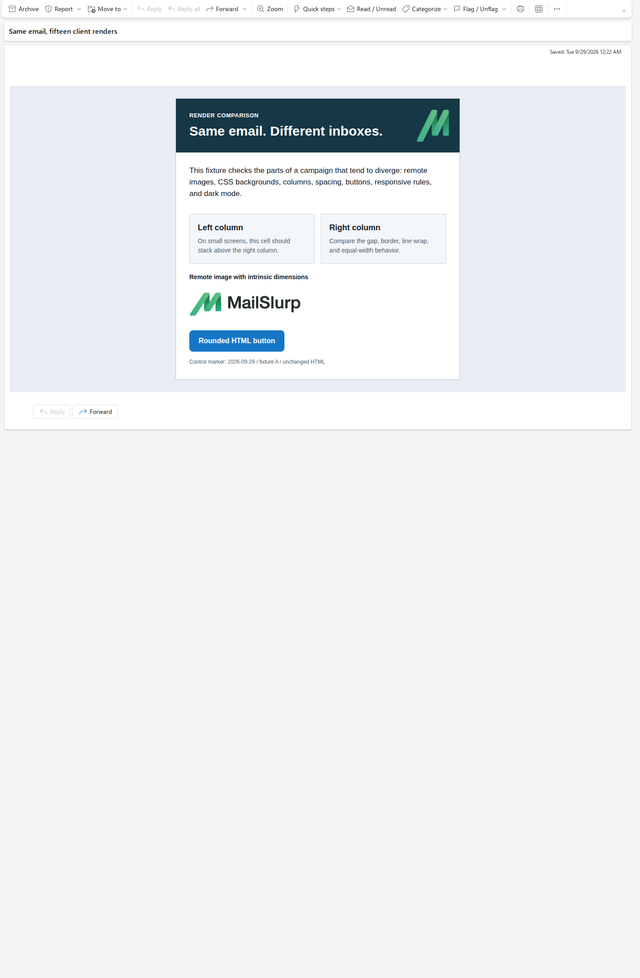
Do not use this pair to conclude that Yahoo Mail and Outlook web support every technique equally. It documents one delivered fixture. A different template may expose a different gap.
What to inspect in Yahoo Mail
Content width and horizontal fit
Look for a message wider than the reading pane, unexpected horizontal scrolling, cropped artwork, or a table that forces tiny text. Test the longest realistic heading and personalized value rather than a short placeholder.
Remote images
Confirm that images load, keep their intended proportions, and include useful alternative text. Essential prices, dates, or calls to action should not exist only inside an image. The message should still make sense when a recipient blocks remote content.
Background images
Provide a solid fallback color with readable live text. In this run, the Yahoo hero background image appeared. The same background was absent in Outlook Classic, so the fallback still mattered.
Buttons
Check fill, border, label, padding, line wrapping, and destination. A CTA that becomes a text link may remain technically clickable while losing the visual priority the campaign depends on.
Columns and reading order
The controlled Yahoo web target kept both columns in one row. If your design also serves phones, that does not prove the mobile layout. Check an appropriate mobile Gmail, Outlook, or Apple Mail target and make sure the source order works when the cells stack or shrink.
Sender, subject, and preheader
Review the inbox context as well as the body. The subject should make sense beside the sender name, and the preheader should be intentional if Yahoo surfaces it in a list or notification. Never put internal QA notes into hidden preview text.
Footer and unsubscribe path
Scroll to the end. Check company details, preferences, unsubscribe links, legal text, and any secondary navigation. A message is not approved because only its hero looks good.
A repeatable Yahoo Mail workflow
- Finish the campaign in the ESP, including preview text, personalization defaults, images, links, tracking, and footer.
- Start a Yahoo Mail render and copy its temporary address.
- Use the ESP's normal test-send action to send the complete message to that address.
- Open the result and inspect the full screenshot.
- Click or separately verify the primary destination in a safe test environment.
- Record the campaign revision and any visible issue.
- Change one part of the message, resend it, and compare the new result with the original.
- Add another client target based on audience risk rather than assuming the Yahoo result covers webmail generally.
Provider-specific sending instructions are available for Mailchimp, Klaviyo, HubSpot, and other major ESPs. The Yahoo target is the viewing destination; your ESP still controls how the final message is assembled and sent.
Keep the bug report specific
When a Yahoo preview fails, report the visible result rather than pasting a broad compatibility claim. For example:
Yahoo Mail web, campaign revision 12: the second offer column pushes the container wider than the reading pane when the personalized company name exceeds 28 characters. Expected both offers to remain within the message width.
Include:
- Yahoo Mail web as the target
- campaign or template revision
- a full screenshot
- the affected section
- the longest data value used
- expected and observed behavior
- whether images were loaded
- the repaired rerender
That gives the editor or template developer a reproducible problem.
Yahoo rendering is separate from Yahoo placement
A clean screenshot does not prove that a future campaign will reach the inbox. Rendering checks appearance after the test message is opened. Placement testing checks whether a controlled send is observed in inbox, spam, another category, or remains unresolved.
Use inbox placement testing for delivery-location questions. Keep the Yahoo render result for design approval.
Frequently asked questions
Does MailSlurp have a Yahoo Mail preview target?
Yes. Use the Yahoo Mail web target to paste HTML, upload an .eml, or send a real test message.
Why test the delivered campaign instead of the ESP preview?
The delivered message includes the ESP's final MIME, link and image processing, tracking, footer, preview text, and any other send-time changes. The editor preview remains useful while designing, but it is not the final artifact.
Does a passing Yahoo web render approve mobile email?
No. It approves this message in the named Yahoo web target. Add mobile mail apps based on your audience and the risk in the layout. A two-column row that passes on web may shrink or stack on a phone.
Should Yahoo Mail look identical to Gmail or Outlook web?
No. Ask whether the information, hierarchy, brand, images, and primary action remain clear and usable. Small differences in scale, font metrics, spacing, or client chrome are expected. Investigate differences that hide content, reverse order, reduce contrast, or weaken the action.
Review the customer view, top to bottom
Yahoo Mail gave this fixture a clean result, but the value of the render is the evidence, not the verdict. Save the target, revision, screenshot, and any accepted differences. Then compare another client when audience risk warrants it.