










Emoji in email: how they look in Outlook, Gmail and Apple Mail (tested 2026)
Do emoji work in email? Smileys, skin tones, flags and the newest emoji tested on 12 email apps. See where flags became letters and emoji became boxes.
Use with your tools
A well-placed emoji can do a surprising amount of work in an email. A 🎉 in a subject line, a ✅ next to a confirmation, a 🛒 on a shop button. They are friendly, they catch the eye, and they cost nothing to add.
They are also not quite what they seem. An emoji isn't a picture you send; it is a text character, a code that tells the reader's device "draw a party popper here". Each phone and computer draws that character with its own emoji font, and older systems don't know about the newest emoji at all. So the emoji you picked on your iPhone can arrive as a slightly different drawing, as two separate pictures, as a pair of letters or as an empty box.
This guide shows how nine kinds of emoji looked in 12 email apps in our tests, which ones you can use with confidence, and which ones to keep away from anything important.
How emoji work in email
Characters, not images
Because emoji are text, they behave like text. They follow your font size, they can be copied and searched, and they show up in subject lines, where images can't go. It also means you have no control over how they are drawn. Apple, Google and Microsoft each have their own emoji designs, and the same emoji can look noticeably different on each.
Why new emoji fail on older systems
New emoji are added to the Unicode standard every year, and devices learn to draw them when their operating system is updated. A phone that hasn't been updated recently has no drawing for the newest emoji, so it shows a blank box, or, for emoji made by joining two older ones, the two older emoji side by side.
Joined emoji and flags
Some emoji are built from several characters joined together. 👩💻 is a woman and a laptop joined by an invisible character, and a skin tone is a modifier added to a base emoji. Flags are made from two special letters: 🇳🇿 is "N" plus "Z". If a device can't draw the combination, you see the parts.
How we tested emoji
The test email
To see how far you can trust emoji in a subject line or heading, we sent one email with nine kinds of emoji, from everyday smileys to emoji added in 2024, to 12 email apps. It included skin tones, joined emoji, flags, keycaps such as 1️⃣, recent emoji from 2022, 2023 and 2024, and a button with an emoji in its label.
Where the screenshots come from
You only notice emoji problems on the device that gets them wrong, so a test on your own phone won't show them. So we sent the email through MailSlurp, an email testing platform that captures all 12 apps at once. These results are from our November 2026 tests.
How automated device rendering works
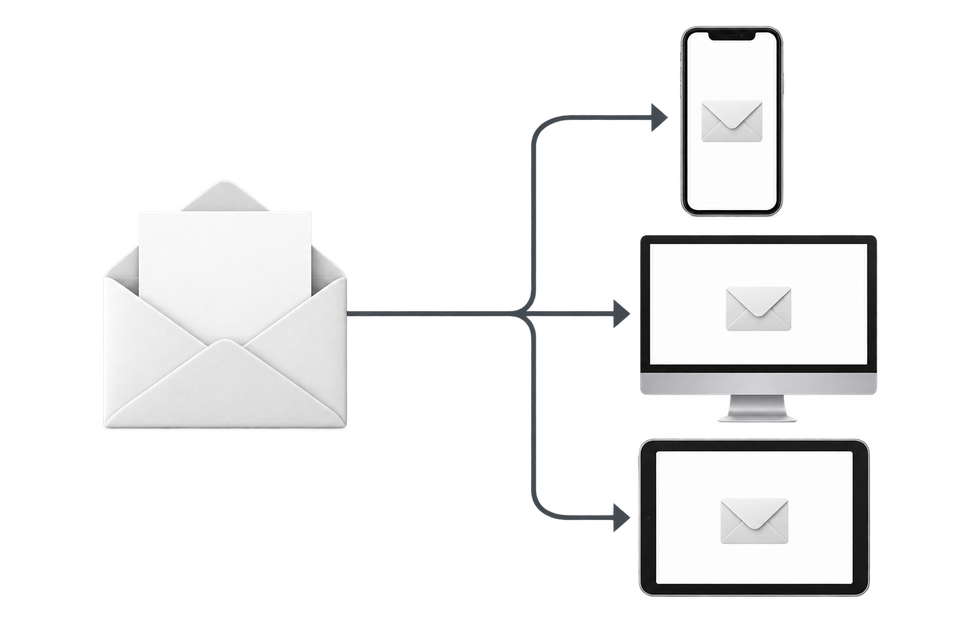
Choose the devices and email services you want to test, and MailSlurp gives you a special email address. Send your campaign to that address. MailSlurp opens the email in the selected apps and webmail services, then captures screenshots automatically.
The screenshots come back together, ready to compare across phones, tablets and computers. Check the layout, images and buttons, then share a result link so your team can review the same version of the email.
What we found
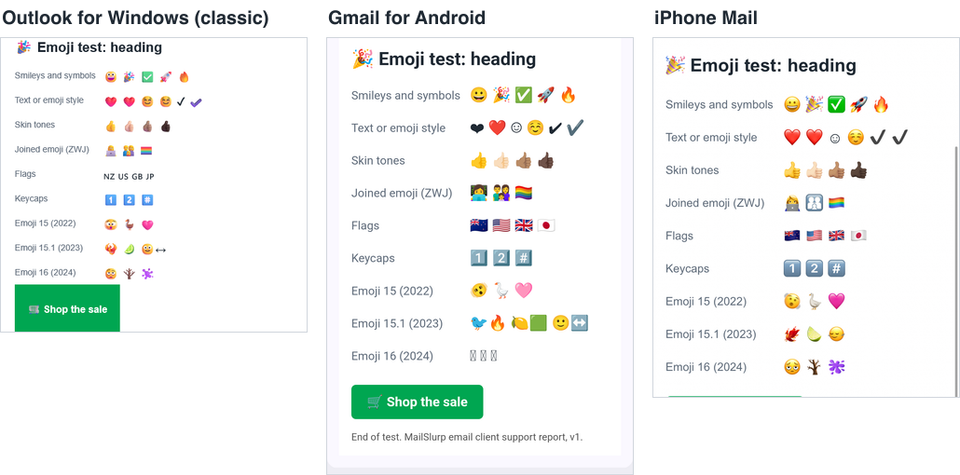
Common emoji, skin tones, joined emoji such as 👩💻 and keycaps worked in all 12 apps. Three things didn't:
- Flags showed as letters in classic and new Outlook for Windows. 🇳🇿 🇺🇸 🇬🇧 🇯🇵 appeared as "NZ US GB JP", because Windows has no flag emoji.
- The Gmail app for Android split 2023 emoji into their parts. The phoenix 🐦🔥 appeared as a bird and a flame, and the lime 🍋🟩 as a lemon and a green square.
- The Gmail app for Android showed 2024 emoji as empty boxes.
The same emoji in three apps
Results by app
| Emoji | Outlook for Windows (classic and new) | Gmail for Android | Every other app we tested |
|---|---|---|---|
| Smileys and symbols 😀 🎉 ✅ | Shown | Shown | Shown |
| Skin tones 👍🏽 | Shown | Shown | Shown |
| Joined emoji 👩💻 👨👩👧 🏳️🌈 | Shown | Shown | Shown |
| Flags 🇳🇿 🇺🇸 | Letters ("NZ", "US") | Shown | Shown |
| Keycaps 1️⃣ #️⃣ | Shown | Shown | Shown |
| Emoji 15, 2022 (🫨 🪿 🩷) | Shown | Shown | Shown |
| Emoji 15.1, 2023 (🐦🔥 🍋🟩 🙂↔️) | Mostly shown; 🙂↔️ split in classic Outlook | Split into parts | Shown |
| Emoji 16, 2024 ( ) | Shown | Empty boxes | Shown |
"Every other app" means Apple Mail on Mac, iPhone and iPad; Gmail on the web and on iPhone; Outlook on the web, iPhone and Android; and Yahoo Mail on the web. Each draws emoji in its own style: Apple, Google and Microsoft designs look noticeably different, even when the emoji is the same.
The Gmail for Android result reflects the Android version on our test device. Newer Android versions include newer emoji, so how many readers see empty boxes depends on how up to date their phones are.
Text-style and emoji-style symbols
Some symbols exist in two versions. A heart typed as ❤ without the hidden emoji selector is a text symbol, and apps disagree about how to draw it. Gmail for Android showed it as a black heart, while iPhone Mail showed a red emoji heart. ❤️, with the selector, was red everywhere. If colour matters, use the emoji-style character, which is what most emoji keyboards insert.
How to use emoji safely in email
Prefer emoji that are a couple of years old
In subject lines, headings and buttons, stick to emoji that have been around for at least two years. In our test, everything up to 2022 worked in all 12 apps.
Don't use flags to carry meaning
Readers on Windows see letters instead of flags. If the country matters, for example in a shipping update, write the country name as well.
Make sure the sentence works without the emoji
If a 2024 emoji becomes an empty box, the sentence around it should still make sense. "Our new range" means nothing when the splatter emoji arrives as a box; "Our new paint range " still works.
Expect each platform's own design
The same emoji looks different on Apple, Google and Microsoft devices, so avoid emoji whose meaning depends on the exact drawing, such as a particular facial expression.
Emoji in buttons are fine
The cart in our 🛒 "Shop the sale" button showed in all 12 apps.
What these tests don't cover
- The inbox list. We captured opened messages, so we can't show how emoji in a subject line look in each inbox.
- Webmail on every computer. Gmail, Outlook and Yahoo on the web draw emoji with the reader's own system, so a Windows reader using webmail may see flags as letters too. Our webmail results come from a single test browser.
- Gmail apps signed in to a Google account. Our Gmail app test devices read IMAP accounts.
The test email is free to download, and more results by app are on the email client support hub.
Frequently asked questions
Do emoji work in email?
Yes. Common emoji displayed in all 12 email apps we tested. Very new emoji and flags are the exceptions.
Why do flag emoji show as letters in Outlook?
Windows doesn't include flag emoji, so Outlook for Windows shows the two letters each flag is made from, such as "NZ" for New Zealand.
Can I use emoji in an email subject line?
Yes. Use emoji that have been around for a few years, and keep the subject readable without them, because a missing emoji leaves a gap or a box.