










Gmail email support: CSS, images and dark mode (tested 2026)
Does Gmail support style tags, media queries, flexbox and web fonts? Test emails rendered in Gmail on the web, Android and iPhone, with screenshots.
Use with your tools
Gmail is one of the places your readers are most likely to open your email, so it is natural to want a simple answer to "what does Gmail support?". The awkward truth is that there isn't one Gmail. There is Gmail in a web browser, the Gmail app for Android and the Gmail app for iPhone, and each of them makes its own decisions about your HTML and CSS.
Those decisions matter. A design that looks finished in your email builder can lose its columns, its custom font or its button styling by the time it reaches someone's inbox, and you won't notice unless you open the email in that particular version of Gmail. The most surprising difference we found has nothing to do with the device at all: it depends on which email account the Gmail app is reading.
This guide explains how the three versions of Gmail differ, shows what each one supported in our tests, and covers what to change in your email so it survives all of them.
Why "Gmail" isn't one email app
Three apps, three sets of rules
Gmail on the web, the Android app and the iPhone app were built separately and have each been updated on their own schedule. They share a name and an inbox, but not a single way of displaying HTML. Checking your email in Gmail on your laptop tells you about Gmail on the web, and not much more.
The account inside the app matters too
The Gmail apps can read more than Gmail addresses. Lots of people add their work email, Outlook.com or Yahoo account to the Gmail app on their phone, which connects to those mailboxes over a standard called IMAP. In that setup the Gmail app handles email very differently from Gmail on the web, as you will see below.
How we tested Gmail
The test emails
Support tables that list what each email app supports are useful, but many of their results are several years old, so we tested Gmail directly. Our CSS test email has one line for each of 20 CSS features, such as rounded corners, custom fonts and media queries (the rules that rearrange an email on a small screen). If Gmail keeps a feature, its line turns green. If Gmail strips it, the line stays red. A second test email checks image formats, video and other HTML elements.
Which Gmail we tested
We sent both emails to Gmail on the web and to the Gmail apps for Android and iPhone. The apps on our test phones read IMAP mailboxes rather than Google accounts, which turned out to be the most important detail of all. These results are from our November 2026 tests, read from screenshots of the delivered emails.
Checking this yourself means keeping Gmail open in a browser, on an Android phone and on an iPhone, sending every revision to each one and comparing what you see. We used MailSlurp, an email testing platform that does the sending and the screenshots automatically.
How automated device rendering works
Choose the devices and email services you want to test, and MailSlurp gives you a special email address. Send your campaign to that address. MailSlurp opens the email in the selected apps and webmail services, then captures screenshots automatically.
The screenshots come back together, ready to compare across phones, tablets and computers. Check the layout, images and buttons, then share a result link so your team can review the same version of the email.
What Gmail on the web supports
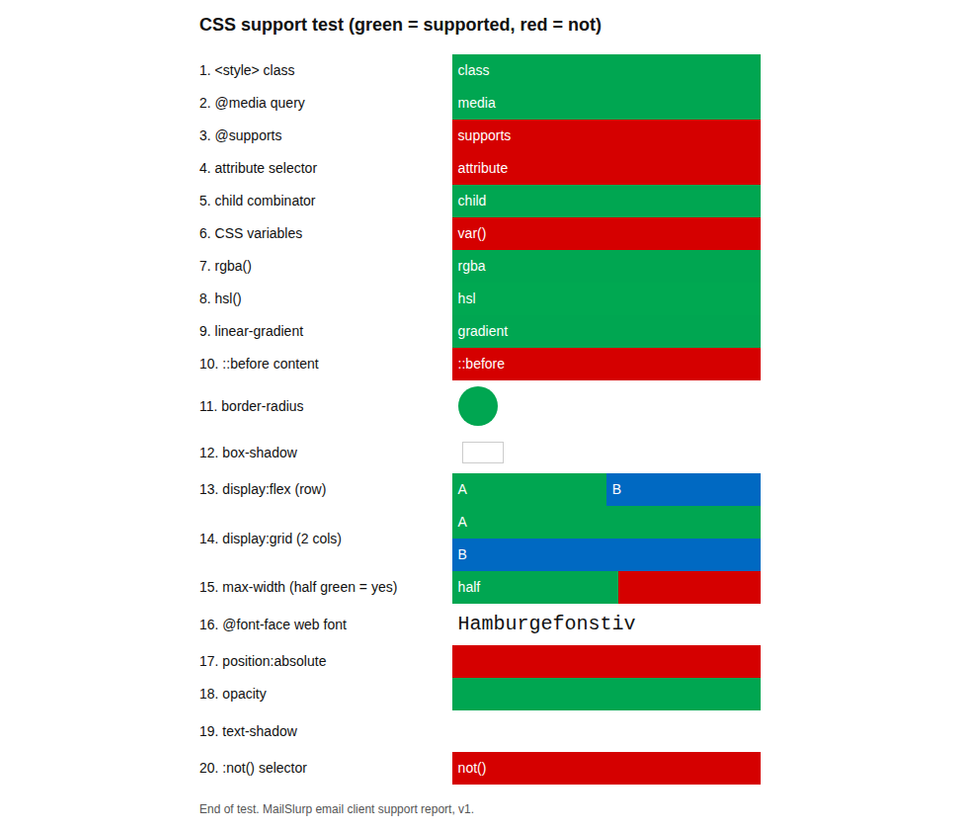
Gmail on the web applied 10 of the 20 CSS features, about half. In the screenshot below, a green line is a feature Gmail kept and a red line is one it removed.
| Feature | Gmail (web) |
|---|---|
<style> class selector |
Yes |
@media query |
Yes |
@supports |
No |
| Attribute selector | No |
Child combinator (>) |
Yes |
| CSS variables | No |
rgba() and hsl() |
Yes |
linear-gradient |
Yes |
::before content |
No |
border-radius |
Yes |
box-shadow |
No |
display: flex |
Yes |
display: grid |
No |
max-width |
Yes |
@font-face web font |
No |
position: absolute |
No |
opacity |
Yes |
text-shadow |
No |
:not() selector |
No |
What works
The good news first. Gmail on the web kept styles in a <style> block, applied media queries, laid out flexbox rows side by side, and drew gradients and rounded corners. A reasonably modern, responsive email will mostly look as designed.
What doesn't, and what to do instead
Grid layouts
Our CSS grid rule didn't apply, so grid items stacked. Use flexbox or tables for columns.
Custom fonts
Gmail didn't load our @font-face font and showed the next font in the list. Choose that second font deliberately, and end the list with a generic family such as sans-serif. Text with no font set at all appeared in Arial.
Shadows
Neither box-shadow nor text-shadow appeared. If a card or button relies on a shadow to stand out, give it a border or a background colour instead.
CSS variables
Variables were ignored, so a colour written as var(--brand) never appeared. Write colours as plain values.
Gmail apps with non-Google accounts
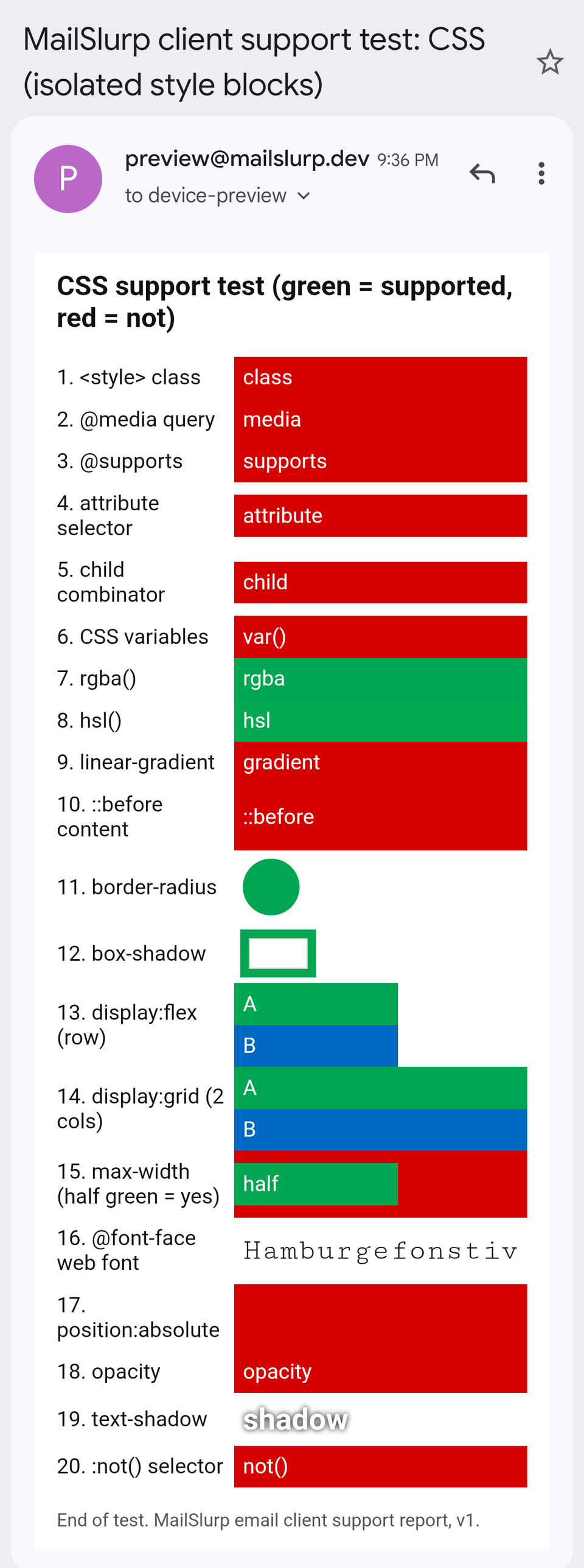
This is the result that catches people out. Many people read their work, Outlook.com or Yahoo mail in the Gmail app. Our Gmail test phones read mail from accounts like these (connected over IMAP), and in that setup the Gmail app dropped every embedded <style> rule, including plain class selectors and media queries.
Only inline styles survive
The lines that stayed green were the ones our test wrote as inline style attributes, directly on the HTML element: rgba(), hsl(), border-radius, box-shadow, max-width and text-shadow. The iPhone app also kept an inline linear-gradient. In total, the iPhone app applied 7 of the 20 features and the Android app 6.
In practice, the same email can keep its two-column layout in Gmail on a laptop and lose it in the Gmail app on a phone.
What to do for these readers
- Put critical styling inline, especially colours, widths and button styles. Most email platforms can inline your CSS automatically when they send.
- Make the single-column version read well. Media queries didn't apply, so the email showed its default layout on a narrow screen. Design that default to work on a phone.
- Test both account types if your list has both. Gmail apps signed in to a Google account handle embedded styles differently, and we haven't tested those yet.
Images and HTML elements in Gmail
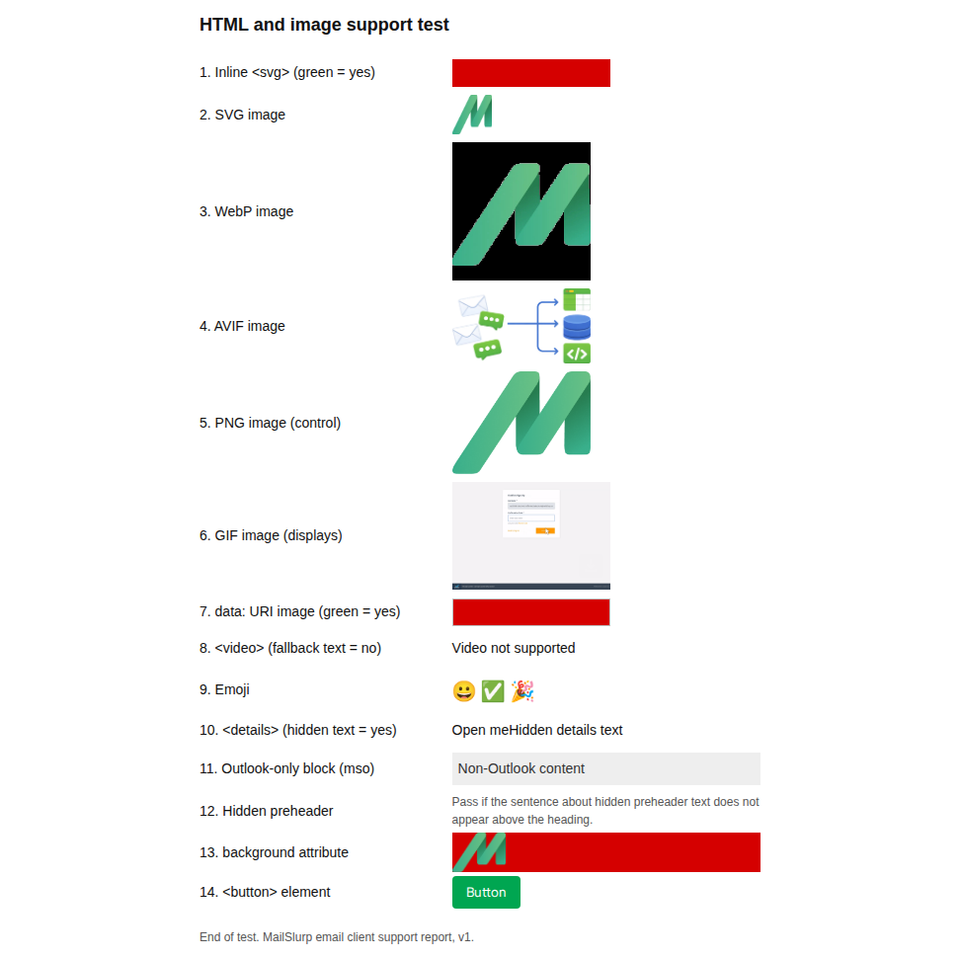
Gmail on the web displayed PNG, GIF, SVG, WebP and AVIF images. It sprang one surprise: our transparent WebP logo appeared on a solid black background, while the PNG version of the same logo kept its transparency.
| Element | Gmail (web) | Gmail for Android (IMAP account) | Gmail for iOS (IMAP account) |
|---|---|---|---|
SVG, WebP and AVIF in <img> |
Yes | Yes | Yes |
Inline <svg> |
No | No | No |
<video> player shown |
No, fallback text | No, fallback text | No, fallback text |
<details> collapses |
No | Yes | No |
Table background image |
Yes | No | No |
<button> element |
Yes | Yes | Yes |
| Emoji | Yes | Yes | Yes |
Transparent logos
If your logo has a transparent background, export it as PNG for Gmail, or give the WebP a solid background that matches your email. Otherwise readers of Gmail on the web may see your logo sitting in a black box.
Background images and video
The Gmail apps with IMAP accounts ignored our table background image, so text meant to sit on a photo sat on a plain background. None of the three showed a video player. The video in email guide covers the linked-image approach that works everywhere.
Other Gmail behaviour worth knowing
Dark mode
Gmail on the web in its dark theme left our message body unchanged. Gmail for Android recoloured light backgrounds and dark text, kept brand colours, and ignored the email's own dark-mode CSS. The Gmail dark mode results show every colour change.
Message clipping
Gmail cuts off long emails and adds a "View entire message" link. In our tests Gmail on the web clipped at about 102 KB of HTML. The Gmail clipping guide explains how to stay under the limit.
Newer emoji on Android
The Gmail app for Android split some 2023 emoji into their separate parts and showed 2024 emoji as empty boxes. The emoji guide has the details.
What these tests don't cover
- Gmail apps signed in to a Google account. Our results for the Gmail apps come from IMAP accounts.
- Dark mode in Gmail for iOS.
The results for all 12 apps we tested are in the November 2026 report, and the test emails are free to download from the email client support hub.
Frequently asked questions
Does Gmail support the style tag?
Yes, in Gmail on the web. Our class selectors, media queries and child selectors in a <style> block all applied. The Gmail apps reading IMAP accounts ignored every <style> block.
Does Gmail support media queries?
Gmail on the web applied our @media rule. The Gmail apps with IMAP accounts didn't, so the email kept its default layout on the phone.
Can I use custom fonts in Gmail?
Not with @font-face. Gmail on the web and the Gmail apps all fell back to the next font in our stack. Of the 12 apps we tested, only Apple Mail loaded the web font.
Why does my email look different in the Gmail app than in Gmail on the web?
The Gmail apps reading non-Google accounts ignore embedded CSS, while Gmail on the web applies most of it. Check the inline-styled version of your email on a phone, not only in the browser.