










Dark mode colour map: what Gmail and Outlook for Android do to 99 email colours
What Gmail and Outlook for Android do to 99 email colours in dark mode, measured from real screenshots. Look up what your brand colours become.
Use with your tools
Picture the moment. You have spent an afternoon choosing exactly the right orange for a "Book now" button, checked it against your brand guidelines, and sent the campaign. Then a customer replies with a screenshot from their phone, and your orange button is dark red.
Nobody changed your email. Their phone is in dark mode, and their email app recoloured the email for them. Some apps do this gently, darkening only the white and pale parts. Others repaint almost everything, shifting hues, darkening brand colours and occasionally merging two colours you meant to look different. Designers rarely see the result, because it only happens on the reader's device.
This guide is a lookup table for that problem. We measured what two popular Android email apps did to 99 colours in dark mode, so you can find a colour close to your own and see what your readers will actually get.
How email apps recolour in dark mode
Two very different approaches
When a phone is in dark mode, an email app can leave the email alone, darken only its lightest colours, or recolour the whole thing. The two apps in this guide sit at opposite ends. Gmail for Android only darkens very light colours. Outlook for Android recolours nearly everything.
Why you can't simply design around it
The new colours are calculated by the app, not chosen by you, and different apps calculate them differently. So the only way to know what a colour becomes is to measure it.
How we tested
The test email
We built an email with 99 coloured squares, from white and pale greys through pastels to saturated brand colours and black. Each square is a table cell with its colour set twice, as a bgcolor attribute and as an inline background style, so every app has a way to read it.
How we measured the colours
We opened the email in Gmail for Android and Outlook for Android, in light and dark mode, on the same device. For each square we found its position in the light screenshot, where its colour matched the source exactly, and read the most common pixel colour at the same position in the dark screenshot. These results are from our November 2026 tests.
Seeing this yourself means a phone in dark mode with each app installed, and a test send for every colour change. We used MailSlurp, an email testing platform that captures both apps in light and dark mode automatically.
How automated device rendering works
Choose the devices and email services you want to test, and MailSlurp gives you a special email address. Send your campaign to that address. MailSlurp opens the email in the selected apps and webmail services, then captures screenshots automatically.
The screenshots come back together, ready to compare across phones, tablets and computers. Check the layout, images and buttons, then share a result link so your team can review the same version of the email.
The results at a glance
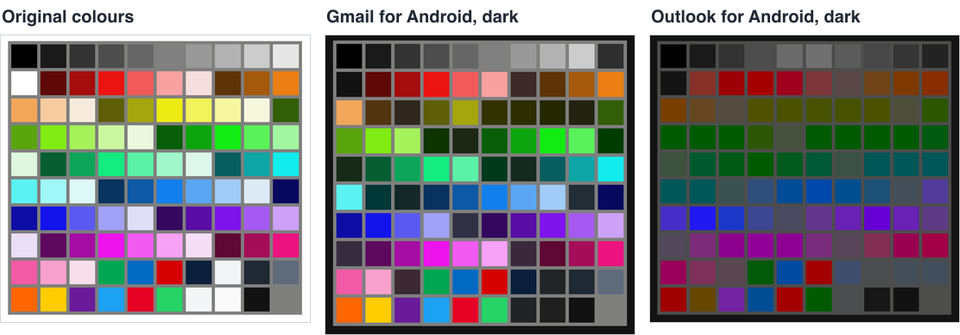
- Gmail for Android changed 25 of the 99 colours, all of them very light: white, pale greys and pastels became dark. Every mid-tone and saturated colour, including all the brand colours we tested, stayed exactly as sent.
- Outlook for Android changed 94 of the 99. It darkened almost every colour, shifted some hues and merged several different greens into nearly the same dark green. Only the darkest greys and black stayed the same.
The same colours in light and dark mode
What changed in Outlook for Android
Outlook for Android treats dark mode as a full recolouring. A few results worth knowing before you choose brand and alert colours:
| Colour in the email | Outlook for Android, dark mode | What happened |
|---|---|---|
Brand green #00a651 |
#005a09 |
Much darker |
Bright green #25d366 |
#005b00 |
Merged with other greens |
Lime #80ec13 |
#005a00 |
Merged with other greens |
Orange #ff6600 |
#9e0100 |
Became dark red |
Yellow #ffcc00 |
#664700 |
Became olive brown |
Sky blue #1da1f2 |
#004d94 |
Darker, still blue |
Navy #0b1f3a |
#3e4d6c |
Lightened |
Pale grey #f2f4f7 |
#4b4d4f |
Became mid grey |
White #ffffff |
#141414 |
Near black |
Greens that merge into one
Seven different greens, from lime to emerald, all came out between #005a00 and #005b00. If your email uses two greens to mean different things, such as "in stock" and "on sale", Outlook for Android readers will see one.
Warm colours that change character
Orange became dark red and yellow became an olive brown. These are the shifts most likely to change the meaning of a colour, because orange and yellow are often used for warnings and highlights.
Dark colours that get lighter
Outlook doesn't only darken. Our navy #0b1f3a became the lighter #3e4d6c, presumably so it stays visible against the dark background.
What changed in Gmail for Android
Gmail for Android only changed very light colours. White became #121212, #f2f4f7 became #222426, and pastels such as #f7cca1 (peach) became dark versions of the same hue (#523411). Everything else, from mid greys to saturated reds, greens and blues, stayed exactly as sent. Our Gmail test device reads mail through an IMAP account.
Gmail on the web, in its dark theme, didn't recolour our test emails at all; see how Gmail dark mode changes your email colours.
What to do with this
Look up your brand colours
Find your brand colours, or the nearest swatch, in the full table below, and check that buttons and badges still read correctly in Outlook for Android.
Don't use colour alone to carry meaning
Orange warnings became red, and different greens merged. Add a word or an icon wherever the colour itself is the message.
Keep text on coloured backgrounds high-contrast
Outlook darkened most backgrounds, so mid-tone text on a coloured button can lose contrast. White or very dark text holds up best.
Expect pale panels to differ between apps
A #f2f4f7 panel became #222426 in Gmail but #4b4d4f in Outlook. If the panel's edge matters, add a border.
The full colour table
All 99 colours in Gmail for Android and Outlook for Android dark mode
| Colour in the email | Gmail for Android, dark mode | Outlook for Android, dark mode |
|---|---|---|
#000000 |
Unchanged | Unchanged |
#1a1a1a |
Unchanged | Unchanged |
#333333 |
Unchanged | Unchanged |
#4d4d4d |
Unchanged | Unchanged |
#666666 |
Unchanged | #6a6a6a |
#808080 |
Unchanged | #707070 |
#999999 |
Unchanged | #5b5b5b |
#b3b3b3 |
Unchanged | #474747 |
#cccccc |
Unchanged | #353535 |
#e6e6e6 |
#2e2e2e |
#232323 |
#ffffff |
#121212 |
#141414 |
#5e0808 |
Unchanged | #863028 |
#a50d0d |
Unchanged | #9e0008 |
#ec1313 |
Unchanged | #a50000 |
#f25a5a |
Unchanged | #9e001e |
#f7a1a1 |
Unchanged | #7e3539 |
#f7dede |
#3d2a2b |
#5c4848 |
#5e3308 |
Unchanged | #6f4217 |
#a5590d |
Unchanged | #7e3900 |
#ec7f13 |
Unchanged | #892e00 |
#f2a65a |
Unchanged | #773e00 |
#f7cca1 |
#523411 |
#664621 |
#f7ebde |
#2f271d |
#544b41 |
#5e5e08 |
Unchanged | #4f5000 |
#a5a50d |
Unchanged | #4a5100 |
#ecec13 |
#323200 |
#475200 |
#f2f25a |
#2c2d00 |
#475200 |
#f7f7a1 |
#252700 |
#4b5100 |
#f7f7de |
#222311 |
#4d4e3a |
#335e08 |
Unchanged | #2c5700 |
#59a50d |
Unchanged | #005a00 |
#80ec13 |
Unchanged | #005a00 |
#a6f25a |
Unchanged | #005a00 |
#ccf7a1 |
#0c3300 |
#2d5707 |
#ebf7de |
#1d2715 |
#46503c |
#085e08 |
Unchanged | #005a03 |
#0da50d |
Unchanged | #005a00 |
#13ec13 |
Unchanged | #005b00 |
#5af25a |
Unchanged | #005b00 |
#a1f7a1 |
#003c00 |
#005a0f |
#def7de |
#172a18 |
#3d523e |
#085e33 |
Unchanged | #00592e |
#0da559 |
Unchanged | #005a16 |
#13ec80 |
Unchanged | #005b00 |
#5af2a6 |
Unchanged | #005a1d |
#a1f7cc |
#00391b |
#005838 |
#def7eb |
#162921 |
#3c5148 |
#085e5e |
Unchanged | #005656 |
#0da5a5 |
Unchanged | #005658 |
#13ecec |
Unchanged | #005659 |
#5af2f2 |
Unchanged | #005658 |
#a1f7f7 |
#003638 |
#005658 |
#def7f7 |
#142829 |
#3b5051 |
#08335e |
Unchanged | #2e4d7b |
#0d59a5 |
Unchanged | #004c96 |
#137fec |
Unchanged | #0048aa |
#5aa6f2 |
Unchanged | #004e90 |
#a1ccf7 |
Unchanged | #1c5075 |
#deebf7 |
#222d36 |
#434e58 |
#08085e |
Unchanged | #523c9a |
#0d0da5 |
Unchanged | #472dc7 |
#1313ec |
Unchanged | #2218f1 |
#5a5af2 |
Unchanged | #1d38c9 |
#a1a1f7 |
Unchanged | #3c4691 |
#dedef7 |
#303144 |
#4a4b60 |
#33085e |
Unchanged | #64368e |
#590da5 |
Unchanged | #6920b4 |
#7f13ec |
Unchanged | #6400d4 |
#a65af2 |
Unchanged | #6820b5 |
#cca1f7 |
Unchanged | #5f3b87 |
#ebdef7 |
#362c40 |
#53495d |
#5e085e |
Unchanged | #7b2b7a |
#a50da5 |
Unchanged | #8c008e |
#ec13ec |
Unchanged | #910097 |
#f25af2 |
Unchanged | #8d0092 |
#f7a1f7 |
Unchanged | #792c7c |
#f7def7 |
#3a283b |
#5a465b |
#5e0833 |
Unchanged | #822f51 |
#a50d59 |
Unchanged | #990050 |
#ec1380 |
Unchanged | #a10046 |
#f25aa6 |
Unchanged | #99005a |
#f7a1cc |
Unchanged | #7d315b |
#f7deeb |
#3c2933 |
#5b4752 |
#00a651 |
Unchanged | #005a09 |
#0069c2 |
Unchanged | #004a9f |
#d50000 |
Unchanged | #a30000 |
#0b1f3a |
Unchanged | #3e4d6c |
#f2f4f7 |
#222426 |
#4b4d4f |
#1f2933 |
Unchanged | #434e59 |
#5f6b7a |
Unchanged | #424e5c |
#ff6600 |
Unchanged | #9e0100 |
#ffcc00 |
Unchanged | #664700 |
#6a1b9a |
Unchanged | #7123a1 |
#1da1f2 |
Unchanged | #004d94 |
#e60023 |
Unchanged | #a40000 |
#25d366 |
Unchanged | #005b00 |
#f4f5f7 |
#222324 |
#4c4d4e |
#fafafa |
#1f1f1f |
#171717 |
#121212 |
Unchanged | Unchanged |
The table is also available as JSON in the results file under dark-colour-map, and the test email is free to download.
What these tests don't cover
- Text colours. This test recoloured backgrounds only. Our earlier dark mode test shows how text and borders changed.
- Outlook for Windows, Outlook for iOS and Apple Mail in dark mode. We can't capture those apps in dark mode yet.
- Dark-mode CSS. This email has none; Outlook for Android applies
prefers-color-schemerules when they are present, and Gmail for Android doesn't.
Frequently asked questions
Why did my orange button turn red in Outlook dark mode?
Outlook for Android darkens colours in dark mode and shifted our #ff6600 orange to #9e0100, a dark red. Use a word or icon alongside the colour if the meaning matters.
Does Gmail change brand colours in dark mode?
Not on Android in our test. Gmail for Android only darkened very light colours such as white and pastels.
Can I stop Outlook from changing my colours?
You can't switch it off, but Outlook for Android applied our prefers-color-scheme and [data-ogsc] dark-mode rules in an earlier test, so you can choose the dark colours yourself.