










Yahoo Mail email support: CSS and images (tested 2026)
Which CSS and HTML features work in Yahoo Mail? Results from test emails rendered in Yahoo Mail on the web in November 2026, with screenshots.
Use with your tools
Yahoo Mail doesn't get talked about much in email design circles, but it is still one of the largest webmail services, and on consumer lists in particular it can be a sizeable share of your readers. It also has a habit of being assumed rather than tested. Designers check an email in Gmail, see that it looks fine, and expect Yahoo to match.
Mostly it does. But Yahoo supports a slightly different set of CSS from Gmail, and the differences land in exactly the places designers like to add polish: gradient banners, soft colours, subtle shadows. When Yahoo ignores one of those, the email quietly falls back to something you didn't choose.
This guide shows what Yahoo Mail supported in our tests, where it differs from Gmail, and what to change so the fallbacks look intentional.
How Yahoo Mail compares with Gmail
Similar overall, different in the details
In our tests Yahoo Mail on the web and Gmail on the web each applied 10 of 20 CSS features. That headline number makes them look interchangeable. They aren't: about a fifth of the features behaved differently, and in both directions. Some things worked in Yahoo and failed in Gmail, and the other way around.
Why that matters
If you only test in Gmail, the features that work in Gmail but fail in Yahoo will slip past you. Gradients are the most common example, and they tend to sit behind important things like headlines and buttons.
How we tested Yahoo Mail
The test emails
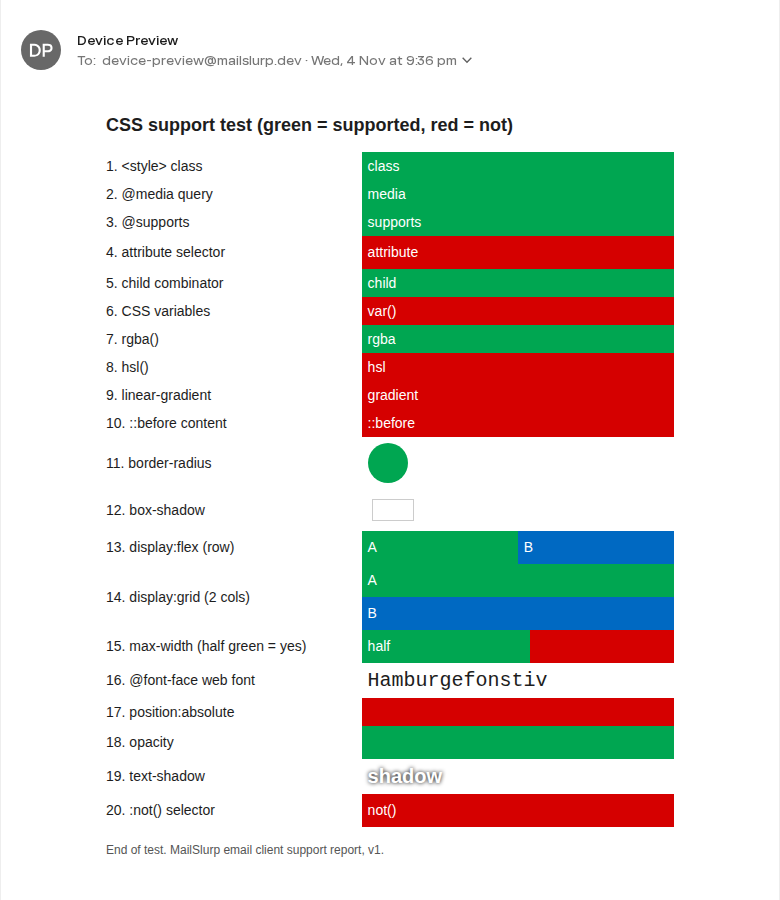
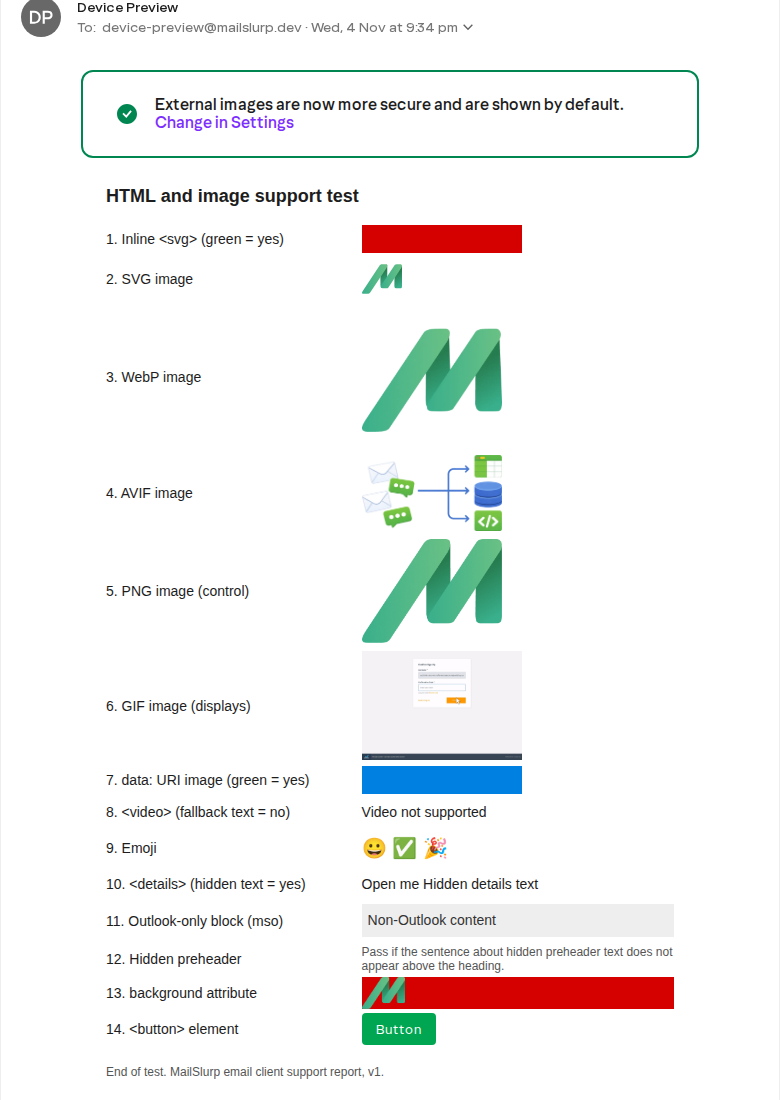
We sent Yahoo Mail on the web the same CSS test email we sent to 11 other email apps. Each of its 20 lines is styled with one CSS feature, from rounded corners and custom fonts to media queries (rules that rearrange a layout on small screens). Green means Yahoo applied the feature; red means it didn't. A second email covers image formats, video and other HTML elements.
Where the screenshots come from
MailSlurp, the email testing platform we used for these tests, captured Yahoo Mail next to Gmail and the other apps, so the differences are visible side by side instead of in separate browser tabs. These results are from our November 2026 tests.
How automated device rendering works
Choose the devices and email services you want to test, and MailSlurp gives you a special email address. Send your campaign to that address. MailSlurp opens the email in the selected apps and webmail services, then captures screenshots automatically.
The screenshots come back together, ready to compare across phones, tablets and computers. Check the layout, images and buttons, then share a result link so your team can review the same version of the email.
What CSS works in Yahoo Mail
Here is the CSS test email in Yahoo Mail on the web, followed by a comparison with Gmail.
| CSS feature | Yahoo Mail (web) | Gmail (web) |
|---|---|---|
<style> class selector |
Yes | Yes |
@media query |
Yes | Yes |
@supports |
Yes | No |
display: flex |
Yes | Yes |
display: grid |
No | No |
border-radius |
Yes | Yes |
box-shadow |
No | No |
text-shadow |
Yes | No |
linear-gradient |
No | Yes |
hsl() colours |
No | Yes |
@font-face web font |
No | No |
| CSS variables | No | No |
| Total of 20 features | 10 | 10 |
What works in Yahoo
Embedded styles, media queries, flexbox layouts, rounded corners and text shadows all applied. Yahoo also applied an @supports rule, which lets a stylesheet check whether a feature is available before using it; Gmail ignored that.
What doesn't, and what to do instead
Gradients
Yahoo showed our red fallback where the gradient should have been. Always set a solid background colour before any gradient, so the area still has a sensible colour when the gradient is dropped:
<td style="background-color:#0069c2; background-image:linear-gradient(#1d8cf0,#0069c2);">
hsl() colours
These were ignored. Write colours as hex values, such as #0069c2, or as rgba(), which worked.
Grid layouts
Grid items didn't sit side by side. Use flexbox or tables for columns.
Shadows
box-shadow didn't appear. Use a border rather than a shadow to separate cards and buttons from the page.
Web fonts and CSS variables
Yahoo used the next font in the list instead of our @font-face font; text with no font set appeared in Arial. CSS variables were ignored too, so write colours as plain values.
Images and HTML elements in Yahoo Mail
| Element | Yahoo Mail (web) |
|---|---|
| SVG, WebP, AVIF, PNG and GIF images | Displayed |
Inline <svg> |
Not displayed |
<video> player shown |
No, fallback text |
<details> collapses |
No |
Table background image |
Shown |
<button> element |
Styled button |
Yahoo was generous with images: every image file we sent appeared, including the newer WebP and AVIF formats. SVG code written straight into the email didn't appear, and the <video> tag showed its fallback text rather than a player.
What these tests don't cover
- The Yahoo Mail apps for iPhone and Android. These results come from Yahoo Mail on the web.
- Dark mode in Yahoo Mail.
The full results are in the November 2026 report, and the test emails are free to download from the email client support hub. To check your own email, see how to preview an email in Yahoo Mail, and for the closest comparison, our Gmail guide.
Frequently asked questions
Does Yahoo Mail support media queries?
Yes. Yahoo Mail on the web applied our @media rule.
Does Yahoo Mail support CSS gradients?
Not in our test. The linear-gradient line showed its red fallback, so give gradient areas a solid background colour too.
Does Yahoo Mail support web fonts?
No. Yahoo used the next font in our stack instead of the @font-face font.