










Apple Mail and iPhone Mail email support: CSS, images and video (tested 2026)
Which CSS and HTML work in Apple Mail on Mac, iPhone and iPad? Results from test emails on real Apple devices in November 2026, with screenshots.
Use with your tools
Apple Mail is the email app built into every iPhone, iPad and Mac, so many of your readers will open your email there. It is also, by a comfortable margin, the most capable email app we have tested. Rounded corners, custom fonts, video, modern layouts: almost anything you can do on a web page, Apple Mail will display.
That sounds like good news, and mostly it is. But it hides a trap. When you check an email on your own iPhone and it looks perfect, that tells you very little about how the same email looks in Outlook or the Gmail app. Apple Mail is so forgiving that it can make a fragile design look finished.
This guide shows what Apple Mail supported in our tests, which of those features no other app matched, and how to use Apple Mail as a best case without mistaking it for the final check.
Apple Mail on Mac, iPhone and iPad
One app family, one set of results
Apple ships a version of Mail on macOS, iPhone and iPad. They look different, but in our tests they handled HTML and CSS the same way, so everything on this page applies to all three. Where we show a screenshot from one device, the others gave the same result.
Why Apple Mail is the best case
Apple Mail displays email with WebKit, the same engine as Safari. That is why it supports so much: it treats your email much like a web page. Other email apps use different engines or strip parts of your HTML for security, which is where most of the differences in this guide come from.
How we tested Apple Mail
The test emails
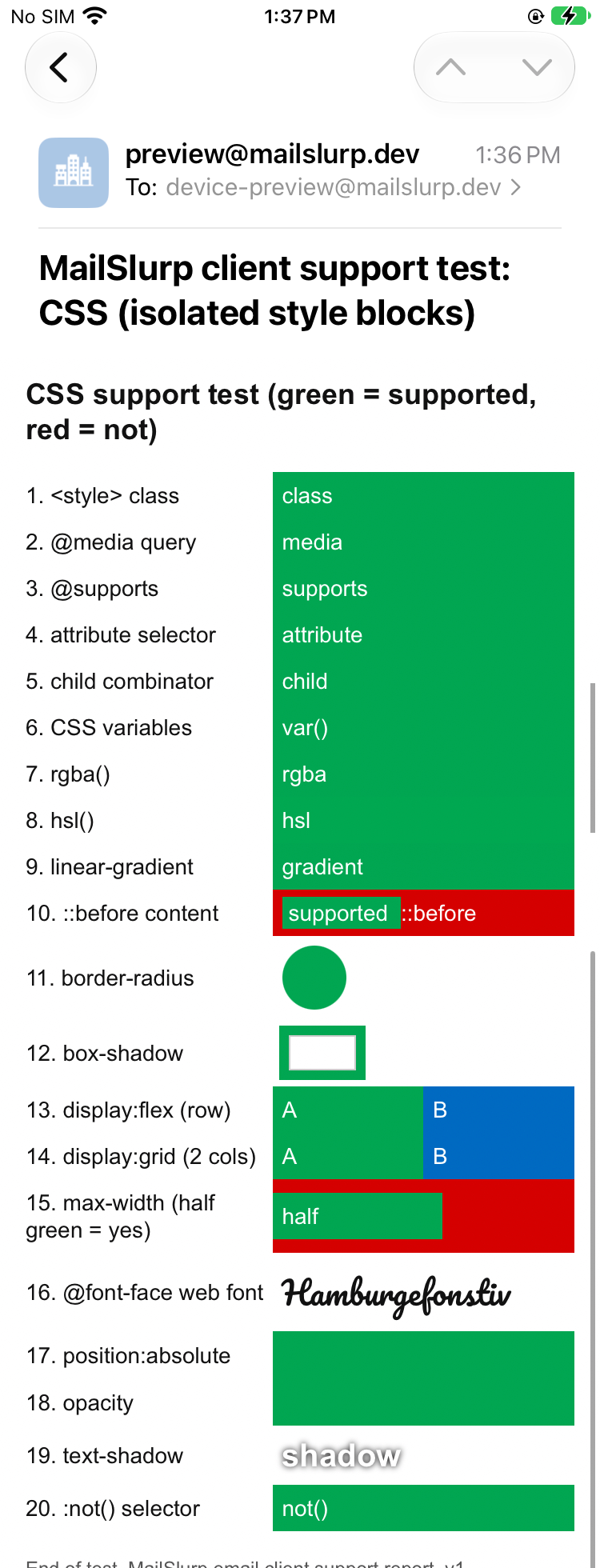
We sent Apple Mail the same test emails we sent to 11 other email apps. The CSS test email checks 20 common features, from rounded corners and custom fonts to media queries, the rules that rearrange a layout on small screens. Each feature gets its own line, which turns green if the app applies it and stays red if it doesn't. A second email checks image formats, video and other HTML elements.
Where the screenshots come from
The screenshots here come from MailSlurp, an email testing platform that captures one email in Apple Mail and the other apps at the same time, so the differences are easy to compare. The iPhone and iPad screenshots come from physical devices. These results are from our November 2026 tests.
How automated device rendering works
Choose the devices and email services you want to test, and MailSlurp gives you a special email address. Send your campaign to that address. MailSlurp opens the email in the selected apps and webmail services, then captures screenshots automatically.
The screenshots come back together, ready to compare across phones, tablets and computers. Check the layout, images and buttons, then share a result link so your team can review the same version of the email.
What CSS works in Apple Mail
All of it, as far as our test goes. Every line of the CSS test email turned green on the iPhone, and the Mac and iPad apps gave the same results.
Features that only worked in Apple Mail, or nearly only
The more useful question is which of these features you can't rely on elsewhere. These worked in Apple Mail but failed in most other apps:
| Feature | Apple Mail | Other apps where it worked |
|---|---|---|
@font-face web font |
Yes | None |
| CSS variables | Yes | None |
| Attribute selectors | Yes | None |
::before content |
Yes | New Outlook for Windows |
position: absolute |
Yes | New Outlook for Windows |
display: grid |
Yes | New Outlook, Outlook for Android and iOS |
What that means for your design
Web fonts
Apple Mail was the only app of the 12 that loaded our custom web font. Everyone else saw the next font in the list. If your headings use a web font, the fallback is what most of your readers see, so choose it carefully and end the list with sans-serif.
CSS variables and attribute selectors
No other app applied these. A colour written as var(--brand) only appears in Apple Mail; elsewhere it disappears. Write colours as plain values and style elements with ordinary classes.
Grid and positioning
Grid layouts and absolutely positioned elements worked in Apple Mail and a few Outlook apps, but not in Gmail or Yahoo. Use tables or flexbox for anything that has to work everywhere.
Images, video and HTML elements
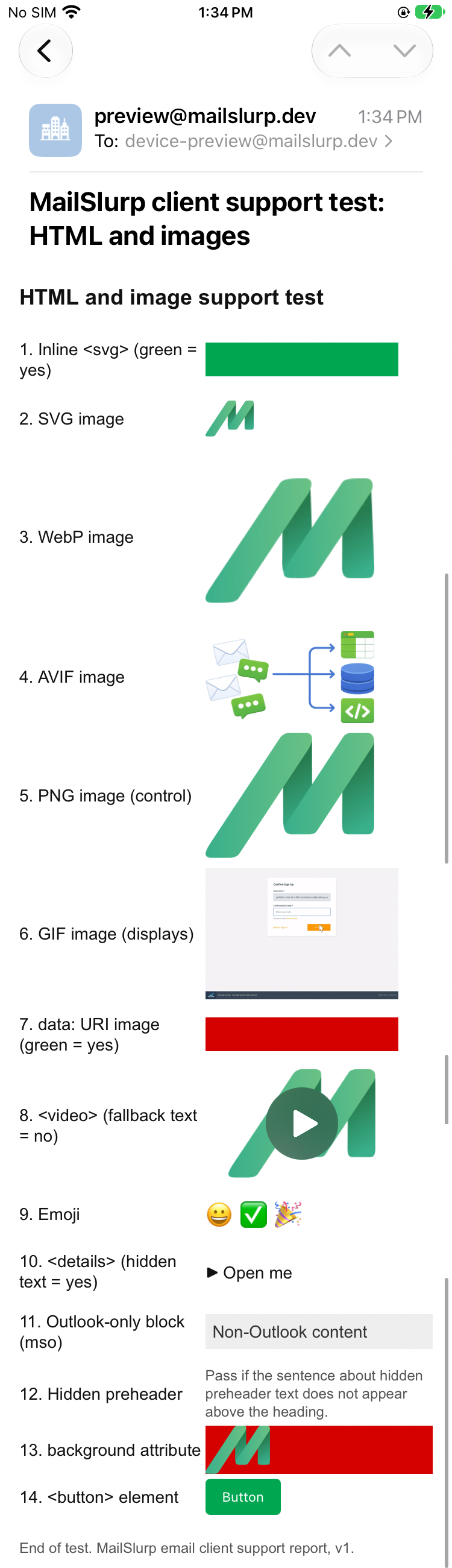
The second test email checks which image formats and HTML elements appear. Apple Mail showed all of them.
| Element | Apple Mail (macOS, iPhone and iPad) |
|---|---|
Inline <svg> |
Displayed |
| SVG, WebP, AVIF, PNG and GIF images | Displayed |
<video> player shown |
Yes |
<details> collapses |
Yes |
Table background image |
Shown |
<button> element |
Styled button |
[if mso] conditional block |
Not shown |
Video
Apple Mail and new Outlook for Windows were the only apps that showed a video player for our <video> tag. Everyone else saw the fallback inside it. The video in email results cover what that fallback should be.
Collapsible sections and inline SVG
Apple Mail collapsed our <details> element and displayed SVG code written straight into the email. Most other apps did neither, so don't hide important content in a <details> block or draw key graphics with inline SVG.
Small things iPhone Mail does on its own
Apple Mail also adds a few touches you didn't ask for. In our template tests, iPhone Mail underlined a street address and a date and turned them into links, because it detects addresses and dates automatically. With no font set at all, text appeared in Apple's system font, San Francisco, on iPhone and iPad, and in Helvetica on the Mac. The default fonts guide has the full comparison.
What these tests don't cover
- Dark mode in Apple Mail. So far we have measured dark mode on Android and the web only.
- Mail Privacy Protection and remote content settings. Our test devices load images, so these results show the email with images on.
The full results are in the November 2026 report, and the test emails are free to download from the email client support hub. To preview your own email on Apple devices, see how to preview email in iPhone Mail.
Frequently asked questions
Does Apple Mail support web fonts?
Yes. Our @font-face font loaded in Apple Mail on Mac, iPhone and iPad. It was the only app of the 12 we tested where it did.
Does iPhone Mail support media queries?
Yes. Our @media rule applied in Apple Mail on iPhone and iPad, as well as on the Mac.
Can you play video in iPhone Mail?
Apple Mail on iPhone showed a video player with a play button for our <video> tag. Most other apps showed the fallback text instead, so keep a linked image as the fallback.
If my email looks right on my iPhone, is it ready to send?
Not yet. Apple Mail applied every feature we tested, so it hides problems that show up elsewhere. Check classic Outlook for Windows and the Gmail app as well.