










Can you put a video in an email? What 12 email apps showed (tested 2026)
Which email apps show a player for the HTML video tag? Results from Apple Mail, Outlook, Gmail and Yahoo, with screenshots and fallback advice.
Use with your tools
Marketers often want video in an email, and on paper it looks easy. HTML has a tag for it, <video>, the same element websites use to show a player with a play button. Drop it into your email, point it at a video file, and job done.
In practice, whether a reader actually sees a player depends entirely on their email app, and most email apps don't show one. What they show instead is whatever you put inside the tag as a fallback. If you left that empty, some of your readers see nothing at all.
This guide shows which of 12 email apps displayed a video player in our tests, what the others showed, and how to add video to an email in a way that works for everyone.
How video in email works
The <video> tag and its fallback
A <video> tag can hold more than the video. Anything you put between the opening and closing tags is a fallback: apps that can't show a player display that content instead.
<video controls poster="https://example.com/poster.jpg" width="560">
  <source src="https://example.com/demo.mp4" type="video/mp4">
  <a href="https://example.com/watch">
    <img src="https://example.com/poster-with-play-button.jpg" alt="Watch the demo" width="560">
  </a>
</video>
In this example, apps that support video show a player with the poster image. Apps that don't support video but do display the fallback show the linked image, which takes the reader to the video on your website.
Why most apps don't play video
Email apps are cautious about what they let an email do, for privacy and security reasons, and loading and playing media inside a message is something many of them simply don't allow. The result is that video support in email is the exception rather than the rule.
How we tested video in email
The test email
We sent an email containing a <video> tag to 12 email apps. The tag had playback controls, a still "poster" image, an MP4 file and the fallback text "Video not supported", which an app shows when it can't display the player.
What a screenshot can and can't tell us
We looked at a screenshot of the delivered email in each app. A screenshot shows whether the app displayed a player. It doesn't show whether the video played when tapped, so we report "player shown", not "played". These results are from our November 2026 tests.
We used MailSlurp, an email testing platform, to send the test and capture all 12 apps at once; you can do the same with your own email to see exactly what each reader gets.
How automated device rendering works
Choose the devices and email services you want to test, and MailSlurp gives you a special email address. Send your campaign to that address. MailSlurp opens the email in the selected apps and webmail services, then captures screenshots automatically.
The screenshots come back together, ready to compare across phones, tablets and computers. Check the layout, images and buttons, then share a result link so your team can review the same version of the email.
Which email apps show a video player
Only 4 of the 12 apps showed a video player: Apple Mail on the Mac, iPhone and iPad, and new Outlook for Windows. Seven showed our fallback text. Outlook on the web showed nothing at all.
| Email app | Video player shown |
|---|---|
| Apple Mail (macOS) | Yes |
| Apple Mail (iPhone) | Yes |
| Apple Mail (iPad) | Yes |
| New Outlook for Windows | Yes |
| Classic Outlook for Windows | No, fallback text |
| Outlook on the web | No, nothing shown |
| Outlook for Android | No, fallback text |
| Outlook for iOS | No, fallback text |
| Gmail (web) | No, fallback text |
| Gmail for Android (IMAP account) | No, fallback text |
| Gmail for iOS (IMAP account) | No, fallback text |
| Yahoo Mail (web) | No, fallback text |
The same email in two apps
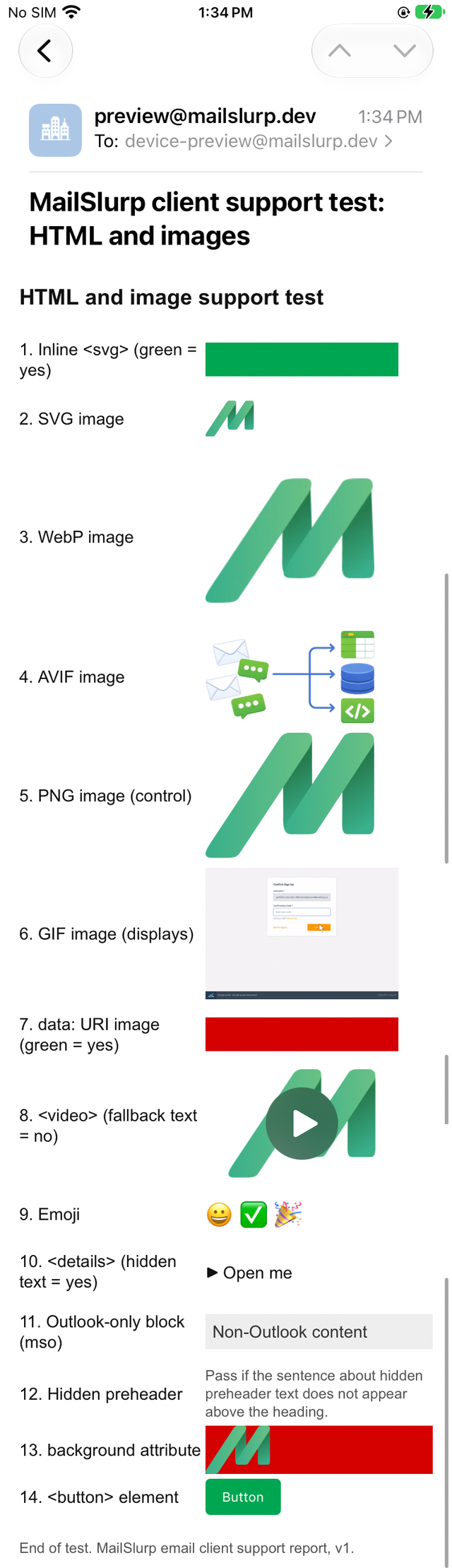
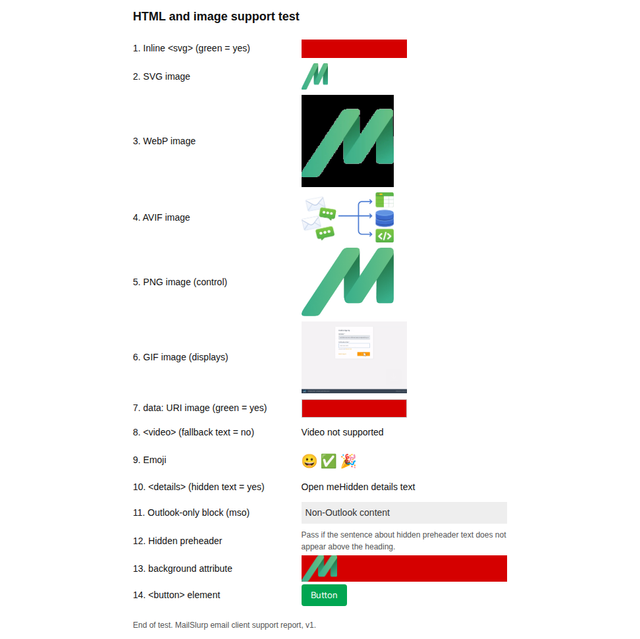
Here is the test email in iPhone Mail and in Gmail on the web. Find the video line in each.
Apple Mail (iPhone)
Gmail (web)
Outlook on the web shows nothing
Outlook on the web is the one to watch. It showed neither a player nor our fallback text, so the video simply wasn't there. Any sentence around it that says "watch the video below" points at empty space for those readers.
How to add video to an email that works everywhere
Use a linked image as the main approach
A still frame from the video with a visible play button, linked to the video on your website, works in every app we tested. Readers recognise the play button, tap it, and watch the video in their browser where playback is reliable.
If you use <video>, put the linked image inside it
Combining the two gets you close to the best of both: Apple Mail and new Outlook readers get the player, and apps that showed our fallback text should show the linked image in its place. Outlook on the web is the exception, since it showed nothing at all, so the linked image alone is still the safer choice if many of your readers use it. The code example above shows the structure.
Don't leave the fallback empty
Because Outlook on the web showed nothing for our video, write the text around it so it makes sense on its own, and include a plain link to the video as well.
Consider an animated GIF for short loops
Every app we tested displayed our GIF image, though a screenshot can't show whether it animated. For a short, silent loop such as a product spinning or a feature in action, a GIF can be a practical middle ground. The GIFs in email guide covers how Outlook treats animation.
What these tests don't cover
- Playback. We recorded whether a player appeared, not whether the video played.
- Gmail apps signed in to a Google account. Our Gmail app test devices read IMAP accounts.
The full results are in the November 2026 report, and the test email is free to download from the email client support hub.
Frequently asked questions
Can you embed a video in a Gmail email?
Not as a player. Gmail on the web and the Gmail apps showed our fallback text. Use a linked image of the video instead.
Does Outlook support video in email?
New Outlook for Windows showed a video player. Classic Outlook, Outlook on the web and the Outlook mobile apps didn't.
What is the best way to share a video in an email?
A still image with a play button, linked to the video on a web page. It shows in every app and doesn't depend on video support.