










Outlook for iPhone and Android email support: CSS and images (tested 2026)
Which CSS and HTML work in Outlook for iOS and Outlook for Android? Results from test emails sent to both apps, with screenshots and a comparison.
Use with your tools
When people picture "Outlook", they tend to picture a big desktop app on a Windows PC. But a good share of the people who use Outlook at work read their email somewhere else entirely: on a phone, in the Outlook app for iPhone or Android, between meetings or on the train home.
Those mobile apps are their own thing. They don't render email like classic Outlook for Windows, and they don't quite match new Outlook either. So if you only test your email in desktop Outlook, you can miss a gradient button that turns into a flat block on the phone, or rely on a fix that phone readers never receive.
This guide shows what the Outlook mobile apps support in our tests, how they differ from the other Outlooks, and what to change so your email holds up on a phone.
How the Outlook mobile apps differ from desktop Outlook
A third way of displaying email
Classic Outlook for Windows uses Microsoft Word to lay out email, which is why it ignores so much CSS. The mobile apps don't use Word. They handle modern layout much better, including responsive designs, but they still skip several features that new Outlook for Windows applies, such as gradients.
Why classic Outlook fixes don't help here
Many email templates include special code for classic Outlook inside [if mso] conditional comments: VML buttons, fixed-width tables and background images. The mobile apps ignore those blocks and show your regular HTML instead. That is usually what you want, but it means the regular version has to look finished on a phone.
How we tested the Outlook mobile apps
The test emails
We sent both apps the same CSS test email we sent to 10 other email apps. Every one of its 20 lines tests a single feature, such as rounded corners, a custom font or a media query (a rule that rearranges the layout on small screens). Each line turns from red to green only if the app applies its feature. A second test email covers image formats, video and other HTML elements.
Where the screenshots come from
The usual way to check this is to install Outlook on an iPhone and an Android phone and send every draft to both. Instead, we sent the test emails through MailSlurp, an email testing platform that captures screenshots from both apps automatically. Our iPhone captures come from physical devices; the Android app runs on an Android emulator. These results are from our November 2026 tests.
How automated device rendering works
Choose the devices and email services you want to test, and MailSlurp gives you a special email address. Send your campaign to that address. MailSlurp opens the email in the selected apps and webmail services, then captures screenshots automatically.
The screenshots come back together, ready to compare across phones, tablets and computers. Check the layout, images and buttons, then share a result link so your team can review the same version of the email.
What CSS works in Outlook for iOS and Android
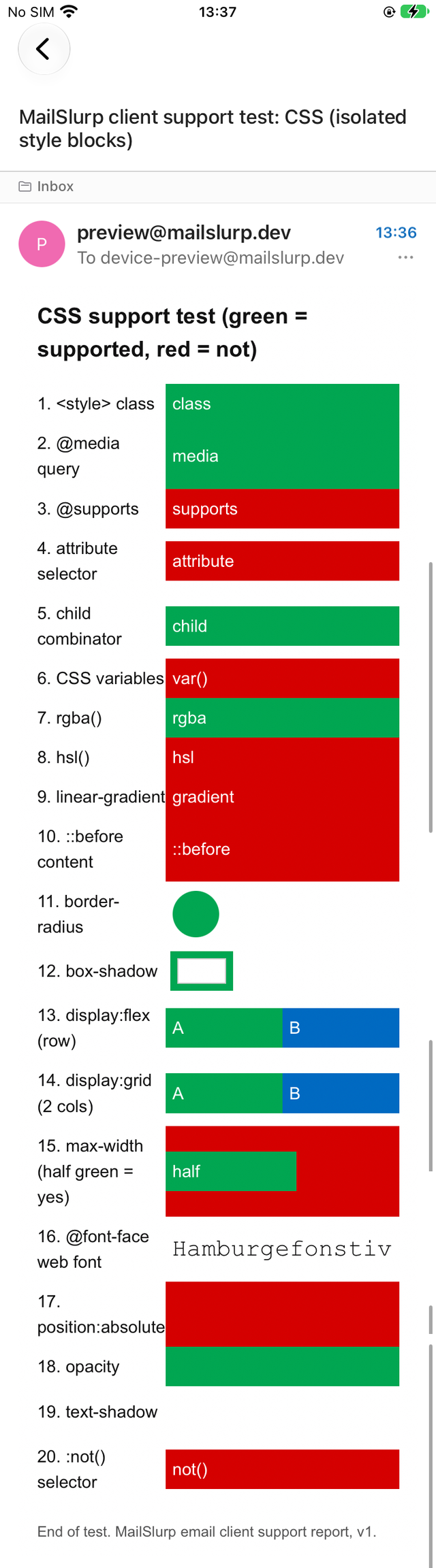
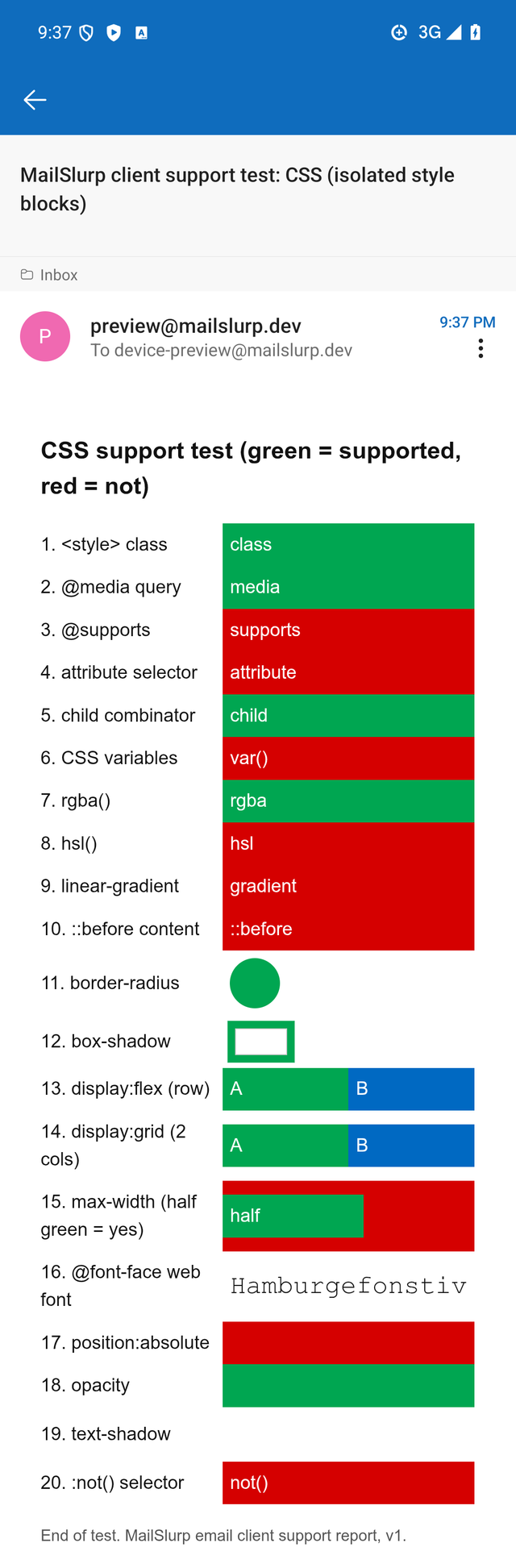
The two apps gave identical results: 10 of the 20 features applied. Here is the CSS test email in each one.
Outlook for iOS
Outlook for Android
Compared with the other Outlooks
| CSS feature | Outlook for iOS and Android | Outlook on the web | New Outlook for Windows |
|---|---|---|---|
@media query |
Yes | Yes | Yes |
border-radius and box-shadow |
Yes | Yes | Yes |
display: flex |
Yes | Yes | Yes |
display: grid |
Yes | No | Yes |
linear-gradient |
No | No | Yes |
hsl() colours |
No | No | Yes |
text-shadow |
No | No | Yes |
@font-face web font |
No | No | No |
| CSS variables | No | No | No |
| Total of 20 features | 10 | 9 | 17 |
What works well
- Responsive layouts. Media queries applied, so a layout that stacks its columns on small screens does so in both apps.
- Modern layout. Flexbox and grid both placed items side by side. Interestingly, grid worked on the phone but not in Outlook on the web, so the same email can look different on the same person's phone and laptop.
- Rounded corners and box shadows appeared as designed.
What doesn't
- Gradients. Our gradient line stayed red. A gradient button shows only its fallback background, so set a solid
background-colorbefore the gradient and make sure that colour looks intended on its own:
<td style="background-color:#0069c2; background-image:linear-gradient(#1d8cf0,#0069c2);">
hsl()colours. These were ignored. Write colours as hex values, orrgba(), which worked.- Text shadows, web fonts and CSS variables. None applied. The next font in your list is what readers see, so end it with
sans-serif.
Images and HTML elements
Both apps displayed SVG, WebP, AVIF, PNG and GIF image files, styled the <button> element and showed a table background image. Three things didn't work in either app:
- Inline SVG, meaning SVG code written straight into the email rather than linked as an image file, didn't appear.
- Video. Neither app showed a player; the fallback text inside the
<video>tag appeared instead. A linked image of the video is the reliable option, as the video in email guide explains. - Collapsible
<details>sections stayed open.
Dark mode in Outlook for Android
Outlook for Android recolours the whole email in dark mode, brand colours included. It darkened our brand green from #00a651 to #005a09, and it was the only app in our dark-mode tests that applied the email's own dark-mode CSS. That is a very different approach from Gmail for Android, which only darkens light colours; see how Gmail dark mode changes your email colours.
If your buttons or alerts rely on a specific colour, check them in Outlook for Android dark mode. The dark mode colour map shows what happened to 99 colours, and the November 2026 report has the side-by-side comparison.
What these tests don't cover
- Dark mode in Outlook for iOS.
- Focused and Other inbox sorting. Our screenshots show the opened message, not where Outlook filed it.
The full results are in the November 2026 report, and the test emails are free to download from the email client support hub. To check your own email in the app, see how to preview email in Outlook on iPhone or Outlook for Android. For the desktop apps, see classic Outlook and new Outlook.
Frequently asked questions
Does Outlook for iPhone support media queries?
Yes. Our @media rule applied in Outlook for iOS and Outlook for Android.
Does Outlook mobile support CSS grid?
Yes, in our tests both apps placed the grid items side by side. Outlook on the web didn't, so a grid layout that works on the phone can still stack in the browser.
Why does my gradient button show a flat colour in Outlook on my phone?
Outlook for iOS and Android ignored our linear-gradient. Set a solid background colour as well, so the button still looks finished.