














How Apple Mail dark mode changes your email on iPhone (tested)
What Apple Mail on iPhone does to email colours in dark mode, with and without a color-scheme declaration. Measured from real iPhone screenshots.
Use with your tools
Plenty of iPhone owners leave their phone in dark mode all day, and Apple Mail opens their email in dark mode with it. Some emails look fine. Others arrive with black text on a dark grey page, a navy header that has turned pale blue, or a brand colour that is suddenly much brighter. Because it happens on the reader's phone, the first you hear of it is usually a screenshot from a customer.
We tested what Apple Mail on iPhone actually does. We sent two test emails to a real iPhone and captured each one in light and dark mode. The first is a short email with the colours real emails use, plus two dark-mode CSS rules that turn their line purple if the app applies them. It also declares, in its <head>, that it supports both light and dark mode. The second is a grid of 99 coloured squares with no such declaration. We then measured every colour from the screenshot pixels.
The answer depends on that one declaration. In our November 2026 tests:
- Without it, Apple Mail recoloured the whole email itself. It flipped light colours to dark and dark colours to light, keeping their hue, so black text turned white and a navy panel turned pale blue.
- With it, Apple Mail left the colours to the email. It applied our
prefers-color-scheme: darkrule and darkened white backgrounds, but left our black text black, which made it close to unreadable on the new dark grey background.
Checking this by hand means switching an iPhone into dark mode and sending yourself every revision. We used MailSlurp, an email testing platform that captures Apple Mail on a real iPhone in light and dark mode automatically.
How automated device rendering works
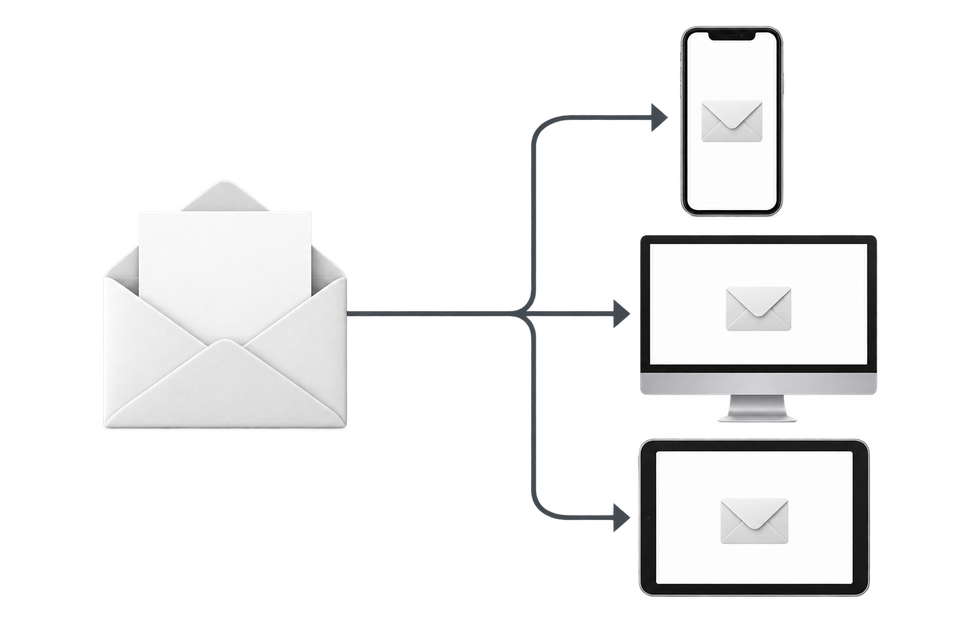
Choose the devices and email services you want to test, and MailSlurp gives you a special email address. Send your campaign to that address. MailSlurp opens the email in the selected apps and webmail services, then captures screenshots automatically.
The screenshots come back together, ready to compare across phones, tablets and computers. Check the layout, images and buttons, then share a result link so your team can review the same version of the email.
How Apple Mail decides what to do in dark mode
The color-scheme declaration
An email can tell the app that it has its own dark design. It does this in the <head>, with a <meta name="color-scheme" content="light dark"> tag and a matching color-scheme: light dark CSS property. Our declared test email also includes the supported-color-schemes versions of both.
Two different behaviours
Apple Mail treated our two emails completely differently. The undeclared email was recoloured for the reader. The declared email was treated as if it would handle dark mode itself: Apple Mail applied its dark-mode CSS and changed little else. So the same design can look right or broken in dark mode depending on two lines in the <head>.
Emails without the declaration: Apple Mail recolours everything
The same colours, light and dark
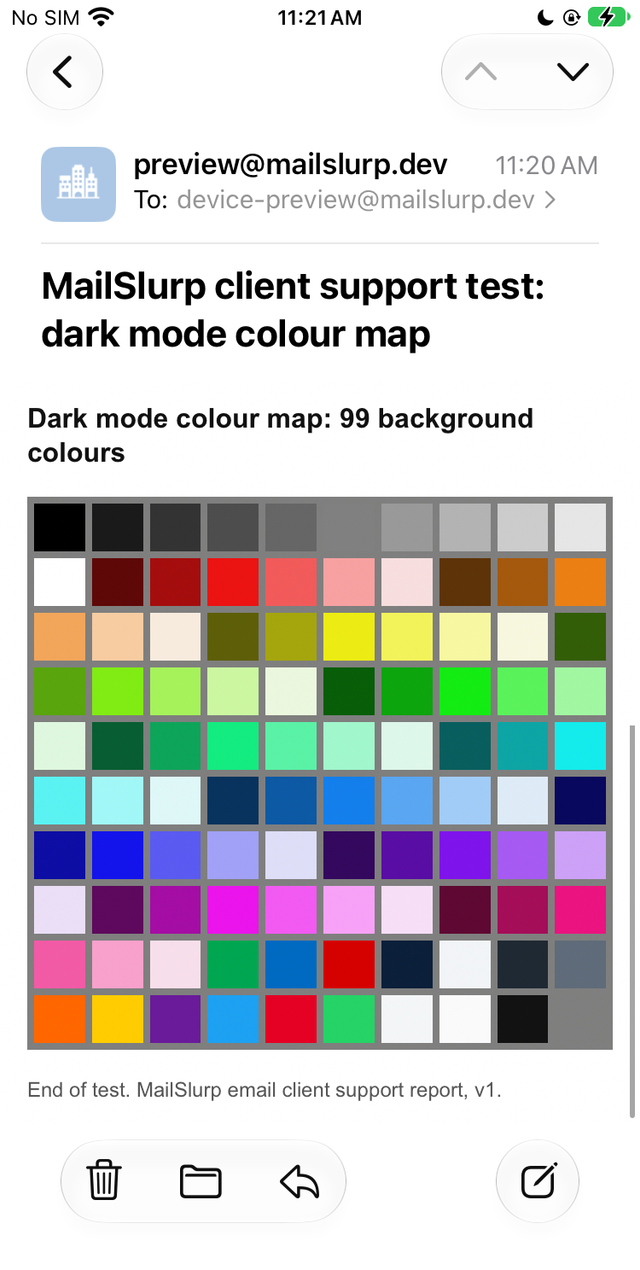
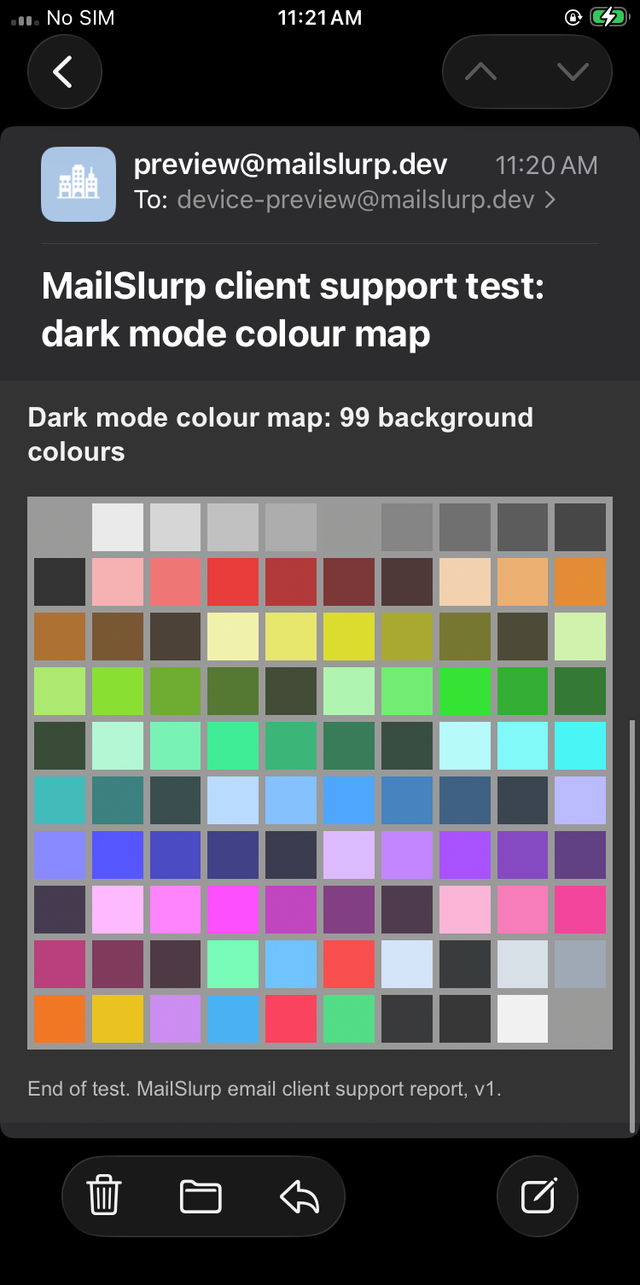
Here is the 99-colour grid in Apple Mail on iPhone, first in light mode and then in dark mode. Look at how the light squares on the right of each row become dark, and the dark squares on the left become light.
Apple Mail on iPhone (light)
Apple Mail on iPhone (dark)
What happened to typical email colours
| In the email | Apple Mail on iPhone, dark mode |
|---|---|
White background #ffffff |
#333333 |
Near-black text #111111 |
#f2f2f2 |
Light grey panel #f2f4f7 |
#393c3d |
Navy panel #0b1f3a |
Pale blue #d4e5f9 |
Brand green #00a651 |
Lighter green #79fcb8 |
Brand blue #0069c2 |
Lighter blue #6fc3fe |
Red #d50000 |
Lighter red #f94e4e |
Orange #ff6600 |
#f17725 |
Purple #6a1b9a |
Light purple #cb8df1 |
Dark grey #333333 |
Light grey #d6d6d6 |
Pale grey #e6e6e6 |
Dark grey #474747 |
The pattern behind the numbers
Apple Mail inverted lightness and kept hue. A colour's position from light to dark was reversed, while red stayed red and blue stayed blue. That keeps text readable: dark text on a light page becomes light text on a dark page. But it also changes things you might not expect:
- Dark panels become light. A navy header turned pale blue.
- Saturated brand colours get noticeably lighter. That matters if white text sits on them, because the contrast drops.
Emails with the declaration: your own CSS decides
The same email, light and dark
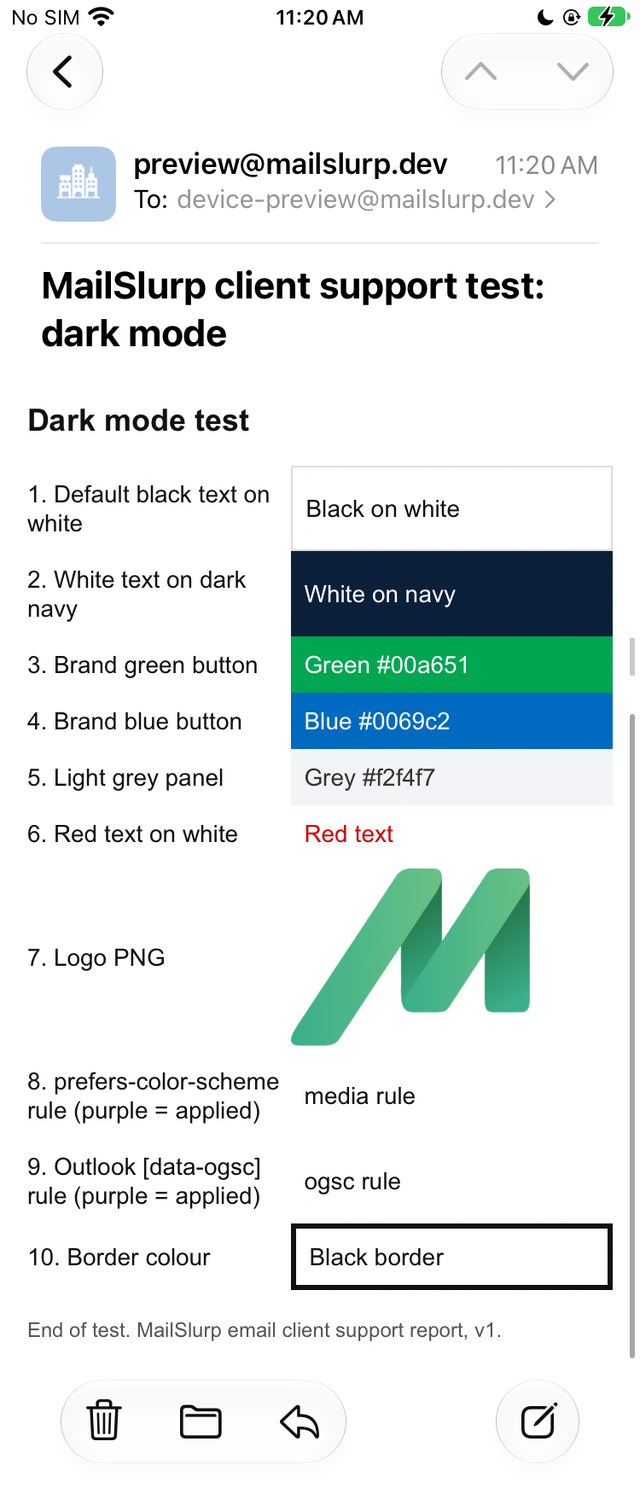
Here is our dark mode test email, which declares color-scheme: light dark, in Apple Mail on iPhone. Watch the first line and the purple line 8.
Apple Mail on iPhone (light)
Apple Mail on iPhone (dark)
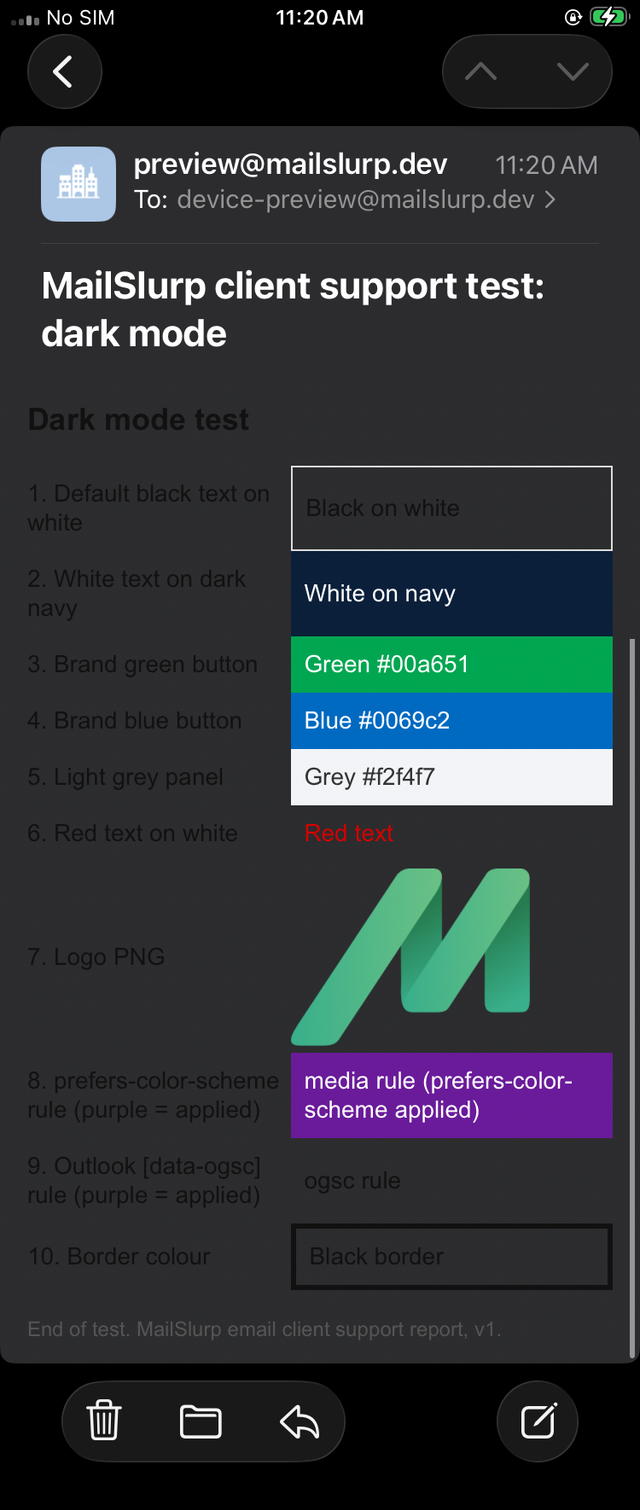
Every change we measured
| In the email | Apple Mail on iPhone, dark mode |
|---|---|
White page and white cells #ffffff |
#2c2c2e |
Near-black text #111111 |
Unchanged |
Grey footer text #555555 |
Unchanged |
Black border #111111 |
Unchanged |
Navy panel #0b1f3a |
Unchanged |
Brand green #00a651 |
Unchanged |
Brand blue #0069c2 |
Unchanged |
Light grey panel #f2f4f7 |
Unchanged |
Red text #d50000 |
Unchanged |
prefers-color-scheme: dark rule |
Applied |
Outlook [data-ogsc] rule |
Not applied |
The trap: dark text on a dark page
Declaring dark mode is a promise that your CSS handles it. Our test email only styled line 8 for dark mode, so everything else kept its light-mode colours, except the white backgrounds, which Apple Mail darkened anyway. The result was #111111 text on a #2c2c2e page, and a black border that disappeared. Our logo image looked the same in both modes, so a logo with dark lettering would sit on the dark page as it is. Any email that declares color-scheme: light dark needs a prefers-color-scheme: dark block that sets text, link and border colours as well as backgrounds.
What to check before you send
If your email doesn't declare dark mode
Expect Apple Mail to invert it. Check dark panels and headers, which will turn light, and white text on brand colours, which loses contrast as the brand colour gets lighter.
If your email declares dark mode
Write the dark styles in full. In your @media (prefers-color-scheme: dark) block, set the text colour for every element whose light-mode colour is dark, not just the background. Then check the email in dark mode before you send. Apple Mail will use your rules exactly as written.
Don't rely on one app's behaviour
Gmail for Android ignores your dark-mode CSS entirely, and Outlook for Android recolours even your brand colours. Whichever approach you take, check the apps your readers use.
How other apps compare
- Gmail for Android darkened light colours, kept saturated brand colours and ignored both dark-mode CSS rules: see Gmail dark mode.
- Outlook for Android recoloured everything, including brand colours, and also applied the email's own dark-mode CSS.
- Gmail on the web left the message body unchanged in its dark theme.
The dark mode colour map shows what the two Android apps did to the same 99 colours. The Apple Mail support page covers CSS and images in Apple Mail in light mode.
What these tests don't cover
- Apple Mail on Mac and iPad in dark mode. These results are from Apple Mail on iPhone only.
- Gmail and Outlook for iPhone in dark mode.
- Other iOS versions. Apple can change dark-mode behaviour in an update, so re-check after major iOS releases.
Both test emails are free to download: the dark mode test email, which declares color-scheme, and the 99-colour map, which doesn't. More results by app are on the email client support hub.
Frequently asked questions
Does Apple Mail on iPhone support prefers-color-scheme?
Yes, in our test. Apple Mail on iPhone applied our prefers-color-scheme: dark media query in an email that declares color-scheme: light dark.
Why is my email black text on a dark background in iPhone dark mode?
Your email probably declares dark mode support, with a color-scheme meta tag or CSS property, without setting dark text colours. Apple Mail then darkens white backgrounds but leaves your text colours alone. Either set text colours in a prefers-color-scheme: dark block, or remove the declaration so Apple Mail recolours the email itself.
Does Apple Mail change brand colours in dark mode?
Only for emails that don't declare dark mode. In our test, Apple Mail kept each colour's hue but made dark colours light and light colours dark, so brand green #00a651 became #79fcb8 and navy #0b1f3a became #d4e5f9. With the declaration, brand colours stayed exactly as sent.
How do I preview my email in iPhone dark mode?
Switch an iPhone to dark mode and send yourself a test, or use a device preview service that captures Apple Mail on a real iPhone in dark mode for you. See how to preview email in iPhone Mail.