
UiPath integration
Documentation navigation
Integrate MailSlurp email and SMS APIs with UiPath Studio

Please see our UiPath project on GitHub to get started.
How it works
You can integrate programmable email accounts and phone numbers in MailSlurp by invoking the REST API with UiPath's built-in HTTP Request activity.
Calling the MailSlurp API
To create inboxes, read emails, and more, use the HTTP App Integration within UiPath to call api.mailslurp.com endpoints.
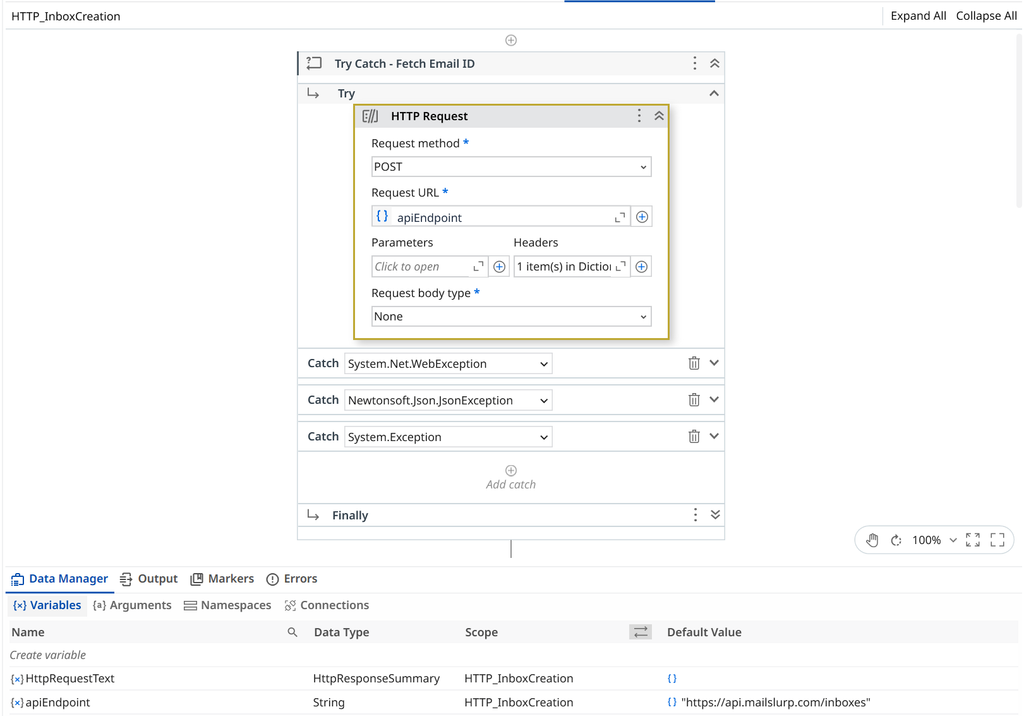
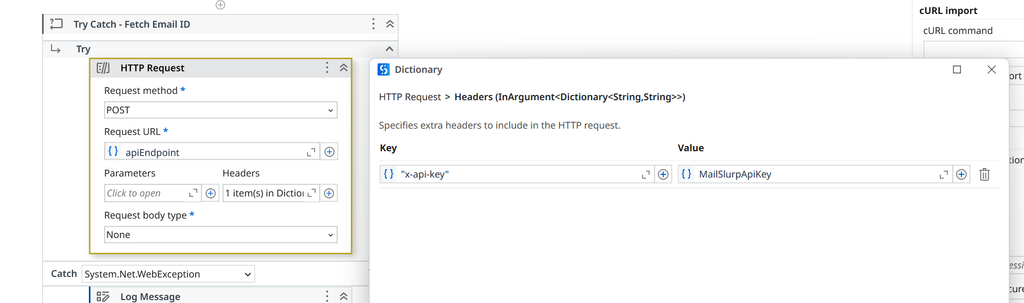
NOTE: You must pass a valid
x-api-keyheader set to your MailSlurp API key.
Storing response variables
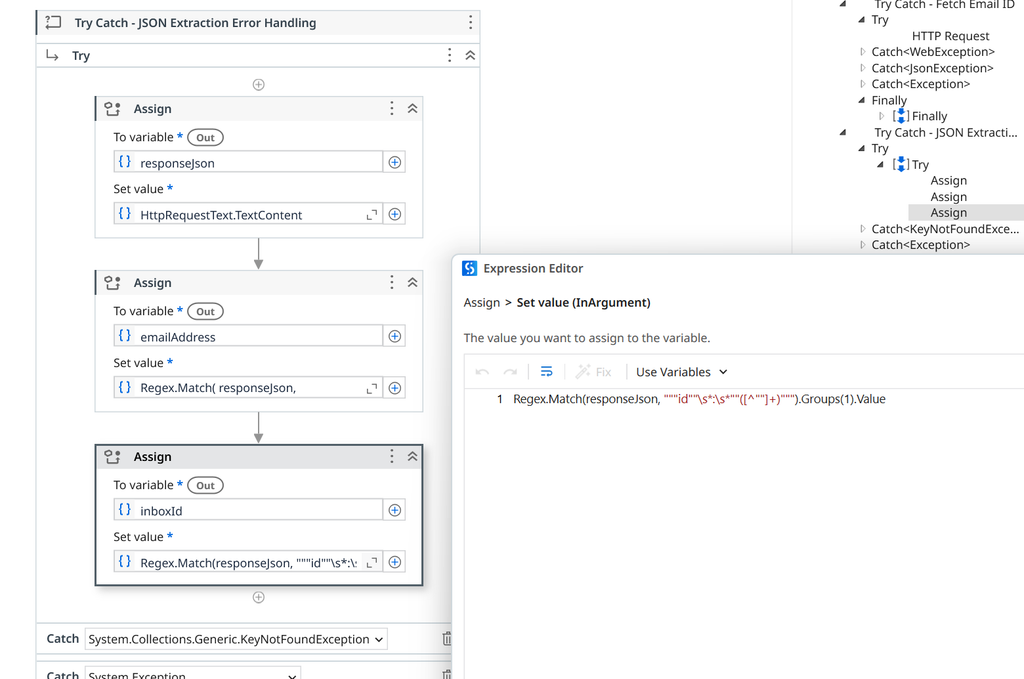
MailSlurp APIs return JSON data. Use the Assign activity to save variables for use in subsequent steps.
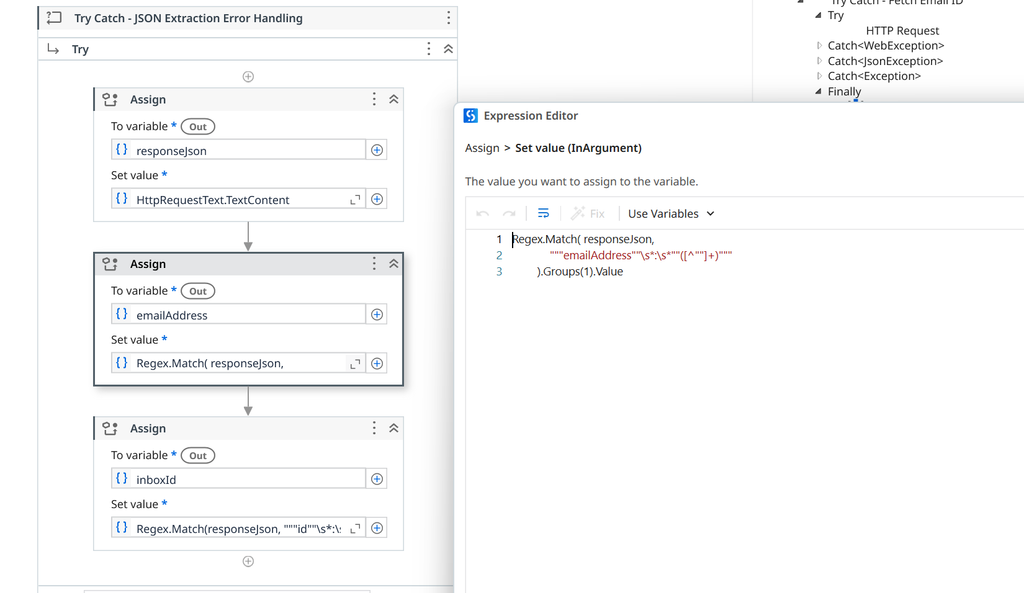
Use Deserialize JSON activity or Regular expressions to extract variables from responses like inbox id, emailAddress and more.
Example testing flow
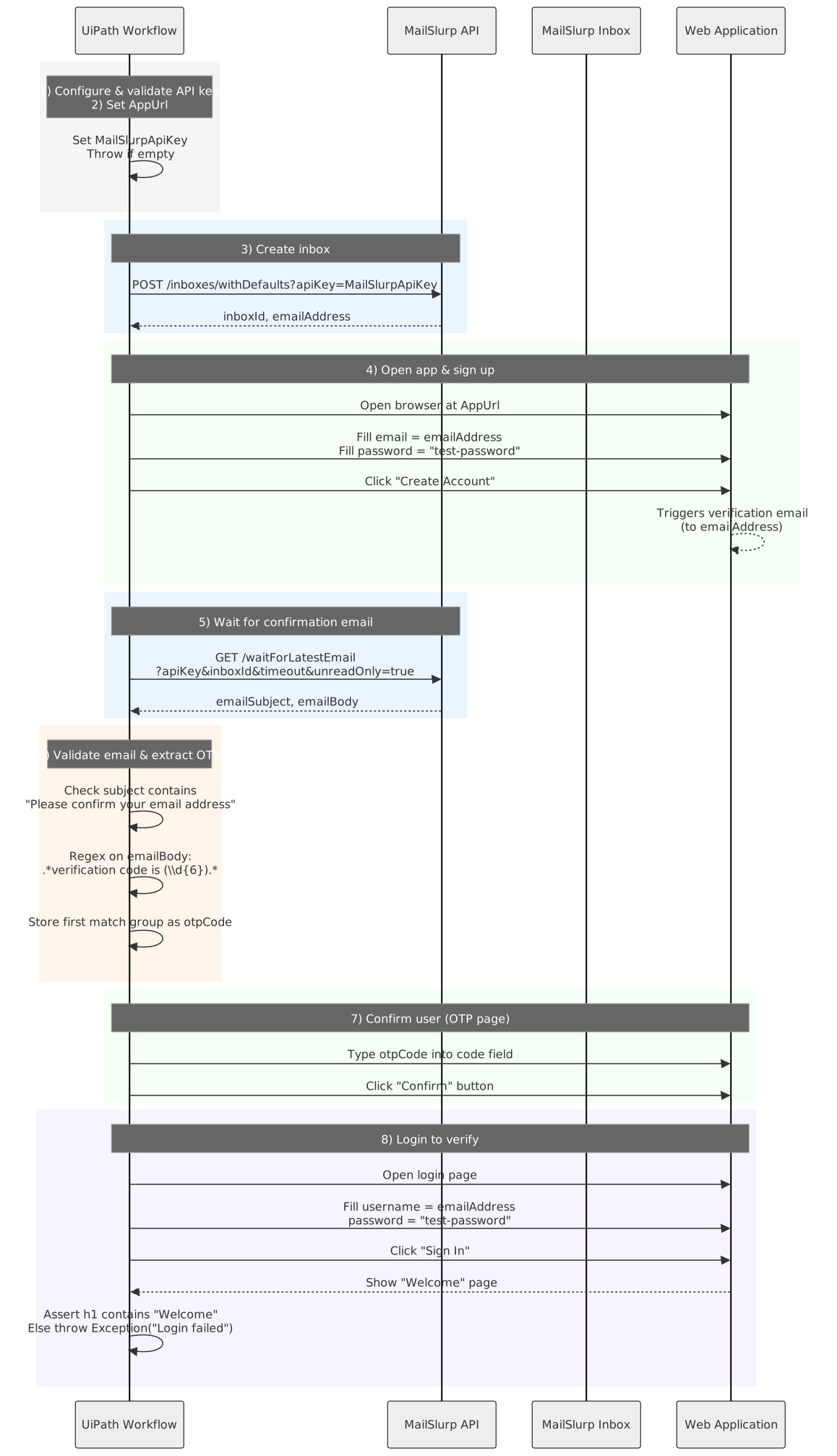
Say you want to test the user sign-up and verification process in a web application in UiPath. With MailSlurp we can create a test email account, submit it to the web application, receive and extract an OTP code, and confirm a new account. This can form the basis of our automated UiPath test of an application sign-up flow. You can see it in action in the video below:
And here is a diagram of how a test like this might work:
Setup in UiPath Studio
To test email and SMS in UiPath Studio create a workflow with a series of steps. These steps are comprised of HTTP Request actions to the MailSlurp API and Browser automation steps that use the email accounts and phone numbers within automations and tests. An example main.xaml would look like this:
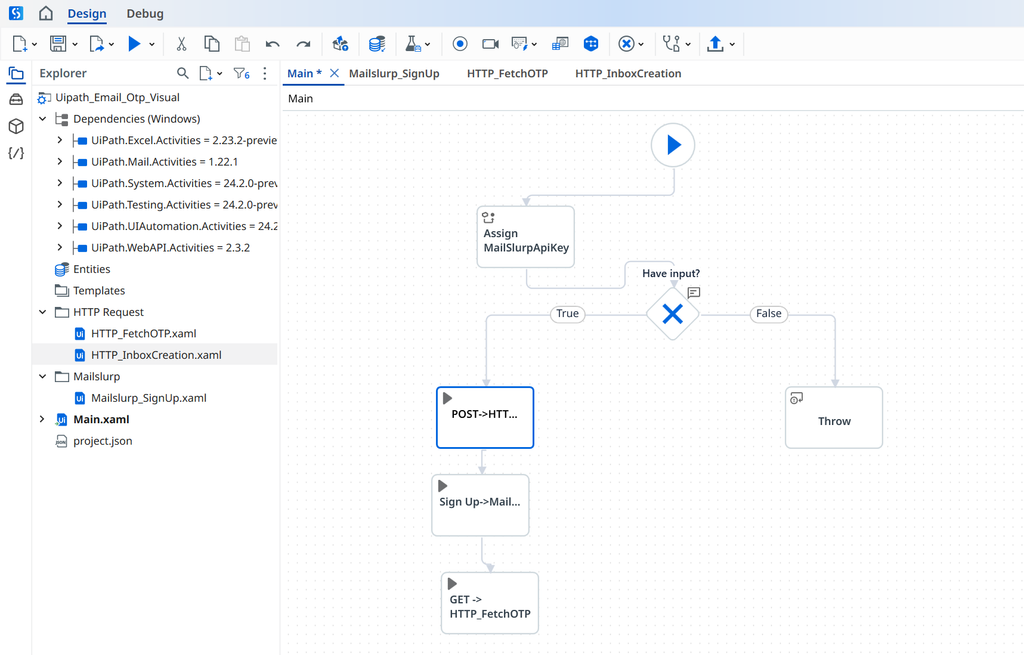
You can combine MailSlurp API actions to create phone numbers and email accounts on demand then send and receive emails, attachments, and SMS within automations and RPA workflows. For more methods see the API endpoints
Important actions
Here are some common actions for creating inboxes, reading emails, and extracting codes. Use the UiPath Studio HTTP Request actions to invoke these MailSlurp endpoints. Make sure you set an x-api-key header with the value of your MailSlurp API Key.
Create inboxes
To create a new email address use the operation below:
/inboxes/withDefaults
Create an inbox with default options. Uses MailSlurp domain pool address and is private.
Request, parameters, and responses
Responses
| Status | Schema | Description |
|---|---|---|
201 | InboxDto | Created |
HTTP and SDK snippets
HTTP
POST /inboxes/withDefaults HTTP/1.1
Host: api.mailslurp.com
x-api-key: YOUR_API_KEY
Accept: application/json
cURL
curl -X POST "https://api.mailslurp.com/inboxes/withDefaults" \
  -H "x-api-key: YOUR_API_KEY" \
  -H "Accept: application/json"
JavaScript SDK
import { Configuration, InboxControllerApi } from "mailslurp-client";

const config = new Configuration({ apiKey: "YOUR_API_KEY" });
const inboxController = new InboxControllerApi(config);

const result = await inboxController.createInboxWithDefaults();
Python SDK
import mailslurp_client
from mailslurp_client.api.inbox_controller_api import InboxControllerApi

configuration = mailslurp_client.Configuration()
configuration.api_key["x-api-key"] = "YOUR_API_KEY"

with mailslurp_client.ApiClient(configuration) as api_client:
    inboxController = InboxControllerApi(api_client)
    result = inboxController.create_inbox_with_defaults()
To save the inbox id and emailAddress for use in further steps use the UiPath Regex extract action to pluck these values from the JSON response.
Wait for email
To wait for emails in your tests, use the waitForLatestEmail MailSlurp endpoint.
/waitForLatestEmail
Fetch inbox's latest email or if empty wait for an email to arrive
Will return either the last received email or wait for an email to arrive and return that. If you need to wait for an email for a non-empty inbox set `unreadOnly=true` or see the other receive methods such as `waitForNthEmail` or `waitForEmailCount`.
Request, parameters, and responses
Query parameters
| Name | Type | Required | Description |
|---|---|---|---|
inboxId | string:uuid | No | Id of the inbox we are fetching emails from |
timeout | integer:int64 | No | Max milliseconds to wait |
unreadOnly | boolean | No | Optional filter for unread only. |
before | string:date-time | No | Filter for emails that were before after the given timestamp |
since | string:date-time | No | Filter for emails that were received after the given timestamp |
sort | enum: ASC | DESC | No | Sort directionValues: ASC, DESC |
delay | integer:int64 | No | Max milliseconds delay between calls |
Responses
| Status | Schema | Description |
|---|---|---|
200 | Email | OK |
HTTP and SDK snippets
HTTP
GET /waitForLatestEmail?inboxId=00000000-0000-4000-8000-000000000000&timeout=value&unreadOnly=true HTTP/1.1
Host: api.mailslurp.com
x-api-key: YOUR_API_KEY
Accept: application/json
cURL
curl -X GET "https://api.mailslurp.com/waitForLatestEmail?inboxId=00000000-0000-4000-8000-000000000000&timeout=value&unreadOnly=true" \
  -H "x-api-key: YOUR_API_KEY" \
  -H "Accept: application/json"
JavaScript SDK
import { Configuration, WaitForControllerApi } from "mailslurp-client";

const config = new Configuration({ apiKey: "YOUR_API_KEY" });
const waitForController = new WaitForControllerApi(config);
const request = {
  "inboxId": "00000000-0000-4000-8000-000000000000",
  "timeout": null,
  "unreadOnly": true
};

const result = await waitForController.waitForLatestEmail(request);
Python SDK
import mailslurp_client
from mailslurp_client.api.wait_for_controller_api import WaitForControllerApi

configuration = mailslurp_client.Configuration()
configuration.api_key["x-api-key"] = "YOUR_API_KEY"

with mailslurp_client.ApiClient(configuration) as api_client:
    waitForController = WaitForControllerApi(api_client)
    result = waitForController.wait_for_latest_email(inbox_id="00000000-0000-4000-8000-000000000000", timeout=NaN, unread_only=True)
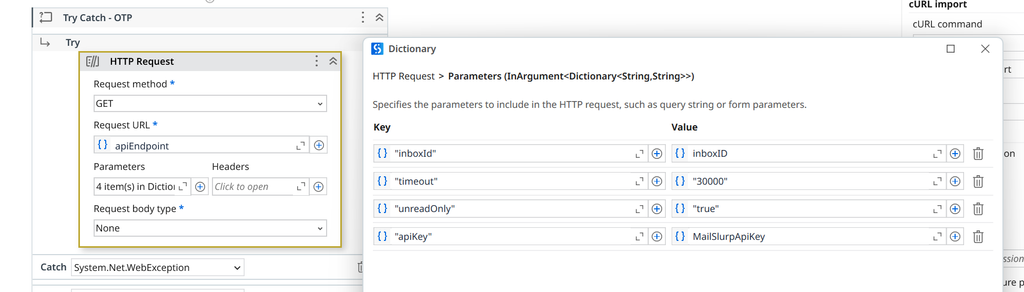
In UiPath Studio this request looks like this:
Extract content
You can extract content from emails and SMS using regular expression patterns by passing them to the MailSlurp API with HTTP.
/emails/{emailId}/contentMatch
Run regex against hydrated email body and return matches
Executes a Java regex pattern over hydrated email body text and returns the full match plus capture groups. Pattern syntax follows Java `Pattern` rules.
Request, parameters, and responses
Path parameters
| Name | Type | Required | Description |
|---|---|---|---|
emailId | string:uuid | Yes | ID of email to match against |
Request body (required)
| Field | Type | Required | Description |
|---|---|---|---|
pattern | string | Yes | Java style regex pattern. Do not include the typical `/` at start or end of regex in some languages. Given an example `your code is: 12345` the pattern to extract match looks like `code is: (\d{6})`. This will return an array of matches with the first matching the entire pattern and the subsequent matching the groups: `['code is: 123456', '123456']` See htt... |
{
  "pattern": "value"
}
Responses
| Status | Schema | Description |
|---|---|---|
200 | EmailContentMatchResult | OK |
HTTP and SDK snippets
HTTP
POST /emails/00000000-0000-4000-8000-000000000000/contentMatch HTTP/1.1
Host: api.mailslurp.com
x-api-key: YOUR_API_KEY
Accept: application/json
Content-Type: application/json

{
  "pattern": "value"
}
cURL
curl -X POST "https://api.mailslurp.com/emails/00000000-0000-4000-8000-000000000000/contentMatch" \
  -H "x-api-key: YOUR_API_KEY" \
  -H "Accept: application/json" \
  -H "Content-Type: application/json" \
  --data '{"pattern":"value"}'
JavaScript SDK
import { Configuration, EmailControllerApi } from "mailslurp-client";

const config = new Configuration({ apiKey: "YOUR_API_KEY" });
const emailController = new EmailControllerApi(config);
const request = {
  "emailId": "00000000-0000-4000-8000-000000000000",
  "contentMatchOptions": {
    "pattern": "value"
  }
};

const result = await emailController.getEmailContentMatch(request);
Python SDK
import mailslurp_client
from mailslurp_client.api.email_controller_api import EmailControllerApi

configuration = mailslurp_client.Configuration()
configuration.api_key["x-api-key"] = "YOUR_API_KEY"

with mailslurp_client.ApiClient(configuration) as api_client:
    emailController = EmailControllerApi(api_client)
    content_match_options = {
      "pattern": "value"
    }
    result = emailController.get_email_content_match("00000000-0000-4000-8000-000000000000", content_match_options)